
git clone https://github.com/[your github username]/portfolio.gitAssessments
Grading Overview
| Component | Points | % of Grade |
|---|---|---|
| Sprints (5 × 50) | 250 | 50% |
| Peer Code Review | 50 | 10% |
| Peer Product Testing | 50 | 10% |
| Final Product | 100 | 20% |
| Quizzes (10 × 5) | 50 | 10% |
| TOTAL | 500 | 100% |
List of All Assessments
| Type | Description | Points | Learning Outcome(s)1 |
|---|---|---|---|
| Quiz | Quiz 1 - PM in the AI Era | 5 | 1 |
| Quiz | Quiz 2 - Problems Worth Solving | 5 | 2 |
| Quiz | Quiz 3 - Problem Discovery | 5 | 2 |
| Quiz | Quiz 4 - Validating Opportunities | 5 | 2 |
| Quiz | Quiz 5 - Building Your MVP | 5 | 4 |
| Quiz | Quiz 6 - Testing with Users | 5 | 4 |
| Quiz | Quiz 7 - Platform Strategy | 5 | 4 |
| Quiz | Quiz 8 - Measuring What Matters | 5 | 4 |
| Quiz | Quiz 9 - Go-to-Market | 5 | 4 |
| Quiz | Quiz 10 - Business Models | 5 | 4 |
| Sprint | Sprint 1 - Ship & Showcase | 50 | 1 |
| Sprint | Sprint 2 - Validate & Commit | 50 | 2, 3 |
| Sprint | Sprint 3 - Product MVP | 50 | 4 |
| Sprint | Sprint 4 - Progress Check | 50 | 4 |
| Sprint | Sprint 5 - Progress Check | 50 | 4 |
| Peer | Peer Code Review | 50 | 4 |
| Peer | Peer Product Testing | 50 | 4 |
| Project | Final Product | 100 | 4 |
| TOTAL | 500 |
Notes
- Table of Learning Outcomes
| Learning Outcome | Supported BYU Aims |
|---|---|
| 1. Understand the basics of how LLMs generate natural language. | Intellectually Enlarging |
| 2. Develop and articulate a product strategy. | Intellectually Enlarging, Lifelong Learning and Service |
| 3. Analyze the physical, mental, and spiritual impact your product is likely to have on its users. | Spiritually Strengthening, Character Building, Lifelong Learning and Service |
| 4. Create a digital product that delivers value to a target customer group. | Intellectually Enlarging, Lifelong Learning and Service |
Quizzes
In-class quizzes assess your understanding of the assigned reading. Each quiz is worth 5 points (1% of your grade).
Quizzes occur at the beginning of class on the dates shown in the schedule. They cover the chapter assigned for that week.
NoteWhy We Do Quizzes
Research shows that writing down what you’ve just learned helps your brain remember it better. Psychologists call this the “testing effect” or “retrieval practice”: when you pull ideas out of your head and put them into words, you strengthen your memory far more than by just rereading or listening.
Sprints
Sprints are your primary way to demonstrate progress throughout the semester. Each sprint builds on the previous one, and your portfolio is the submission point for all sprint work.
Portfolio: You’ll use the same portfolio URL all semester. TAs will check your portfolio at each sprint deadline.
Videos: All sprint submissions require a 2-minute Loom video walking through your deliverables.
Portfolio Template: github.com/byu-strategy/product-management-portfolio
Sprint 1: Ship & Showcase
50 points | Due: Thu, Jan 29
Overview
The purpose of this homework assignment is to help you create a public facing portfolio containing your work that you can use to share with potential employers and others.
The deliverables for this homework are:
- A URL pointing to your personal portfolio published on the internet via GitHub Pages (see template)
- A 2-minute Loom video walking through your portfolio
Set-up
- Create a new repo from the following template on GitHub: https://github.com/byu-strategy/product-management-portfolio. Call the repo “portfolio”.
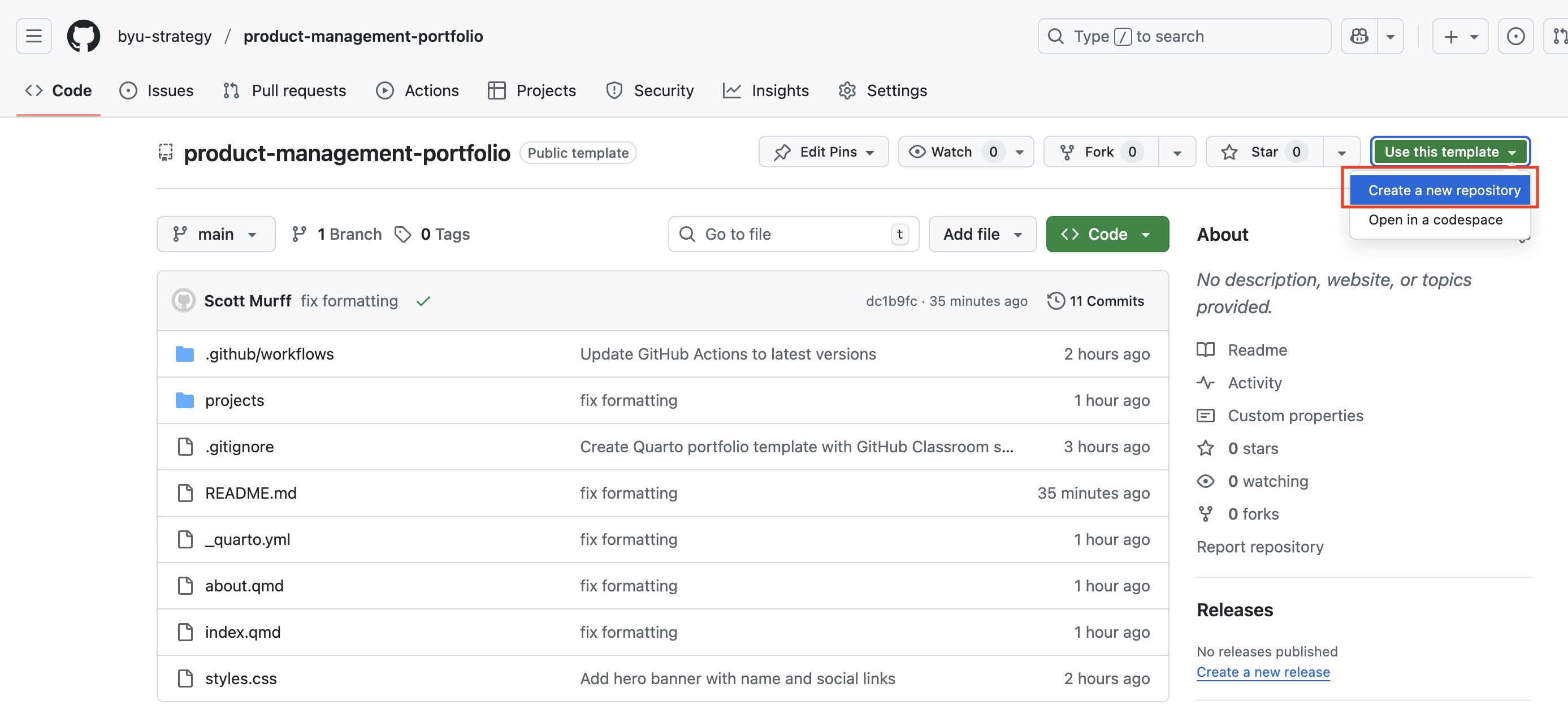
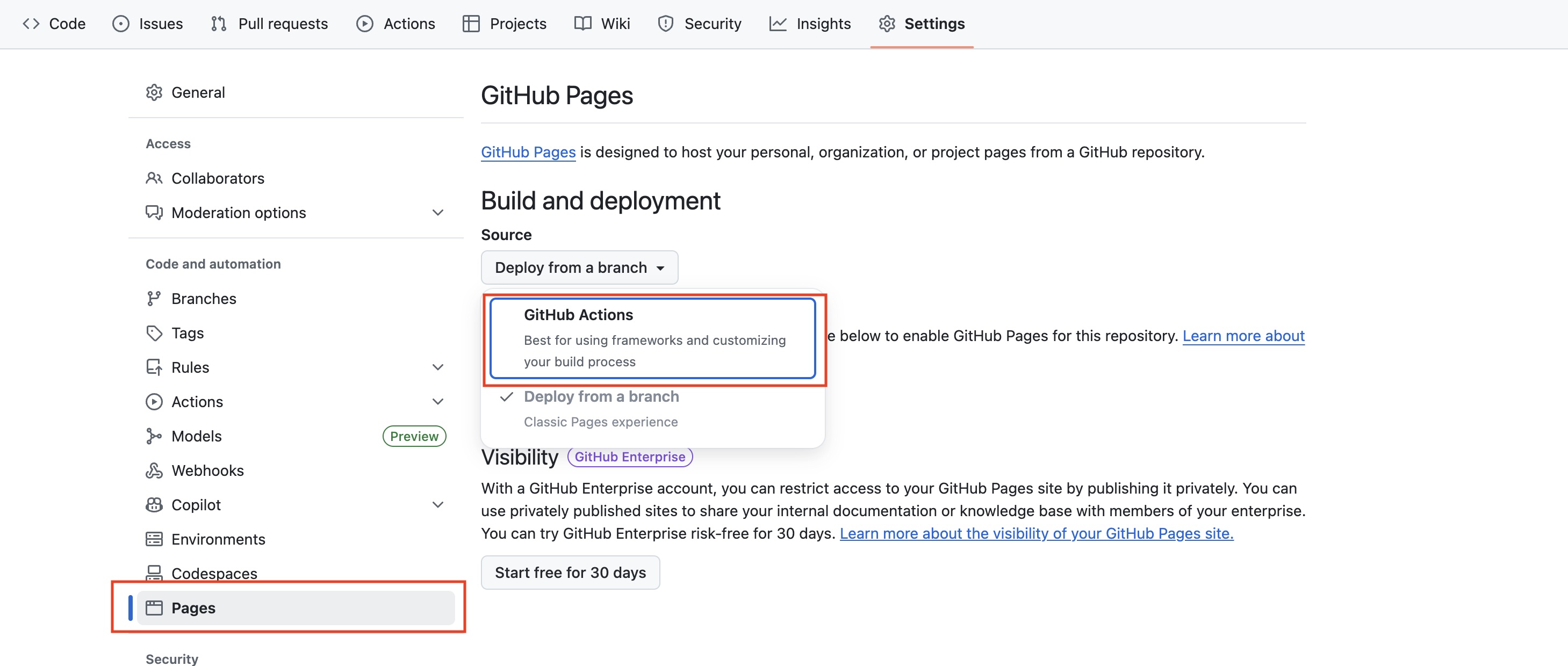
- After creating the repo, go to
Settings -> Pages -> Deploy from a branch, and selectGitHub Actions
Start VS Code and then
Open -> Open Folderto the folder you want to save your portfolio files in. Then open a Terminal within VS Code.Copy/paste the URL of your new repo and run the following command from the terminal. Your URL should have the following structure: https://github.com/[your github username]/portfolio
Make sure to add .git to the end of the URL and update your user name before running the command.
- Then use the terminal to navigate into the newly cloned git repo (folder)
cd portfolioYou should now see all of the files from the repo in your left hand window pane within VS Code. These are the source files behind the template.
To complete the homework, you will edit and personalize the template. Once you are done editing, save all of the files and run the following git commands to publish your portfolio:
git add .
git commit -m "write a short message describing your changes"
git push
Once you have pushed your changes, within about one minute, your website portfolio will be live at this URL: https://[your github username].github.io/portfolio/
Remember to update your user name in the URL.
You can preview what your portfolio looks like at any point by running this command from the terminal:
quarto previewFor this to work, you will need to install quarto. Get Claude code to help you install it.
Requirements
You should make at least the following changes to the source files of your portfolio.
- Add a personal photo (I recommend using your LinkedIn photo for a consistent online presence)
- Update and personalize the Home page (index.qmd)
- Update and personalize the About page (about.qmd)
- Update and personalize the project-1.qmd file to accurately reflect the application you built. The two buttons linking to your GitHub source code and deployed Vercel app are required and will be verified during grading.
- Use AI or another tool of your choice to create a favicon and update the image reference in the
.yml. You could use an icon or just your initial(s). - Create a “Problems I’m Exploring” page on your portfolio with 5 problems you personally experience. For each problem:
- Write a professional, public-facing description
- Explain why this problem matters to you
- Frame it as something worth solving (not just a complaint)
- Choose one other person to show your portfolio to and describe to them what you built. Take a couple minutes to explain to them the tools and skills you are learning.
Although not required for this assignment, you should feel free to make further enhancements and personalizations to your portfolio. You will continue to build on this portfolio throughout the course so it should be something you invest significant effort in as it can be a valuable tool for you in the future to showcase your skills.
Turn in:
Submit a PDF or Word Doc containing:
- URL to your live portfolio
- URL to your Loom video walkthrough
Video Requirements:
Your 2-minute Loom video should cover:
- Portfolio walkthrough - Walk through your portfolio showing your About page, prototype project, and Problems I’m Exploring page
- What you learned - Briefly explain one new tool or skill you learned while building this
- Show & tell reflection - Share who you showed your portfolio to (name and relationship), and describe their reaction:
- What questions did they ask?
- What was their overall impression?
- Did anything surprise you about their feedback?
Grading Rubric (50 points)
| Category | Points | Expectations |
|---|---|---|
| Portfolio Deployed & Accessible | 10 | Site is live at GitHub Pages URL, all pages load without errors, navigation works |
| About Section | 5 | Personal photo included, compelling personal story, professional tone, no placeholder text |
| Prototype Project | 15 | Project page complete with description, working links to both deployed Vercel app AND GitHub repo |
| Problems I’m Exploring | 10 | 5 distinct problems listed, each professionally framed with clear description of why it matters |
| Client Ready Polish | 5 | No broken links, no typos, consistent formatting, would confidently show to an employer |
| Loom Video Walkthrough | 5 | 2-min video covering portfolio walkthrough, what you learned, and show & tell reflection |
What “Client Ready” Means:
Your portfolio should be something you could show to a prospective employer with confidence. This means:
- All hyperlinks work
- No spelling or grammar errors
- No placeholder or template text remaining
- Images load properly
- Consistent visual styling
- Professional tone throughout
Points will be deducted for issues that detract from a professional presentation.
Sprint 2: Validate & Commit
50 points | Due: Tue, Feb 17, 11:59pm
Goal: Identify and validate a problem worth solving and then commit to building it out for the rest of the semester.
| Deliverable | Points |
|---|---|
| Problem Discovery Worksheet (2 problems scored) | 10 |
| AI Interview (shared conversation URL) | 10 |
| One recorded customer interview + AI transcript analysis | 10 |
| JTBD + Value Proposition + ICP summary | 10 |
| Loom reflection video (2 min) | 10 |
| Total | 50 |
What you turn in: A single Google Doc using the Sprint 2 Submission Template. Make a copy now and fill it in as you work through each part below.
The Problem Discovery Worksheet
This sprint uses the Problem Discovery Worksheet — a structured framework for exploring and evaluating problems worth solving. Click the link to make your own copy.
The worksheet is grounded in Self-Determination Theory (Deci & Ryan) which cleanly parallels the core tenets of the Gospel of Jesus Christ, and identifies three universal human needs:
| Human Need | Gospel Framing | What It Means |
|---|---|---|
| Autonomy | Agency | Control over your life and choices |
| Competence | Becoming | Growth, mastery, becoming more capable |
| Relatedness | Connection | Meaningful relationships with others |
The worksheet organizes life into 15 domains (plus 6 work sub-domains) ordered from inner to outer: starting with Body, Mind, and Spirit, then moving through your environment, resources, growth, relationships, and work. Each row includes granular activities to prompt specific recall of where frustration or delight occurs.
TipFrustration AND Delight
Problems aren’t only about pain. Both frustration (pain to relieve) and delight (joy to amplify) are valid signals. A frustration points to a pain reliever product. A delight points to a gain creator product. The worksheet captures both.
Problem Discovery Framework
Expand the box below and copy-paste the framework into your AI conversation in Part 2. Review the full Problem Discovery Framework reference page.
Part 1: Describe 3 Problems
Start with your “unfair” advantages. Before scanning every domain, pause and ask: Where do I have unusual insight that most people don’t? Maybe you grew up on a cattle ranch, served a mission in rural Southeast Asia, worked night shifts at a fulfillment center, or spent years managing your family’s small business. Those experiences give you a front-row seat to problems that people outside that world would never think to solve and that’s exactly the kind of edge that can make for a great product discovery. List 2-3 domains where you have this kind of special access, and start there.
If nothing jumps out at you, then broaden your thinking. Scan the worksheet’s remaining life domains. For each domain, reflect on the example activities listed and ask yourself:
- Frustration: What made me or someone close to me angry, stuck, or anxious recently?
- Delight: What do I love doing that could be even better?
Choose 3 problems you’d want to explore further. These can be any mix of problems from Sprint 1 or new ideas. For each row, fill in the narrative fields only, no scores yet:
- Who — A real person’s name (not a persona, you’ll create that at the end)
- Frustration / Delight — What they experience
- Customer’s Job to be Done — “I’m trying to [verb] so I can [outcome]”
- Value Proposition, i.e. how you would do the customer’s job — “We help [who] [do what] by [how]”
Do this on your own before moving to Part 2. The goal is to articulate each problem in your own words first. Complete your Problem Discovery Worksheet with 3 problems described (narrative fields above filled in).
Part 2: AI-Assisted Scoring & Evaluation
Pick the most compelling 2 problems from Part 1 and use AI as described below for a structured evaluation. You must use Claude.ai, ChatGPT, or Gemini so you can share a link to the conversation.
How to start: Copy the prompt below into your AI conversation and update with your 2 problem descriptions.
I'm exploring 2 problems for a product I want to build. Here is
the Problem Discovery Framework my course uses:

PROBLEM DISCOVERY FRAMEWORK

OPPORTUNITY SIGNALS
- Frustration → Pain Reliever: Reduce friction, remove obstacles, solve problems
- Delight → Gain Creator: Amplify joy, create more of what works, enhance experiences

OPPORTUNITY SCORE (1-5 scales)

Frequency:      1=Rarely, 2=Yearly, 3=Monthly, 4=Weekly, 5=Daily
Intensity (F):  1=Shrug, 2=Minor annoyance, 3=Annoying, 4=Frustrating, 5=I hate this
Intensity (D):  1=Meh, 2=Mildly pleasant, 3=Enjoyable, 4=Love it, 5=Can't live without
Willingness:    1=Wouldn't pay, 2=Unlikely, 3=Might pay, 4=Probably would, 5=Already paying
Market Size:    1=Just me, 2=Small niche, 3=Moderate group, 4=Large segment, 5=Widespread

CONVICTION SCORE (0/1 checkboxes, sum of 4)
- Personal Pain: You live this problem yourself
- Close Relationship: Someone you love experiences this
- Moral Calling: You believe it's wrong that this problem exists
- Unique Insight or Skills: You see something others don't

Sum 0-1 = Low (reconsider) | 2 = Moderate (explore further) | 3-4 = High (strong conviction)

TECHNICAL FEASIBILITY (0/1 checkboxes, sum of 3)
- Data/API Access: I can get the data or API access I need
- Technology Readiness: Tech is good enough to deliver a great experience
- No Hardware or Regulatory Blockers: No unavailable hardware or regulatory approval needed

Sum 3 = Clear path | 1-2 = Caution (have a plan) | 0 = Blocked (reconsider)

GOSPEL FRAMEWORK (directional checks)
- Expands Agency: Does my value proposition expand what users can do and choose?
- Supports Becoming: Does my value proposition help users genuinely grow?
- Deepens Connection: Does my value proposition strengthen real relationships?

Not every product needs all three. The question is directional: for the needs
you DO touch, are you on the right side?

Here are my 2 problems:

1. [Paste your Who, Frustration/Delight, JTBD, and Value Prop]
2. [Paste your Who, Frustration/Delight, JTBD, and Value Prop]

Take them one at a time. For each problem, walk me through the scoring
dimensions in the framework: Opportunity (Frequency, Intensity,
Willingness to Pay, Market Size), Conviction, Feasibility, and Mission
Fit. This is an interview — ask me questions about my experience, then
YOU assign scores based on my answers and your own knowledge. Don't ask
me to pick scores. Push back where my thinking seems shallow. Always
number your questions so I can respond easily, and never ask more than
3 questions at a time.

After we've scored both, give me a side-by-side scorecard table
comparing every dimension across the 2 problems. Then ask me: "All
things considered, which of these ideas would you be most excited to
build for the rest of the semester?"
The AI will interview you about each problem and help you assign initial scores across every dimension in the framework. After this conversation, update your worksheet with the final scores for both problems.
Reflect on your AI interview and make a decision on which product to build. The answer doesn’t necessarily need to be the idea with the highest score. For our class, the primary concern is finding something you are excited to build, not necessarily something that will turn into a real profit-making product (although that’s great if it happens).
Deliverable: Your shared conversation URL (use the share/link feature in your chosen AI tool) + completed scores on the worksheet. Add both to your submission template.
Part 3: One Customer Interview (Recorded)
Conduct at least one 5-minute interview via Loom with a real person who experiences your problem.
Interview tips (The Mom Test): Ask about past behavior, not hypotheticals. Don’t pitch your idea. Listen for specifics, emotion, and workarounds.
Good questions:
- “Tell me about the last time you [activity from worksheet]…”
- “What did you do about it?”
- “What was the hardest part?”
- “How are you dealing with it now?”
- “How much time/money does this cost you?”
Bad questions:
- “Would you use an app that…”
- “Do you think this is a good idea?”
After recording, paste or upload the Loom transcript into an AI tool (Claude, Claude Code, ChatGPT, or Gemini) and have it help you extract key quotes, patterns, and surprises from the interview.
Add a few sentences of your personal reflections on what you learned if it reinforces or causes you to pause about your idea.
Deliverable: Add your Loom recording URL and AI-assisted transcript analysis (key quotes, patterns, surprises, and your reflections) to your submission template.
Part 4: Summarize & Commit
Based on everything you’ve learned from the worksheet, AI interview, and customer interview, write up your final:
- Job to be Done — “I’m trying to [action] so I can [outcome]”
- Value Proposition — “We help [who] [do what] by [how]”
- Ideal Customer Profile — A detailed portrait of who you’re building for. You can use the template below to have AI help you document the persona.
Ideal Customer Profile should include:
Who they are:
- Name (make one up to humanize them)
- Demographics (age, role, situation)
- Context (when/where do they experience this problem?)
Their problem:
- Goals (what are they trying to accomplish?)
- Frustrations or delights (what drives them?)
- Current solutions (what do they do today?)
Why it matters (synthesis from your framework scores):
- Frequency — How often do they experience this?
- Intensity — How strong is the frustration or delight?
- Willingness to Pay — Evidence they’d pay to solve this
Market size:
- How many people like this exist?
- Where do they congregate? (communities, platforms, locations)
- How would you reach them?
Deliverable: Write your JTBD + Value Proposition + Ideal Customer Profile directly in your submission template.
Part 5: Loom Reflection Video
Record a 2-minute Loom video reflecting on your Sprint 2 journey. In your video, address:
- Which problem you chose and why
- Walk through the worksheet scores you gave it
- What you learned from the AI interview and customer interview
- Why you’re excited about solving this problem
Deliverable: Add your Loom video URL to your submission template.
Turn In
Make a copy of the Sprint 2 Submission Template and fill in all sections. Your worksheet link, AI interview link, customer interview, transcript analysis, JTBD/Value Prop/ICP, and reflection video all go in this single document.
Submit: Your completed Google Doc URL.
Grading Rubric (50 points)
| Category | Points |
|---|---|
| Problem Discovery Worksheet (2 problems scored with complete fields) | 10 |
| AI Interview (shared conversation URL showing deep, challenging dialogue) | 10 |
| Customer Interview (Loom recording + AI-assisted transcript analysis with your reflections) | 10 |
| JTBD + Value Proposition + Ideal Customer Profile (clear, specific, grounded in your research) | 10 |
| Loom reflection video (2 min, covers problem choice, scores, learnings, and excitement) | 10 |
Sprint 3: Product MVP
50 points | Assigned: Tue, Feb 24 | Due: Tue, Mar 10
Goal: Build the core feature that delivers your value proposition, test it with real users, and decide on your platform strategy.
| Deliverable | Points |
|---|---|
| Product Spec Documents (AI-assisted) | 10 |
| Core feature functional with data persistence | 15 |
| 3 user tests with feedback synthesis | 15 |
| Platform strategy decision documented | 5 |
| Loom reflection video (2 min) | 5 |
| Total | 50 |
What you turn in: A single Google Doc link on LearningSuite using the Sprint 3 Submission Template. Your Google Doc collects all links (Updated Portfolio, GitHub, Vercel, Loom recordings) and written deliverables in one place.
Part 1: Product Spec Documents (AI-Assisted)
Your product spec documents live in your codebase and tell both you and Claude Code what you’re building. The key documents are:
- CLAUDE.md — Your project’s instruction file. This should contain your product overview, target user, value proposition, tech stack, and key decisions. Claude Code reads this every time it starts, so keeping it current means better AI assistance.
- Spec documents — Detailed requirements, user stories, and feature specs. These can live in a
specs/ordocs/folder in your repo, or wherever makes sense for your project.
What your spec documents might cover (not all required, use what makes sense for your app, if you don’t know, ask Claude):
| Section | Where It Lives | Purpose |
|---|---|---|
| Product overview, JTBD, value prop, ICP | CLAUDE.md |
Quick context for you and Claude Code |
| User stories with acceptance criteria | Spec doc(s) | What to build, in detail |
| Functional requirements | Spec doc(s) | What the MVP must do |
| Out of scope | Spec doc(s) or CLAUDE.md |
What you’re explicitly NOT building |
| Success metrics | Spec doc(s) | How you’ll know it’s working |
| Database Schema | Spec doc(s) or CLAUDE.md |
How data is persisted |
How to start: Use AI to help you generate appropriate documents for your product. You may copy the prompt below to get started. Or chart your own path from scratch.
I'm building a product and need spec documents. Here's my context:

- Job to be Done: [paste your JTBD from Sprint 2]
- Value Proposition: [paste your Value Prop from Sprint 2]
- Ideal Customer Profile: [paste your ICP summary from Sprint 2]

Generate:

1. A CLAUDE.md I can add to my project with: product
   overview, target user, value proposition, and tech stack

2. A product spec document with:
   - 5 user stories in "As a [user], I want [goal] so that
     [benefit]" format, each with acceptance criteria
   - Functional requirements — what must the MVP do?
   - Success metrics — how will we know it's working?
   - Out of scope — what we are explicitly NOT building

For the user stories, prioritize using the MoSCoW method:
- Must have: MVP fails without this
- Should have: Important but MVP works without it
- Could have: Nice if time permits
- Won't have: Explicitly out of scope for now

Be ruthless about scope. This is an MVP. Focus on the ONE core
action users must be able to complete.
After generating, review carefully. Ask yourself:
- Does the “Must have” list truly contain only what’s essential?
- Could you cut one more user story and still deliver value?
- Are the success metrics things you can actually measure?
- Does your CLAUDE.md give Claude Code enough context to help you build?
Deliverable: GitHub URLs to your CLAUDE.md and spec documents committed to your repo. Share your report with sdmurff, nmccaul, and twall03 if private.
Part 2: Build Your Core Feature
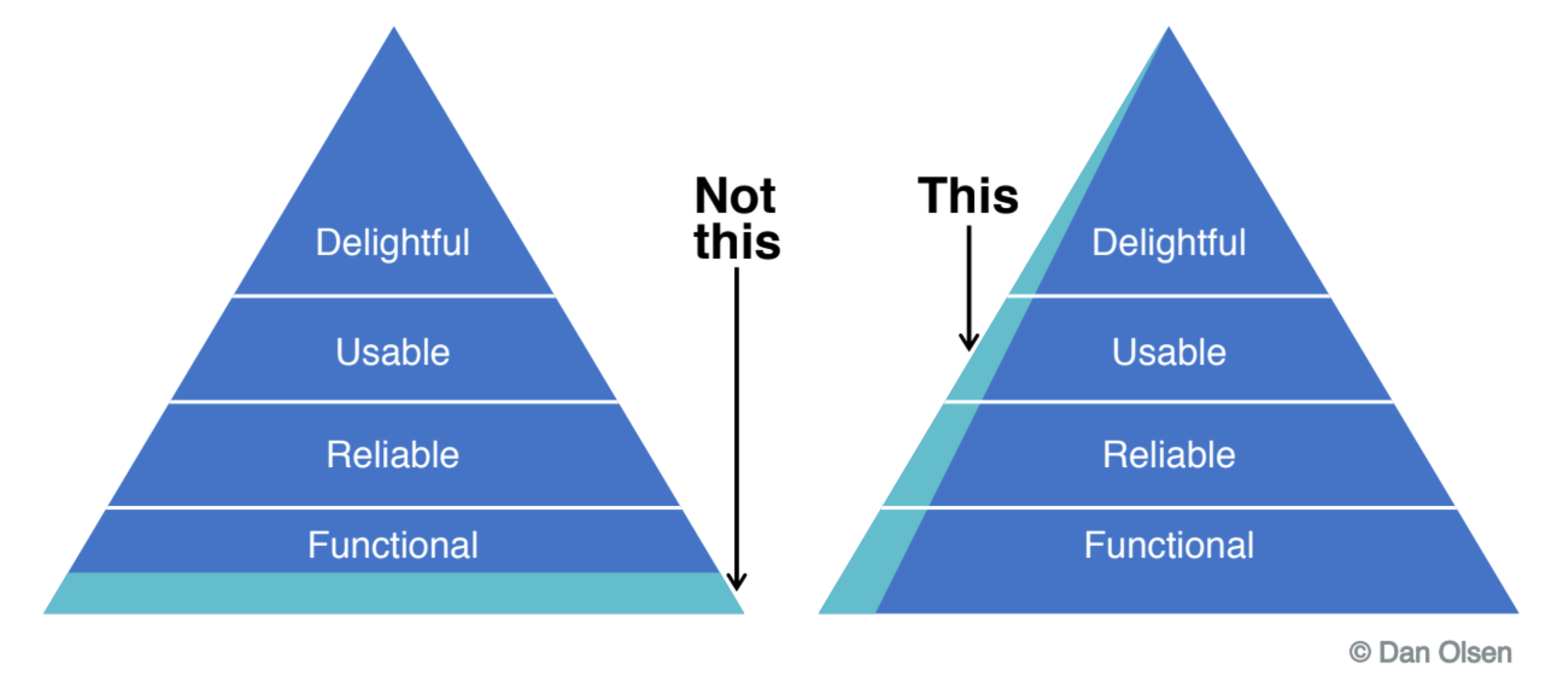
This is the heart of Sprint 3. Your app should do the one thing that delivers your value proposition. Remember: an MVP isn’t a complete product with every layer finished. It’s a thin slice through all the layers — functional, reliable, usable, and even a little delightful — for your core action only.
Requirements:
- Core action works end-to-end: A user can complete the main task your product promises
- Data persistence: User data is saved to Supabase (not just local state)
- Authentication: Users can sign up/log in and see only their own data (RLS enabled)
- Deployed: Your app is live at a public URL (e.g. Vercel)
Tips for building with Claude Code:
Give Claude Code your spec documents as context. A good prompt:
In @file_name.md, build the core feature described in the "Must have" user stories.
I will eventually use Supabase for the database and auth. Help me design the database schema as well. The app will be deployed to Vercel.
Break the work into pieces. Don’t ask Claude Code to build everything at once. This is bit of trial an error on how much Claude can bite off at one time. Experiment to get a feel for it. If you burn through your Claude tokens, try switching over to the native Antigavity agent. Tag your Claude.md and spec files and ask the agent to pick up where Claude left off.
What “functional” means for grading:
- A TA can sign up, complete the core action, and see their data persist
- No placeholder data or hardcoded content, it works with real user input
- Basic error states are handled (empty states, failed saves)
Deliverable: Working app at a public URL (Vercel) with core feature functional. Add your Vercel link, and your GitHub repo link to your portfolio and submission. If you GitHub repo is private, go to setting and share it with the TAs:
Part 3: Conduct 3 User Tests
Now that your core feature works, watch real people try to use it. For deeper background, see Chapter 6.
Why this matters: You built this thing. You know exactly where every button is and what every label means. Your users don’t. This is the curse of knowledge — once you know something, it’s nearly impossible to imagine not knowing it. The only cure is watching people who don’t know.
Usability testing is not a demo. It’s not a survey. It’s observing real users attempt real tasks while you stay quiet and take notes.
Who to test with: People who match your Ideal Customer Profile from Sprint 2.
Test script structure:
Use this structure for each ~10 minute session:
INTRO (1 minute)
"Thanks for helping me test this. I'm testing the product,
not you — there are no wrong answers. Please think out loud
as you go. I'll mostly stay quiet and take notes."

TASK (5-7 minutes)
"Imagine you want to [core action]. Go ahead and try."
[Stay quiet. Observe. Take notes.]

FOLLOW-UP (2-3 minutes)
"What was that experience like?"
"What was most confusing?"
"What would you change?"
During the session:
| Do | Don’t |
|---|---|
| Stay silent while they work | Help them unless completely stuck |
| Let them struggle (painful but necessary) | Explain why something works that way |
| Note where they pause, click wrong things, hesitate | Defend your design decisions |
| Ask “What are you thinking?” if they go quiet | Lead with “Did you see the button in the corner?” |
| Take notes on behavior, not just outcomes | Ask “Do you like it?” (opinions aren’t data) |
How to run each test:
- Share your live URL — don’t demo it for them, let them find their way
- Give them a task — “Imagine you want to [core action]. Go ahead and try.”
- Stay quiet — this is the hard part. Don’t help. Don’t explain. Just watch and take notes.
- Record the session — use Loom to capture screen + audio (get their permission)
- Ask follow-up questions after they finish
Severity levels — use these to classify issues you find:
| Severity | Definition | Example |
|---|---|---|
| Critical | User cannot complete the core task | Can’t sign up, main action broken |
| Major | Task is possible but difficult | Takes 5 minutes to find the main feature |
| Minor | Annoying but doesn’t block anything | Confusing label, awkward layout |
Use this observation template for each test:
Test #: ___
Tester name: ___
Why is this person a good tester? ___
Date: ___

Task given: ___

OBSERVATIONS:
- Could they complete the core task? (Yes / No / Partially)
- Time to complete: ___
- Where did they get stuck?
- Where did they click wrong things or hesitate?
- What did they say out loud?
- Facial expressions / body language:

FOLLOW-UP RESPONSES:
- What was confusing?
- What would they change?
- Would they use this again?

SEVERITY OF ISSUES FOUND:
- Critical (can't complete core task):
- Major (difficult but possible):
- Minor (annoying but not blocking):
After all 3 tests, synthesize your findings. You can paste your notes (and loom transcript) into AI to help:
Here are my usability test notes from 3 sessions testing my product:

[Paste all 3 observation notes]

Synthesize these into:
1. A summary paragraph of overall findings
2. Issues found, grouped by severity (critical, major, minor)
3. Patterns: what did multiple testers experience?
4. Key quotes from testers that illustrate important findings
5. Top 3 prioritized changes I should make, with rationale
Deliverable: Your 3 test observation notes + AI-assisted synthesis. Include Loom recording URLs for each session. Add a polished user feedback summary to your portfolio.
Part 4: Platform Strategy Decision
Document your platform strategy decision. For deeper background, see Chapter 7.
The Platform Decision Framework — start by answering these questions honestly:
| Question | If Yes → | If No → |
|---|---|---|
| Do users need this away from a computer? | Consider mobile | Web is fine |
| Does it need device hardware (camera, GPS, sensors)? | Consider mobile | Web is fine |
| Is your core user flow < 30 seconds? | Mobile-friendly matters | Desktop-first okay |
| Do competitors have apps? | Understand why | May not need one |
| Will users install another app? | Maybe mobile | Probably web |
The platform spectrum — you don’t have to choose between “web only” and “native app.” There’s a progression:
| Approach | Effort | Native Feel | App Store? | Best For |
|---|---|---|---|---|
| Responsive Web | Low | Low | No | Most B2B, productivity, content apps |
| PWA | Medium | Medium | Limited | Internal tools, B2B, content-heavy apps |
| Capacitor | Medium | Medium-High | Yes | Consumer apps needing store presence |
| React Native | High | High | Yes | Performance-critical consumer apps |
| Native (Swift/Kotlin) | Highest | Highest | Yes | Games, AR, deep OS integration |
For most of you, the sweet spot is Responsive Web → PWA → Capacitor as your product grows. Start simple, upgrade when you have evidence you need to.
Answer these questions in your submission (a few sentences each):
- Where do your users need your product? (At a desk? On the go? Both?)
- Does your product need device hardware? (Camera, GPS, sensors, etc.)
- What is your platform decision? Choose one:
- Web-only — responsive web app, no app store
- PWA — installable web app with offline support
- Capacitor — web app wrapped for app store distribution
- Why? Justify using the decision framework above
- What would change your mind? What signal would cause you to upgrade (e.g., from web-only to PWA)?
Deliverable: Platform strategy writeup in your submission document.
Part 5: Loom Reflection Video
Record a 2-minute Loom video reflecting on your Sprint 3 work. In your video:
- Demo your core feature — show a user completing the main task
- Share what you learned from user testing — what surprised you? What broke?
- Describe your top change — what’s the #1 thing you’re going to fix based on feedback?
- State your platform decision and why
Deliverable: Add your Loom video URL to your submission document.
Portfolio Updates
By the Sprint 3 deadline, your portfolio should include:
- Product spec documents — as a page, downloadable PDF, or linked from your repo
- Updated product link — pointing to your live, functional app
- Screenshots — showing your core feature in action
- User feedback summary — a polished writeup of what you learned from testing
Turn In
Submit your completed Google Doc link on LearningSuite. Use the Sprint 3 Submission Template. Your doc should contain all links and written deliverables in one place:
- GitHub repo URL (share with TAs if private)
- Live product URL (Vercel)
- GitHub URLs to your CLAUDE.md and spec documents
- All 3 user test observation notes + AI synthesis
- Loom URLs for each user test recording
- Platform strategy writeup
- Loom reflection video URL
- Link to your updated portfolio
Grading Rubric (50 points)
| Category | Points | Expectations |
|---|---|---|
| Product Spec Documents | 10 | CLAUDE.md contains product overview, target user, value prop, and tech stack. Spec doc(s) include user stories with acceptance criteria, functional requirements, success metrics, and out of scope. Scope is focused on MVP, not a wish list. |
| Core Feature Functional | 15 | Core action works end-to-end. Data persists in Supabase. Auth and RLS enabled. Deployed to public URL. TA can sign up and complete the core task. |
| 3 User Tests + Synthesis | 15 | 3 documented test sessions with observation notes. AI-assisted synthesis with severity-ranked issues, patterns, and prioritized changes. |
| Platform Strategy | 5 | Clear decision with justification using the decision framework. Thoughtful, not just “I picked web because it’s easiest.” |
| Loom Reflection Video | 5 | 2-min video covering demo, testing learnings, top change, and platform decision. |
Sprint 4: Progress Check
50 points | Assigned: Thu, Mar 19 | Due: Thu, Mar 26
Goal: Make meaningful progress on your product. You decide what to work on.
By now you have a working MVP, user feedback from Sprint 3, and ideas for what to improve. This sprint is self-managed — you choose what to build, fix, or improve based on what your product needs most.
Deliverable: A 5-minute Loom video. That’s it.
Your video should:
- Demo your live, deployed product — show the real app, not slides or localhost
- Show what’s new or improved since Sprint 3
- Explain why you chose to work on what you did
- State what you’re planning next
Submit: Your Loom URL on LearningSuite.
Grading Rubric (50 points)
| Score | What the TA sees |
|---|---|
| 45-50 | Significant progress. Live product demo. Clear explanation of what changed and why. Product is visibly better than last submission. |
| 35-44 | Moderate progress. Product works and something new is visible, but scope of work is thin or explanation is vague. |
| 25-34 | Minimal progress. Video submitted, product runs, but hard to see what’s new. |
| 15-24 | Video submitted but little evidence of real work. |
| 0 | Not submitted. |
Sprint 5: Progress Check
50 points | Assigned: Thu, Mar 26 | Due: Thu, Apr 2
Goal: Continue building. Your final project is due in less than two weeks — this is your last progress check before the finish line.
Same format as Sprint 4. Self-managed. You decide what to work on.
Deliverable: A 5-minute Loom video.
Your video should:
- Demo your live, deployed product — show the real app, not slides or localhost
- Show what’s new or improved since Sprint 4
- Explain why you chose to work on what you did
- Describe your plan for the final submission — what still needs to happen?
Submit: Your Loom URL on LearningSuite.
Grading Rubric (50 points)
| Score | What the TA sees |
|---|---|
| 45-50 | Significant progress. Live product demo. Clear explanation of what changed and why. Product is visibly better than last submission. |
| 35-44 | Moderate progress. Product works and something new is visible, but scope of work is thin or explanation is vague. |
| 25-34 | Minimal progress. Video submitted, product runs, but hard to see what’s new. |
| 15-24 | Video submitted but little evidence of real work. |
| 0 | Not submitted. |
Peer Assignments
Peer assignments teach you to give and receive constructive feedback, a critical professional skill. You’ll be randomly paired with different classmates for each assignment.
Peer Code Review
50 points | Assigned: Tue, Mar 10 | Due: Tue, Mar 17
Goal: Apply code analysis skills to a peer’s codebase and provide constructive feedback.
Process:
- You’ll be assigned a partner (different from your product testing partner)
- Your partner shares their GitHub repo with you
- You use Claude Code to analyze their codebase
- You write a professional code review
- You actually run and test their app
Deliverables:
Part 1: AI-Assisted Analysis
Run the following prompts in Claude Code on your peer’s repo and save the outputs:
Prompt 1: "Analyze this project structure. List all directories and their purposes,
identify frontend vs backend files, and count total lines of code.
Save as peer-review-structure.md"

Prompt 2: "Trace the main user flow from UI to database.
What happens when a user performs the core action?
Save as peer-review-dataflow.md"

Prompt 3: "Identify the architecture pattern, code organization,
and any potential security concerns or code smells.
Save as peer-review-architecture.md"
Part 2: Written Review
Write a 1-2 page review covering:
- Architecture observations: What patterns did you notice? How is the code organized?
- Code quality: What’s done well? What could be cleaner?
- Security considerations: Any obvious vulnerabilities?
- 3 specific suggestions: Actionable improvements with rationale
Part 3: Kick the Tires
- Sign up and use the app as a real user
- Document: Did it work? What broke? What was confusing?
Turn in:
Make a copy of the Peer Code Review submission template and fill in each section. All deliverables go in this single document:
- The 3 AI-generated analysis outputs (pasted into the template)
- Your written review covering architecture, code quality, security, and 3 specific suggestions
- Notes from your hands-on testing session
Submit the link to your completed Google Doc on Learning Suite.
Grading Rubric (50 points)
| Category | Points |
|---|---|
| AI analysis files complete and thorough | 15 |
| Written review professional and constructive | 20 |
| Testing notes with specific observations | 10 |
| Tone is helpful, not harsh | 5 |
TipCode Review Mindset
Your goal is to help your peer improve, not to criticize. Frame feedback as “Have you considered…” or “One thing that might help…” Great code reviewers make others want to work with them.
Peer Product Testing
50 points | Assigned: Thu, Apr 2 | Due: Thu, Apr 9
Goal: Be a real test user for a peer’s product and provide actionable UX feedback.
Process:
- You’ll be assigned a different partner than code review
- You become an actual user of their product
- You sign up, use core features, and try to break things
- You record the whole thing
Deliverable: A 5-minute Loom video of you using your peer’s product. That’s it.
How to record your test session:
- Start Loom, share your screen, and open their app URL
- Think out loud the entire time — narrate what you see, what you expect, where you’re confused, what works
- Try to complete the core task — sign up, use the main feature, see if your data persists
- Try to break things — what happens with bad input? Edge cases? Unexpected flows?
- End with your summary — look at the camera and give:
- 3 things that worked well (be specific)
- 3 things you’d improve (most impactful first)
- Would you use this product? Why or why not?
Submit: Your Loom URL on LearningSuite. Share the video with your peer too — this is a gift to them.
Grading Rubric (50 points)
| Score | What the TA sees |
|---|---|
| 45-50 | Genuine engagement — spent real time exploring the product. Think-aloud narration is specific and continuous. Summary feedback is actionable and constructive. |
| 35-44 | Good test session but narration is sparse, or summary feedback is vague. Clearly used the product but didn’t dig deep. |
| 25-34 | Surface-level engagement. Quick walkthrough without much exploration or thoughtful feedback. |
| 15-24 | Video submitted but minimal effort. Barely used the product. |
| 0 | Not submitted. |
TipTesting Mindset
Your job is to help your peer see their product through fresh eyes. Be honest but kind. The best feedback is specific (“The button on the checkout page didn’t respond when I clicked it”) not vague (“The checkout was buggy”).
Final Project
100 points | Due: Tue, Apr 14
Goal: Show me a finished product and tell me the story of building it.
You’ve spent the semester discovering a problem, validating it, building an MVP, testing it with users, and iterating. This is the culmination — your product should be the best version of itself, and you should be able to tell a compelling story about the journey.
Deliverables:
- Your product live and deployed
- A 5-minute Loom video (details below)
The 5-Minute Video
This is your final presentation. In 5 minutes, cover:
- The problem (~1 min) — What problem are you solving and why does it matter?
- Live demo (~2.5 min) — Walk through your product. Show real functionality with real data. Don’t narrate slides — use the actual app.
- Reflection (~1.5 min) — What did you learn? What would you do differently? What surprised you about building a real product?
Submit: Your Loom URL on LearningSuite.
Grading Philosophy: You are graded on effort and learning, not user acquisition outcomes. A thoughtful product with 3 engaged users beats a rushed product claiming 50 signups.
Grading Rubric (100 points)
Product (60 points)
| Score | What this looks like |
|---|---|
| 54-60 | A real product someone outside this class would use. Core flow works reliably end-to-end. Visibly improved since Sprint 3. Deployed and stable. |
| 42-53 | Works and delivers value but has rough edges. You can tell it’s a class project. Some iteration visible. Deployed. |
| 30-41 | Partially works. Incomplete flow or significant usability issues. Limited improvement since Sprint 3. |
| 18-29 | Barely functions. More mockup than product. Little progress beyond Sprint 3. |
| 0-17 | Not functional or not submitted. |
5-Minute Loom Video (40 points)
| Score | What this looks like |
|---|---|
| 36-40 | Live demo with real data. Clear problem/solution narrative. Honest reflection — talks about failures, not just wins. Compelling and well-structured. |
| 28-35 | Demo works, story is clear, but reflection is generic or demo hits a few snags. |
| 20-27 | Demo has real issues. Narrative is vague. Surface-level reflection. |
| 10-19 | Video submitted but minimal substance. |
| 0-9 | Not submitted. |
Feedback Surveys
Mid-Semester Feedback Survey
Complete this anonymous survey to earn 5 extra credit points. Take a screenshot of the confirmation page and submit it to LearningSuite by Tuesday, February 24 at 11:59 PM.
Student Ratings
Complete the end-of-semester student ratings to have your lowest quiz score converted to a perfect score.