
Problems Worth Solving
Software development has historically been constrained by scarcity – high costs, specialized skills, and long timelines. So builders chased only big markets.
AI is making it cheap, fast, and easy to build – suddenly it’s economically sane to solve niche workflows for small…— Madhu Guru ((realmadhuguru?)) August 7, 2025
Why This Matters
The graveyard of failed startups is filled with beautifully designed products that nobody wanted. The most common cause of startup failure isn’t running out of money, technical problems, or bad marketing. It’s building something people don’t actually need. This chapter will help you avoid that fate by teaching you to start with problems, not solutions.
With AI tools dramatically lowering the cost of building software, the bottleneck has shifted. The hard part is no longer can we build it? but should we build it? Finding a problem worth solving is now the most valuable skill a product builder can develop.
Part 1: The Strategy
Why Most Products Fail
According to CB Insights’ analysis of over 100 startup post-mortems, the number one reason startups fail is “No Market Need”, cited by 42% of failed founders. Not lack of funding. Not competition. Not bad teams. Simply building something people didn’t want.
This happens because of what we call The Idea Trap: falling in love with a solution before understanding the problem. It looks like this:
“I have a great idea for an app that does X!”
The problem? You’re starting with a solution. You’ve already decided what to build before asking whether anyone actually needs it. This is backwards.
Problem vs. Solution Thinking
Solution thinking starts with technology or features:
- “Let’s build an AI-powered calendar app”
- “We should make a blockchain-based voting system”
- “What if we created a social network for pet owners?”
Problem thinking starts with pain:
- “Professionals waste 5+ hours weekly scheduling meetings”
- “Voters distrust election integrity and want verifiable results”
- “Pet owners struggle to find trustworthy sitters when they travel”
The difference seems subtle, but it’s profound. Solution thinking leads you to build features. Problem thinking leads you to understand customers.
You Are Your Best First Customer
You don’t necessarily need to conduct elaborate market research to find a problem worth solving. You’re surrounded by problems every day, and you just need to find one you are passionate about fixing.
Many of the best products come from founders who were frustrated by something in their own lives:
- Slack came from a gaming company’s internal communication frustrations
- Dropbox came from Drew Houston constantly forgetting his USB drive
- Airbnb came from founders who couldn’t afford their San Francisco rent
When you’re your own customer, you have unfair advantages:
- Faster feedback loops: You can test ideas immediately on yourself
- Authentic insight: You truly understand the problem’s nuances
- Built-in motivation: You actually want the solution to exist
Problem Journaling
Start keeping a problem journal. For the next week, write down every moment of friction, frustration, or inefficiency you experience. Don’t filter, just capture.
Ask yourself:
- What did I just waste time on?
- What task felt harder than it should be?
- What made me say “there has to be a better way”?
- What workaround did I create because existing tools failed me?
Your journal entries might look like:
- “Spent 20 minutes trying to split a dinner bill with friends because everyone uses different payment apps”
- “Had to manually copy data from one spreadsheet to another AGAIN”
- “Missed a package delivery because I didn’t know it was coming”
These small frustrations are seeds for products.
Evaluating Your Problems
Not every problem is worth solving. Whether a problem is worth solving can be evaluted from these four factors:
| Criteria | Question to Ask |
|---|---|
| Frequency | How often does this problem occur? |
| Intensity | How painful is it when it happens? |
| Willingness to Pay | Would someone pay to make this go away? |
| Addressability | Can software actually solve this? |
A problem that happens rarely but is extremely painful (like planning a wedding) can be worth solving. A problem that happens constantly but is mildly annoying (like seeing ads) can also be worth solving. The sweet spot is frequent AND painful AND people will pay.
The Importance-Satisfaction Framework
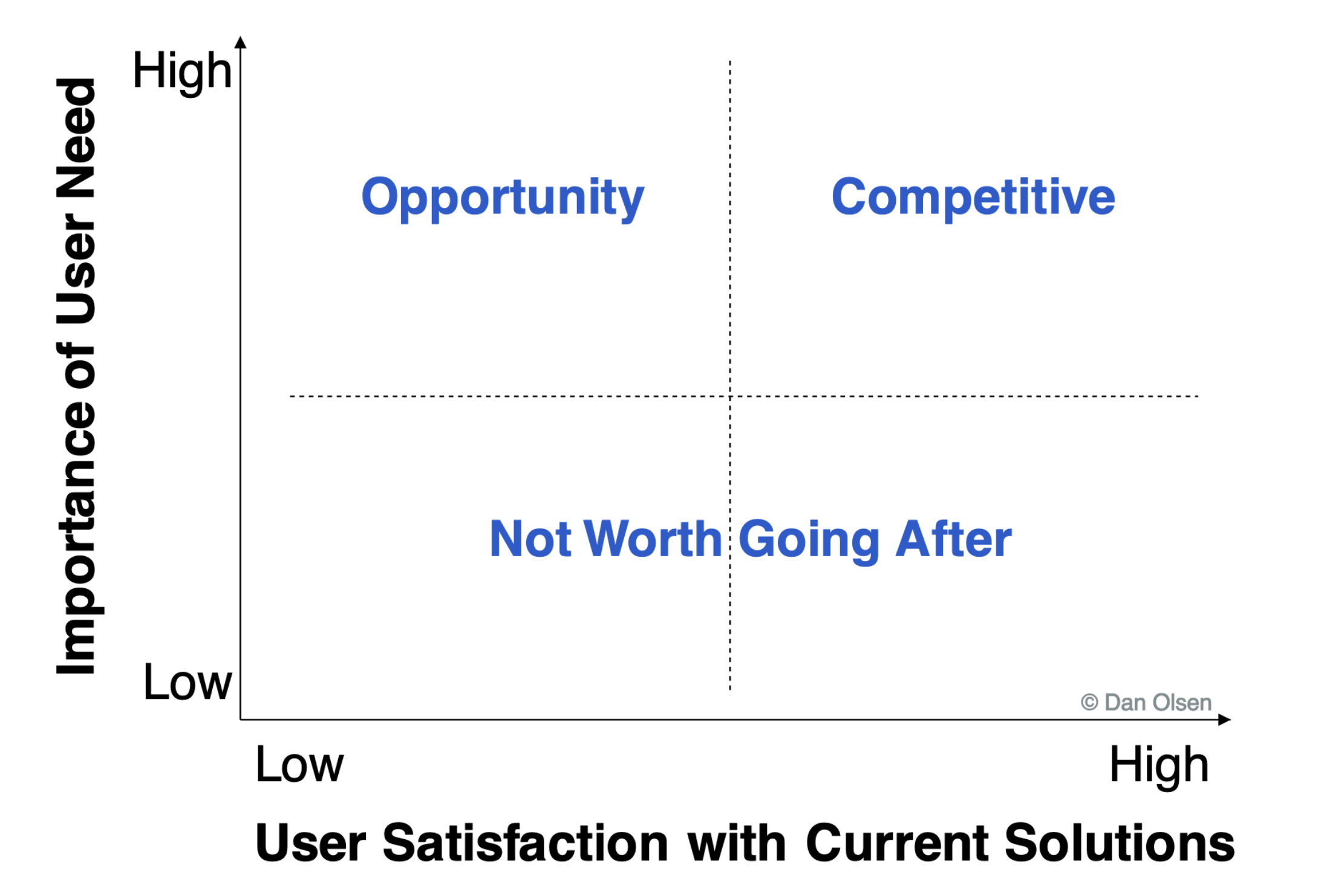
Another helpful way to evaluate problems comes from Dan Olsen’s Lean Product Playbook. Plot potential problems on a 2x2 matrix:
- Y-axis: Importance: How much does this matter to the customer?
- X-axis: Satisfaction: How well do current solutions address it?
The opportunity zone is high importance + low satisfaction. These are problems people care deeply about but can’t solve well today.
From Problems to Opportunities
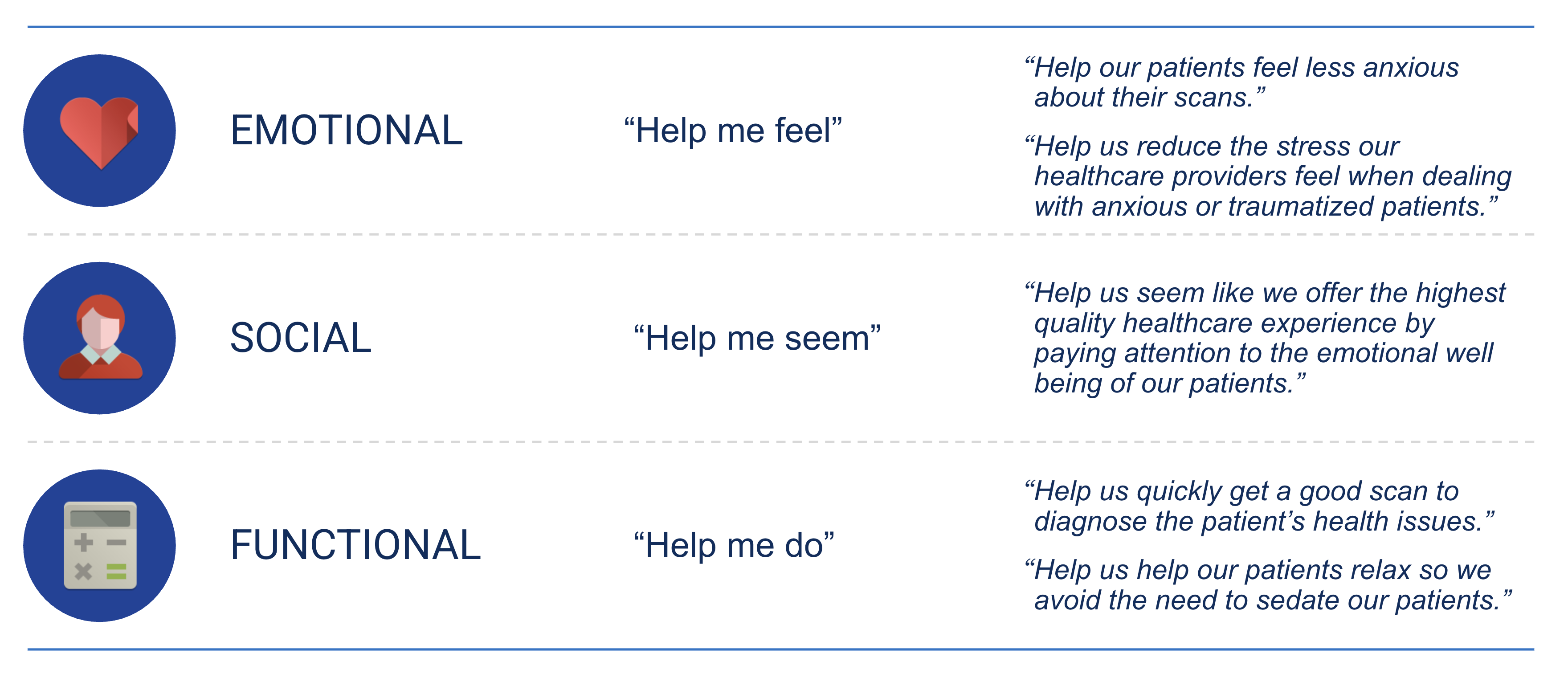
Once you’ve identified a promising problem, frame it as a Jobs-to-be-Done (JTBD) statement:
When I’m [situation], I want to [motivation], so I can [desired outcome].
For example: > When I’m trying to expense a business meal, I want to quickly capture the receipt and categorize it, so I can avoid the monthly expense report nightmare.
This framing keeps you focused on the customer’s goal, not your solution. It reminds you that customers don’t want your product, they want progress in their lives. Your product is just a means to that end.
Part 2: Building It
Now let’s practice the technical skills that will help you test your problem hypotheses quickly.
Terminal Practice
Last chapter, you learned the basics of the command line. Let’s reinforce those skills with some practice exercises.
Exercise 1: Create a project structure
# Create a new project folder
mkdir problem-tracker
cd problem-tracker

# Create subdirectories
mkdir notes prototypes research

# Create your first problem journal entry
echo "Day 1: Problems I noticed today" > notes/journal.txt
Exercise 2: Navigate and inspect
# List everything you created
ls -la

# Check your journal
cat notes/journal.txt

# Add another entry
echo "- Spent 10 min finding a parking spot downtown" >> notes/journal.txt
cat notes/journal.txt
Claude Code: Markdown Files
One of Claude Code’s most powerful features is its ability to understand context through markdown files. Let’s explore how to give Claude persistent knowledge about your project.
CLAUDE.md: Your Project’s Memory
A CLAUDE.md file (or .claude/CLAUDE.md) is a special file that Claude Code automatically reads when you start a session. It tells Claude about your project, including what you’re building, your preferences, and any important context.
Create one for your problem tracker:
Then in Claude Code:
Create a CLAUDE.md file that describes a problem tracking application I’m building to help me identify startup ideas
Claude will create something like:
# Problem Tracker

## Project Overview
A personal tool for capturing and evaluating problems that could become product opportunities.

## Tech Stack
- Python with Streamlit for the frontend
- JSON file for data persistence

## Key Features
- Daily problem journaling
- Problem evaluation scoring (frequency, intensity, WTP)
- Categorization and tagging

## Development Notes
- Keep the UI simple since this is for personal use
- Focus on fast capture over elaborate analysis
This context persists across sessions. Every time you start Claude Code in this directory, it knows what you’re building.
Project-Specific vs. Global Settings
Claude Code supports settings at multiple levels:
| Location | Scope | Use Case |
|---|---|---|
.claude/CLAUDE.md |
This project only | Project-specific instructions, tech stack, conventions |
~/.claude/CLAUDE.md |
All your projects | Personal preferences, common patterns |
.claude/settings.json |
This project | Technical configuration |
For now, focus on project-specific CLAUDE.md files. As you build more projects, you might create a global one with your preferred coding style.
Conversational Coding
The key to effective AI-assisted coding is learning to think out loud. Instead of trying to write perfect prompts, have a conversation:
Less effective: > Build me a problem tracker app with all features
More effective: > I want to track problems I notice throughout the day. Let’s start simple, just a way to add a new problem with a title and description. We can add evaluation features later.
Then iterate: > That looks good. Can we add a timestamp so I know when I captured each problem?
Now I want to rate each problem on frequency (daily, weekly, monthly, rarely). Add a dropdown for that.
This conversational approach gives you more control and helps you learn what Claude is doing at each step.
AI Dev Tools Landscape
Claude Code is your primary tool, but it’s worth knowing about the broader ecosystem:
| Tool | Best For | Notes |
|---|---|---|
| Claude Code | Full-stack development, complex features | Our primary tool, agentic, can edit files directly |
| Lovable | Quick UI prototypes | Great for testing visual ideas fast |
| Figma | Design mockups, user flows | Industry standard for design collaboration |
| 21st.dev | UI components | Copy-paste React components |
| v0.dev | UI generation from prompts | Vercel’s AI design tool |
For this class, we’ll primarily use Claude Code. But when you want to quickly visualize a UI idea before building it, Lovable can generate a working prototype in seconds.
Deploying a Prototype
Let’s deploy a simple problem tracker to make it real. In your problem-tracker directory start Claude from the terminal:
claudeThen:
Build a simple Streamlit app for tracking problems. It should let me add a problem (title, description, frequency rating), see a list of all problems I’ve added, and save everything to a JSON file. Keep it minimal since this is just for me to capture ideas.
Streamlit is an even lighter weight than Vercel to delpoy an app quickly. Claude Code will help you install any missing dependencies.
After Claude creates the app, run it:
streamlit run app.pyThis opens your app in a browser. Add a few problems from your journal. Congratulations, you’ve built your first problem-tracking tool!
To share it (or access from your phone), you can deploy to Streamlit Community Cloud:
- Push your code to GitHub
- Go to share.streamlit.io
- Connect your repo and deploy
Now you can capture problems wherever you are. You don’t really have to use this tool and this excercise was just to illustrate another way to ship simple apps quickly using streamlit.