
Building Your MVP
At (Google?), we are moving from a writing-first culture to a building-first one.
Writing was a proxy for clear thinking, optimized for scarce eng resources and long dev cycles - you had to get it right before you built.
Now, when time to vibe-code prototype ≈ time to write PRD,…— Madhu Guru ((realmadhuguru?)) July 29, 2025
Why This Matters
You’ve validated a problem and committed to solving it. Now you need to build something. But what exactly? How do you avoid spending months on features nobody wants?
This chapter teaches you to scope an MVP ruthlessly, write effective user stories, use AI to generate PRDs, and implement database-backed features with Supabase. The goal: build the smallest thing that delivers real value.
Part 1: The Strategy
What is an MVP?
A Minimum Viable Product isn’t a stripped-down version of your final vision. It’s the smallest thing you can build that:
- Delivers value to real users
- Tests your hypothesis about the problem
- Generates learning you can act on
The keyword is viable. An MVP must actually work and provide value. It’s not a prototype or a demo. It’s a real product, just minimal.
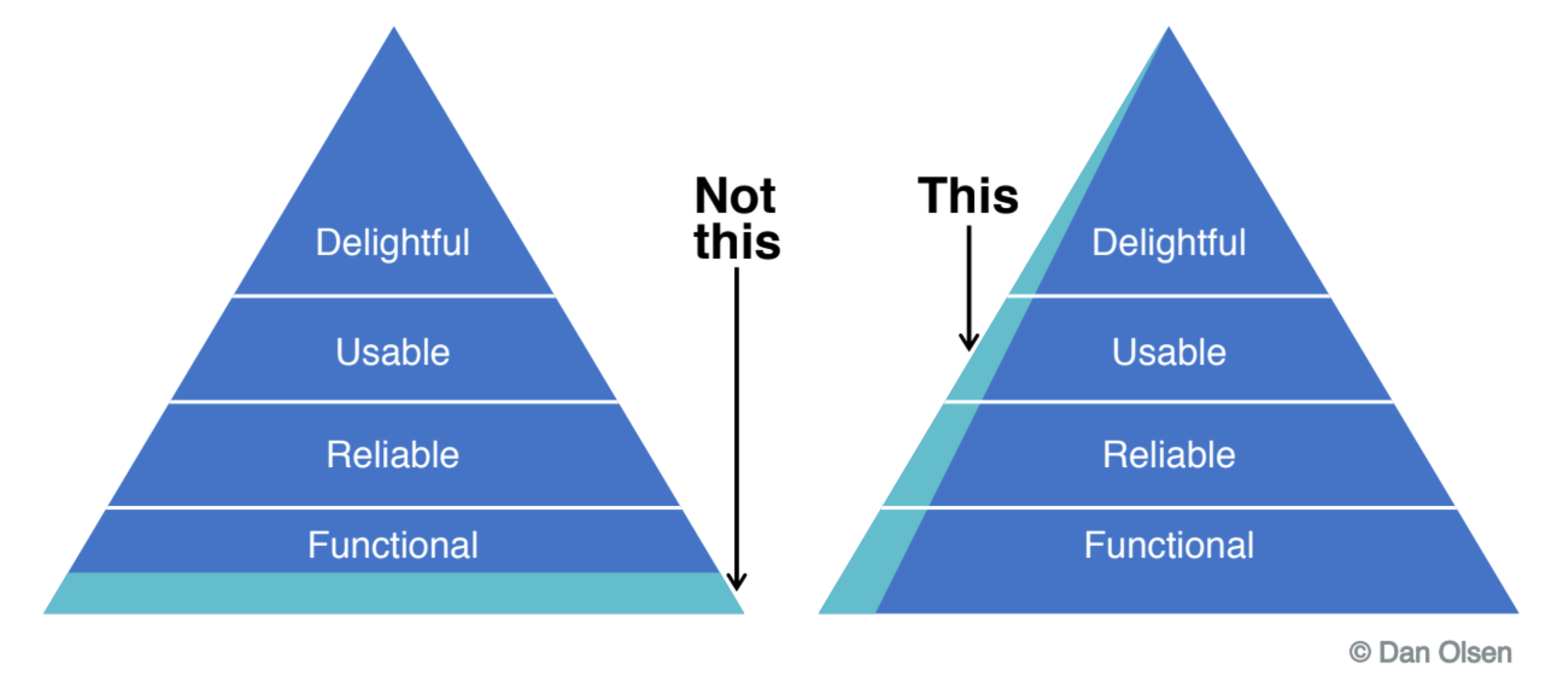
MVP Scoping: The Art of Cutting
Most founders include too much in their MVP. They think “just one more feature” will make it viable. Wrong. Every feature adds:
- Development time
- Testing complexity
- User confusion
- Things that can break
The MVP question: What is the one thing users must be able to do? Everything else is optional.
The Single-Feature MVP
The best MVPs often do exactly one thing:
| Product | MVP Feature | What They Didn’t Build Yet |
|---|---|---|
| Dropbox | Sync files to cloud | Mobile apps, sharing, teams |
| Post 140-character updates | Retweets, media, DMs | |
| Airbnb | List your spare room | Payments, reviews, insurance |
| Stripe | Accept credit cards | Invoices, subscriptions, fraud detection |
What’s the one thing your product must do?
Feature vs. Product Thinking
Feature thinking: “We need user profiles, notifications, settings, admin panel, analytics…”
Product thinking: “Users need to accomplish X. What’s the minimum to enable that?”
Start with the outcome, not the feature list.
User Stories
A user story describes a feature from the user’s perspective. They keep you focused on value, not just functionality.
The Format
As a [type of user], I want [goal] so that [benefit].
Examples:
As a marketing manager, I want to see all my campaigns in one dashboard so that I don’t waste time switching between tools.
As a job seeker, I want to save interesting positions so that I can apply when I have time.
As a small business owner, I want to accept credit card payments so that I can sell to customers who don’t carry cash.
Good vs. Bad User Stories
| Bad Story | Why It’s Bad | Better Story |
|---|---|---|
| “Build login system” | No user, no benefit | “As a user, I want to save my progress so I don’t lose my work” |
| “Add profile pictures” | Feature, not outcome | “As a user, I want colleagues to recognize me so team coordination is easier” |
| “Make it faster” | Too vague | “As a user loading the dashboard, I want it to load in under 2 seconds so I can start working immediately” |
Acceptance Criteria
Every user story needs acceptance criteria, specific conditions that must be true for the story to be “done”:
User Story: As a customer, I want to reset my password so I can access my account if I forget it.

Acceptance Criteria:
- User can request reset via email
- Reset link expires after 1 hour
- User must create password with 8+ characters
- User receives confirmation email after reset
- Old password no longer works
Product Requirements Documents (PRDs)
A PRD explains what you’re building, why, and how you’ll know it’s successful. It aligns your team (even if that’s just you and Claude) around a shared understanding.
PRD Structure
| Section | Purpose |
|---|---|
| Overview | What is this feature/product? |
| Objectives | Why are we building it? What problem does it solve? |
| User Stories | Who uses it and what do they accomplish? |
| Functional Requirements | What must it do? |
| Non-Functional Requirements | Performance, security, usability standards |
| Success Metrics | How will we measure success? |
| Out of Scope | What we’re explicitly NOT building |
AI-Assisted PRD Generation
With AI, you can draft PRDs much faster. Here’s a prompt for Claude:
I’m building [brief description]. The target user is [persona]. The core problem is [problem statement].
Generate a PRD with: 1. Overview 2. Objectives (with measurable goals) 3. 5 user stories with acceptance criteria 4. Functional requirements 5. Success metrics 6. What’s explicitly out of scope for MVP
Review and refine the output. AI gives you a starting point, not the final document.
The New Reality: Build-First Culture
As the tweet above suggests, AI is changing how we approach PRDs. When building a prototype takes as long as writing a detailed PRD, the optimal approach shifts:
Traditional approach: Write detailed PRD → Get approval → Build
AI-era approach: Build quick prototype → Test with users → Document what works
This doesn’t mean PRDs are useless, they’re still valuable for alignment and reference. But the emphasis moves from planning what to build to documenting what we learned.
Feature Prioritization
You’ll always have more ideas than time. Use frameworks to prioritize ruthlessly.
The ICE Framework
Score each feature 1-10 on:
| Factor | Question |
|---|---|
| Impact | How much will this improve the user experience? |
| Confidence | How sure are we this will work? |
| Effort | How much time will this take? |
ICE Score = Impact × Confidence / Effort
Higher scores = higher priority.
MoSCoW Method
Categorize features as:
| Category | Meaning |
|---|---|
| Must have | MVP fails without this |
| Should have | Important but MVP works without it |
| Could have | Nice to have if time permits |
| Won’t have | Explicitly out of scope (for now) |
Be honest about what’s truly “must have.” Most features are “should have” at best.
Part 2: Building It
Supabase Database Fundamentals
Your MVP needs to persist data. Supabase provides a PostgreSQL database that’s easy to use and scales with you.
Understanding Tables
A database table is like a spreadsheet: - Rows = individual records (one user, one task, one order) - Columns = fields (name, email, created_at)
-- Example: problems table
CREATE TABLE problems (
  id UUID PRIMARY KEY DEFAULT gen_random_uuid(),
  user_id UUID REFERENCES auth.users(id),
  title TEXT NOT NULL,
  description TEXT,
  frequency TEXT CHECK (frequency IN ('daily', 'weekly', 'monthly', 'rarely')),
  intensity INTEGER CHECK (intensity BETWEEN 1 AND 10),
  created_at TIMESTAMP DEFAULT NOW()
);
Creating Tables in Supabase
- Go to your Supabase dashboard
- Navigate to Table Editor
- Click New Table
- Define your columns with types
Common column types:
| Type | Use For |
|---|---|
text |
Names, descriptions, any text |
integer |
Whole numbers |
boolean |
True/false values |
timestamp |
Dates and times |
uuid |
Unique identifiers |
jsonb |
Flexible structured data |
Schemas: Your Database Blueprint
A schema defines all your tables and how they relate. For a problem tracker:
users (from Supabase Auth)
├── id
├── email
└── created_at

problems
├── id
├── user_id → users.id
├── title
├── description
├── frequency
├── intensity
└── created_at

interviews
├── id
├── problem_id → problems.id
├── interviewee_role
├── notes
├── key_quotes
└── conducted_at
Row Level Security (RLS)
RLS ensures users can only access their own data. Without it, any authenticated user could read everyone’s data.
Enabling RLS
-- Enable RLS on the table
ALTER TABLE problems ENABLE ROW LEVEL SECURITY;

-- Create policy: users can only see their own problems
CREATE POLICY "Users can view own problems"
ON problems FOR SELECT
USING (auth.uid() = user_id);

-- Users can insert problems for themselves
CREATE POLICY "Users can insert own problems"
ON problems FOR INSERT
WITH CHECK (auth.uid() = user_id);

-- Users can update their own problems
CREATE POLICY "Users can update own problems"
ON problems FOR UPDATE
USING (auth.uid() = user_id);

-- Users can delete their own problems
CREATE POLICY "Users can delete own problems"
ON problems FOR DELETE
USING (auth.uid() = user_id);
Always enable RLS on tables with user data.
CRUD Operations
CRUD = Create, Read, Update, Delete. These are the fundamental database operations.
Using the Supabase Client
import { createClient } from '@supabase/supabase-js';

const supabase = createClient(
  'https://your-project.supabase.co',
  'your-anon-key'
);

// CREATE - Insert a new problem
const { data, error } = await supabase
  .from('problems')
  .insert({
    title: 'Expense tracking is tedious',
    description: 'I spend 30 min every week categorizing receipts',
    frequency: 'weekly',
    intensity: 7
  })
  .select();

// READ - Get all problems for current user
const { data, error } = await supabase
  .from('problems')
  .select('*')
  .order('created_at', { ascending: false });

// READ - Get a specific problem
const { data, error } = await supabase
  .from('problems')
  .select('*')
  .eq('id', problemId)
  .single();

// UPDATE - Modify a problem
const { data, error } = await supabase
  .from('problems')
  .update({ intensity: 9 })
  .eq('id', problemId)
  .select();

// DELETE - Remove a problem
const { error } = await supabase
  .from('problems')
  .delete()
  .eq('id', problemId);
Relations and Queries
Real applications have related data. A user has many problems. A problem has many interviews.
Defining Relations
In Supabase, use foreign keys:
CREATE TABLE interviews (
  id UUID PRIMARY KEY DEFAULT gen_random_uuid(),
  problem_id UUID REFERENCES problems(id) ON DELETE CASCADE,
  -- ...other fields
);
ON DELETE CASCADE means: if a problem is deleted, delete its interviews too.
Building Your MVP with Claude Code
Let’s put it all together. Here’s how to build a database-backed feature:
cd my-product
claude
I need to add a feature where users can track problems they’re exploring. Create: 1. A Supabase table for problems (with title, description, frequency, intensity) 2. RLS policies so users only see their own problems 3. A React component with a form to add problems 4. A list view showing all problems with ability to delete 5. Connect everything to the existing Supabase client
Claude will generate the SQL, React components, and API calls. Review each piece, understand how it works, then test.
Key Concepts
- MVP (Minimum Viable Product): Smallest thing that delivers real value
- Single-Feature MVP: Do one thing well before adding more
- User Stories: Feature descriptions from the user’s perspective
- Acceptance Criteria: Specific conditions for “done”
- PRD (Product Requirements Document): Alignment document for what you’re building
- ICE Framework: Impact × Confidence / Effort for prioritization
- MoSCoW Method: Must/Should/Could/Won’t have categorization
- Database Tables: Rows and columns storing your data
- RLS (Row Level Security): Ensuring users only access their own data
- CRUD Operations: Create, Read, Update, Delete
- Foreign Keys: Linking related tables together