
Validating Opportunities
Why This Matters
You’ve conducted interviews and identified a problem that people genuinely experience. But not every real problem is worth building a product around. Some problems are rare. Some are mildly annoying. Some have perfectly good solutions that people are happy with.
This chapter teaches you to evaluate whether a problem represents a real business opportunity, one worth committing your time and energy to solve. You’ll learn frameworks for scoring opportunities, the discipline of commitment, and the technical foundations you need to start building your first real product.
Part 1: The Strategy
The Opportunity Evaluation Framework
A problem worth solving must pass three tests:
| Test | Question | What You’re Looking For |
|---|---|---|
| Frequency | How often does this happen? | Daily/weekly is ideal; yearly is weak |
| Intensity | How painful is it? | High frustration, strong emotions |
| Willingness to Pay | Would they pay to solve it? | Evidence of spending, not just words |
Frequency
Problems that occur frequently create more value when solved. A tool that saves someone 10 minutes daily is worth more than one that saves an hour yearly.
How to assess: - “How often does this happen?” (from your interviews) - Look for patterns in your interview notes - Daily problems > Weekly > Monthly > Rarely
Red flag: If interviewees can’t remember the last time it happened, frequency is too low.
Intensity
Intensity measures how much the problem disrupts someone’s life or work. High-intensity problems create urgency and willingness to adopt new solutions.
Signs of high intensity: - Strong emotional language (“I hate this,” “It drives me crazy”) - They’ve already tried to solve it (DIY solutions, workarounds) - It blocks them from something important - They bring it up unprompted
Signs of low intensity: - “It’s annoying but not a big deal” - They’ve never tried to fix it - They shrug when describing it
Willingness to Pay
The ultimate validation: will someone exchange money to make this problem go away? This is harder to assess than frequency or intensity, but it’s the most important.
Strong signals: - They’re already paying for partial solutions - They describe the problem in terms of money (“This costs me $X per month”) - They immediately ask about pricing or availability - They offer to pay for early access
Weak signals: - “Yeah, I’d probably pay for that” (hypothetical) - “That sounds like a good idea” (opinion, not commitment) - They have no budget authority for this type of purchase
Opportunity Scoring
Create a simple scorecard for each problem you’re considering:
| Criteria | Score (1-5) | Notes |
|---|---|---|
| Frequency | How often? | |
| Intensity | How painful? | |
| Willingness to Pay | Evidence of spending? | |
| Market Size | How many people have this? | |
| Your Fit | Do you understand this deeply? | |
| Total | /25 |
Scoring guide: - 20-25: Strong opportunity: pursue with confidence - 15-19: Promising: worth exploring further - 10-14: Questionable: dig deeper before committing - Below 10: Weak: consider other problems
The Commitment Decision
At some point, you need to stop exploring and start building. This is the commitment decision, choosing one problem to focus on.
Signs you’re ready to commit: - You’ve talked to 5+ people who experience the problem - Multiple people show strong signals on all three tests - You have a clear hypothesis for a solution - You’re excited to work on this for months
Signs you’re not ready: - You’re still finding contradictory information - Nobody seems to care that much - You can’t articulate who this is for - You’re only excited because you like the solution idea
Avoiding Premature Commitment
The opposite trap is committing too early. Watch for these warning signs:
Solution love: You’re attached to a specific solution before validating the problem. (“I want to build an AI app” → wrong starting point)
Confirmation bias: You’re only hearing what supports your hypothesis. Actively seek disconfirming evidence.
Sunken cost: You’ve invested time, so you don’t want to pivot. Cut your losses early. It’s cheaper than building the wrong thing.
Founder fantasy: You imagine the success, not the work. Fall in love with the problem, not the outcome.
Your Value Proposition
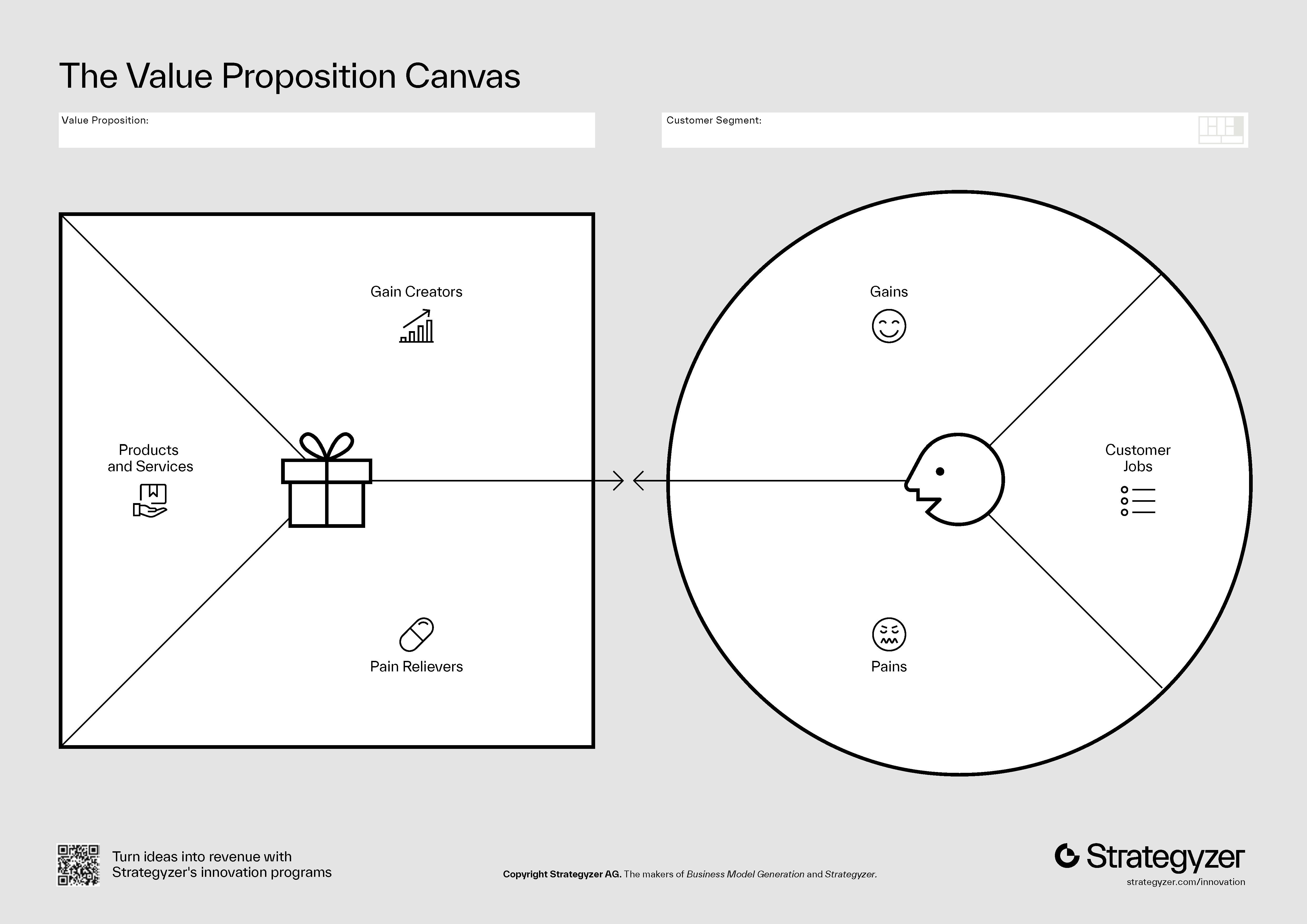
Once you commit to a problem, articulate your value proposition, a clear statement of what you offer and why it matters.
Template:
For [target customer] Who [has this problem] Our product is [category] That [key benefit] Unlike [alternatives] We [key differentiator]
Example:
For marketing managers at mid-size SaaS companies Who spend 6+ hours weekly compiling reports from multiple tools Our product is an automated reporting dashboard That pulls data from all your tools into one real-time view Unlike manual spreadsheets or expensive enterprise solutions We take 10 minutes to set up and cost 1/10th the price
Part 2: Building It
It’s time to start building your real product. This section introduces the frontend fundamentals and backend setup you’ll need.
Frontend Fundamentals
Every web application has a frontend, the part users see and interact with. Modern frontends are built with HTML (structure), CSS (styling), and JavaScript (interactivity).
HTML: The Structure
HTML (HyperText Markup Language) defines the structure of a web page using elements:
<!DOCTYPE html>
<html>
  <head>
    <title>My App</title>
  </head>
  <body>
    <h1>Welcome</h1>
    <p>This is a paragraph.</p>
    <button>Click me</button>
  </body>
</html>
Common HTML elements: - <h1> to <h6>: Headings - <p>: Paragraphs - <a>: Links - <button>: Buttons - <input>: Form inputs - <div>: Generic containers
CSS: The Styling
CSS (Cascading Style Sheets) controls how elements look:
h1 {
  color: blue;
  font-size: 24px;
}

button {
  background-color: green;
  color: white;
  padding: 10px 20px;
  border-radius: 5px;
}
Modern apps often use CSS frameworks like Tailwind CSS, which provides utility classes:
<button class="bg-green-500 text-white px-4 py-2 rounded">
  Click me
</button>
JavaScript: The Interactivity
JavaScript makes pages interactive:
const button = document.querySelector('button');
button.addEventListener('click', () => {
  alert('Button clicked!');
});
React Basics
For complex applications, raw HTML/CSS/JavaScript becomes hard to manage. React is a JavaScript library that helps you build user interfaces from reusable components.
Components
A React component is a function that returns UI:
function Welcome() {
  return <h1>Hello, World!</h1>;
}
Components can accept props (inputs) and manage state (data that changes):
function Counter() {
  const [count, setCount] = useState(0);

  return (
    <div>
      <p>Count: {count}</p>
      <button onClick={() => setCount(count + 1)}>
        Increment
      </button>
    </div>
  );
}
Why React?
- Reusable components: Build once, use everywhere
- Declarative: Describe what you want, not how to do it
- Ecosystem: Huge community, lots of libraries
- Industry standard: Used by Facebook, Netflix, Airbnb, etc.
For this class, we’ll use Next.js, a React framework that handles routing, server rendering, and deployment.
Client-Side State and Forms
Most apps need forms to collect user input. Here’s how state and forms work together:
function ProblemForm() {
  const [title, setTitle] = useState('');
  const [description, setDescription] = useState('');

  const handleSubmit = (e) => {
    e.preventDefault();
    console.log({ title, description });
    // Save to database
  };

  return (
    <form onSubmit={handleSubmit}>
      <input
        value={title}
        onChange={(e) => setTitle(e.target.value)}
        placeholder="Problem title"
      />
      <textarea
        value={description}
        onChange={(e) => setDescription(e.target.value)}
        placeholder="Describe the problem"
      />
      <button type="submit">Save</button>
    </form>
  );
}
Supabase Introduction
Supabase is an open-source backend platform that provides everything you need to build a real application:
| Feature | What It Does |
|---|---|
| Database | PostgreSQL database for storing data |
| Authentication | User signup, login, OAuth |
| Storage | File uploads and hosting |
| Realtime | Live updates when data changes |
| Edge Functions | Serverless code execution |
Think of Supabase as “Firebase for people who like SQL.” It’s free for small projects and scales as you grow.
Setting Up Supabase
- Go to supabase.com and create an account
- Create a new project
- Note your project URL and API key (you’ll need these)
Connecting Your App
Install the Supabase client:
npm install @supabase/supabase-jsCreate a client:
import { createClient } from '@supabase/supabase-js';

const supabase = createClient(
  'https://your-project.supabase.co',
  'your-anon-key'
);
Authentication with Supabase
Authentication is how you verify who users are. Supabase makes this simple:
Email/Password Auth
// Sign up
const { user, error } = await supabase.auth.signUp({
  email: 'user@example.com',
  password: 'secure-password'
});

// Sign in
const { user, error } = await supabase.auth.signInWithPassword({
  email: 'user@example.com',
  password: 'secure-password'
});

// Sign out
await supabase.auth.signOut();

// Get current user
const { data: { user } } = await supabase.auth.getUser();
OAuth (Google, GitHub, etc.)
// Sign in with Google
const { data, error } = await supabase.auth.signInWithOAuth({
  provider: 'google'
});
Configure OAuth providers in your Supabase dashboard under Authentication → Providers.
Claude Code: Agents
As your projects get more complex, you can leverage Claude Code’s ability to work on multiple tasks in parallel using agents.
What Are Agents?
Agents are subprocesses that Claude Code can spawn to handle specific tasks. Instead of doing everything sequentially, Claude can work on multiple things at once:
- One agent researches how to implement authentication
- Another agent sets up the database schema
- A third agent creates the UI components
Using Agents Effectively
To activate agentic behavior, give Claude Code complex, multi-part tasks:
Set up a complete Next.js project with: 1. Supabase authentication (email + Google OAuth) 2. A protected dashboard page 3. A landing page for logged-out users 4. Basic navigation between pages
Claude will break this into subtasks and potentially work on multiple parts simultaneously.
Managing Context
Agents share context with the main Claude session but can work independently. To keep things organized:
- Use CLAUDE.md: Define your project structure and conventions
- Be specific: “Create the auth flow following the pattern in /lib/auth”
- Review incrementally: Check agent work as it completes
Task Decomposition
Break large tasks into smaller, parallelizable pieces:
Instead of: > “Build my entire app”
Do this: > “Let’s build the authentication system first. Start with: > 1. Supabase client setup in /lib/supabase.ts > 2. Auth context in /contexts/AuthContext.tsx > 3. Login page at /login > 4. Protected route wrapper component”
This gives Claude a clear scope and lets you verify each piece works before moving on.
Key Concepts
- Frequency, Intensity, Willingness to Pay: The three tests for opportunity validation
- Opportunity Scoring: Quantifying how promising a problem is
- The Commitment Decision: When to stop exploring and start building
- Avoiding Premature Commitment: Watch for solution love, confirmation bias
- Value Proposition: Clear statement of what you offer and why
- Frontend Fundamentals: HTML (structure), CSS (styling), JavaScript (interactivity)
- React: Component-based UI library
- Supabase: Backend-as-a-service (database, auth, storage)
- OAuth: Third-party authentication (Google, GitHub)
- Agents: Claude Code’s parallel task execution