
Problem Discovery
Why This Matters
You’ve identified problems you personally experience. But how do you know if others share that pain? And even if they do, have you understood the problem deeply enough to solve it well?
Problem discovery is the process of moving from I think this is a problem to I know this is a problem worth solving. It requires talking to real people, asking the right questions, and synthesizing what you learn into actionable insights.
This chapter teaches you the Jobs-to-be-Done framework for understanding customer motivations, the Mom Test approach for conducting honest interviews, and the Git skills you need to version control your work as your projects grow.
Part 1: The Strategy
Jobs-to-be-Done Framework
The Jobs-to-be-Done (JTBD) framework, popularized by Clayton Christensen, shifts focus from what customers buy to why they buy it. The core insight: customers don’t want products, they “hire” products to do a job.
The classic example is the milkshake. A fast-food chain wanted to sell more milkshakes, so they improved the recipe. Sales didn’t budge. Then they asked a different question: What job are people hiring the milkshake to do?
They discovered that most milkshakes were bought in the morning by commuters. The “job” wasn’t enjoy a delicious treat. It was make my boring commute more interesting while keeping me full until lunch. Suddenly, the milkshake’s competition wasn’t other milkshakes; it was bananas, bagels, and donuts. The solution? Make it thicker (lasts longer), add fruit chunks (more interesting), and offer it at the drive-through (more convenient).
The JTBD Formula
Frame customer needs as jobs using this structure:
When I’m [situation], I want to [motivation], so I can [desired outcome].
For example: - When I’m planning a trip with friends, I want to easily see everyone’s availability, so I can pick dates that work for everyone. - When I’m starting a new exercise routine, I want to follow a structured program, so I can build strength without figuring out what to do each day. - When I’m managing a team project, I want to see who’s blocked on what, so I can unblock them before deadlines slip.
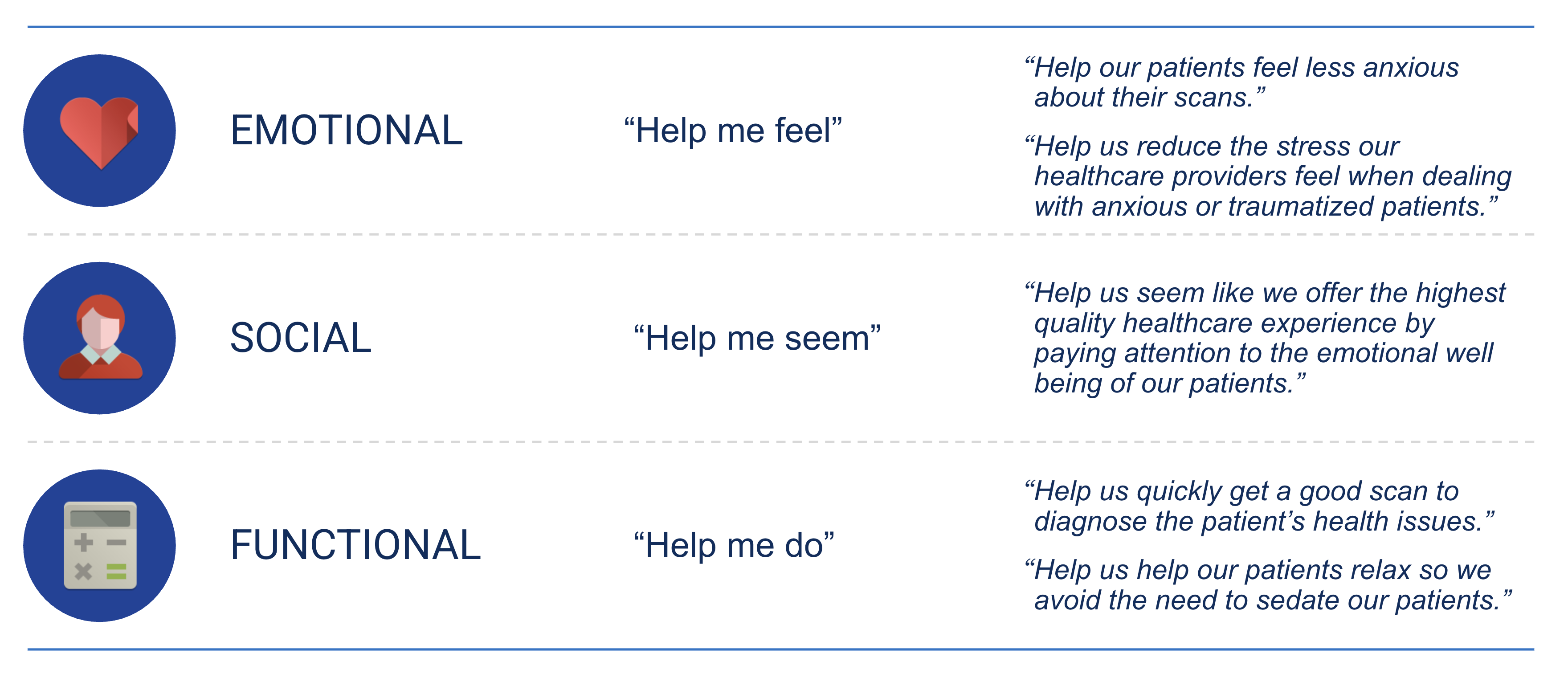
Three Types of Jobs
Every job has three dimensions:
| Job Type | Description | Example |
|---|---|---|
| Functional | What they want to accomplish | “Get from home to work” |
| Emotional | How they want to feel | “Feel in control of my day” |
| Social | How they want to be perceived | “Appear professional to colleagues” |
Most products focus only on functional jobs. But emotional and social jobs often drive purchasing decisions. Someone might buy a Tesla for the functional job (transportation) but the real motivation is social (appear environmentally conscious) or emotional (feel like an innovator).
Problem Interviews (The Mom Test)
Once you have a hypothesis about the job customers are trying to do, you need to validate it with real conversations. This is where most people fail, they ask bad questions that produce misleading answers.
Rob Fitzpatrick’s book The Mom Test identifies the core problem: if you tell your mom about your business idea, she’ll say it’s great. She loves you. She doesn’t want to hurt your feelings. And her feedback is useless.
The solution is to ask questions that even your mom couldn’t lie about, questions about their actual behavior, not hypothetical futures.
Rules of The Mom Test
- Talk about their life, not your idea
- Ask about specifics in the past, not generics about the future
- Talk less, listen more
Bad Questions vs. Good Questions
| Bad Question | Why It’s Bad | Good Question |
|---|---|---|
| “Would you use an app that does X?” | Hypothetical, everyone says yes | “Tell me about the last time you tried to do X” |
| “Do you think this is a good idea?” | Asking for opinions, not facts | “What solutions have you tried? What happened?” |
| “How much would you pay for this?” | They’ll guess to be nice | “What are you currently paying to solve this?” |
| “Would you recommend this to friends?” | Future promise, not behavior | “Have you ever told anyone about this problem?” |
The Magic Question
The most powerful interview question is:
“Walk me through the last time you experienced this problem.”
This forces specificity. You’ll learn: - How often it really happens - What they actually did (not what they say they’d do) - What emotions came up - What solutions they tried - Why existing solutions fell short
Signs You’re Onto Something
- They get animated or frustrated describing the problem
- They’ve already tried to solve it themselves
- They’ve spent money on partial solutions
- They ask if they can beta test your product
- They introduce you to others with the same problem
Signs You Should Pivot
- They can’t remember the last time this happened
- They shrug and say “it’s not a big deal”
- They’ve never tried to solve it
- They wouldn’t pay anything to make it go away
Conducting Effective Interviews
Before the Interview
- Define your hypotheses: What do you believe about the problem?
- Prepare 5-7 open-ended questions: Focus on behavior and specifics
- Target the right people: Those who actually experience the problem
- Set expectations: “I’m trying to understand how people handle X. Can I ask you some questions?”
During the Interview
- Shut up: You should talk less than 20% of the time
- Dig deeper: “Tell me more about that” / “Why was that frustrating?”
- Get specific: “Can you give me an example?” / “What happened next?”
- Watch for emotion: Strong feelings indicate strong needs
- Take notes: Or record with permission
Sample Interview Script
“I’m researching how people [handle X situation]. I’m not selling anything, I just want to understand your experience. Can I ask you some questions?”
- “Can you tell me about your role and what a typical day looks like?”
- “When was the last time you [experienced the problem]?”
- “Walk me through what happened.”
- “What did you do about it?”
- “What was frustrating about that?”
- “Have you tried any solutions? What happened?”
- “What would have to be true for something to be worth paying for?”
Interview Synthesis
After 5+ interviews, patterns emerge. Synthesize what you learned into actionable insights.
Synthesis Template
Use this format to document your findings:
Problem Statement: One clear sentence describing the problem you’ve validated.
Who You Talked To: Roles/titles of interviewees (not names, for privacy). - 3 marketing managers at mid-size companies - 2 freelance consultants
Key Insights: 3-5 bullet points summarizing the most important patterns. - All 5 participants mentioned X as their biggest frustration - 4/5 have tried Y solution but found it lacking because Z - Time spent on this problem: average 3 hours/week
Notable Quotes: Direct quotes that capture the emotion and specificity. - “I literally dread Mondays because I know I’ll spend half the day on this.” - “I’ve tried everything. Nothing actually works.”
What We Learned: Your interpretation and next steps. - The problem is real and frequent (validated) - Current solutions fail because they don’t address X - Opportunity: build something that does Y
Building Personas
A persona is a fictional but realistic representation of your target customer. It synthesizes interview data into a memorable character that keeps your team aligned.
Persona Template
Name & Role: Sarah, 34, Marketing Manager at a 200-person SaaS company
Demographics: - 5 years in role, manages team of 3 - Based in Austin, works hybrid - Comfortable with technology but not technical
Goals/Motivations: - Ship campaigns on time - Prove marketing’s impact to leadership - Get promoted to Director within 2 years
Frustrations/Pain Points: - Spends 6+ hours/week manually compiling reports - Can never get real-time data when executives ask - Marketing tools don’t talk to each other
Job-to-be-Done: > When I’m preparing for our weekly leadership meeting, I want to quickly pull together campaign performance data, so I can confidently answer questions and demonstrate marketing’s value.
Current Solutions & Workarounds: - Manually exports data from 4 different tools into a spreadsheet - Has built elaborate formulas that break constantly - Sometimes just estimates because accurate data takes too long
Willingness to Pay: Has budget authority up to $500/month for tools that save significant time.
Part 2: Building It
Git Fundamentals
As your projects grow, you need version control. Git tracks every change you make, lets you experiment safely, and enables collaboration. GitHub stores your Git repositories online for backup and sharing.
Understanding the Git Workflow
A typical Git workflow has four stages:
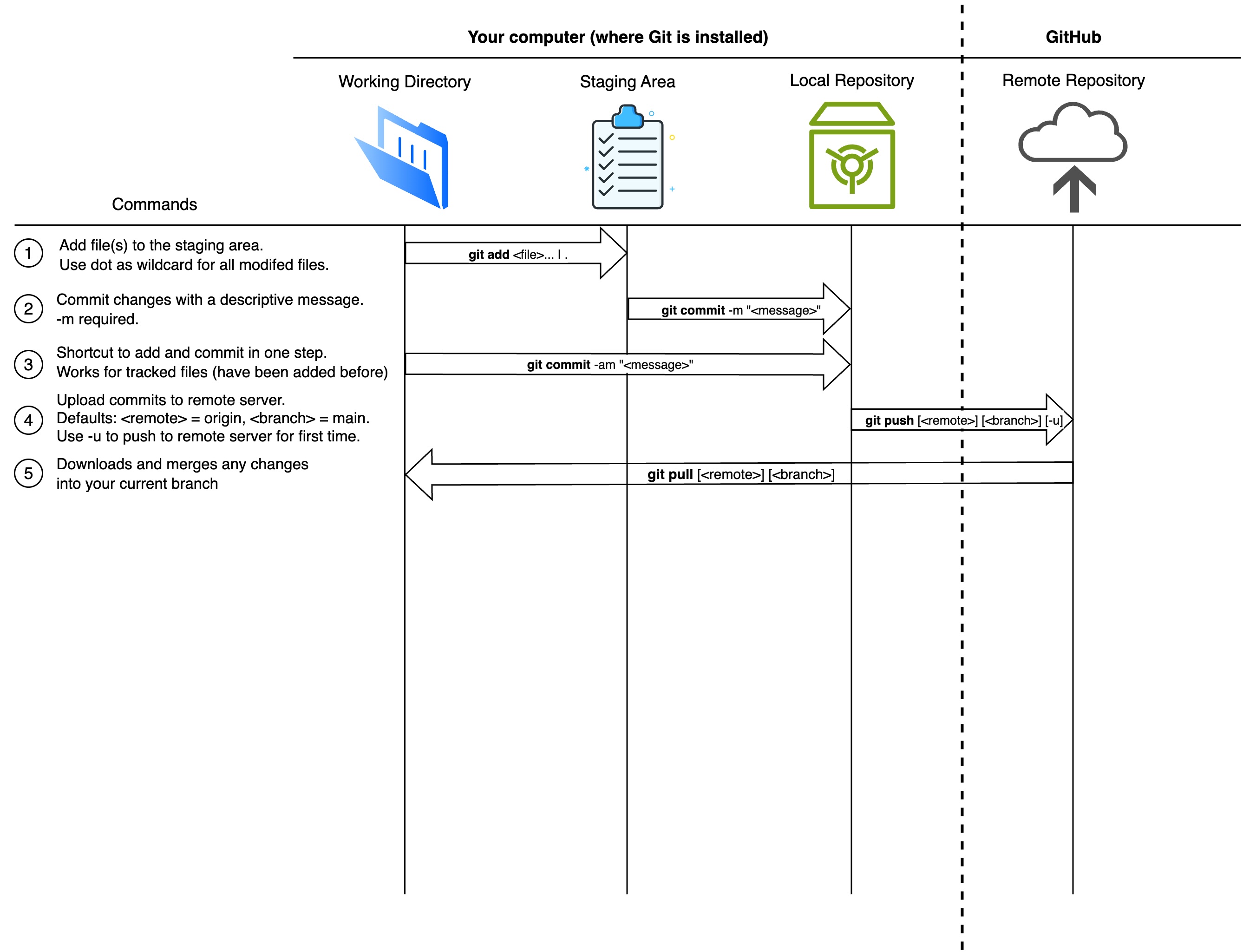
| Stage | What It Is |
|---|---|
| Working Directory | The folder on your computer where you edit files |
| Staging Area | A list of changes you want to include in your next save |
| Local Repository | Your project’s history, stored in a hidden .git folder |
| Remote Repository | A copy of your project on GitHub (or similar) |
Essential Git Commands
| Command | What It Does |
|---|---|
git init |
Create a new Git repository in current folder |
git status |
See what’s changed since last commit |
git add . |
Stage all changes for commit |
git commit -m "message" |
Save staged changes with a description |
git log --oneline |
View commit history |
git push |
Upload commits to GitHub |
git pull |
Download changes from GitHub |
Your First Git Workflow
Let’s practice with your problem tracker from last chapter:
# Navigate to your project
cd problem-tracker

# Initialize Git (only do this once per project)
git init

# See what files exist
git status

# Stage all files
git add .

# Commit with a message
git commit -m "Initial commit: problem tracker app"

# Check your history
git log --oneline
Connecting to GitHub
- Create a new repository on github.com (don’t initialize with README)
- Connect your local repo:
# Add GitHub as your remote
git remote add origin https://github.com/YOUR-USERNAME/problem-tracker.git

# Push your code
git push -u origin main
Now your code is backed up online and you can share the link with anyone.
Branches: Safe Experimentation
Branches let you try new features without breaking your main code.
# Create and switch to a new branch
git switch -c feature-rating

# Make changes, then commit
git add .
git commit -m "Add rating system for problems"

# Switch back to main
git switch main

# Merge your feature branch
git merge feature-rating
Pro tip: Always create a branch before making significant changes. If it doesn’t work out, you can just delete the branch.
Deployment with Vercel / GitHub Pages
Once your code is on GitHub, deployment is simple.
Option 1: Vercel (Recommended for Apps)
- Go to vercel.com and sign up with GitHub
- Click “Add New” → “Project”
- Import your GitHub repository
- Vercel automatically detects your framework and deploys
- Get a live URL like
problem-tracker.vercel.app
Every time you push to GitHub, Vercel automatically redeploys. Zero configuration needed.
Option 2: GitHub Pages (Great for Static Sites)
For your portfolio and other static sites:
- Go to your repository on GitHub
- Settings → Pages
- Source: “Deploy from a branch” or “GitHub Actions”
- Your site appears at
username.github.io/repo-name
Claude Code: Slash Commands
Slash commands are shortcuts for common Claude Code actions. They help you work faster and more consistently.
Built-in Commands
| Command | What It Does |
|---|---|
/help |
Show available commands |
/clear |
Clear conversation history |
/compact |
Toggle compact mode |
/config |
Open configuration |
/status |
Show current project state |
Creating Custom Slash Commands
The real power is creating your own commands. Store them in .claude/commands/ in your project:
mkdir -p .claude/commandsCreate a file .claude/commands/interview.md:
# Interview Synthesis Prompt

Analyze the following interview notes and create a synthesis document with:

1. **Problem Statement** - One clear sentence
2. **Key Insights** - 3-5 bullet points of patterns
3. **Notable Quotes** - Direct quotes that capture emotion
4. **Validation Status** - Is this problem validated? Why/why not?
5. **Next Steps** - What should we do with this information?

Interview notes:
$ARGUMENTS
Now you can use it:
claude
/interview [paste your interview notes here]
Useful Custom Commands
Create these to speed up your workflow:
persona.md: Generate a persona from interview data jtbd.md: Convert a problem description to JTBD format commit.md: Write a good commit message for staged changes review.md: Review code for best practices
Storing Reusable Prompts
For prompts you use across projects, put them in your global Claude directory:
mkdir -p ~/.claude/commandsFiles here are available in any project. Great for commands like /debug or /explain that you use everywhere.
Key Concepts
- Jobs-to-be-Done (JTBD): Customers hire products to do jobs
- Functional/Emotional/Social Jobs: Three dimensions of every need
- The Mom Test: Ask about past behavior, not future intentions
- Problem Interviews: Conversations that validate (or invalidate) hypotheses
- Interview Synthesis: Turning conversations into actionable insights
- Personas: Fictional but realistic customer representations
- Git Workflow: Working directory → staging → commit → push
- Branches: Safe experimentation without breaking main code
- Slash Commands: Custom shortcuts for Claude Code