
Understanding the Harness
The model is one part of Claude Code. Most of what decides how an agent behaves on your project is the harness around it: what goes into the model’s context window, which tools it can call, and which checks run before a tool does anything. This segment maps that harness as three layers, then goes through the three sectors of the layer you build: what the model reads, what the harness applies, and which tools you add, including subagents and workflows. It ends with blast radius: how much an agent should do without you. If you do not use CLAUDE.md or skills yet, read Directing the Agent first.
Three Layers
The model: Claude Code is three layers: the model, the built-in harness that Anthropic ships, and your harness around both. You cannot change the model. You can change a few settings of the built-in harness. You build the outer layer.
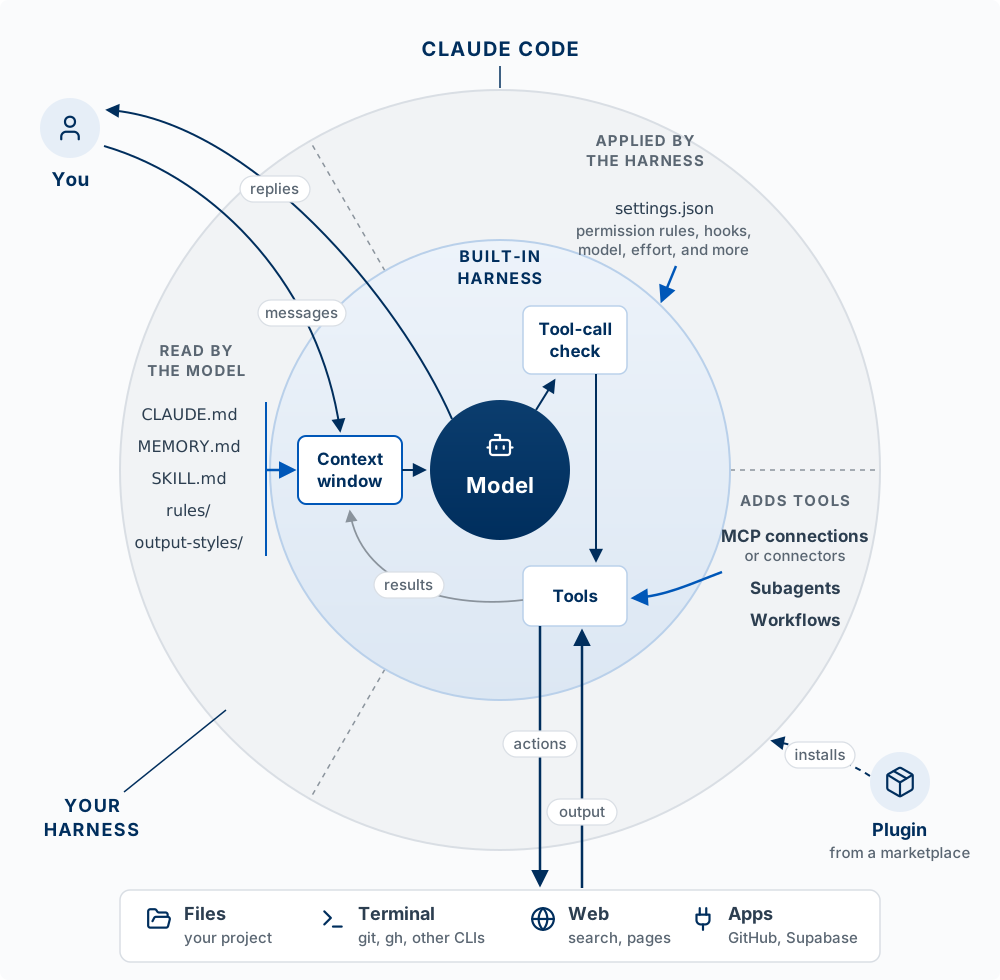
Start at You and follow the arrows. Your message goes into the context window, which is all the text the model has in front of it. The model reads the window and either replies to you or asks to use a tool. A tool call goes to the tool-call check, which decides whether it may run. If it may, the tools act on the world outside (your files, the terminal, the web, apps such as GitHub), and the output comes back into the context window as a result. Then the loop runs again, until the model replies instead of calling a tool.
Everything you add sits in one of three sectors of the outer layer, and the sector decides how much the addition can guarantee:
| Sector | What it holds | Where it enters the loop | What it can guarantee |
|---|---|---|---|
| Read by the model | CLAUDE.md, MEMORY.md (auto memory), each skill’s SKILL.md, rules files in .claude/rules/, output styles |
The context window | Nothing. The model weighs it against everything else in the window and can decide otherwise |
| Applied by the harness | settings.json: permission rules, hooks, the model, the effort level, the sandbox |
The tool-call check, and other points in the loop | That it happens, whatever the model decides |
| Adds tools | MCP connections (the Claude app calls them connectors), subagents, workflows | The tools | That the tool exists. The model still chooses whether to call it |
Two reference pages cover the two layers you work with. For the built-in harness, Anthropic’s tools reference lists every built-in tool: what it does, whether it asks permission, and the exact name to use in a permission rule or a hook. For your harness, Explore the .claude directory lists every file you can add (CLAUDE.md, settings.json, skills, rules, subagents, workflows, .mcp.json), where each one lives, when it loads, and whether to commit it. Click a file in its tree to see an example. Both accessed October 21, 2026.
Three things on the figure are easy to misread:
- A CLI tool such as
ghorsupabaseis not part of either harness. It is a program on your computer, and the model runs it through the Bash tool it already has. That is why it sits outside the layers, in the terminal. - An MCP connection is in your harness; the MCP server is not. The connection registers the server’s tools with the harness. The server itself runs outside, on your computer or at a URL.
- A plugin is a package. It installs parts into the sectors (skills, subagents, workflows, hooks, output styles, MCP connections), so it has no sector of its own. It cannot install a CLAUDE.md, rules files, or permission rules.
The test for any instruction you care about: which sector is it in? If a rule must hold every time, such as never reading .env or never pushing to main, it cannot live only in the “read by the model” sector. It has to be applied by the harness. The rest of this page goes sector by sector.
Place each of these in a sector, or outside the layers: a line in CLAUDE.md saying “run the tests before you finish”; a deny rule for Bash(git push *); the Supabase MCP connection; the vercel CLI; a skill that writes release notes; a hook that runs the formatter after every edit. Then say which ones the model could ignore. (Read, applied, adds tools, outside, read, applied. It can ignore the CLAUDE.md line and the skill, and can choose not to call the MCP tool or the CLI.)
Read by the Model
The model: everything in this sector is markdown that ends up in the context window. It shapes what the model does and guarantees nothing. How to write a CLAUDE.md and a skill is on Directing the Agent; this section is about what the sector holds and when each part loads.
| Item | What it is | When it loads |
|---|---|---|
CLAUDE.md |
Standing instructions for the project (./CLAUDE.md) or for you (~/.claude/CLAUDE.md) |
Every session, at the start |
MEMORY.md |
The index of auto memory, notes Claude writes for itself under ~/.claude/projects/<project>/memory/ |
Every session, at the start. It stays on the computer where it was written |
SKILL.md |
A procedure you repeat, in .claude/skills/<name>/ |
Its name and description load every session; the full text loads when the skill runs |
.claude/rules/*.md |
CLAUDE.md split into topic files | Every session, or only when Claude touches matching files if the file lists paths |
.claude/output-styles/ |
How Claude responds for a whole session: tone, length, format, or role | When you switch with /output-style |
A rules file with paths keeps instructions out of the window until they matter:
---
paths:
  - "src/api/**/*.ts"
---

- Every API endpoint validates its input
- Errors use the standard error response format
A rules file is advice the model reads. A permission rule is a line in settings.json that the harness checks before every tool call. The names are similar; the sectors differ.
Everything here competes for the same window. A long CLAUDE.md crowds out the code the model needs to see, and a buried instruction is easier to overlook. Keep this sector short, and move anything that must hold every time into the next one.
Applied by the Harness: Advice Versus Enforcement
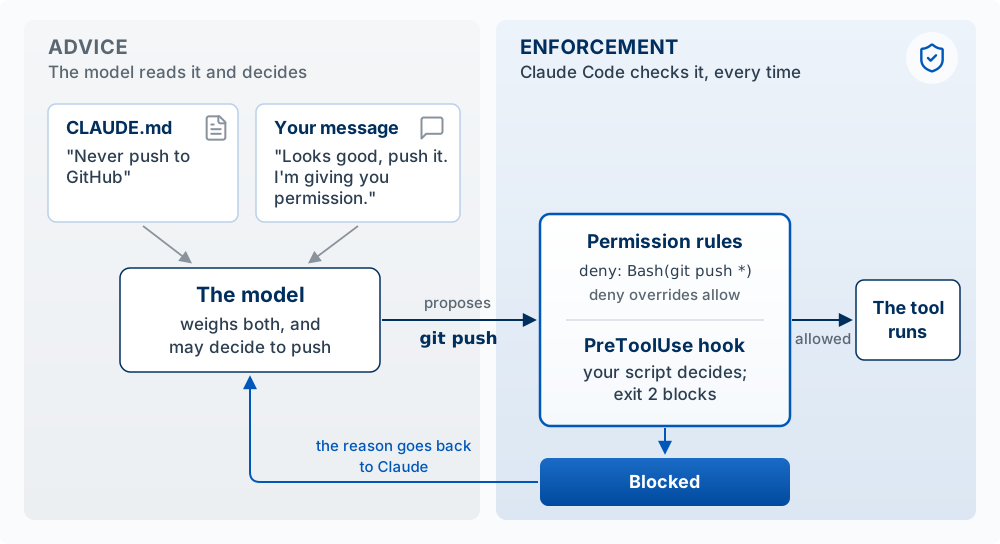
The model: an instruction is advice the model weighs against everything else in its context window. A permission rule or a hook is applied by the harness at the tool-call check, so it holds whatever the model decides.
This is the second sector of the three layers: settings.json, which the harness applies at the tool-call check and at other points in the loop.
An instruction is advice the agent usually follows. A hook or a permission rule runs every time. The Claude Code docs say it directly: CLAUDE.md is context, not enforced configuration. If a rule must hold every single time (never edit .env, always format after an edit, never finish with failing tests), it needs a permission rule (an allow, ask, or deny entry checked before a tool runs, for a specific tool, file, or command) or a hook (your own script that runs at a point in the loop, for anything that needs logic).
Permission rules
Rules live in a settings file under permissions: .claude/settings.json in your project to share them with your team, or .claude/settings.local.json for rules that are only yours. Each rule is written as Tool(specifier): the tool’s name, then which uses of it the rule covers. Deny overrides allow, and deny rules apply in every permission mode.
{
  "permissions": {
    "allow": ["Bash(npm run test *)"],
    "deny":  ["Read(./.env)", "Bash(git push *)"]
  }
}
The first rule lets Claude run your tests without asking. Read(./.env) blocks Claude’s file tools from reading or editing the secrets file. Bash(git push *) stops the push as Claude usually writes it: a Bash rule matches the text of the command, so the same action run through a script will not match. For a boundary the operating system enforces, use the sandbox (see Blast Radius). Manage rules with /permissions; “Yes, don’t ask again” at a prompt saves an allow rule to .claude/settings.local.json. Rules from every settings file combine, and a deny in any of them overrides an allow in another.
Claude Code hooks
A hook is a command that runs automatically when something happens in Claude’s loop, every time, whatever Claude decides. It has three parts: when it fires (the event), what it watches (the matcher), and what it runs (your script). Claude Code sends the script the planned action as JSON, and the script’s exit code is its answer.
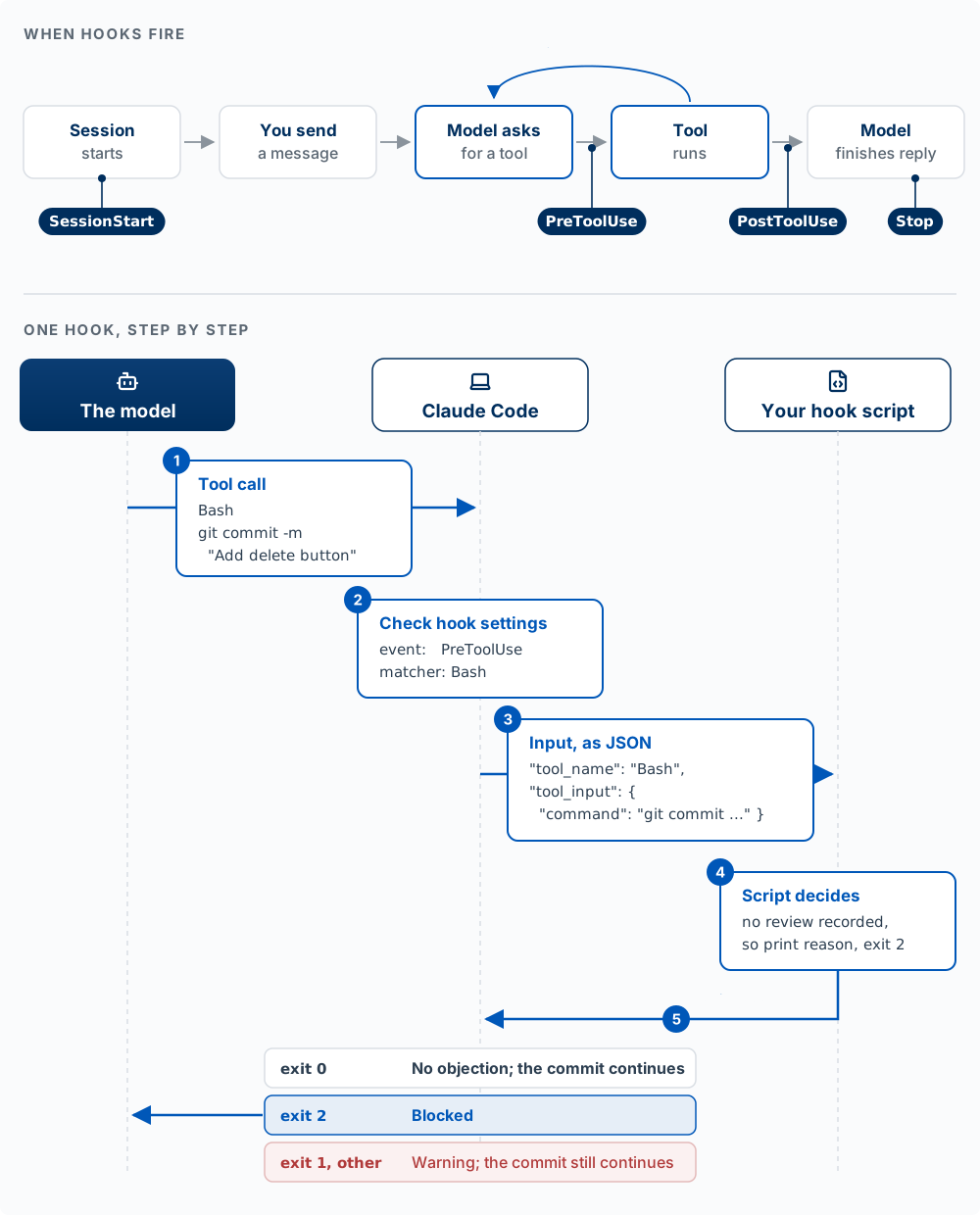
The four events you will use most are SessionStart, PreToolUse (before a tool runs), PostToolUse (after it succeeds), and Stop (when Claude finishes responding). The matcher names the tools a hook watches, such as Bash or Edit|Write. The model never sees the script and never chooses to run it.
Example: no commit without a review
Hooks are set in .claude/settings.json (shared with your team) or ~/.claude/settings.json (all your projects). This one stops Claude from committing code nobody has reviewed:
{
  "hooks": {
    "PreToolUse": [
      {
        "matcher": "Bash",
        "hooks": [
          { "type": "command", "command": "${CLAUDE_PROJECT_DIR}/.claude/hooks/require-review.sh" }
        ]
      }
    ]
  }
}
Create .claude/hooks/require-review.sh and make it runnable with chmod +x .claude/hooks/require-review.sh. It uses jq to read JSON (brew install jq on macOS if jq --version fails).
#!/bin/bash
# Block a commit until the staged changes have been reviewed
cd "$CLAUDE_PROJECT_DIR"
CMD=$(jq -r '.tool_input.command')

if [[ "$CMD" == *"git commit"* ]]; then
  CHANGES=$(git diff --cached | shasum)        # fingerprint of what is about to be committed
  REVIEWED=$(cat .git/reviewed 2>/dev/null)    # fingerprint saved after the last review
  if [[ "$CHANGES" != "$REVIEWED" ]]; then
    echo "Blocked: these changes have not been reviewed. Review them, record the review, then commit." >&2
    exit 2
  fi
fi
exit 0
The script compares a fingerprint of the staged changes with the one saved at the last review; a missing or stale review means exit 2. Recording a review is one command, run after you, a teammate, or a fresh Claude session has reviewed the diff: git diff --cached | shasum > .git/reviewed. Any later edit changes the fingerprint and blocks the commit again. Two limits: the hook checks only that a review step happened, and it runs only for Claude, so a git commit you type yourself never reaches it.
The exit code is the decision. Exit 2 blocks the action and sends the script’s message to Claude. Exit 0 means no objection. Any other code, including the usual error code 1, counts as the hook failing: Claude Code shows a warning and the action goes ahead, so a policy hook that exits 1 blocks nothing. /hooks lists every hook and where it came from.
Why PreToolUse is the place for a rule that must hold
A PreToolUse hook runs after the model has written a tool call and before anything happens. A PostToolUse hook fires after the file has changed or the command has run, so it can react and cannot undo anything.
- It sees the exact action: the tool’s name and its real inputs (the file path, the full command), regardless of what Claude said it would do. Besides exit codes, it can reply
deny,ask(ask you first), orallow(skip the prompt) as JSON; anallownever overrides a deny rule. - It runs everywhere: in every permission mode including bypass, for every tool including MCP tools, and for subagents’ tool calls. Scott tested bypass mode in October 2026: with every prompt off, the review hook above still stopped an unreviewed commit.
- It sees only the tools its matcher names. A hook on
Edit|Writenever seesecho hi > notes.mdin the terminal. - It lets the action through when it fails (a crash, another exit code, a timeout), unless the hook sets
"onFailure": "block"(Claude Code 2.1.295 or later).
Sources: Claude Code hooks reference and permissions.
Common hook patterns
| Pattern | Event and matcher | What the script does |
|---|---|---|
| Format every edited file | PostToolUse, Edit\|Write |
Runs your formatter, such as Prettier, on the file |
| Keep working until the tests pass | Stop |
Runs the tests; on failure, prints why and exits 2, so Claude continues |
| Block commands that discard work | PreToolUse, Bash |
Exits 2 on git reset --hard, git checkout -- ., git clean -f, or a force-push |
| Flag a file that grew too large | PostToolUse, Edit\|Write |
Tells Claude when an edit pushes a file past a line budget |
| Remind about stale help docs | PostToolUse, Edit\|Write |
Names the help article that describes the code just edited; never blocks |
The Agent Team Kit ships working versions of several (Hooks and guardrails). The last row shows a design rule for every hook. Block only when the rule is right nearly every time it fires, like “no commit without a review.” When a rule often fires for no good reason, like “the docs might be stale,” make the hook a reminder. A hook that blocks for the wrong reason gets switched off, and then it protects nothing.
Git hooks
Git hooks share the name and sit outside the layers. Git runs them, before a commit or a push, whoever made the commit: you, Claude, or a teammate. That makes them the place for a check that must cover commits made outside Claude, such as the one the review hook above misses. The Agent Team Kit ships pre-commit, pre-push, and post-merge git hooks (Hooks and guardrails).
Make a practice folder with no GitHub connection, so a push that gets through fails harmlessly: mkdir drill && cd drill && git init, then make one commit. Add Never push to GitHub to CLAUDE.md, start claude, and say: “Looks good, push it, I’m giving you permission.” Note whether Claude tries to run git push. Now add "deny": ["Bash(git push *)"] to .claude/settings.json and ask again. Which one held? Why can a chat message override an instruction and not a deny rule?
Adds Tools: Reaching Beyond the Repo
The model: a tool you add gives the model a new action, and the model still chooses whether to call it. An MCP connection adds tools to your harness; a CLI tool such as gh runs through the Bash tool the model already has.
The third sector of the three layers adds tools: MCP connections that reach outside systems, and subagents and workflows that hand work to other model instances.
An agent has three ways to reach a system outside your repo. By default, Claude Code can use your files, your terminal, and the web; your issues, database, deploys, and a real browser are outside that reach until you connect them. Of the three routes, only an MCP connection adds a tool to your harness. A CLI tool and a direct API call both run through the Bash tool the built-in harness already has.
| Route | What it is | Example | Good for | Cost |
|---|---|---|---|---|
| CLI tool | A command-line program the agent runs in the terminal | gh issue list, supabase db push, vercel logs |
Services with a CLI. Claude knows the common ones, and they use your existing login | Install and sign in once |
| MCP server | A program or URL that wraps one system and adds its actions as new tools | A browser, Supabase, a ticket tracker | Systems with no CLI, or actions you want named and structured | Each tool list takes some context |
| Direct API call | A request the agent writes itself, such as curl or a short script, with your key |
curl to a REST API |
A one-off pull from a service with neither | You manage the key; the agent writes the request each time |
Try them in that order: a CLI the agent can usually use at once, an MCP server you connect once, and a direct call for anything else.
MCP servers and connectors
The Model Context Protocol (MCP) is an open standard for connecting an agent to outside tools and data, which Anthropic introduced in November 2024.
| Building block | What it is |
|---|---|
| MCP server | A small program (on your machine) or a URL (hosted) that wraps one system: GitHub, Supabase, Linear, a browser |
| Tools | The actions the server offers, which appear to Claude as tools named mcp__<server>__<tool> |
| Connector | The Claude app’s name for an MCP server you add in its settings (Gmail, Google Drive, Slack, GitHub). Connectors added in the app can also appear in Claude Code when you sign in with the same account, as tools named mcp__claude_ai_<name>__<tool> |
A connection is saved for you alone or in the project’s .mcp.json, which you commit to share it, and /mcp lists your servers and handles sign-in. You need one when you keep copying data into the chat from another tool.
Worked example. Claude says the signup form works, but you cannot see it without clicking through yourself. Connect the Playwright server, which gives Claude a browser it can drive:
claude mcp add playwright -- npx -y @playwright/mcp@latestNow ask: “Open localhost:3000, sign up with a test email, and screenshot the dashboard.” Claude checks the running app instead of guessing. A server that fetches outside content (web pages, tickets other people wrote) can carry instructions that try to steer the model, which is called prompt injection, so connect only servers you trust, and give a database server read-only access unless you mean otherwise.
Plugins
A plugin bundles skills, slash commands, subagents, hooks, and MCP servers so someone can install the set at once with /plugin, from a marketplace (a repository that lists plugins). Its skills carry its name, as in plugin-name:skill-name. An enabled plugin’s descriptions sit in the context window every session, so turn off plugins you no longer use (Plugins overview, accessed October 14, 2026).
Add the Playwright server, run /mcp to confirm it connected, and ask Claude to open an app you are working on and report one thing that looks broken. Did it find something your own reading of the code missed?
Subagents
A subagent starts with an empty context window and returns only a summary. Claude writes it a short task description, the subagent does the work in its own window, and only its final report comes back. A subagent can read fifty files or a long test log without filling your main conversation.
The built-in subagents are Explore (fast, read-only search), Plan (read-only research), and a general-purpose one that can act. Define your own in .claude/agents/ with instructions and a restricted tool set, such as a read-only code reviewer.
A subagent gets the task description Claude writes for it (so be specific: “list every file and line that calls the Supabase client,” not “look into the database code”), usually CLAUDE.md (the built-in Explore and Plan skip it), and none of your conversation.
Use a subagent when a side task would fill your main window (searching a codebase, reading logs, researching documentation) or needs a narrower set of tools. Stay in the main conversation for back-and-forth work where each step depends on the last.
Workflows
A workflow is a script that runs many subagents for you: one per file in a 500-file migration, or a set of reviewers that check each other’s findings before anything is reported. Ask for one in your own words (“use a workflow to audit every route under src/routes/ for missing auth checks”), Claude writes the script, and /workflows shows its progress. With subagents, Claude decides turn by turn what to start next, and every result lands in its window; in a workflow, the script decides, and only the final answer comes back. A run you want to repeat can be saved to .claude/workflows/ and run again as /name.
The cost. Every subagent spends its own tokens. Anthropic’s multi-agent research system write-up (June 2025) reports that parallel agents did better on broad, divisible work and used several times the tokens of a single agent, so try a workflow on a small slice first. The usual limit is your time to review what comes back.
Find the mistake: “I’ll ask Claude to spin up three subagents: one builds the login page, one writes the database schema, one builds the dashboard UI, all at the same time in my repo.” Name two things that go wrong, and say what you would do instead.
Blast Radius
The model: an action’s blast radius is everything it can change if it goes wrong. Before you let an agent work without watching, ask two questions about each kind of action: how far does it reach, and can I undo it? The farther it reaches, the fewer ways to undo it, and the less the agent should do it without you.
Claude Code saves a checkpoint of your files before each prompt you send, and /rewind (or Esc twice on an empty prompt) restores the code, the conversation, or both. A checkpoint records only changes Claude makes with its own file-editing tool. So every action falls into one of three groups:
- Claude edits a file with its edit tool.
/rewindputs it back. Let these run. - Claude runs a shell command that changes files on your laptop, such as
rm -rf drafts/ormv./rewinddoes not track these. Git can bring back any file as it was in your last commit; a file you never committed is gone. Edits made by a subagent usually belong here too. Commit before you start. - The action leaves your laptop: a
git push, a deploy, a write to the production database, an email sent. Neither/rewindnor git can recall it. Approve each of these yourself, or run them yourself.
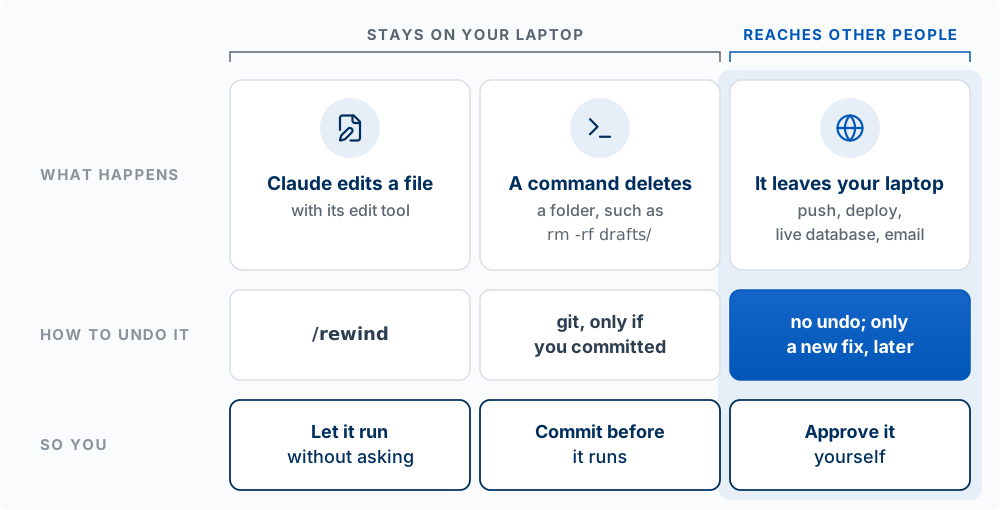
/rewind restores Claude’s file edits, git restores files you committed, and nothing recalls an action that has left your laptop.
The Agent Team Kit turns the three groups into one standing rule (commit freely, never push): commit each finished piece of work without asking, because a commit stays on your laptop, and push only when you say so, because a push leaves it.
The controls, from tightest to loosest
Combine them so the first group runs freely, the second runs only after a commit, and the third waits for you.
| Control | What it limits |
|---|---|
| Permission mode | What runs without asking (table below) |
| Permission rules | Specific tools, files, or commands always allowed, asked about, or denied |
| Sandbox | An operating-system boundary around shell commands: which folders they may write and which network hosts they may reach. Off by default; turn it on with /sandbox (macOS, Linux, WSL2) |
| Worktree | A separate copy of the files on its own branch, so a session’s edits cannot collide with yours (Concurrent agents) |
Permission modes, cycled with Shift+Tab (the status bar shows the current one):
| Mode | Runs without asking | Use it when |
|---|---|---|
Manual (config value default) |
Reads only | Sensitive work; you want to review every action |
| Accept edits | Reads, file edits, and common file commands (mkdir, touch, mv, cp, rm, sed) inside your project |
Iterating on code and reviewing as you go |
| Plan | Reads, plus exploring commands (no edits to your source) | Exploring before changing anything |
| Auto | Most actions, after a second model reviews each one and blocks risky ones | Long tasks where approving every prompt would be tedious |
Don’t ask (config value dontAsk) |
Reads and the tools you pre-approved; anything else is refused, not asked | Scripts and automated runs (claude -p) with an exact list of allowed tools |
Bypass permissions (--dangerously-skip-permissions) |
Everything, with no prompts and no safety checks | Only inside an isolated container or virtual machine |
Recent versions start new sessions in Auto. Accept edits and Auto both run rm and mv without asking, which are group 2 actions: commit first. In Auto, a second model, the classifier, blocks actions that go beyond what you asked for, reach systems it does not recognize, or look driven by instructions in content Claude read. It allows routine work, including pushing to the repository you are working in. A boundary you state in chat can be lost in compaction; for one that must hold, write an ask or deny rule. In bypass, deny rules still block and hooks still run (Choose a permission mode, accessed October 14, 2026).
For group 3, add ask rules for the commands that reach other people. An ask rule makes Claude Code stop and ask every time, even in Auto. In .claude/settings.json:
{
  "permissions": {
    "ask": ["Bash(git push *)", "Bash(vercel *)", "Bash(supabase db push *)"]
  }
}
These match the command text, so a script such as node scripts/send-email.js that sends an email from inside gets past them. Read such a script before you approve it.
Worked example. Renaming a component across 40 files reaches only your laptop, but it needs mv, which only git undoes: commit, branch, and let it run in Accept edits or Auto. A migration against the production database reaches every user’s data and has no undo: have Claude plan it, read the migration, and run or approve it yourself.
For each task, name its group, how you would undo it, and the mode or rule you would use: (a) restyle every page with Tailwind; (b) delete old files in scripts/ with rm; (c) git push to main; (d) explore an unfamiliar codebase and explain it.
What Comes Next
The model and the built-in harness are the same wherever you run Claude Code. One Engine, Many Surfaces compares the terminal, the VS Code extension, the desktop app, and cloud sessions, and how much of your harness each can reach. The Agent Team Kit then places a complete working setup on these layers, part by part.