
The Agent Team Kit
The Agent Team Kit is a working setup for building real software with Claude Code agents: one person or a small team directing many agents, from the first mockup to a release and the bug reports that come back. It started as a fix for parallel agents colliding with each other, and it now covers most of the loop around the code. Every part is built from the harness pieces on Understanding the Harness, and The kit on the three layers places each one. You will install it in the Lab. Everything named here is in the public repo at github.com/ai-foundry-byu/agent-team-kit, and the Kit Reference lists every file.
What the kit gives you
| Highlight | What it gives you |
|---|---|
| Concurrent agents | Run several Claude Code agents on one app at the same time without them colliding on files, ports, or the database |
| Fast design loops | Agents produce clickable, high-fidelity mockups and multi-screen prototypes for desktop and mobile, frozen from the real app, and you iterate on them in minutes before building |
| Tending agents from anywhere | Start a batch of agents, step away, and check in on them from your phone |
| Hooks and guardrails | Automatic checks that keep agent-written code clean and stop risky commands before they run |
| Memory | Your preferences and project context carry from one session to the next, and from one teammate to another |
| Bug feedback loops | A one-click in-app bug report that hands a coding agent everything it needs to fix the problem |
| Agents that test your app | Agents click through your app like a user, critique the experience, and file what they find |
It also covers spec-driven builds and a release pipeline (From Spec to Release), plus a few more pieces listed under Also in the kit.
Code where it fits everywhere, specs where it has to fit your app. The hooks, skills, and launchers are code you install. The bug inbox, the browser test passes, the mockup freezer, and “view as” depend on your stack, so the kit ships them as build specs: stack-agnostic documents detailed enough that you hand one to a coding agent and it builds the feature in your app.
The kit on the three layers
The model: the kit is a set of additions to your harness, plus a few git hooks and shell commands outside it. Placed on the three layers, each part shows what it can and cannot guarantee.
| Where it sits | Kit part | What it does |
|---|---|---|
| Read by the model | Three sections the installer appends to CLAUDE.md (concurrent agents on main, working discipline, mockups) |
Tell every agent the working agreements: stage explicit paths, run your own dev server, what “done” means |
.claude/team-memory/ |
Lessons the team has learned, loaded as memory at session start (the loading is a hook) | |
13 skills, such as /spec, /build-spec, /push, /stage, /promote, /merge-worktree |
Procedures the model follows when you run them | |
| Applied by the harness | dev-port.mjs (SessionStart) |
Gives each session its own dev-server port from a pool (5180 to 5199 by default), skipping the human’s port (5173) |
team-memory.mjs (SessionStart) |
Loads the tracked team memory into the session (Memory) | |
bash-guard.sh and bash-guard.mjs (PreToolUse on Bash) |
Blocks blanket staging, git stash, reset --hard, and schema changes while another session holds the lock (what it checks) |
|
file-size-nudge.mjs (PostToolUse on Edit and Write) |
Flags a file that grows past its size budget or a new import that crosses a boundary | |
session-release.mjs (SessionEnd) |
Frees the session’s port and, if it holds it, the schema lock | |
| Outside the layers | Git hooks: pre-commit, pre-push, post-merge |
Run by git, for any commit or push, whether an agent or a person makes it |
Launchers: cs, wt, cockpit |
Shell commands that start named Claude Code sessions, in the shared tree or in a worktree |
Each working agreement appears twice. The CLAUDE.md section tells the agent to stage files by name, and bash-guard blocks git add -A when the agent does not. The advice prevents most mistakes cheaply; the hook catches the rest. That pairing is the design of the whole kit.
Concurrent agents
The model: parallel agents collide on what they share: dev-server ports, the database, and the git working tree. A worktree separates files only, so the kit handles ports and the database with hooks in both of its modes.
The problem the kit started with: one person running several agents at once, or a small team (usually two people) each running several against the same main. Most of it pays off with no collaborator at all, because the port assignment and the git and schema guards protect you from your own parallel agents.
Why parallel agents collide
When two agents work in one repo, most of the trouble comes from three things they share that the code depends on: the ports their dev servers listen on, the database, and the git working tree (including git’s staging area, the index).
| What they share | What goes wrong | Does a git worktree fix it? | The kit’s answer |
|---|---|---|---|
| Dev-server ports | Every agent starts the dev server on the default port. The second one fails or moves to another port, and an agent that still assumes localhost:3000 tests its sibling’s server and reports that server’s errors as its own |
No. Each worktree still starts its own server | The dev-port hook gives each session its own port |
| The database | Two migrations at once, or a seed reset while another agent is mid-task. Nothing errors; the data is quietly wrong | No. Every worktree reads the same .env and the same database |
The schema lock, the psql DDL block, and the post-merge notice |
| Files in the working tree | Two agents edit the same file and one overwrites the other | Yes | Give each agent a different area, or use worktree mode |
| The git index | git add -A stages a sibling’s half-finished files. git stash or git reset --hard destroys them. Even a plain git commit commits whatever a sibling staged a moment ago |
Yes. Each worktree has its own index | The bash-guard hook blocks the blanket and destructive commands |
The two rows a worktree does not fix cause the most confusion day to day: ports and the database stay shared, which is why the kit handles them in both of its modes (DESIGN-NOTES.md).
Worktrees: separate copies of the files
A git worktree is a second working folder with its own files, branch, and index, sharing the same repository history. Claude Code makes one for you:
claude --worktree fix-login # a second, isolated session on branch worktree-fix-login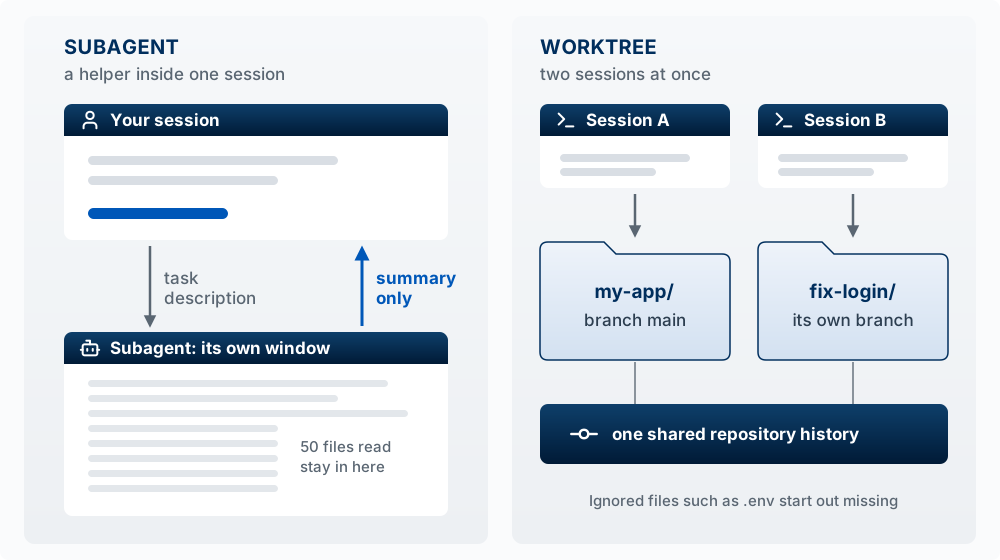
This creates .claude/worktrees/fix-login/. Two things surprise people: a worktree is a fresh checkout, so gitignored files like .env are missing until you copy them in (a .worktreeinclude file can do it automatically), and it branches from your main branch on GitHub, so unpushed work on your laptop is not in it. The desktop app offers a worktree option when you start a session.
Messaging between sessions
Parallel sessions can pass news to each other. Tell Claude in plain words what another session should know, and it finds the session and writes the message; type @ to pick one from a list:
Let @fix-login know the schema migration finished
Tell me when the fix-login session finishes what it is working on
/list-agents (or /peers) shows which sessions Claude can reach, and sessions answer to the name you give them with /rename. A message is plain text: it never carries the sender’s conversation or files, it arrives between steps, and it has no authority (it cannot approve a prompt, change settings, or run a slash command). You choose in /config whether a session accepts messages, holds each for your approval, or refuses them (Message your other Claude Code sessions, accessed October 14, 2026). Which surfaces can reach which sessions is on One Engine, Many Surfaces.
The kit does not depend on messages. Because a message has no authority and may arrive late, the kit routes all coordination through two things every session can see: lock files on disk, under .git/.wg-agent/, and git itself (tracked migrations, shared settings). The lock folder is found with git rev-parse --git-common-dir, which returns the same path from the main checkout and every worktree, so a lock taken in one is seen by all of them.
Two ways to run it
Almost everything is shared between the two modes: the port assignment, the schema lock, the architecture guards, the skills, the specs, and the launchers. They differ in how agents are kept from colliding on files.
- Stay on main. Every agent commits to one
main. You keep them apart by giving each a different area of the codebase. There is no merge step. You are at the keyboard, watching. - Worktree mode. Each agent works in its own git worktree on its own branch. One session on
main, the cockpit, merges each finished branch in. File collisions cannot happen, so you can start several agents and leave, at the cost of one merge per worker.
| Stay on main | Worktree mode | |
|---|---|---|
| How agents are kept apart | By you: each gets a different area | By git: each has its own worktree |
| Two agents editing one file | Possible, and rare if you divide the work well | Cannot happen |
| Integration step | None. Commits interleave on main |
One merge per worker, done by the cockpit |
| Setup per agent | None | Each new worktree needs its own dependencies and .env.local |
| Ports, schema lock, guards, skills, specs, launchers | Yes | Yes, identical |
The one behavioral difference: the git guard that blocks blanket staging, reset --hard, and stash turns itself off inside a linked worktree, where the tree belongs to one agent. It detects this by comparing the worktree’s git directory with the shared one, so there is no mode setting.
How to choose (README): start with stay on main if you are usually at the keyboard and can give agents areas that do not overlap, which fits most solo builders and small supervised teams. Use worktree mode when agents run unattended on work that might overlap. You can mix them, because the choice is per terminal: cs <name> for the shared tree, wt <name> for a worktree.
The launchers
worktree-commands.sh defines four shell functions. Each starts a named Claude Code session with permission prompts skipped and Remote Control on.
| Command | What it starts | The claude command it runs |
|---|---|---|
cs <name> |
A named session in the current folder (stay on main) | claude --name <name> --dangerously-skip-permissions --remote-control |
wt <name> |
A worker: a new worktree and a session named the same | claude --worktree <name> --name <name> --dangerously-skip-permissions --remote-control |
cockpit |
A named session in the main checkout, called <repo>-cockpit |
claude --name <repo>-cockpit --dangerously-skip-permissions --remote-control |
wtls |
Nothing; lists worktrees and branches | git worktree list |
Extra arguments pass through, so wt fix-login --tmux puts the worker in its own tmux session. Integration is deliberately not a shell command. In the cockpit you say “integrate fix-login”, and Claude runs the merge-worktree skill: it checks that it is on main in the main checkout with a clean tree, merges, stops and shows you any conflict instead of resolving it, removes the worktree, and does not push.
Two things to know about the launchers:
- Skipping permission prompts widens the blast radius. The agent runs every command without asking; the kit’s hooks still run. Decide whether that trade fits the repo you are in (Blast Radius).
- Name every session. The name appears in the
/resumepicker, the terminal title, and@mentions for messages. With six terminals open, an unnamed session is a folder path that looks like every other one.
The worktree loop
- Start the cockpit in one pinned terminal:
cockpit. - Start a worker per task in other terminals:
wt fix-citations,wt search-page. Name each for its task. - Workers commit to their own branches. They may stage everything (their tree is their own). They do not merge or push.
- Integrate from the cockpit as each finishes: “integrate fix-citations”. Work that touched different files merges cleanly; overlapping work becomes a conflict you settle there.
- Ship from the cockpit when the merged work is ready (From Spec to Release).
Worktree mode also swaps one CLAUDE.md section. The installer appends the stay-on-main rules; for worktree mode you replace them with snippets/CLAUDE-md-worktree.md, which tells workers they may stage freely, that the database is still shared, and that only the cockpit integrates. Full details are in WORKTREE-MODE.md.
The collaboration model
The hooks stop the mechanical collisions. These agreements, from the README, are the human part, in both modes.
| Agreement | What it means in practice |
|---|---|
| Stay in your lanes | Before a work block, each person says which area they are in. Two people’s agents editing the same files at once is the one thing the hooks cannot sort out |
| Pull and rebase often | No hook does it for you, on purpose: it needs a clean tree and human judgment on conflicts. Do it at the start of a session, before you push, and whenever your teammate says “pushed” |
| Commit small and often | Small commits make pulls, rebases, and reviews cheap, and make git revert a precise undo. Stage explicit paths |
| Announce migrations; agree who releases | The schema lock cannot see your teammate, so a migration is a “pushing schema” message between people. Decide up front who cuts release tags; tagging is always a person’s act, never an agent’s |
| Review each other’s output | Agents produce plausible code fast. Read the diff of what the other person’s agents committed, for example with /code-review on recent commits |
| Share knowledge through tracked files | Standing rules go in CLAUDE.md; lessons go in .claude/team-memory/ (Memory) |
The loop in one line: claim a lane, pull and rebase, work with your agents, integrate through the cockpit, review, and coordinate schema and releases by hand.
Fast design loops
The model: a mockup frozen from the real app is judged on the design, because everything around the change is the app itself. A clickable prototype of every screen, marked up by screen number, takes the place of a Figma round.
The /mockup skill gets a design in front of you in minutes, close enough to the real app that you judge the design and not the drawing.
| Mode | What you get | When |
|---|---|---|
| One screen | A copy of a frozen snapshot of the real page (its HTML, stylesheet, fonts, and copy) with one region changed | Trying an idea on an existing screen, or comparing two options side by side |
| Prototype | Every screen of the app frozen and numbered, the app’s own links rewired between them, and a storyboard of thumbnails. You click through it like the product and mark it up by number: “screen 3: move the summary above the table” | A design round across several screens. It replaces Figma for an app that already exists |
| Fresh page | One self-contained HTML file built from the app’s own stylesheet and tokens | A screen the app does not have yet |
The snapshots come from your running app at desktop width, or at phone width for a mobile round, so the chrome is right because it is the app. The agent edits the frozen files in place, screenshots each change and reads it before handing it back, and keeps a running list of every change agreed in the round, which becomes the input to /spec. The freezer and the prototype builder are specified in MOCKUP-SHELLS-SPEC.md; From Spec to Release covers how a mockup feeds a spec.
Tending agents from anywhere
TENDING-AGENTS.md covers three settings for starting several agents and stepping away:
| Need | Setting |
|---|---|
| See what each session did | Verbose mode: "verbose": true in ~/.claude/settings.json, or claude --verbose for one session |
| Reach sessions from your phone | Remote Control. The launchers pass --remote-control, so each session appears in the Claude app when you are signed in to Claude |
| Keep the computer running | macOS, plugged in: System Settings, Battery, Options, “Prevent automatic sleeping on power adapter when the display is off”. On battery: caffeinate -i in a spare terminal. Windows: set sleep to Never when plugged in, or use PowerToys Awake. Closing a Mac’s lid sleeps it regardless |
Hooks and guardrails
The model: each working agreement appears twice: as advice in CLAUDE.md, which prevents most mistakes cheaply, and as a hook, which catches the rest every time.
The working agreements are advice; the hooks run every time (Advice Versus Enforcement). The kit on the three layers lists the five Claude Code hooks. This section covers what the table leaves out: what bash-guard checks, the architecture guards, and the git hooks, which act on the repository whoever runs git.
What bash-guard checks
bash-guard.sh is a fast filter that passes harmless commands through without starting Node; anything that might be blocked goes to bash-guard.mjs, which does four jobs:
| Job | What it blocks | Why |
|---|---|---|
| Git safety | git add -A, git add ., git commit -a, git reset --hard, git checkout -- ., git clean -f, git stash, and force-push |
On a shared tree, blanket staging mixes two agents’ work into one commit, and the destructive commands erase another agent’s uncommitted work with no commit to recover from. All but force-push turn off inside a worktree |
| Commit-sweep guard | A git commit with no file paths when the index holds files this session did not stage |
The index is shared. Even after a clean git add path/a, a plain commit takes everything staged, including a sibling’s files. The fix it suggests: git commit -m "..." -- path/a path/b |
| Schema lock | A second session’s migration, type generation, seed, or dependency install while another session holds the lock | Two schema changes at once corrupt shared state without an error. The lock expires after 10 minutes of inactivity, so a crashed session cannot block everyone |
| psql DDL block | CREATE, ALTER, DROP, TRUNCATE, GRANT, REVOKE typed straight into psql |
Every schema change should be a tracked migration file. SELECT queries and psql -f <file> are allowed |
The schema lock’s list of commands (SCHEMA_RE) defaults to Supabase and pnpm. If your stack differs, edit it (HOOKS.md). The lock is local to one machine: it knows nothing about a collaborator’s laptop. That coordination is a message between people.
The architecture guards
Without a limit, agent-written files grow to thousands of lines. Two guards push back:
- The file-size ratchet (
file-size-budget.mjs). New files may have up to 800 lines (BUDGET). Files already over the limit are listed inFROZENat their current length and may only get shorter. A file that is long for a good reason goes inEXEMPTwith that reason written next to it. By default it covers files undersrc/(isGoverned). - Import boundaries (
import-boundaries.mjs). A dangerous import (the default example is a database client that bypasses row-level security) may appear only in files on anALLOWLIST. A new file importing it fails until someone adds it to the list with a comment saying why.
Both run in two places: the file-size-nudge.mjs hook during the session, and arch-check.mjs from the pre-commit git hook on the staged files. The kit’s guidance on a red guard: treat it as a prompt to check whether the file does one job, and split it along a real seam. Deleting comments to get under the number defeats the purpose (arch guards are alarms).
On an existing repo, run node scripts/hooks/arch-check.mjs once after installing and paste the files it flags into FROZEN and ALLOWLIST. That accepts today’s state and blocks only new growth.
Git hooks
| Git hook | When it runs | What it does |
|---|---|---|
post-merge |
After git pull or git merge |
If migration files arrived, prints them and the commands to apply and check them. Silent otherwise |
pre-commit |
Before each commit | Runs the architecture guards on the staged files, with a marked place to add your formatter or linter |
pre-push |
Before each push | Runs your typecheck (CHECK_CMD) and tests (TEST_CMD), which you set at the top of the file. Tag must-never-break end-to-end tests @critical and add them here |
Git runs these only after git config core.hooksPath .githooks, a setting each clone makes once. The installer sets it for you; a teammate who clones the repo runs ./bootstrap.sh, which sets it and checks that Node and the settings file are present.
One limit. Every guard here runs only on machines that installed it, and anyone can get around a regex with a different tool. The kit’s README says to treat local hooks as the fast reminder and CI on push as the real gate.
Memory
The model: personal memory stays on the computer where it was written. A lesson the team needs goes in tracked team memory, which every teammate’s sessions load at start.
Claude Code memory stays on one machine, under ~/.claude/projects/<launch path>/memory/. If your agents learn that the seed script wipes a table, your teammate’s agents do not know it. The kit handles this in three parts:
| Part | What it is |
|---|---|
The memory pack (memory-pack/) |
32 short lessons from building software with parallel agents, one per file, in Claude Code’s memory format (a rule, then Why, then How to apply). Examples: never --amend on a shared branch; git commit -- <path> commits the working tree of that path, not what you staged; run your own dev server and kill only your own process; verify in proportion to risk |
.claude/team-memory/ |
install.sh copies the pack into this tracked folder. At every session start the team-memory.mjs hook links each file into that session’s memory folder and writes the team’s index lines at the top of the person’s MEMORY.md, between two marker comments, leaving their own entries alone. New lessons arrive with git pull |
/share-memory |
The way a personal lesson becomes a team one. It picks the memory (or proposes a short list), removes credentials, customer data, and people’s names, rewrites it so someone who was not there can act on it while keeping the concrete reason, moves it into the team folder, deletes the personal copy, and commits |
Promotion is one memory at a time on purpose. A personal memory folder names people, accounts, and production details that should not be shared.
Where does a rule go? Standing rules about how the project works (commands, where code goes, what never to do) go in CLAUDE.md, which every agent reads at start (WRITING-CLAUDE-MD.md). Lessons learned along the way (a trap, an incident, “never do X because Y”) go in team memory.
Bug feedback loops
The model: a bug report captured with its context (screenshot, recent clicks, errors) gives a coding agent what it needs to reproduce and fix the problem, and committing the fix closes the report.
FEEDBACK-LOOP-SPEC.md specifies the path back from users to code: a one-click widget that captures a report with its context (a screenshot, recent clicks, console and network errors, all scrubbed of secrets in the browser), an admin inbox, a /fix-bug <id> hand-off to a coding agent, and a post-commit git hook that closes the report and notifies the reporter when the fix is committed. Like the other build specs, it is detailed enough for an agent to build in your stack.
Two skills work with it:
| Skill | What it does |
|---|---|
/fix-bug |
Loads a bug report by id from the database, with its timeline and screenshot. Separates what the user saw from their theory of the cause, reproduces it, and reads the code path before changing anything. Only a reproduced bug gets a fix |
/regression-check |
Before you finish a change to shared code, finds every caller of what you changed, judges whether each feature’s behavior changed, and adds a test that locks in the intended behavior |
fix-bug and regression-check are worked examples from a real project, so their table names and paths are placeholders to adapt (SKILLS.md).
Agents that test your app
The model: an agent that drives the real interface and reads the page state tests the app the way a user meets it. Findings go into the same bug inbox as human reports.
Agents can use your app the way a person does, in four ways. All of them file findings into the same bug inbox as human reports, so a finding hands off to /fix-bug with its screenshot attached.
| Part | What it does |
|---|---|
/ux-critique |
Drives a flow in a real browser on the disposable environment, predicting at each step what should happen and recording where the app differs |
| Walks and sweeps (build spec) | A walk travels one journey end to end; a sweep stands on one screen and clicks every control on it. Both photograph every state and produce one navigable report |
| Crawlers (build spec) | A route crawler loads every page across a matrix of data states, an action crawler sends bad input to every form, and a browser monkey looks for client-side errors. Goal: no errors during a demo. They run only against a disposable copy of the app |
/userflow-map |
A map of every screen, its ways in and out, and the actions on it, which gives the testers a list of flows to cover and gives findings an address (“create.actions.3”) |
Driving the app to verify
DRIVING-THE-APP.md covers how an agent sees what the running app actually does. Two rules underlie all of it:
- Run your own dev server on your assigned port. Read the real port from the server’s log, never assume the default, and stop only the process you started (run your own dev server).
- Verify by reading state. Confirm a flow worked by reading the URL, the page’s DOM, and the network responses in each tool result. A screenshot shows that it looks right; the URL trail shows that it is right.
| Tool | Use it when | How |
|---|---|---|
| A screenshot | The question is about one state: a layout, “did this land” | Playwright (page.screenshot) for repeatable captures; Claude in Chrome for a one-off in your own signed-in browser |
| A recording | The question is about a sequence: reproducing a bug, demoing a flow | Dry-run the flow once without recording to learn the steps, then record a clean take |
| Driving the app | You want Claude to run a whole flow and report what happened | A UI layer (Playwright or Claude in Chrome clicking the real interface) plus a backend layer (project scripts that seed data and exercise flows over HTTP) |
The doc ranks these by fidelity. Writing rows straight to the database proves nothing about the app; calling the server over HTTP proves the endpoint; only the real interface in a browser runs the client code a user runs. Set up state with the lower layers, then switch to the browser for the part you are checking.
Verify in proportion to risk (memory):
| The change | Verification |
|---|---|
| Copy, a placeholder, a tooltip, a class name, an obvious one-liner: the effect is fully visible in the diff | Typecheck, then commit |
| A new layout, a state change, an interaction, data loading: anything whose failure you cannot predict from the diff | Run it in the browser |
| Anything that changes imports between server and client code | A real build as well, because a typecheck can pass while the build fails (memory) |
Also in the kit
- Spec-driven builds and releases.
/spec,/build-spec, a staging twin, and release flags. From Spec to Release covers them. - “View as” any user. IMPERSONATION-SPEC.md specifies opening any page as a specific user or role, with the same navigation, data, and redirects they would see, and a clear way out.
Hub and spokes
HUB-AND-SPOKES.md answers a question outside one repo: a project’s files are spread across a git repo, a shared drive, and private folders, so where should you start Claude? Where you launch decides two things. Memory is keyed to the launch folder, so starting from a different folder gives you a different, empty memory. And Claude’s file tools can reach only the launch folder plus any folder passed with --add-dir.
The pattern: make one neutral folder per project the hub. It holds only a CLAUDE.md that says where things live and a launch script. Every content folder, code included, is a spoke mounted with --add-dir. You always launch from the hub, so there is one memory per project, and you never move the hub, because moving it orphans that memory.
The tooling is in hub/:
./hub/install-hub.sh            # once: creates ~/hubs, the dispatcher, the template, and a `hub` alias
hub new myproject               # scaffold ~/hubs/myproject
$EDITOR ~/hubs/myproject/launch # list your spokes, one absolute path each
hub myproject                   # launch
hub myproject --add-dir /path   # mount a sensitive folder for this run only
Sort spokes by who may see them (private, team, external), and leave sensitive ones out of the default list. One honest limit, from the doc: the file tools respect the mounted folders, but Bash can read anything your user account can. With permission prompts on, a Bash command reaching outside stops and asks. With --dangerously-skip-permissions, it does not, which is why the hub template ships with prompts on.
The hub and the launchers stack. The hub decides where you launch and which folders are in scope; cs, wt, and cockpit decide how many sessions run and how isolated they are.
What is in the repo
The repo has four kinds of thing in it:
| Folder or file | What it is | What you do with it |
|---|---|---|
hooks/ |
Claude Code hooks and git hooks: the automation | The installer copies them into your repo and wires them up |
skills/ and snippets/ |
Skills (/spec, /build-spec, /stage, …) and text to paste into CLAUDE.md |
The installer copies the skills and appends three snippets |
docs/ |
The reading: references, build specs, design notes | Read them, or hand a build spec to an agent |
install.sh, bootstrap.sh, worktree-commands.sh |
The three scripts you run | Install once, set up a teammate, launch named sessions |
You clone the kit to a scratch folder, run install.sh pointed at your project, and delete the clone. Nothing is nested and there is no submodule (ADOPT.md).
What the kit does not solve
The README lists its own gaps. The ones that matter most for a team:
- CI. Local hooks are reminders. The real gate is tests, lint, and the architecture check running on every push in GitHub Actions, and you write that workflow yourself.
- Secrets. Sharing a
.envfile hands over full database and provider access. Use per-person credentials, and if schema integrity matters, a database role with no DDL rights. - Review and revert norms. Committing straight to
mainmeans recovery isgit revert. Agree how you review and roll back before the first bad commit. - Spend. Several agents per person use tokens quickly. Set an expectation.
TipTry it
Before the lab, open a session in a repo you work in and ask: “If I ran three Claude Code sessions in this folder at once, which of these would collide: dev-server ports, the database, files, the git index? For each, say what would happen and point to the file or setting involved. Do not change anything.” Keep the answer; it tells you which of the kit’s hooks you will notice first.