
Directing the Agent: The Basics
This page covers what the workshop assumes you know: what the agent can see, how to write a CLAUDE.md and a skill, the handful of commands that manage a session, and permission modes. Read it if you have run Claude Code a few times but have not yet written a CLAUDE.md or a skill. Skip it if you already use both daily.
It Knows Only What It Can See
The model: the agent can use only what is in its context window. Whatever is not in it does not exist for the agent: not the conversation you had yesterday, not the decision you made in your head, not the file it never opened.
What fills the window
| Building block | When it enters | You control it with |
|---|---|---|
| Claude Code’s own system instructions | Every session | (fixed) |
| CLAUDE.md files | Start of every session, and again after /clear |
Editing the file |
| Skill names and descriptions | Start of every session; a skill’s full instructions load only when it is used | Writing skills |
| Your messages and Claude’s replies | As you talk | What you say |
| Tool results: files it read, command output, search results | Each time it uses a tool | What you ask it to read; subagents |
The window is finite. As it fills, Claude Code clears old tool output and then summarizes the conversation automatically, and instructions from early in the conversation can get lost in the summary. That is the practical reason for CLAUDE.md: anything that must survive goes in a file the agent re-reads, not in a chat message.
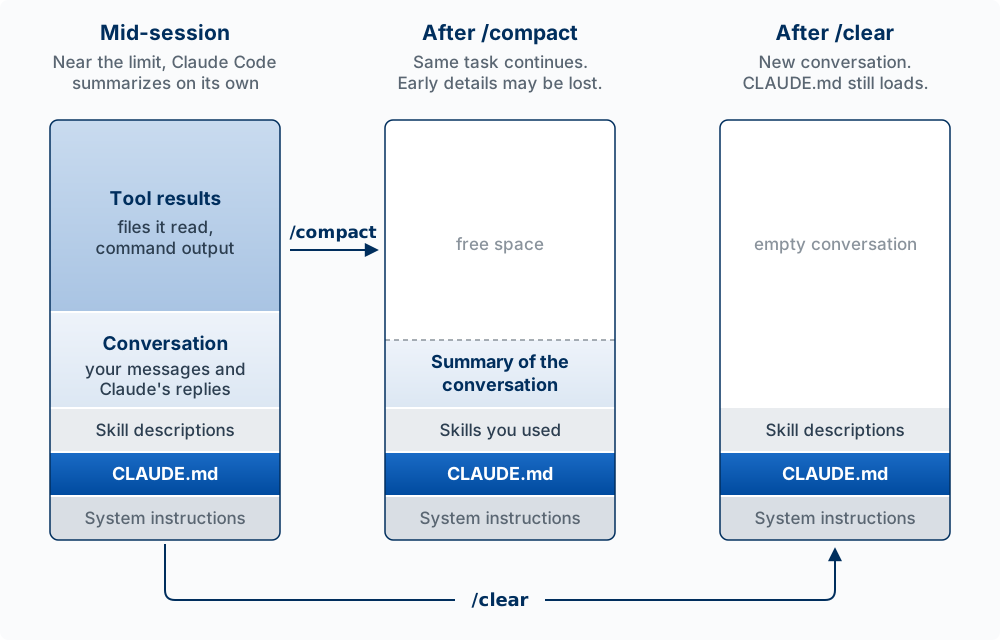
/compact keeps a summary and the task; /clear keeps nothing you said.
Worked example. One day you tell Claude, “Never use a database for this project; JSON files only.” The next day you start a new session and ask for a search feature. Claude adds SQLite (a small database). It did not disobey you: that sentence was in the first session’s window, and the second session’s window never contained it. Put the rule in CLAUDE.md and every session starts with it.
CLAUDE.md: your project’s memory
CLAUDE.md is a Markdown file that Claude Code reads automatically at the start of every session. It is where you write down what you would otherwise re-explain.
/init generates a starter CLAUDE.md by reading your codebase, and /memory opens your CLAUDE.md files. Keep it short: the docs suggest under 200 lines, because every line costs context on every turn and long files are followed less reliably.
What to write in it. Write what the agent cannot work out by reading the code: decisions, constraints, and traps. The code already shows which framework you use. It does not say why you chose one approach over another, which file breaks if it is edited carelessly, or which commands must never run without asking. The Agent Team Kit suggests these sections in its guide to writing CLAUDE.md:
| Section | What goes in it |
|---|---|
| What this repo is | One paragraph: the product and the stack |
| Commands | The dev, build, test, and database commands, one line each |
| Architecture | Where each kind of code goes, so new code lands in the right place |
| Conventions | Naming, styling, the words used in the interface |
| Definition of done | The checks that must pass before work counts as finished (see From Spec to Release) |
| Leave alone unless asked | Lines the agent must not cross on its own: pushing to GitHub, adding a new sign-in or database library, deleting database tables |
When a convention changes, update CLAUDE.md in the same commit as the change, because an out-of-date file misdirects every session that reads it.
Where CLAUDE.md files live
| Location | Scope | Use it for |
|---|---|---|
./CLAUDE.md in the project root |
This project; commit it so your team shares it | Tech stack, conventions, build and test commands |
./CLAUDE.local.md |
This project, just you (keep it out of git) | Personal notes about this project |
~/.claude/CLAUDE.md |
All your projects | Your personal preferences and style |
All the files that apply are combined: a project file adds to your personal one, and the more specific file is read last.
CLAUDE.md and auto memory
Claude Code also keeps auto memory: notes Claude writes for itself as it works, such as a build command it worked out or a correction you gave it. It is on by default.
| CLAUDE.md | Auto memory | |
|---|---|---|
| Who writes it | You (or Claude, when you ask) | Claude, when it decides something is worth keeping |
| Where it lives | In your project folder, so it is committed with the code | In your home folder, ~/.claude/projects/<project>/memory/ |
| What loads | The whole file, every session | An index file, MEMORY.md (its first 200 lines), every session; the rest when Claude needs it |
| Who else gets it | Anyone who clones the repo, and cloud sessions | Nobody else. Another computer, a teammate, or a cloud session does not see it |
Check what Claude has saved with /memory. A rule you depend on belongs in CLAUDE.md, which you write and commit, because Claude decides what goes into auto memory and it stays on one computer.
Run /context in a session and find your CLAUDE.md in the list. Then: (1) tell Claude a project rule in chat, run /clear, and ask it what the rule is. (If Claude remembers it anyway, check /memory: it may have saved the rule to auto memory.) (2) Put the rule in CLAUDE.md, run /clear, and ask again. Explain the difference in one sentence.
The Commands That Manage a Session
Type / to see every command. These are the ones the workshop uses:
| Command | What it does |
|---|---|
/context |
Show what is filling the context window |
/compact |
Summarize the conversation to free space and keep going on the same task. /compact focus on the API changes says what to keep |
/clear |
Start a new, empty conversation. CLAUDE.md still loads; everything you said does not |
/rewind |
Roll back Claude’s file edits, the conversation, or both, to an earlier prompt |
/rename, /resume |
Name a session, and reopen it later by that name. Name every session you run in parallel |
/init, /memory |
Write a starter CLAUDE.md; open your CLAUDE.md files and auto memory |
/skills, /mcp, /hooks, /permissions |
See what is installed in your harness (Understanding the Harness) |
/diff |
Review the changes in your files, including Claude’s edits |
Skills
The model: a skill is a procedure you write down once, and its full text enters the context window only when it is used. Standing facts go in CLAUDE.md; a procedure you need sometimes goes in a skill.
A skill is a reusable procedure you teach Claude once: a folder with a SKILL.md file of instructions, plus any reference files or scripts it needs. You run it with /skill-name, or Claude loads it on its own when your request matches the skill’s description.
Creating a skill
Each skill is a folder in .claude/skills/ in your project, with a file named SKILL.md inside it. The folder name becomes the command, so .claude/skills/test-synthesis/SKILL.md creates /test-synthesis.
The lines between the --- markers at the top are the skill’s settings. The description matters most: Claude reads it to decide when the skill applies, so a vague description means Claude never uses the skill on its own.
---
description: Synthesizes usability test notes into findings and recommendations. Use when the user shares test session notes.
---

# Test Synthesis Skill

From the usability test notes provided, produce: a one-paragraph summary,
key findings ordered by severity, prioritized recommendations, and notable quotes.

## Rules
- Focus on behavior, not opinions
- Prioritize by frequency (multiple users) and severity (blocks core task)
- Include what worked well

$ARGUMENTS
Now use it: /test-synthesis [paste your notes here]. Text you type after the command replaces $ARGUMENTS.
To use a skill in every project, put its folder in ~/.claude/skills/. Older projects keep saved prompts in .claude/commands/; those still work, but a skill can also carry reference files and scripts.
CLAUDE.md or a skill?
CLAUDE.md is in the context window on every turn, so every line costs context all the time. A skill’s full instructions load only when it is used. The rule of thumb: standing facts go in CLAUDE.md; a procedure you need sometimes goes in a skill.
Two tests for when a procedure should become a skill, from the Agent Team Kit’s skills guide: if you have explained the same careful procedure to an agent twice, write it down once as a skill. If an action is expensive to get wrong (a release, a database migration), write a skill that fixes the safe order of steps, so the agent does not improvise it. The Agent Team Kit ships 13 skills built on those two tests.
Skills worth creating as a PM: feedback-synthesis (synthesize several interviews or test sessions), persona (a persona from interview data), jtbd (a problem restated as a job to be done), prd-review (check a PRD against your team’s template).
You have three things to tell Claude: “We use Supabase for the database,” “To publish a release: bump the version, write notes, tag, push,” and “Never commit to main.” Decide which goes in CLAUDE.md, which in a skill, and which belongs in neither. (The third must hold every time, so it belongs in the “applied by the harness” sector: see Advice Versus Enforcement.)
Permission Modes
By default Claude Code asks before it edits a file or runs a command. Press Shift+Tab to cycle through its permission modes, which include the default (ask before edits and commands), accept edits (edit files without asking, still ask before commands), and plan mode (read and plan only, change nothing). The current mode shows below the prompt. Plan mode is a good start for any change you have not thought through: Claude reads the code and proposes a plan, and nothing changes until you approve it.
Modes are one control among several; permission rules and hooks are covered in Advice Versus Enforcement.
For the full version of this material, see Directing the Agent in the Product Management book.