
Building with AI Agents
Why This Matters
This is a course about building products, and you are going to start building in week one, before you know what a backend is. That is deliberate. You build with an AI agent, and directing one well is the skill everything else in this course depends on.
The Loop: How This Course Works
The course is organized around one idea. At its core, product management means two things: figure out what is true, and act on it. True about a customer, a problem, a market. Everything else, the interviews, the specs, the MVPs, the metrics, is a method for doing that.
We run those methods as a single loop called AIRE. Each step is a question, except the last, which is what happens when you have answered the first three:
- Aim. What do you want? The goal, and the values behind it: what value you are trying to create, for whom, and how much you mean to capture.
- Inform. What is true? Go find out what is actually true about your customer and their problem. Gather evidence.
- Reason. What’s the best option? Lay out the real alternatives and choose among them. If there was only ever one option, you have not reasoned, you have rationalized.
- Enact. What happened? Build it, ship it, and watch. The answer becomes the next turn’s evidence, so you loop back with a more precise aim, better information, and clearer reasoning.
In short: what do you want, what is true, what’s the best option, what happened.
Aim comes first on purpose. Information is endless; without an aim you have no way to tell which facts matter, and discovery with no goal gathers facts at random. Lewis Carroll made the point in Alice’s Adventures in Wonderland (Carroll 1865), when Alice reaches a fork and asks the Cheshire Cat which way to go. President Thomas S. Monson retold it this way:
The cat answers, “That depends where you want to go. If you do not know where you want to go, it doesn’t matter which path you take.”
Alice does not know where she wants to go, so for her it does not matter. Monson’s reading of the story is the reason Aim comes first: “Unlike Alice, we know where we want to go, and it does matter which way we go, for by choosing our path, we choose our destination” (Monson 2016). Answer what do you want first, and every question after it has a criterion. Skip it, and you have no reason to prefer one option over another.
The course is this loop. Each step matches one stage of the work you will do this semester:
| The loop | The question | The part of the course |
|---|---|---|
| Aim | what do you want? | Aim: choose what is worth building, strategically and morally |
| Inform | what is true? | Discover: go learn what is true about the customer |
| Reason | what’s the best option? | Build: decide what to build, then build it |
| Enact | what happened? | Build, then Grow: ship it, measure, and learn on the live product |
The Aim, what is worth building at all, is where strategy and values meet. What value you create and for whom, and how much of it you can capture, is the create-versus-capture choice in Product Strategy; whether it is worth building at all is Product Morality. And you will run the whole loop many times across the semester, once per sprint, because a single turn tells you little; the trend across sprints shows whether you are improving.
Two things about the loop are worth knowing up front.
First, the last three multiply, they do not add. How good a decision turns out is roughly Information × Reasoning × Execution (Inform, Reason, and Enact), and because those multiply, a zero in any one makes the whole product zero. Brilliant reasoning on evidence you never gathered is a confident mistake. A great idea you never ship is worth nothing. Think of it as the area of a rectangle, where the sides multiply: a rectangle with one short side has almost no area however long the others are.
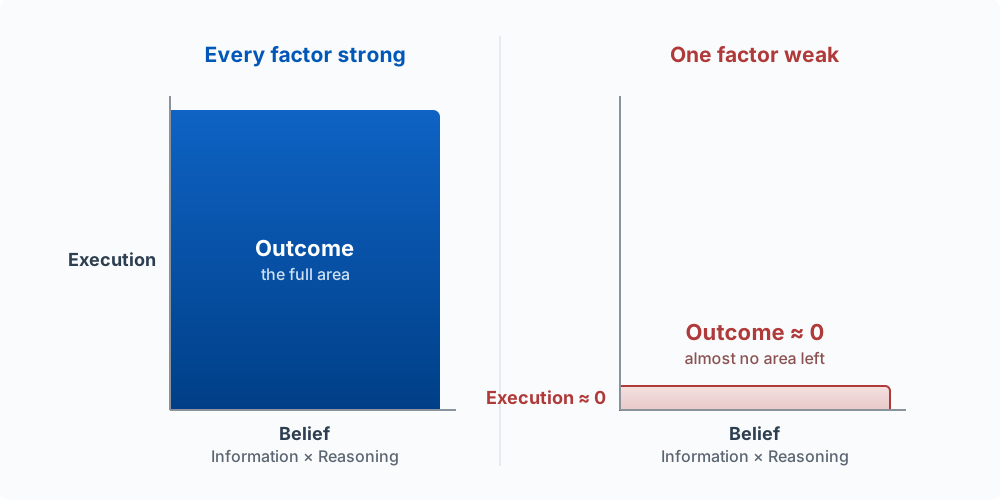
Second, most of the loop is about telling what you believe from what is true. You will always have beliefs about your customer. Some are right, some are wrong, and the work of Inform and Reason is to find out which are which. Finding and Validating the Problem gives you a diagram of that: a map of where a belief can sit relative to the truth, and how to move it.
AIRE is the loop you run, across a sprint. Later in this chapter you will meet a second, much faster loop: the one the agent runs on every turn (gather context, act, check). Keep the two apart. AIRE decides what is worth building; the agent loop is how a piece of it gets built.
How we run class
Class meets once a week: short periods of focused instruction to teach a skill, then live building with Claude Code. Each class has one emphasis, and we open it with a scripture and a quote tied to that emphasis.
The scripture is not decoration, and it is not separate from the craft. This is BYU, and we take seriously Brigham Young’s charge to Karl G. Maeser as he left to found this university: to “not teach even the alphabet or the multiplication tables without the Spirit of God.” All truth is God’s truth, and seeking it honestly, about a customer, a market, or anything else, is a spiritual act as much as a technical one. Faith, in the oldest sense, does not mean believing without evidence; it means acting on what you believe. That is the Enact in AIRE: a belief you will not act on is dead. We will treat the whole loop that way, as work worth doing well and worth doing in good faith.
The Six Builder Axes
This course tracks six skills. Together they are what a full-stack AI product builder can do: one person who, with AI’s help, can take a product from an idea to live software that customers use (the term is explained under Where This Is Going). The six skills organize everything that follows, and each part of the book in the sidebar is one of them.
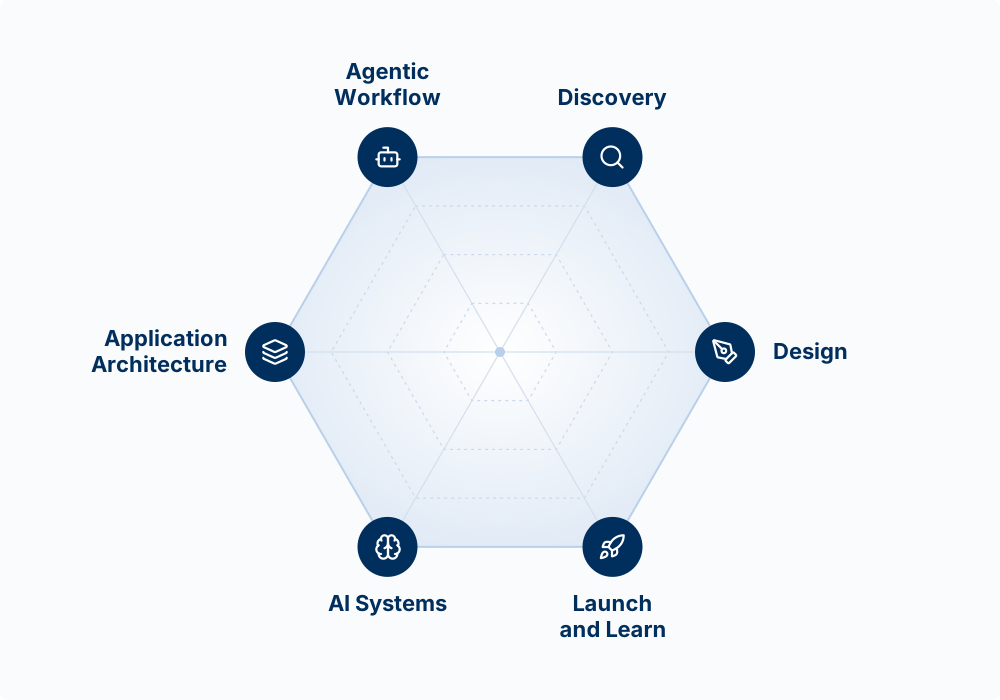
| Axis | The question it answers |
|---|---|
| Agentic Workflow | How do I put AI to work, as the way I build and inside the product? |
| Discovery | What should I build, for whom, and should I? |
| Design | What does the surface look like, how does it flow, and how do I write it down so an agent can build it? |
| Application Architecture | How is it structured, shipped, and kept safe? |
| AI Systems | How do the models work, and why do they behave the way they do? |
| Launch and Learn | How do people find it, and did it work? |
There is no Build axis, on purpose. A coding agent can now write a working first version of a feature in minutes, so most of the cost has moved to deciding what to build and describing it precisely. That work happens before the build, in Discovery and Design. The last step of Design is the spec, the written description an agent builds from and you check the result against (Specs).
Each axis gets about two weeks. You will rate yourself on all six this week, and that rating is your baseline. From then on, each sprint report shows your builder profile: a six-sided chart, 0 to 100 on each axis, filled by your sprint work and the two exams. Your builder profile explains how. The baseline is there so you know which axis is your weakest and can spend your discretionary effort there.
Agentic Workflow comes first because you need the tool before you can do anything else. You will ship something in week one that you do not fully understand, and that is deliberate. You will understand it later, and you will understand it faster because you already have something running to study.
History of Product Management
Product management is the work of identifying customer needs, aligning them with business goals, and leading a cross-functional team (people from different functions, such as engineering, design, and marketing) to build a product that succeeds in the market. The person responsible is the Product Manager (PM), sometimes called the “CEO of the product.” The comparison is loose: PMs usually lead without formal authority and have few direct reports. The skills are broad, though:
- Strategic thinking: setting vision, making trade-offs, aligning with business goals
- Customer insight: understanding user needs and pain points
- Analytical ability: using data and critical thinking to guide decisions
- Technical and design fluency: working effectively with engineers and designers
- Execution: planning, prioritizing, and delivering
- Communication and leadership: influencing, storytelling, managing stakeholders
The principles apply to hardware and software alike, but this course is about software products built with AI’s help.
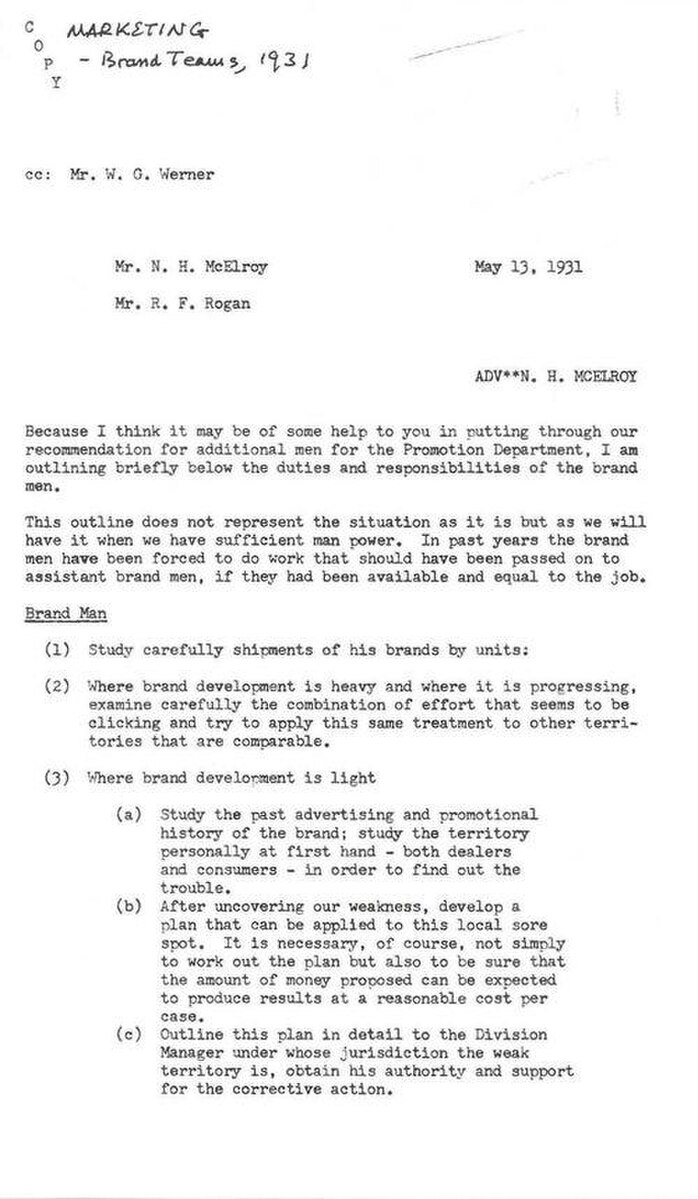
Product management as a job title traces to Hewlett-Packard in the 1940s. The idea is older: a 1931 Procter & Gamble memo described “Brand Men” whose responsibilities resembled the later role (McElroy 1931).
Later influences, including the Scrum development process (work organized into short, fixed cycles called sprints, the same rhythm this course uses), the Agile Manifesto (Beck et al. 2001) (a 2001 statement of principles favoring working software, delivered in small frequent steps, over long up-front plans), Google’s Associate Product Manager (APM) program, and a number of influential books, standardized how the work is done.
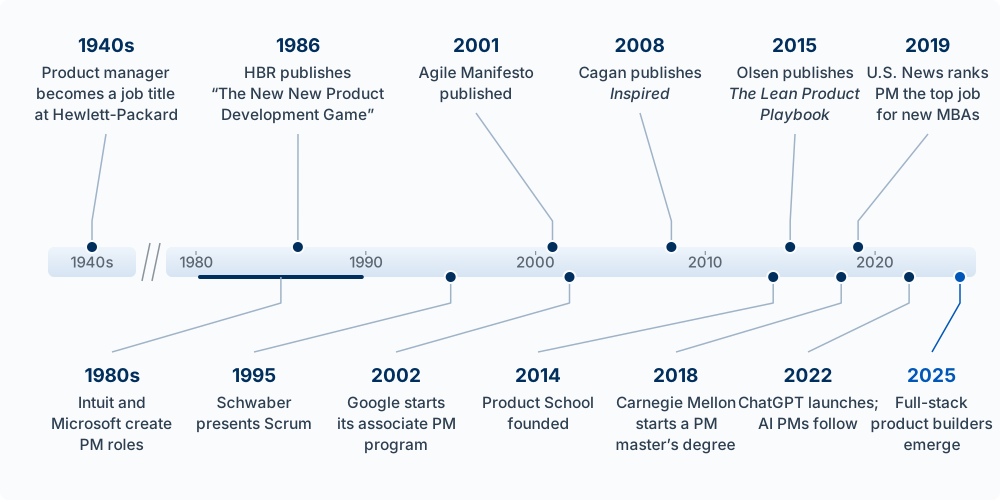
Each computing wave widened the field: personal computers in the 1980s, the internet in the 1990s, broadband and cloud computing in the 2000s, and the iPhone in 2007. In 2011, Marc Andreessen of the venture firm Andreessen Horowitz (a16z) wrote that Software Is Eating the World (Andreessen 2011). The launch of ChatGPT on November 30, 2022 began the next wave, and with it the AI Product Manager. Andreessen now argues that AI Will Save the World (Andreessen 2023). It will not do so on its own; people will use the same tools to do harm. We are living in the time when:
“Discoveries latent with such potent power, either for the blessing or the destruction of human beings as to make men’s responsibility in controlling them the most gigantic ever placed in human hands. … This age is fraught with limitless perils, as well as untold possibilities.” –David O. McKay, in Conference Report, Oct. 1966, 4. (McKay 1966)
You have the opportunity to use AI to improve the world. This class will help prepare you to take it.
For two decades many companies built software with a product trio: a product manager who sets vision, strategy, and priorities; a designer who owns usability and the experience; and engineers who turn ideas into working, scalable systems. AI is changing both the division of labor inside the trio and how much one person can do.
AI Product Management
With AI, a PM can produce wireframes (rough sketches of a screen’s layout), mockups (detailed pictures of finished screens), and working demos without waiting on design or engineering, and can put a tangible idea in front of users in days. Designers and engineers are still needed; what changes is when they are engaged. Some ambitious individuals will do all three jobs.
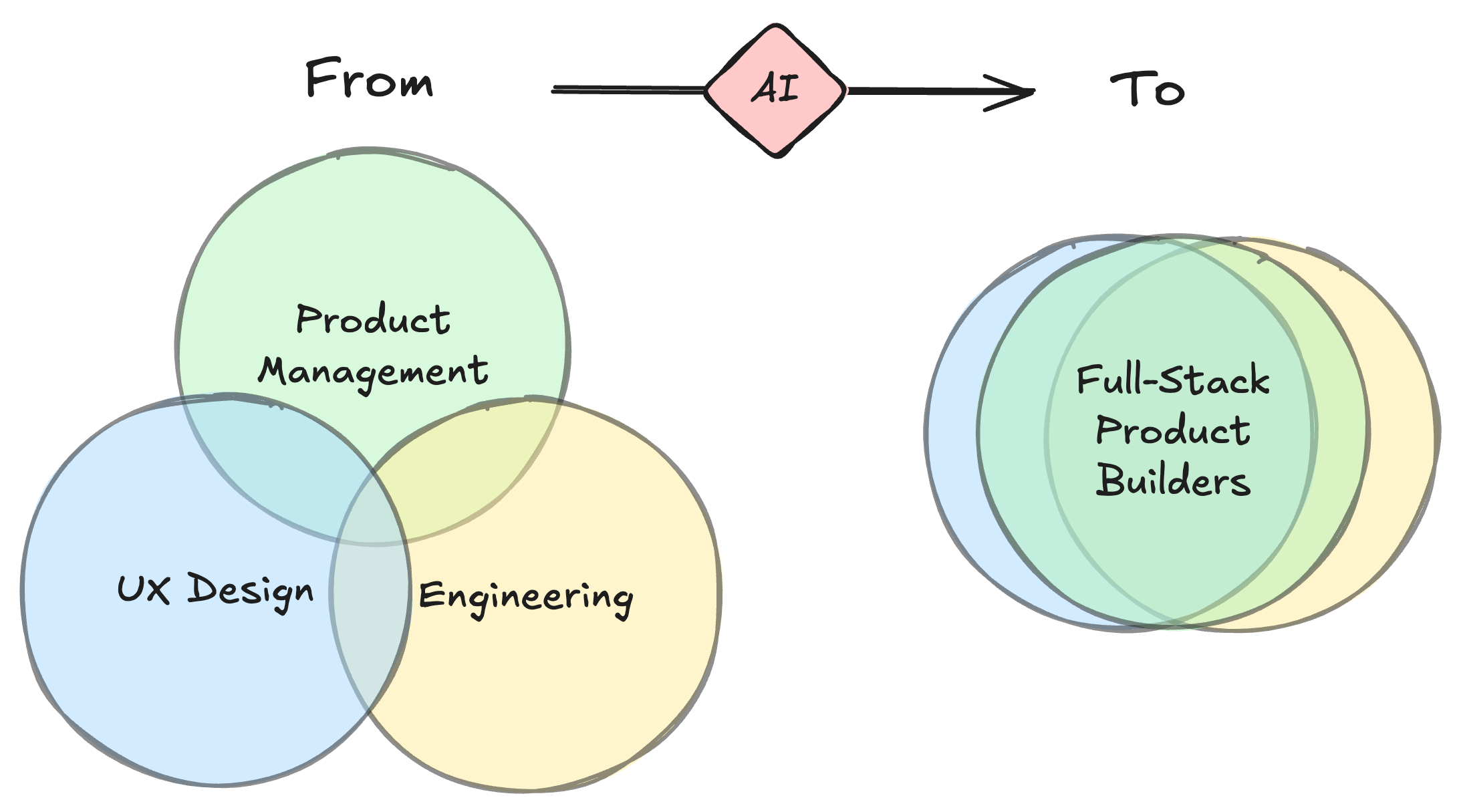
Two kinds of AI PM are emerging.
AI-Powered PM
An AI-Powered PM uses AI tools as a core part of their own workflow: prototyping, coding, analysis. Most PMs will become AI-powered, at different speeds at different companies. Shopify made it part of hiring:
We are adding a coding section to all of our Product Managers interviews at @Shopify.
We’ll start with APM interviews. We expect candidates to build a prototype of the product they suggested in the case interview.
There is no excuse for PMs not building prototypes.— Kaz Nejatian (@CanadaKaz) August 13, 2025
AI Product PM
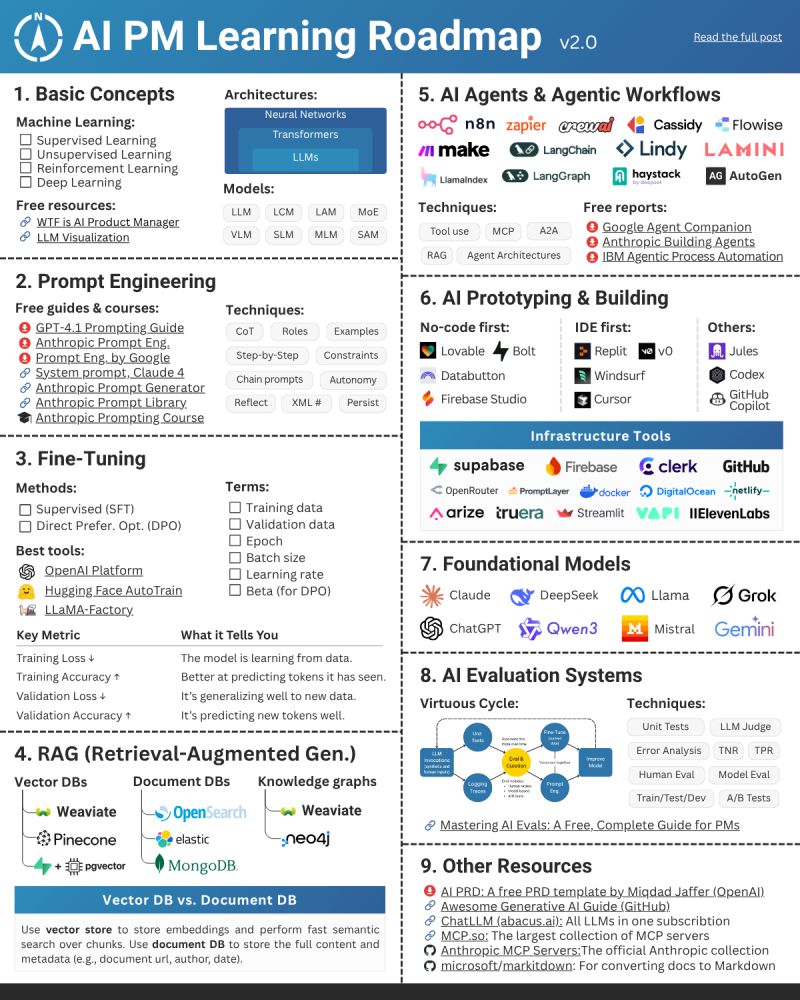
An AI Product PM builds products where AI is a core feature. On top of the traditional job (define the problem, lead the team, ship), they need to know what AI can and cannot do, how to measure its performance, and how to design around its limits, balancing accuracy, speed, cost, and safety. That is a high standard, and it is the standard this course aims at. Paweł Huryn’s roadmap lays out what it takes:
Where Vibe Coding Came From
Andrej Karpathy, a founding member of OpenAI, coined “vibe coding” on February 2, 2025:
There’s a new kind of coding I call “vibe coding”, where you fully give in to the vibes, embrace exponentials, and forget that the code even exists. It’s possible because the LLMs (e.g. Cursor Composer w Sonnet) are getting too good. Also I just talk to Composer with SuperWhisper…
— Andrej Karpathy (@karpathy) February 2, 2025
The term spread fast as a name for having AI write your code, often by voice. Collins Dictionary made it its 2025 Word of the Year. Karpathy had earlier described English as the new programming language.
The practice is contested. Skeptics say it encourages a shallow relationship with code: builders who do not understand their systems, more bugs, and unclear accountability when something breaks. Supporters see the next step in a long trend. Compilers (programs that translate readable code into the instructions a computer chip runs) freed programmers from writing those low-level instructions, called assembly, by hand; language models free them from typing every character of syntax, so they can spend their attention on intent, design, and impact. Both camps are partly right, and this course is built on the overlap: let the agent write the syntax, and keep the understanding for yourself.
Paul Graham, co-founder of Y Combinator (YC), changed his mind:
Vibe coding is here to stay. I’d been worried it might be a fad, but I talked to the founder of an infrastructure company who’s in a position to see how well vibe-coded apps are doing, and he said a lot of them are making money.
— Paul Graham (@paulg) August 15, 2025
In March 2025, YC managing partner Jared Friedman said that a quarter of the Winter 2025 batch had codebases that were 95% AI-generated:
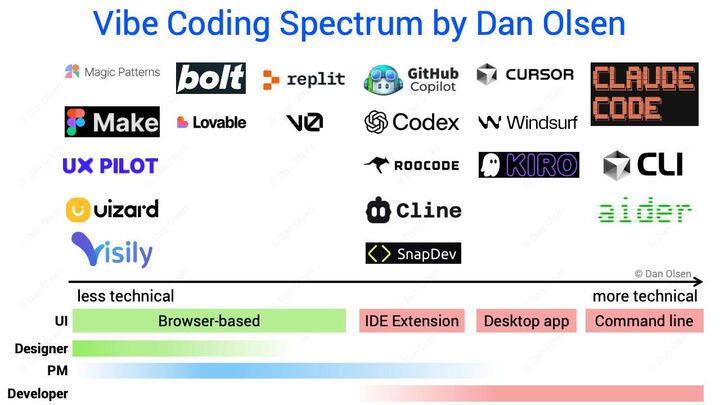
Many companies now sell tools for this. Dan Olsen’s chart sorts them from less technical to more technical: browser-based app builders on the left, then IDE extensions (add-ons to a code editor such as VS Code; IDE stands for integrated development environment), desktop apps, and command-line agents such as Claude Code, which you run by typing in a terminal, on the right. This course works on the right side, and tools from the left side are often useful too.
The clearest gain for a PM is fast, high-fidelity prototyping. A saying at the design firm IDEO explains why that matters:
“If a picture is worth 1000 words, a prototype is worth 1000 meetings.” —saying at @ideo
— John Maeda (@johnmaeda) October 5, 2014
Shopify’s interview change (above) shows the skill is becoming expected. Beyond prototypes, a developer tool like Claude Code also gives a PM fast data analysis, automation, and more precise use of models than a chat window allows.
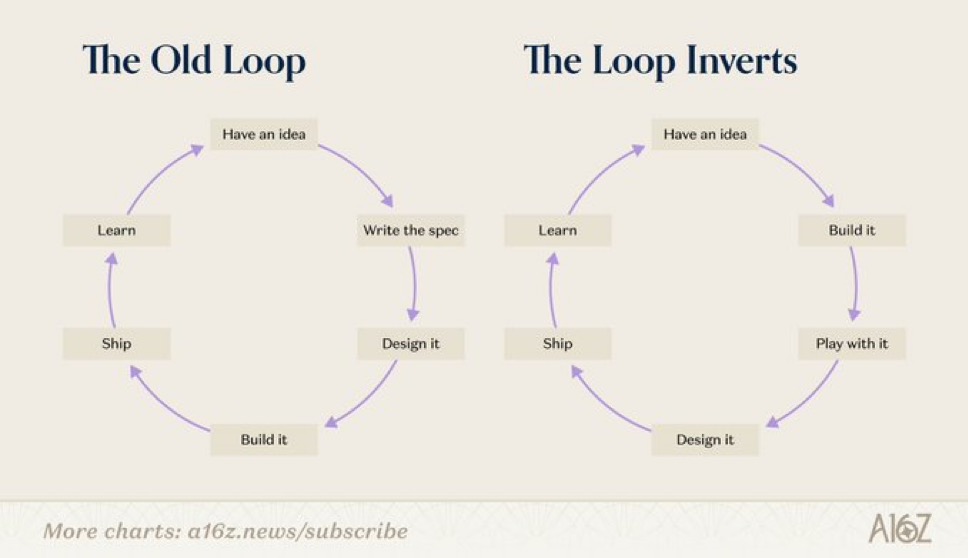
When building gets this cheap, the order of the work changes. A spec (short for specification) is a written description of what a product or feature should do; the standard form in product management is the product requirements document, or PRD. Product work used to run in this order: idea, spec, design, build, ship, learn. You wrote the thing down first because building it was the expensive step, so you wanted to be sure before anyone started. a16z calls what is happening now the inversion of that loop.
Madhu Guru described the same shift happening inside Google:
At @Google, we are moving from a writing-first culture to a building-first one.
Writing was a proxy for clear thinking, optimized for scarce eng resources and long dev cycles - you had to get it right before you built.
Now, when time to vibe-code prototype ≈ time to write PRD,…— Madhu Guru (@realmadhuguru) July 29, 2025
In the inverted loop you build first and work out your thinking on the prototype. You use a working version, and only then do you design it, because now you have something real to react to. The prototype, in place of a document, is what you use to make the case for the idea.
This is a change in sequence, and the writing still happens. You still write down what the thing is supposed to do, you just write it after you have learned something from a build instead of guessing beforehand, and you write it before the code is something you intend to keep. The rule for the rest of the course: explore to learn, then spec anything you intend to keep. Chapter 6b is about that discipline.
Where This Is Going
Who owns which piece of product work is now an open question:
The fight over what a product manager does is going to among the first major AI organizational design problems faced by companies.
— Ethan Mollick (@emollick) November 1, 2025
It is a job right at the center of what AI can do with first pass coding, marketing, design, ideation, etc. Who will own which pieces up for grabs. https://t.co/XkJQYOu9N9
With the right tools, one person can credibly do all three trio roles and become what LinkedIn’s Tomer Cohen calls a Full-Stack Product Builder.
The table below lists what product work actually consists of, question by question, and marks which role does each piece. The highlighted column is the full-stack product builder: the same discovery, planning, go-to-market (getting the product to customers and selling it), and analytics work a business PM does, plus the architecture and engineering execution rows that used to belong to someone else. Those added rows are the ones this course is built to cover.
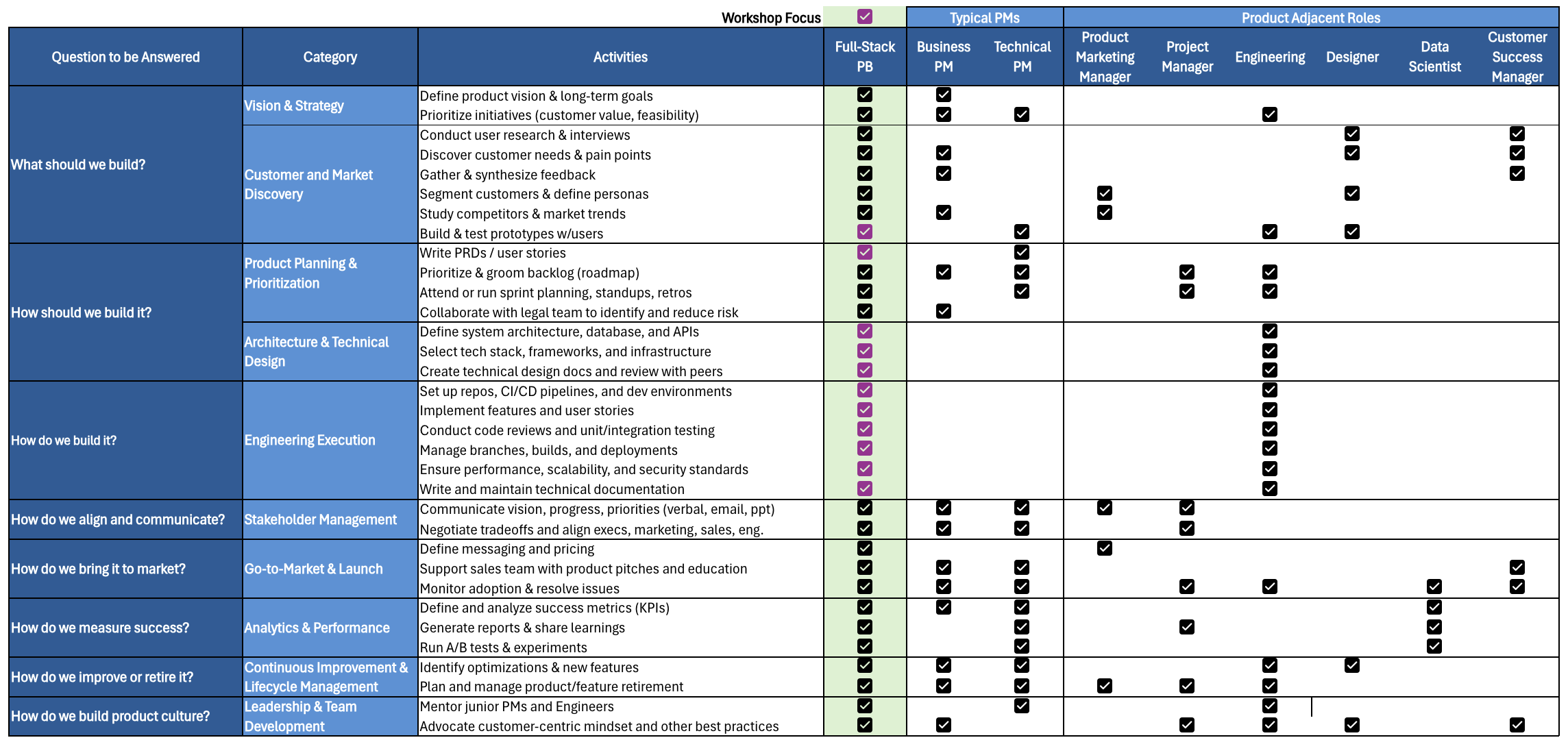
Boris Cherny, who created Claude Code, has said the team building it is staffed on this assumption:
As always, a very thoughtful and well reasoned take. I read till the end.
— Boris Cherny (@bcherny) January 27, 2026
I think the Claude Code team itself might be an indicator of where things are headed. We have directional answers for some (not all) of the prompts:
1. We hire mostly generalists. We have a mix of senior…
Builder’s high is back…
— Madhu Guru (@realmadhuguru) August 13, 2025
That is the ambition for you in this course: to become a full-stack product builder who uses AI to build products that improve people’s lives.
Vibe Coding Terminology
The term “vibe coding” sounds unserious, and often the practice is. Some engineers now advertise themselves as “Vibe Code Cleanup Specialists,” hired to clean up AI slop: code or content generated carelessly.
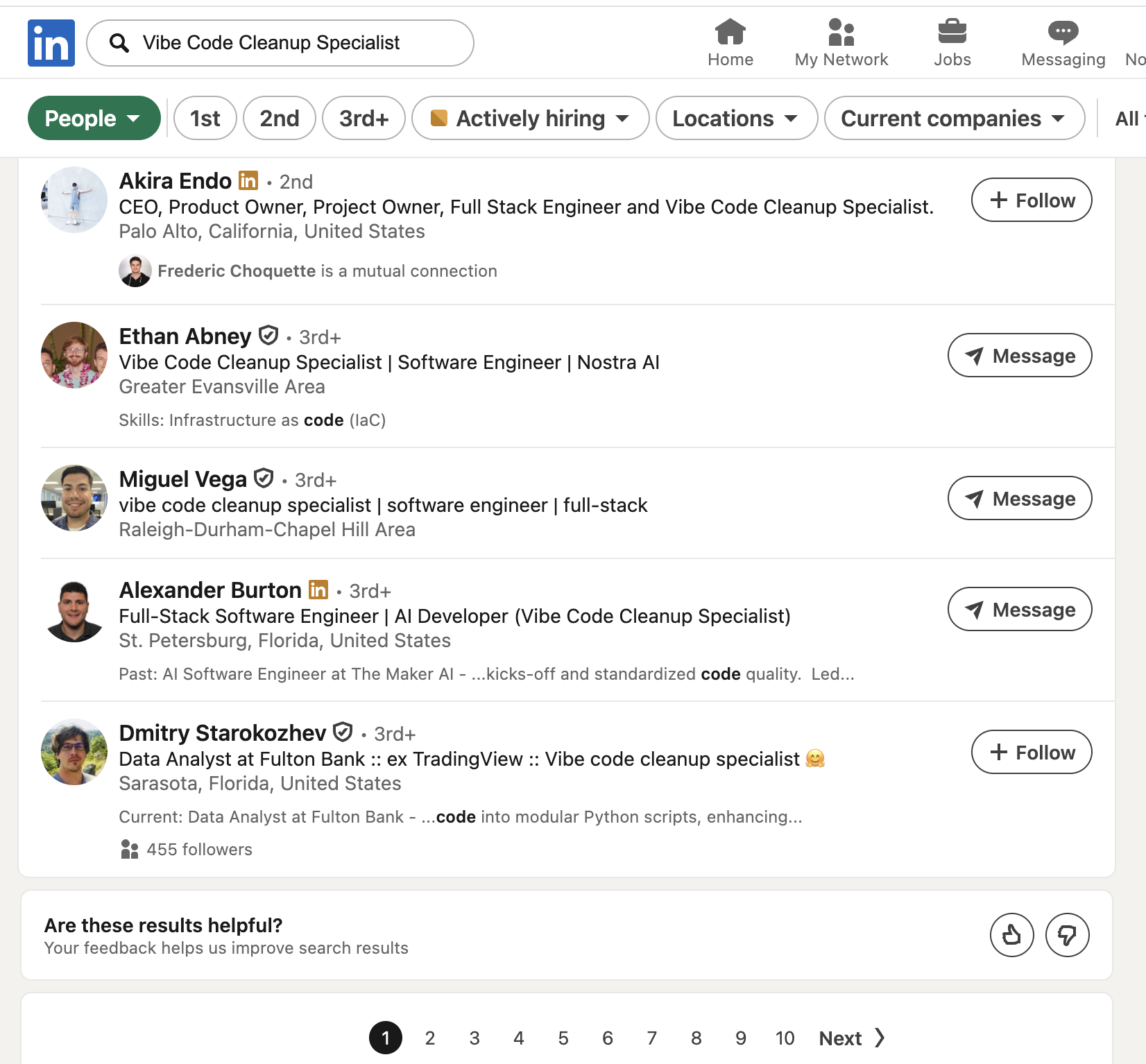
Don’t be the reason your boss has to bring in a Vibe Code Cleanup Specialist.
This course uses terms like “building with AI,” “agentic coding,” “AI builder,” and “full-stack product builder” instead, and holds the work to a standard: code an agent wrote for you should pass review in a serious engineering organization.
What Makes an Agent an Agent
An agent is a model in a loop with tools. The model is a large language model (LLM), such as Claude: a program that takes in text and images and writes text back. Every way of using Claude (web, mobile, desktop, and Claude Code) runs the same models. What differs is the harness, the program around the model, and how far it lets the model reach. In the web and mobile chat apps, Claude can run code and make files, but only in a sandbox on Anthropic’s servers, and it reaches services such as Gmail and Google Drive through connectors. The desktop app and the terminal (Claude Code) also work on your computer: they read your files, run commands in your terminal, and see what happened. The two are now close. The terminal adds scripts and automated runs, such as a check that runs on every pull request.
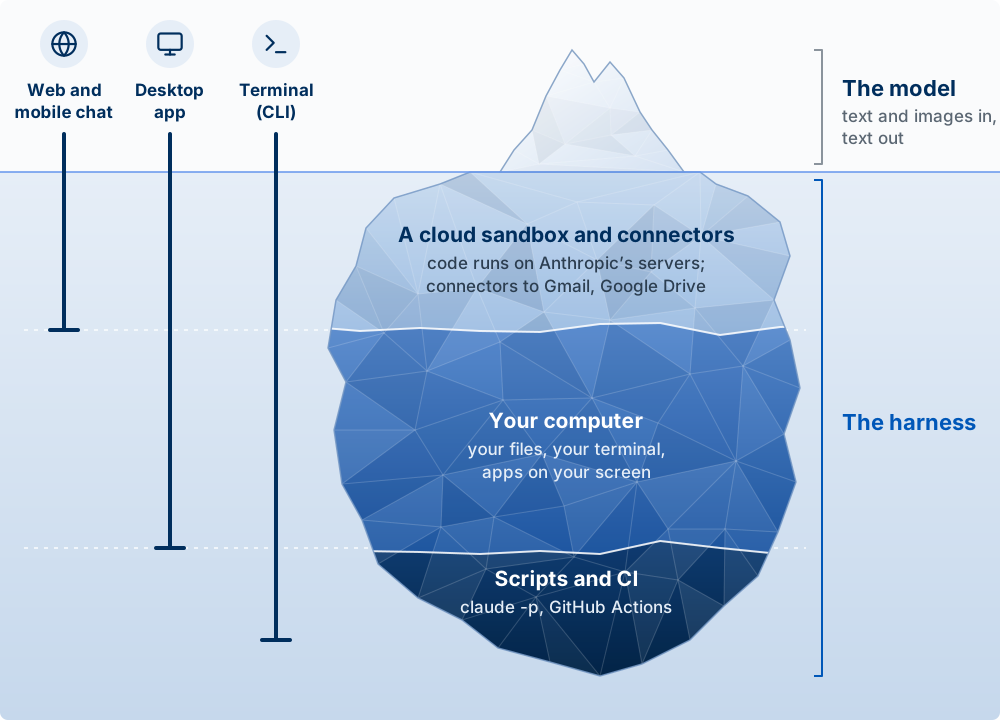
A chatbot can write you a PRD. An agent can read your repo (short for repository, the folder that holds your project’s code), write the code, run it, watch it fail, fix it, and deploy the result. That gap is why this course runs in a terminal instead of a browser tab.
The agent loop: gather context, act, check
Every agent turn has three phases. Claude Code’s documentation names them gather context, take action, and verify results, and the loop repeats until the task is done or you interrupt.
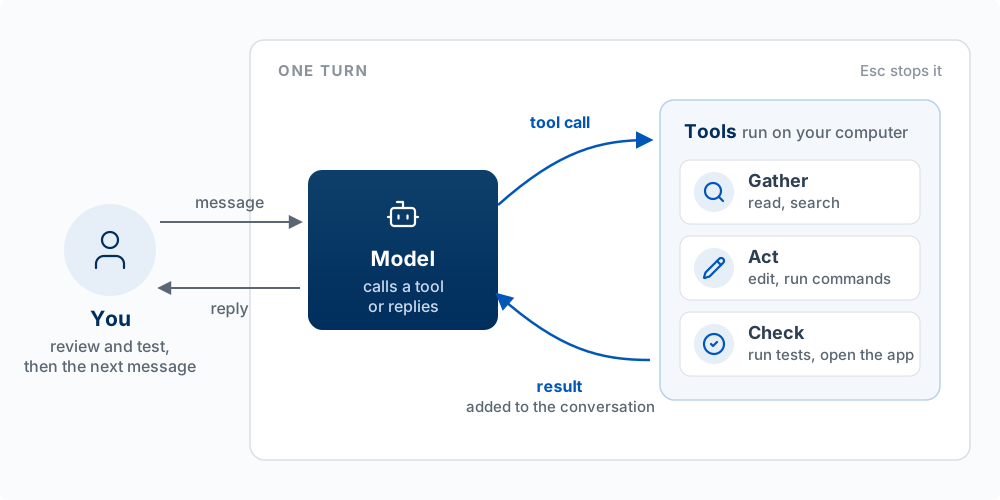
| Phase | What the agent does | The tools it uses | What goes wrong here |
|---|---|---|---|
| Gather context | Reads files, searches the code, reads your instructions | Read, search, CLAUDE.md, web fetch | It never looked at the file that mattered, or your instruction was not in front of it |
| Act | Changes something | Edit, Write, Bash (run a command) | It edited the wrong file, or ran a command you did not want |
| Check | Looks at the result of its action | Run the tests, run the app, read the error output | It skipped the check, or the check could not detect the problem |
Two building blocks make this work. The model reasons and decides the next step. The tools act and report back: every tool result goes into the conversation and shapes the model’s next decision. Claude Code is the layer around the model that supplies the tools and manages what the model sees; the docs call that layer the agentic harness. The model and the harness, after the tools section, shows what that layer does.
Worked example. You tell Claude Code: “The delete button on my to-do app doesn’t work.” A good run looks like this:
- Context: it reads
app.py(the app’s code), finds the delete handler (the code that runs when the button is clicked), and readstodos.json(the file where the to-dos are saved). - Act: it notices the handler removes the item from the list but never saves the file, and adds the save.
- Check: it runs the app (or a small test, a short program that checks one behavior automatically), deletes an item, reloads, and confirms the item is gone.
- The check passes, so it stops and reports.
Now three bad runs, one per phase. It “fixes” the wrong button because it never opened app.py (context). It rewrites the whole file and breaks the add feature (act). It announces “Fixed!” without ever reloading the app (check). The loop gives you a debugging checklist for the agent itself: when a result is wrong, ask which phase failed. Did it lack context, take the wrong action, or skip the check? Each has a different fix: give it the file or the rule, narrow the request, or give it a way to verify (for a web app, Claude in Chrome lets it open the app and check).
You are part of the loop too. You can interrupt at any point (press Esc), add context, or redirect. A good builder treats the agent like a fast, capable new hire with no memory who takes you literally: brief it well, check its work, and do not assume it knows what you did not tell it. The analogy breaks in one useful place: unlike a new hire, the agent does not learn from yesterday unless the lesson is written down where it will read it: in CLAUDE.md, which you write, or in auto memory, the notes Claude saves for itself on your computer (Chapter 2).
Tools: how the agent acts on your computer
The model only writes text. Every file it reads, every edit, and every command happens because Claude Code ran a tool the model asked for. A tool is a function Claude Code offers the model: a name, a description of what it does, and the inputs it takes. Read takes a file path. Edit takes a file path, the text to replace, and the new text. Bash takes a command.
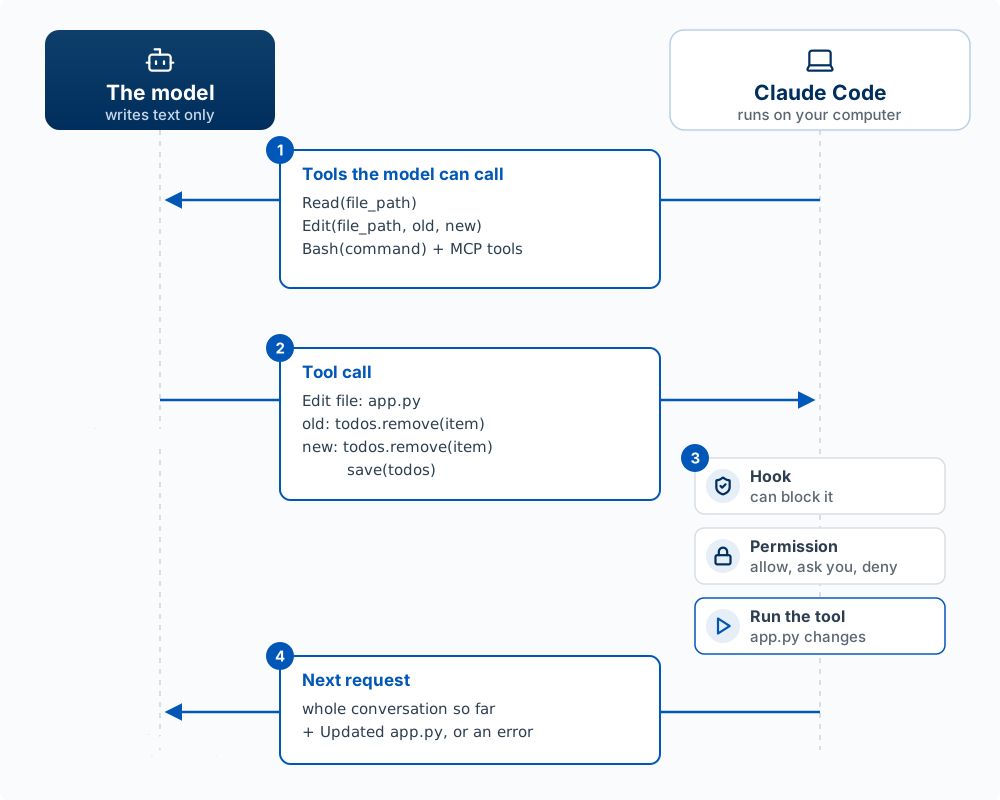
One tool call, step by step, using the delete-button fix from the worked example above:
- The list. With every request, Claude Code sends the model the tools the model can call and what each one takes. The model can only use what is on this list.
- The call. The model writes a tool call: text in a fixed format naming the tool and its inputs (
Edit, the fileapp.py, the old line, the new lines). Its reply ends there. Nothing has changed on your computer yet. - The checks, then the run. Claude Code, the program running on your computer, receives the call. A hook can block it, and a permission rule either allows it, asks you, or denies it. Only then does Claude Code run the tool, and the file changes. Chapter 2 covers both, and PreToolUse up close covers this step in detail.
- The next request. What the tool returned (a file’s contents, a command’s output, or an error message) is added to the conversation as text, and Claude Code sends a new request: the whole conversation so far, plus the result. The model keeps nothing between requests, so it rereads everything and decides the next step: another tool call, or a reply to you. The loop ends when the model replies without a tool call.
The tools you will see most often in Claude Code:
| Tool | What it does | Asks permission by default |
|---|---|---|
Read |
Reads a file | No |
Edit |
Replaces specific text in a file | Yes |
Write |
Creates a file, or overwrites one | Yes |
Bash |
Runs a terminal command: tests, installs, git, searches | Yes |
WebFetch, WebSearch |
Reads a web page; searches the web | Yes |
Agent |
Starts a subagent with its own context window (Chapter 2) | No |
Skill |
Runs a skill (Chapter 2) | Yes |
Source: the Claude Code tools reference. Four things follow from this mechanism:
- You can see and control every action. Each tool call appears in the transcript, and permissions and hooks act on tool calls, so they can stop any action before it runs.
- The model knows only what tool results put in front of it. If it never called
Readon the file that mattered, it is guessing about that file. - More tools means more ability. An MCP server, a small program that connects Claude Code to another system, adds tools to the list. Connect the Playwright server and the model gains tools that open a browser and click (Chapter 2).
- Your own product can work the same way. When you give a model tools through the API (the interface your own code uses to send requests to a model), your code plays Claude Code’s part: it receives the call, decides whether to run it, and sends the result back (Chapter 11).
Ways to tell a computer what to do
An interface is how one side tells a computer what to do and gets an answer back. Interfaces differ in what is exchanged and in who they were built for:
| Interface | What is exchanged | Built for | Who uses it now |
|---|---|---|---|
| CLI (command-line interface) | Typed commands in an exact format | People | People, and agents such as Claude Code |
| GUI (graphical user interface) | Windows, buttons, and menus you point at | People | People. An agent can use one by reading screenshots and clicking, when nothing else is available |
| API (application programming interface) | Structured requests and replies, often JSON | Programs | Programs, including agents |
| Natural language | Plain sentences | People | People talking to agents and chat apps |
A keyboard, a mouse, a touchscreen, and a microphone are not interfaces. They are input devices, and each can carry more than one interface: the keyboard types both commands and chat messages. Voice is a way to deliver natural language.
The CLI and the API are the closest pair. Both exchange exact text: a command and an API request each follow a strict format, do exactly what they say, and can be saved and run again by a program. They differ in who they were built for:
| Built for people | Built for programs | |
|---|---|---|
| Visual | GUI | |
| Exact text | CLI | API |
A CLI prints output meant to be read on a screen (“3 files changed”) and offers help text; an API returns structured data, such as JSON, with no screen at all. The CLI sits between the two: built for people, but exact enough for a program to drive, which is why shell scripts work and why Claude Code can run your commands. Often a CLI is a front end to an API. When you type gh pr create (GitHub’s CLI) to open a pull request, the gh program turns that command into a request to GitHub’s API and shows you the reply.
The order they arrived in explains a lot. Early computers ran batch jobs: you handed in a stack of punched cards and got a printout back later. In 1961, MIT demonstrated time-sharing, where many people typed at terminals and the computer answered each one in turn; the command line comes from there. The GUI was built at Xerox PARC on the Alto in 1973, reached a mass market with the Apple Macintosh in January 1984, and came to most PCs with Microsoft Windows 1.0 in November 1985, which is named for the windows of its interface. The GUI’s purpose was to let people use a computer without memorizing commands.
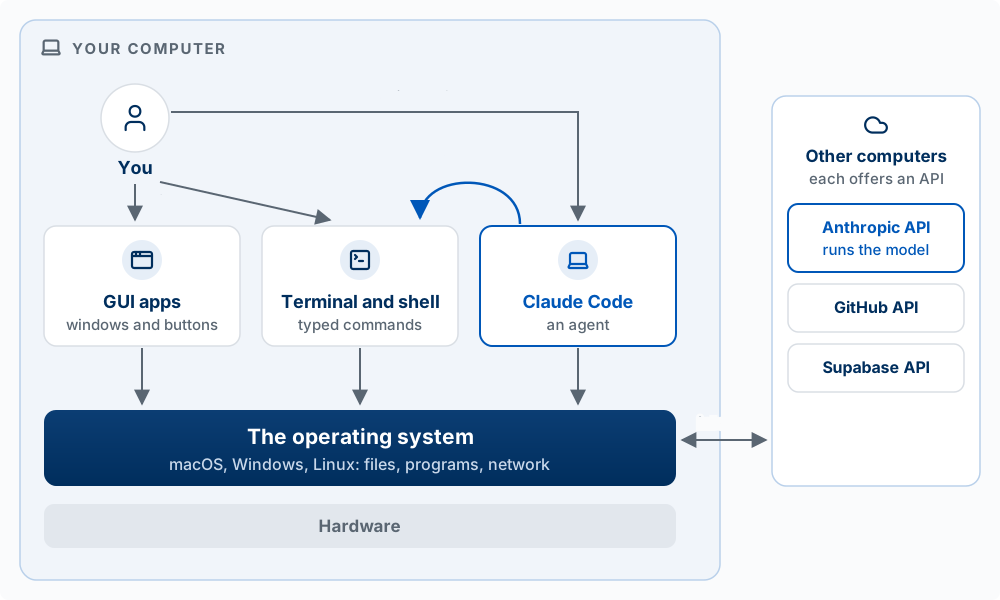
The GUI and the shell are side by side. A Mac app that opens a file asks macOS to open it; it does not type a command into a shell. The shell asks macOS for the same things. Some GUI apps do run command-line programs behind the scenes (the Git panel in VS Code runs git), but that is a choice an app makes, not how GUIs work. Claude Code is a program in the same row: it asks the operating system to read and edit files, and hands commands to the shell.
An API is not a place your requests pass through. It belongs to the program that offers it. The Anthropic API is part of Anthropic’s software on Anthropic’s computers; Claude Code, on yours, asks your operating system to send each request there over the internet, and every turn reaches the model this way. The operating system offers an API too: every arrow into it in the figure (“open this file,” “send this over the network”) is a request to the operating system’s API.
Why this matters for building with agents. The command line was always the most powerful interface: commands are exact, they can be chained together, and they can be saved in a file and run again. It was also the hardest to learn, which is why the GUI took over. An agent removes the hard part. You describe what you want in plain English, and the agent writes and runs the commands. You get what the command line can do without memorizing it, which is why Claude Code is built as a CLI. Two qualifications. A GUI is still the better tool for visual work, such as designing a screen or reading a chart. And the same access that lets an agent do anything on your computer lets it break anything, which is the subject of Blast Radius in Chapter 2.
The terminal, the shell, and scripts
The Bash tool runs “a terminal command,” but the terminal is only the window. The program that runs commands is the shell. When you type git status in a terminal, the terminal passes the line to the shell, and the shell runs the git program. Claude Code reaches the same shell directly, with no window: Claude’s Bash tool sends it commands, and so do the hooks you will set up in Chapter 2. A shell script is a file of commands the shell runs from top to bottom, with no one typing.
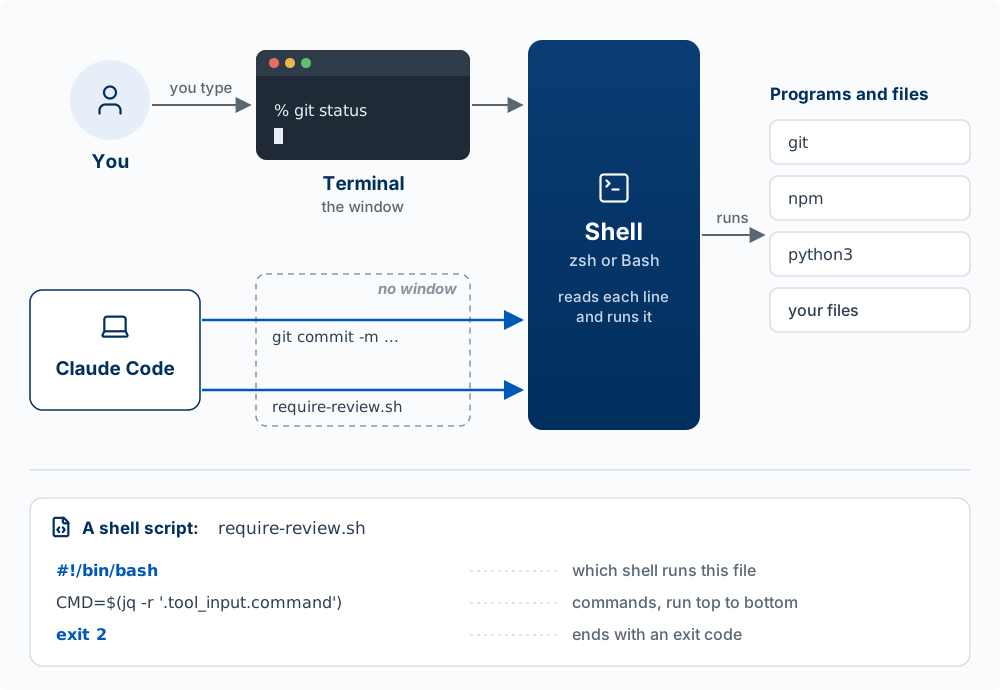
Words used in this section:
| Term | What it means |
|---|---|
| Terminal | The window that shows text and passes your typing to the shell: Terminal on a Mac, iTerm, or the terminal panel in VS Code. It runs nothing itself |
| Shell | The program that reads a command and runs it. It also defines the language commands are written in |
| zsh, Bash | Two shells with nearly the same language. zsh is the default on a Mac; Bash is the default on most Linux computers and in Git Bash on Windows. Windows also has its own shell, PowerShell |
| Command | One line the shell runs: a program’s name and its inputs, such as git commit -m "Add delete button" |
| Shell script | A file of commands the shell runs from top to bottom. Its first line, such as #!/bin/bash, names the shell that runs it |
| CLI | Command-line interface: working by typing commands, or a program built to be used that way. Claude Code is a CLI |
Ask Claude Code to make a small change in your project, then watch the transcript instead of the result. Label each step it takes as context, action, or check. Did it check its own work before saying it was done? If not, what check would you have asked for?
The model and the harness
The model reads text and images and writes text. The harness is the software around the model: it builds each request, sends it to the model, and carries out the tool calls the model asks for. Claude Code is a harness, and it runs on your computer. In web and mobile chat, the harness runs on Anthropic’s servers.
On its own, the model has three limits. It writes only text. It stores nothing from one request to the next, so everything it should know has to be in the request. And it has no access to your computer. The harness makes up for all three. The two also run in different places: Claude Code runs on your computer, next to your files and terminal, and the model runs on Anthropic’s servers, which the harness reaches over the internet.
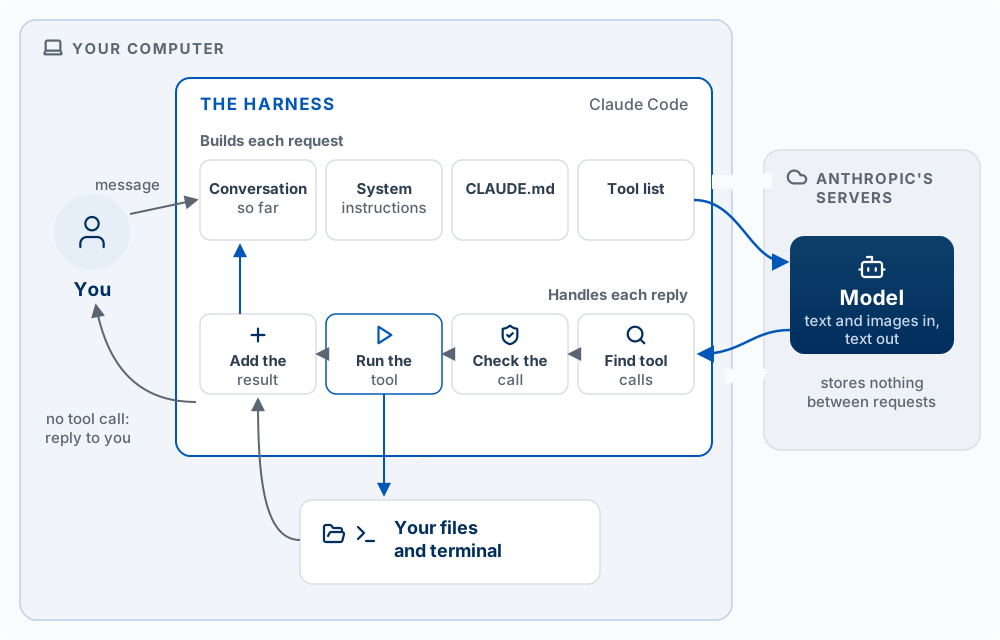
The harness’s jobs, in the order they happen on each request:
| Job | What it does | Example in Claude Code |
|---|---|---|
| Build the request | Puts together everything the model will see: system instructions (Claude Code’s standing instructions on how to use tools and behave), your CLAUDE.md, the list of tools, and the conversation so far | Your CLAUDE.md is in every request of every session, which is why the model follows it |
| Send and receive | Sends the request to the model and receives the text the model writes back | Each message you type, and each tool result, starts a new request |
| Find tool calls | Reads the reply for tool calls. If there are none, it shows you the reply and the turn ends | The reply “The bug is fixed” with no tool call comes back to you |
| Check the call | Runs your hooks and permission rules on the tool call, which can allow it, ask you, or block it | The approval prompt before an Edit |
| Run the tool | Runs the tool on your computer | Bash runs your tests in your terminal |
| Add the result | Adds the tool’s output to the conversation as text, then sends the next request | The failing test’s error message, which the model reads next |
| Manage the context window | When the conversation nears the limit, clears old tool outputs, then summarizes the conversation (compaction) | Automatic compaction; /compact when you want it now |
| Give you an interface | Shows you the conversation and the tool calls, and takes your messages, approvals, and Esc |
The terminal, the VS Code panel, the desktop app |
Sources: How Claude Code works and the Claude Code glossary, which defines the agentic harness as “the tools, context management, and execution environment that turn a language model into a capable coding agent.”
Three things follow for a builder.
- The same model behaves very differently in different harnesses. In the claude.ai chat window, Claude answers you but cannot open the files on your laptop. In Claude Code, the same model reads, edits, and runs your project. Cursor lets you pick a Claude model inside its own harness. In your own app (Chapter 11), the model can do only what your code offers it as tools. A model’s abilities, as a user experiences them, depend on the harness around it.
- When an agent fails, ask whether the model or the harness was the limit. If the right file and instructions were in the request and the model still reasoned badly, the model was the limit: give it a smaller task, clearer instructions, or a stronger model (
/model). If the file was never read, the tool was missing, a permission blocked the call, or compaction dropped an early instruction, the harness was the limit, and you can usually fix that yourself. - What you configure in Claude Code is the harness. CLAUDE.md changes what goes into every request. Permissions and hooks change what happens to a tool call. Skills and MCP servers add to what the model can ask for. You cannot change the model’s training; you can change everything around it, and Chapter 2 shows how.
In Claude Code, run /context. It lists what the harness has put into the context window by category: system prompt, tools, MCP tools, memory files (your CLAUDE.md), skills, and messages. Find your CLAUDE.md in the list. Then ask “What files are in my project folder?” in the claude.ai chat window and in Claude Code. Explain the difference between the two answers in one sentence about the harness.
The Command Line
To direct an agent you need to read what it is doing, and most of what a coding agent does happens on the command line: a text-based way to control your computer by typing commands instead of clicking. The program that shows it is a terminal: Terminal on macOS; Command Prompt, PowerShell, or Git Bash on Windows; or the terminal panel built into VS Code.
The command line gives direct access to files, programs, and system functions, many of which have no graphical interface at all. That is why AI made it more important: Claude Code, Codex, Copilot CLI, and Antigravity CLI all run there, and when the agent runs a command you approve or reject it based on whether you can read it.
You do not need to memorize commands, since the agent will type them. You need to recognize the core ones:
| Command | What it does |
|---|---|
pwd |
Print the folder you are in |
ls |
List files in the current folder (ls -la includes hidden files like .claude) |
cd foldername, cd .., cd ~ |
Move into a folder, up one level, or to your home folder |
mkdir my-project |
Make a folder |
echo "text" > file.txt |
Write text to a file, overwriting it |
echo "text" >> file.txt |
Append text to the end of a file |
cat file.txt |
Show a file’s contents |
cp a.txt b.txt |
Copy a file |
rm file.txt, rm -r folder |
Delete a file, or a folder and everything in it |
open my-project (macOS), explorer.exe my-project (Windows) |
Open a folder in Finder or File Explorer |
Gotchas
- Paths with spaces need quotes:
cd "My Folder". - macOS and Linux are usually case-sensitive; Windows is not.
rmdeletes permanently. Nothing goes to the Trash. Keep this in mind when an agent asks to run it; Chapter 2’s section on blast radius explains why a deleted file is one of the few things you cannot undo with Claude Code’s rewind.
Predict the contents of notes/journal.txt after these four commands, then run them and check:
mkdir -p problem-tracker/notes && cd problem-tracker
echo "Day 1: Problems I noticed today" > notes/journal.txt
echo "- Spent 10 min finding a parking spot" >> notes/journal.txt
echo "Day 2" > notes/journal.txt
(Answer: only Day 2. The last line used >, which overwrites.)
In a VS Code terminal, run winget install --id Git.Git -e --source winget, then confirm with git --version. In VS Code press Ctrl + Shift + P, choose Terminal: Select Default Profile, pick Git Bash, and open a new terminal (Ctrl + ~). It should start with bash$ or MINGW64 instead of PS. The commands above then work as on macOS.
Package management
A package manager installs, updates, and removes software from the command line, so you type one command instead of clicking through an installer. On macOS the standard one is Homebrew (installed from brew.sh; check it with brew --version). On Windows 10 and 11, winget comes pre-installed (winget --version). When Claude Code installs git, node, or python for you, it is calling one of these.
VS Code
Visual Studio Code is a free code editor from Microsoft and the main workspace for this course: a file browser, an editor, a built-in terminal, and the Claude Code extension in one window. Installation is in Computer Setup. (On macOS, brew install --cask visual-studio-code installs it from the command line; --cask tells Homebrew it is a graphical app.)
Claude Code
Claude Code is Anthropic’s coding agent. You describe what you want in plain language; it reads your project, plans, edits files across the codebase, runs commands and tests, and reports back, asking your permission for actions you have not pre-approved. It will not build a polished, complicated application by itself, but it does much of the construction while you direct it.
You installed it in Computer Setup: a Claude Pro (or higher) subscription, the install script in the VS Code terminal, then claude to sign in. As a reminder of what that looked like, the terminal opens as a pane inside VS Code:
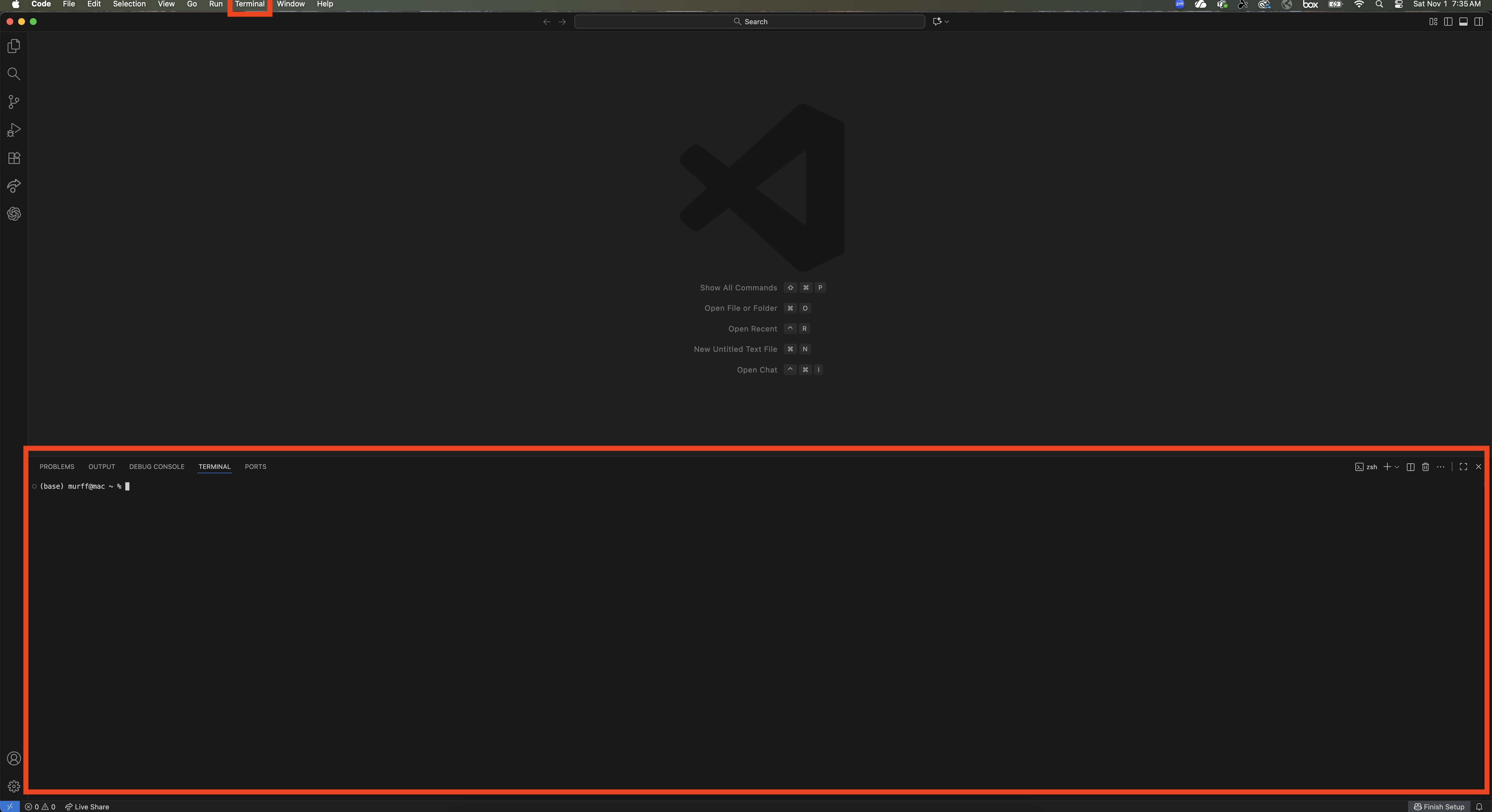
After you sign in, you see the welcome screen:

When Claude wants to run something, such as installing git, node, and python, it asks first and you press Enter to approve:
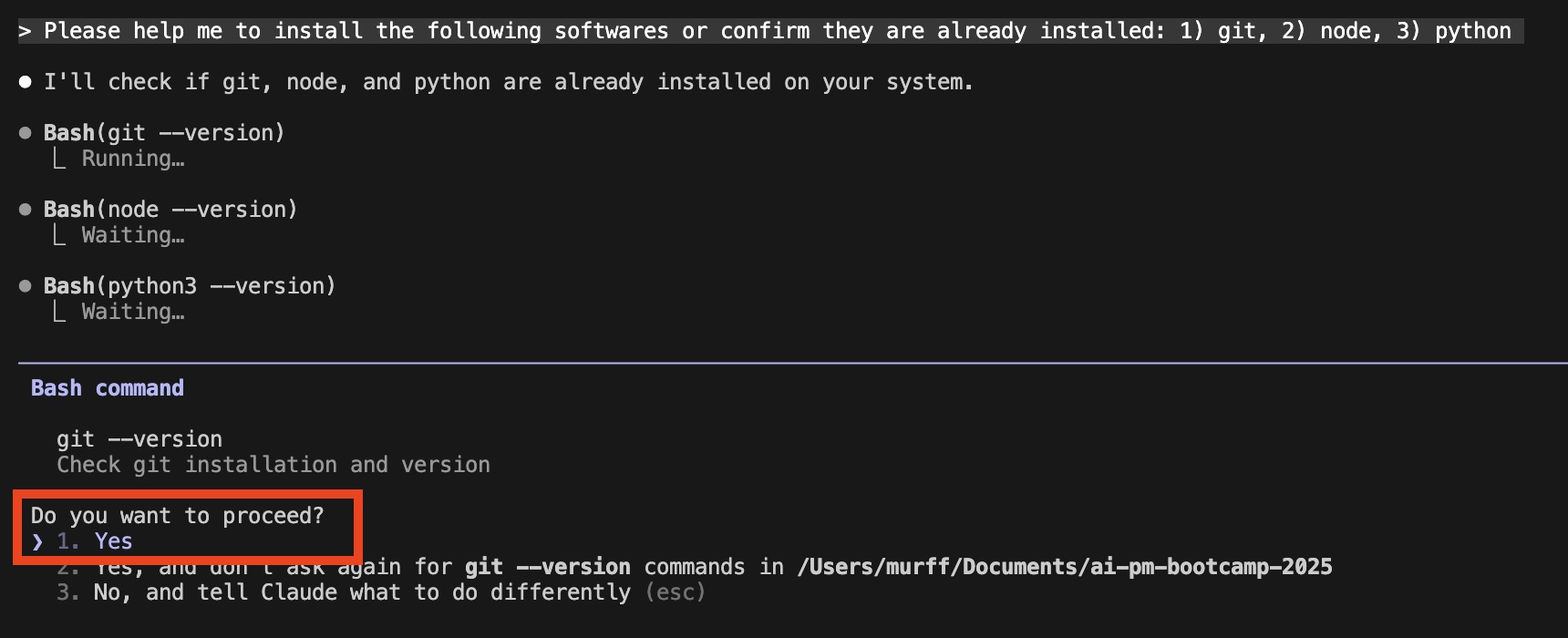
That approval prompt is the permission system at work. Chapter 2 explains how to decide what the agent may do without asking.
Instruction in this course uses Claude Code, but the same model applies to other terminal agents. Install commands are in Computer Setup, and Claude Code and Other Coding Agents maps each Claude Code command to its counterpart. Google’s terminal agent is now Antigravity CLI (agy), which replaced Gemini CLI for personal accounts on June 18, 2026.
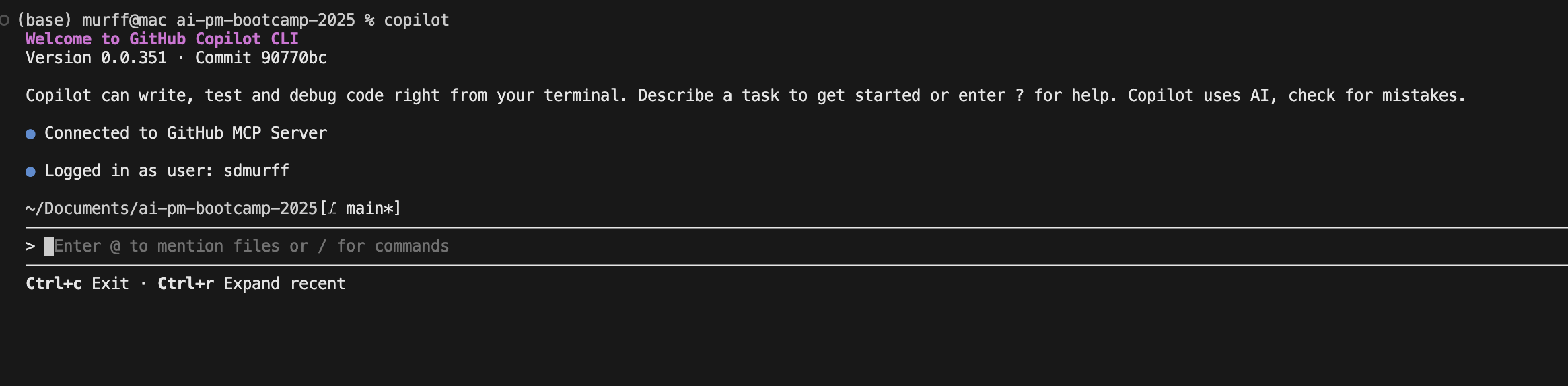
GitHub Copilot CLI (free for verified students with Copilot Student):
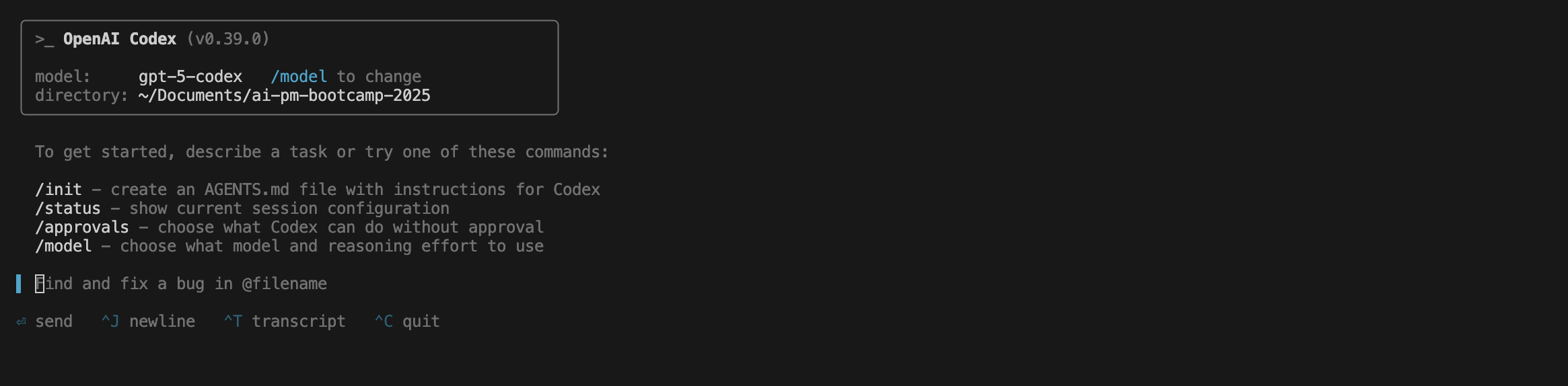
OpenAI Codex:
One engine, many surfaces
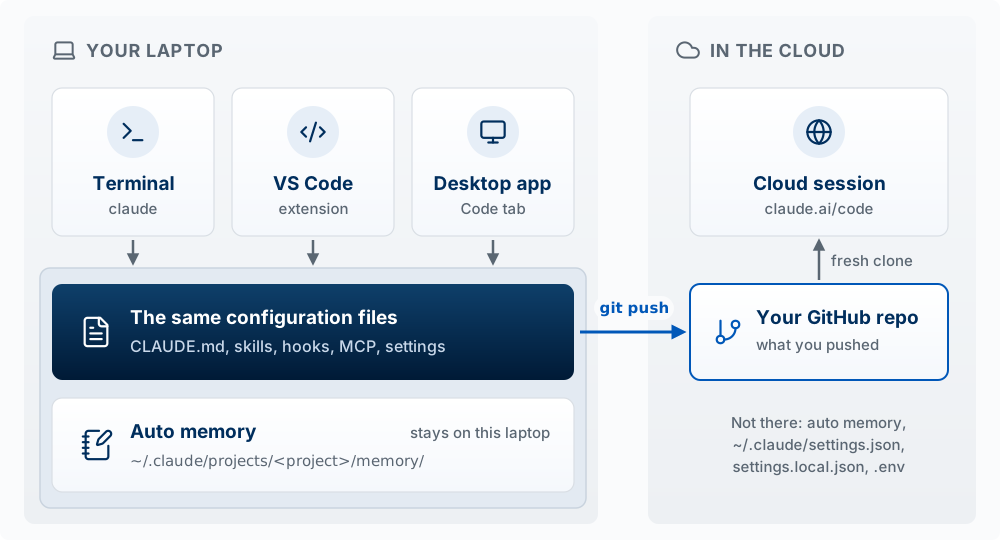
Claude Code is one engine with several front ends. The agent loop, the tools, and the configuration are the same everywhere; what changes is the window around it and a short list of features each one adds or lacks.
| Surface | What it is | Pick it when |
|---|---|---|
| Terminal (CLI) | claude typed in any terminal, including VS Code’s |
You want every feature, scripting (claude -p), or a terminal workflow. The docs call it the most complete surface |
| VS Code extension | A chat panel in the editor, opened from the Spark icon | You want inline diffs next to your code and to stay in the editor |
| Desktop app | The Code tab in the Claude desktop app | You want a visual diff viewer, an app preview, and several sessions side by side |
| Cloud session (claude.ai/code, formerly Claude Code on the web) | A session that runs in Anthropic’s cloud on a fresh clone of your GitHub repo | A long task that should keep running after you close the laptop |
What carries across: the terminal, the VS Code extension, and the desktop app read the same configuration files on your machine: CLAUDE.md, skills, hooks, MCP servers, and settings.json. Chapter 2 explains each of these; for now, what matters is that all three surfaces share them. Learn them once in the terminal and you have learned them for the app. A cloud session is different because it runs on another computer: it sees what you have committed to your repo (saved as a version with git) and pushed (uploaded to GitHub), such as the project CLAUDE.md and .claude/settings.json. It does not see what lives only on your laptop: ~/.claude/settings.json, .claude/settings.local.json, and your .env (the file that holds your secret keys and passwords).
Three gotchas students hit:
- The VS Code extension bundles its own private copy of Claude Code. Installing only the extension does not let you type
claudein a terminal; that needs the standalone install from Computer Setup. Shift+Tabcycles permission modes in the terminal. The desktop app uses a mode menu instead.- Some terminal commands, such as
/permissions, are not available in the desktop app; you edit the settings file instead.
Predict, then check: you add a line to your project’s CLAUDE.md while working in the terminal. Will a session in the VS Code extension see it? Will a cloud session at claude.ai/code see it if you have not committed and pushed the file? (Yes; no.)
Code your first app
Open VS Code and create a new folder for your app.
Agents usually name files for you, but when you name them yourself:
- Use lowercase to avoid cross-platform issues.
- Use hyphens (
-), not spaces or underscores:data-cleaning, notData_Cleaningordata cleaning. - Be descriptive but concise:
customer-surveys-2025.csvbeatscs25.csv. - Avoid special characters: letters, numbers, and hyphens.
- Be consistent: plural folder names (
scripts/,images/).
Common folders: src/ (source code), data/, docs/, tests/, scripts/, configs/, assets/. Name files for what they contain or do (train-model.py, db-settings.json), number notebooks to keep order (01-data-exploration.ipynb), and keep README.md in the root folder.
Make the folder, move into it, and start Claude Code:
mkdir my-project
cd my-project
claude
Turn on the Explanatory output style, which makes Claude add short Insight notes explaining the choices behind the code it writes:
/output-style explanatoryRun ls -la in a second terminal and you will see a new hidden folder named .claude. Claude Code saved your choice to a settings file inside it, .claude/settings.local.json (the local file holds your personal settings for this project and is not meant to be committed). The .claude folder is where a project’s Claude Code configuration lives: settings, and later skills, hooks, and subagents. It is separate from CLAUDE.md, the instructions file Claude reads at the start of every session, which you will write in Chapter 2.
Now paste this prompt into Claude Code:
Build me a simple todo list app using streamlit. Use a json file as the database.
As it works, label the loop: when is it gathering context, when is it acting, and does it check that the app runs before it says it is done?
Streamlit is an open-source Python framework for building interactive, data-driven web apps without front-end code (HTML, CSS, or JavaScript). A Python script becomes a web app; built-in widgets (sliders, dropdowns, checkboxes, file uploaders) collect input; it works with Pandas, Matplotlib, Plotly, and similar libraries; and apps can be hosted on Streamlit Community Cloud.
JSON (JavaScript Object Notation) is a lightweight format for storing and sending data as keys and values:
{"name": "Alice", "age": 20, "isStudent": true}
Here “name” is a key and “Alice” its value. JSON is easy for people to read and for programs to parse, which is why apps use it to exchange data.
Code Your Second App
Spend the next 15 minutes building another application. For now, keep using streamlit (say so in your prompt).
AI Dev Tools Landscape
Claude Code is the primary tool in this course. The wider field, roughly sorted:
| Tool | Type | Best for |
|---|---|---|
| Claude Code | Coding agent (terminal, VS Code, desktop, web) | Full-stack building; the course’s main tool |
| Codex, GitHub Copilot CLI, Antigravity CLI | Coding agents from OpenAI, GitHub, and Google (compared) | The same agent-loop model, different vendors |
| Cursor | AI code editor (a VS Code fork) | Editing with AI built into the editor |
| Lovable, v0 | Browser app builders | Quick UI prototypes from a prompt |
| Figma | Design tool | Mockups and user flows |
When you want to see a UI idea in seconds before building it properly, a browser app builder like Lovable is a reasonable place to start.
Key Concepts
- AIRE: the loop the course runs: Aim (what do you want?), Inform (what is true?), Reason (what’s the best option?), Enact (what happened?). Aim comes first, because without a goal you cannot tell which facts matter.
- Outcome as area: how good a decision turns out is roughly Information × Reasoning × Execution. The factors multiply, so a zero in any one makes the outcome zero.
- The six builder axes: Agentic Workflow, Discovery, Design, Application Architecture, AI Systems, and Launch and Learn. There is no Build axis because a coding agent writes a first version in minutes, so most of the cost has moved to deciding what to build and describing it.
- Product management: identifying customer needs, aligning them with business goals, and leading a cross-functional team to build a product that succeeds in the market.
- Product trio: a product manager who sets vision, strategy, and priorities; a designer who owns usability and the experience; and engineers who turn ideas into working systems.
- AI-Powered PM: a PM who uses AI tools in their own workflow (prototyping, coding, analysis).
- AI Product PM: a PM who builds products where AI is a core feature, and so must know what AI can and cannot do, how to measure it, and how to design around its limits.
- Vibe coding: Andrej Karpathy’s 2025 term for having AI write your code. This course lets the agent write the syntax and keeps the understanding for you.
- The inverted loop: when building is cheap, you build first and work out your thinking on the prototype. The rule: explore to learn, then spec anything you intend to keep.
- Full-stack product builder: one person who, with AI tools, does the work of all three trio roles, including the architecture and engineering work that used to belong to someone else.
- Agent: a model in a loop with tools. Every way of using Claude runs the same models; the harness around the model decides how far it reaches, from a sandbox on Anthropic’s servers (web and mobile chat) to your own files and terminal (desktop app and Claude Code).
- Agent loop: gather context, act, check. When a result is wrong, ask which phase failed: it lacked context, took the wrong action, or skipped the check.
- Tool: a function Claude Code offers the model, with a name, a description, and inputs. The model only writes a tool call; Claude Code checks it against your hooks and permissions, runs it, and adds the result to the conversation.
- Harness: the program around the model that builds each request, checks and runs the tool calls in each reply, adds the results, and manages the context window. Claude Code is the harness and Claude is the model. When an agent fails, ask whether the model or the harness was the limit.
- Command line and terminal: a text-based way to control your computer by typing commands; the terminal is the program that shows it. You need to read the commands an agent runs before you approve them.
- Package manager: a tool that installs, updates, and removes software from the command line (Homebrew on macOS, winget on Windows).
- VS Code: the free code editor used throughout the course, with a file browser, an editor, a terminal, and the Claude Code extension in one window.
- Claude Code, one engine with many surfaces: Anthropic’s coding agent, run from the terminal, the VS Code extension, the desktop app, or a cloud session. The three local surfaces share the same configuration files; a cloud session sees only what you have pushed to GitHub.
.claudefolder: where a project’s Claude Code configuration lives: settings, and later skills, hooks, and subagents.CLAUDE.mdis a separate file.- Explanatory output style: a setting that makes Claude add Insight notes explaining the choices behind the code it writes.