
Data and APIs
Why This Matters
Everything your product remembers lives in a database, and everything it gets from other services arrives through an API (Chapter 7: a defined way for one program to ask another for something). These two mechanics are most of what separates a prototype from a product. A prototype loses its data when you refresh. A product keeps it.
This chapter gives you four models: the data model is the structure every screen depends on; a query is a few blocks that pick rows; the database decides who sees which rows; and every request can fail. It ends with the rules for secrets and for other people’s data.
Design the Data Model First
The model: tables are the nouns of your product and keys are how they relate. The data model is the hardest thing to change later, so it deserves the most thought early.
The building blocks come from E. F. Codd’s relational model, which Postgres (the database Supabase runs) and nearly every business database still follow (Codd 1970). The examples use a problem tracker, an app where users log problems they have noticed and the interviews they hold about each one. It is the running example for most of this chapter, and Chapters 9 and 9b use it again:
| Block | What it is | Problem-tracker example |
|---|---|---|
| Table | One kind of thing your product keeps track of (a noun) | problems |
| Row | One instance of that thing | the problem “Expense tracking is tedious” |
| Column | One fact recorded about every row, with a type (text, number, date, true/false) | title, intensity |
| Primary key | A column whose value is unique to each row, so the row can be pointed at | id |
| Foreign key | A column that holds another table’s primary key, which is how two tables relate | problems.user_id points to a user |
A spreadsheet is a fair picture of one table. It breaks in two places: a database enforces types and rules on every write (a spreadsheet lets you type “seven” into a number column), and most of a database’s usefulness comes from the links between tables, which a spreadsheet does not have.
From description to schema. Take the product description and underline the nouns. “Users log problems they have noticed, and record interviews with people who have each problem.” The nouns are users, problems, and interviews. Then ask of each pair: how many of one go with one of the other?
- One user has many problems, so
problemsgets auser_id. - One problem has many interviews, so
interviewsgets aproblem_id. - If it were many-to-many (one interview could cover several problems), you would add a third table,
interview_problems, with one row per pairing.
The whole design is called the schema:
users (from Supabase Auth)
├── id
├── email
└── created_at

problems
├── id
├── user_id → users.id
├── title
├── description
├── frequency
├── intensity
└── created_at

interviews
├── id
├── problem_id → problems.id
├── interviewee_role
├── notes
├── key_quotes
└── conducted_at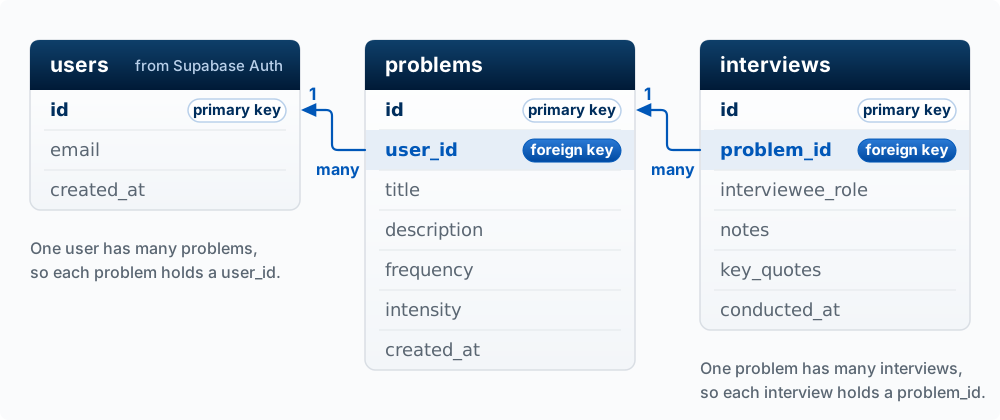
The same design written as SQL (the language databases are given instructions in) is worth being able to read. Each line is a column, its type, and its rule:
CREATE TABLE problems (
  id UUID PRIMARY KEY DEFAULT gen_random_uuid(),
  user_id UUID REFERENCES auth.users(id),
  title TEXT NOT NULL,
  description TEXT,
  frequency TEXT CHECK (frequency IN ('daily', 'weekly', 'monthly', 'rarely')),
  intensity INTEGER CHECK (intensity BETWEEN 1 AND 10),
  created_at TIMESTAMP DEFAULT NOW()
);

CREATE TABLE interviews (
  id UUID PRIMARY KEY DEFAULT gen_random_uuid(),
  problem_id UUID REFERENCES problems(id) ON DELETE CASCADE,
  -- ...other fields
);
UUID is a long random id, and gen_random_uuid() makes a new one for each row. TEXT holds text, INTEGER a whole number, and TIMESTAMP a date and time. NOT NULL means the column may not be left empty, and DEFAULT gives the value used when none is sent. REFERENCES makes a foreign key: the database refuses an interview whose problem_id does not exist. ON DELETE CASCADE means that if a problem is deleted, its interviews are deleted too. CHECK rejects a bad value no matter which screen or script sent it.
Why it is hard to change. Once real rows sit in a table, every screen, query, and report depends on its shape. Splitting name into first and last name later means rewriting every existing row and every piece of code that reads it, and guessing for rows like “Madonna”. Code can be rewritten in an afternoon; data has to be migrated. So sketch the schema before you build, and include it in your sprint plan when a sprint adds tables.
Change it with migrations. A migration is a file of SQL that makes one change to the schema (“add a status column to problems”), saved in your repo and applied in order. Ask the agent to write a migration instead of adding columns by clicking in the Supabase Table Editor. A migration is reviewable, repeatable on a fresh database, and in your git history; a click is none of those.
Once real people use your app, stop developing against its database. On day one your laptop and the live site can share one Supabase project, because there is nothing to lose. After the first real users sign up, every unfinished feature you run locally, every seed script (a script that fills the database with made-up sample rows), and every agent you let click through the app acts on their data, often with the secret key, which skips the database’s access rules (row level security, or RLS, later in this chapter). Develop against a copy you can wipe and refill with made-up data: a second Supabase project used only for development, or a local copy started with supabase start (it needs Docker). Your migrations give the copy the same tables as production, which is one more reason to write them. Keep the production keys out of .env.local, so that no command reaches the live database unless you chose it on purpose. The Agent Team Kit states the rule in develop against a disposable copy, and its disposable environment guide covers the details, including how to test real AI calls against the copy. Chapter 9 shows how your laptop, previews, and production each choose a database.
Write one sentence describing your product. Underline the nouns, decide which are tables, and for each pair decide one-to-many, many-to-many, or unrelated. Sketch the schema as a tree like the one above. Then ask Claude Code to compare your sketch with the tables your app actually has, and explain every difference.
Asking the Database a Question
The model: every read is built from the same few blocks. Choose the columns, choose the table, filter the rows, sort them, and (when the answer spans two tables) join. You do not need to write SQL. You need to predict which rows a described query returns, because that is how you catch an agent’s query that returns the wrong ones.
| Block | SQL keyword | What it does |
|---|---|---|
| Choose columns | SELECT |
Which facts to return. * means all of them |
| Choose the table | FROM |
Where to look |
| Filter rows | WHERE |
Keep only rows that pass a test; combine tests with AND and OR |
| Sort | ORDER BY |
Put rows in order; ascending unless you say DESC |
| Limit | LIMIT |
Keep only the first N rows after sorting |
| Join | JOIN ... ON |
Pair each row with matching rows in another table |
The database applies them in a fixed logical order: find the table (and join), filter the rows, pick the columns, sort, then limit. A query that matches nothing returns an empty list, which is not an error.
Worked example. Here is a small problems table (with names in place of user ids so it is easier to read):
| id | owner | title | frequency | intensity |
|---|---|---|---|---|
| 1 | ana | Expense tracking is tedious | weekly | 7 |
| 2 | ana | Group chat scheduling chaos | daily | 8 |
| 3 | ben | Lost receipts | monthly | 4 |
| 4 | ben | Finding a study room | daily | 6 |
| 5 | cara | Splitting rent | monthly | 9 |
| 6 | ana | Forgetting to call home | weekly | 3 |
“Show the title and intensity of Ana’s problems that score 5 or higher, most intense first”:
SELECT title, intensity
FROM problems
WHERE owner = 'ana' AND intensity >= 5
ORDER BY intensity DESC;
The filter keeps rows 1 and 2 (row 6 fails the intensity test), the sort puts 8 before 7, and the result is two rows: Group chat scheduling chaos, 8 and Expense tracking is tedious, 7.
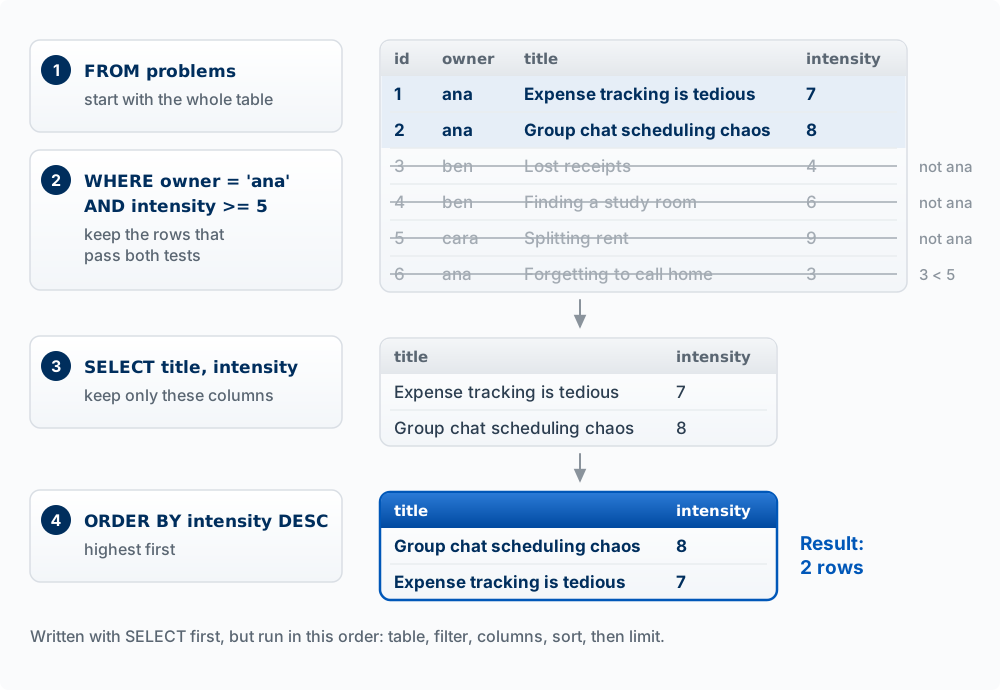
Your app’s code says the same thing in the Supabase client’s syntax, block for block:
supabase.from('problems')                      // FROM
  .select('title, intensity')                  // SELECT
  .eq('owner', 'ana').gte('intensity', 5)      // WHERE
  .order('intensity', { ascending: false });   // ORDER BY
Joins. Add an interviews table:
| id | problem_id | interviewee_role |
|---|---|---|
| 10 | 1 | student |
| 11 | 1 | parent |
| 12 | 4 | student |
SELECT problems.title, interviews.interviewee_role
FROM problems
JOIN interviews ON interviews.problem_id = problems.id;
The join makes one result row for each matching pair: Expense tracking / student, Expense tracking / parent, Finding a study room / student. Problem 1 appears twice because it has two interviews. Problems with no interviews disappear entirely; a LEFT JOIN would keep them, with empty interview columns. In the Supabase client the same join is written as a nested select, .select('*, interviews (*)'), which returns each problem with a list of its interviews inside.
The other verbs. Reading is one of four operations, together called CRUD: Create (INSERT), Read (SELECT), Update (UPDATE), Delete (DELETE). Update and delete use the same WHERE block to pick their rows, which is why an update or delete with a missing or wrong filter can change or erase every row in a table with one line: DELETE FROM problems with no WHERE removes every row.
Indexes, in one paragraph. To answer WHERE owner = 'ana', the database either reads every row or uses an index: a sorted lookup list it keeps on a column, like the index at the back of a book, so it can jump to the matching rows. Indexes make reads on large tables fast and make each write slightly slower. At student scale you rarely need to think about them; when a page gets slow as data grows, a missing index is the first thing to check. Markus Winand’s free Use The Index, Luke! is the reference (see Builder Resources).
Using the two tables above, predict the result of each before opening the answers.
SELECT title FROM problems WHERE frequency = 'daily' ORDER BY intensity;SELECT title FROM problems WHERE intensity > 9;- You ask the agent for “each user’s most painful problem.” It writes
SELECT owner, title FROM problems ORDER BY intensity DESC LIMIT 1;What comes back, and what is wrong? - How many rows does the join above return if you add an interview for problem 5?
- Finding a study room, then Group chat scheduling chaos. Sorting is ascending by default, so 6 comes before 8.
- No rows. Nothing scores above 9 (Splitting rent is exactly 9). An empty result, not an error.
- One row, cara / Splitting rent: the highest-intensity problem overall. “Each user’s” needs one row per user (grouping by owner), which
LIMIT 1cannot give. - Four. Problem 5 now has a matching interview, so it gains one row.
Row Level Security: Enforce Access Where the Data Lives
The model: in a Supabase app the browser queries the database directly with a key everyone can see (Chapter 7). So the database is the only place access can be enforced. Row level security (RLS) enforces access there. Hiding a button enforces nothing.
A policy is a rule attached to a table that says which rows a request may touch, based on who is asking. The clearest way to picture it: the database silently adds the policy as an extra WHERE filter to every query. With the policy below, Ana’s SELECT * FROM problems behaves as if it said WHERE user_id = <Ana's id>, so she gets only her own rows no matter what the browser asked for.
ALTER TABLE problems ENABLE ROW LEVEL SECURITY;

-- Read: users see only their own problems
CREATE POLICY "Users can view own problems"
ON problems FOR SELECT
USING (auth.uid() = user_id);

-- Write: users can only create problems that belong to themselves
CREATE POLICY "Users can insert own problems"
ON problems FOR INSERT
WITH CHECK (auth.uid() = user_id);
auth.uid() is the id of the signed-in user making the request, read from the session token the database can verify. USING filters which existing rows are visible; WITH CHECK tests the new row being written. Updates and deletes get policies of the same form.
Without RLS, anyone holding the publishable key, which means anyone who has loaded your site, can read and change every row in the table, signed in or not. With RLS on and no policies, nobody can read anything through the public key, which is the usual cause of “my query returns an empty list.” Both are worth recognizing on sight. The secret key bypasses RLS completely, which is exactly why it must never reach the browser.
The same idea protects files. Supabase Storage keeps uploads in buckets, either public (anyone with the link can read, fine for profile pictures) or private, and a private bucket’s access is set with policies of the same form, for example “a user may read files in the folder named with their own id.”
Worked example. A peer-feedback app shows each student only their own feedback, because the page asks for .eq('student_id', user.id). RLS is off. A student opens developer tools, edits the request to remove the filter, and downloads every student’s feedback. The page’s filter was a convenience; a USING (auth.uid() = student_id) policy would have enforced the restriction.
Create two accounts in your app, A and B. As A, create a record. Sign in as B and try to see, edit, or delete A’s record: through the screens, by changing ids in the address bar, and by asking Claude Code to write a short script that queries the table with your publishable key while signed in as B. If any attempt succeeds, you have found an authorization hole. Fix it with a policy, then run the drill again. This is also a standard check in the Peer Code Review.
Requests Are Contracts That Fail
The model: an API call is a request with a defined input and output, and it can fail for many reasons: network, permission, limits, bad input, a bug on the other side. Good apps expect failure and tell the user what happened.
Most products also use other companies’ APIs: Stripe for payments, Resend or SendGrid for email, Twilio for text messages, Anthropic for models. They all work the same way, over HTTP, the protocol your browser uses for every page. Chapter 7 shows the parts of one, the Claude API, in Figure 13.4.
A request has a method (what kind of action), an address (which endpoint), headers (metadata, including who is calling), and sometimes a body (the data). A response has a status code (how it went) and usually a body.
Words used in this section
| Word | What it means |
|---|---|
| Request | A message the browser sends to a server asking it to do one thing. It has a method, an address, headers, and sometimes a body |
| Response | The server’s reply to one request: a status code and usually a body |
| Method | The first word of a request, naming the kind of action: GET reads, POST creates, PATCH changes, DELETE removes |
| Endpoint (address) | One address on a server that answers requests, such as /api/tasks. A method plus an address names one action: POST /api/tasks adds a task |
| Header | A labeled line sent with a request or response. Authorization: Bearer ... is the header that carries the user’s token |
| Body | The data a request or response carries, usually written as JSON |
| JSON | A plain-text format for data: labels and values inside curly braces, such as { "task_text": "Buy groceries" } |
| Status code | The three-digit number at the start of every response. 2xx means it worked, 4xx means the request was the problem, 5xx means the server was the problem. The table below lists the common ones |
| Network error | The request never reached the server, or the response never came back, for example because the Wi-Fi dropped. There is no status code |
| Timeout | A time limit your code sets for waiting. When it passes with no response, the code stops waiting and treats the request as failed |
The four common methods:
| Method | Purpose | Example |
|---|---|---|
GET |
Retrieve data | Get user profile |
POST |
Create new data | Create new order |
PUT / PATCH |
Update existing data | Update user settings |
DELETE |
Remove data | Delete a post |
The status codes you will see most, and what each should show the user:
| Code | Meaning | What usually happened | What the user should see |
|---|---|---|---|
200 |
OK | It worked | The result |
201 |
Created | A new record was saved | The new record |
400 |
Bad request | Missing or invalid input | What to fix in the form |
401 |
Unauthorized | Not signed in, or the session expired | “Please sign in again” |
403 |
Forbidden | Signed in, but not allowed to do this | “You don’t have access to this” |
404 |
Not found | Wrong address, or the record is gone | “This no longer exists” |
429 |
Too many requests | You hit a rate limit (a cap on calls per minute) | “Busy, try again in a moment,” and a delayed retry |
500 |
Server error | A bug or outage on the server | “Something went wrong on our end” |
Two failures have no status code at all: the network drops (the request never arrives) and the request hangs until it times out. A spinner that never stops is usually one of these.
The figure and the messages below use the to-do app from Chapter 7, whose code you have already read: a user adds a task, and the browser sends it to /api/tasks. The worked example at the end of this section returns to the problem tracker and saves a problem to /api/problems.
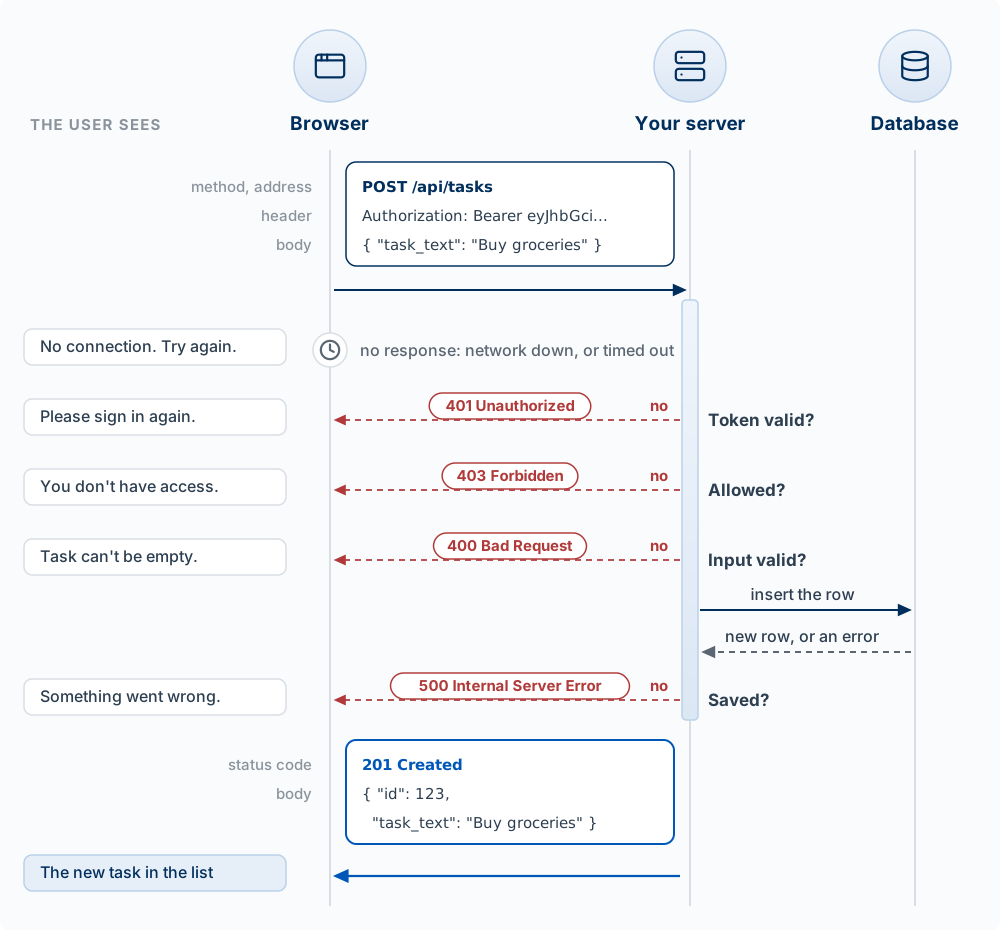
One save, as the actual messages. Here is the save from the figure, slightly shortened, in the same form as Chapter 7’s messages. Maya adds “Buy groceries.” The browser sends:
POST https://your-app.vercel.app/api/tasks
Authorization: Bearer eyJhbGciOiJIUzI1NiIs...
Content-Type: application/json

{ "task_text": "Buy groceries" }
Every check passes, the database stores the row, and your server answers:
201 Created
Content-Type: application/json

{ "id": 123, "task_text": "Buy groceries", "completed": false }
Now the same request with a token that expired and was not replaced (a tab left open for hours, for example). Your server’s first check fails, so it never touches the database:
401 Unauthorized
Content-Type: application/json

{ "error": "Not signed in" }
The status code is set by the HTTP standard; the body is whatever your server’s code chooses to send. The browser reads the code to decide what to show, so the user sees “Please sign in again” and the text they typed stays in the box.
When the browser writes to Supabase directly (step 3 in Chapter 7), Supabase sends the same kinds of answers: 401 when the token is expired or invalid, and 403 when row-level security refuses a signed-in user’s insert (the message reads new row violates row-level security policy). Reads work differently. Row-level security filters a read instead of refusing it, so a read the rules block returns 200 with an empty list. To the code, “you may not see these rows” and “there are no rows” look the same.
Your app is the customer, the API is the waiter, the server is the kitchen. You order from a fixed menu (the endpoints), and the waiter brings back the dish or tells you why not. Where it breaks: a real waiter comes back to tell you the kitchen is out of fish. A request may never come back at all, and nothing tells you unless your code set a time limit.
Worked example. Back in the problem tracker, here is a save that handles failure. fetch is the browser’s built-in function for sending a request. try { ... } catch { ... } runs the code in the first braces, and if that code throws an error, jumps to the code in the second. The key fact: fetch throws an error only when no answer came back at all. A 403 or a 500 is still an answer, so the code has to check response.ok (true for any 2xx) itself.
try {
  const response = await fetch('/api/problems', {
    method: 'POST',
    headers: { 'Content-Type': 'application/json' },
    body: JSON.stringify({ title })
  });
  if (!response.ok) {
    if (response.status === 401) showError('Please sign in again.');
    else if (response.status === 429) showError('Busy. Try again in a minute.');
    else showError('Could not save your problem. Your text is still here.');
    return;
  }
  const problem = await response.json();
  addToList(problem);
} catch {
  showError('No connection. Check your internet and try again.');
}
The version agents often write by default stops after await response.json() and assumes the happy path. In that version a failed save looks exactly like a successful one, or leaves a blank screen.
Calling another company’s API. The same rules apply, plus one: the call that carries a secret key goes from your server, never from the browser. Your browser calls your own endpoint, and your endpoint calls the outside API. Calling a model is the most important case of this in the course, with its own costs and failure modes; Chapter 11 (Models in Your Product) covers it and has the current code.
Pick one button in your app that saves something. For each failure in the status table, plus “no network,” predict what the user sees right now. Then test two: turn off Wi-Fi and click it, and sign out in another tab and click it. Ask Claude Code to make every case show a clear message without losing what the user typed.
Secrets and Sensitive Data
The model: an API key is a password. Personal and client data has rules about where it may go, including into prompts and logs.
Secrets. Anyone holding a secret key can act as your product: spend your money on a model API, issue refunds through Stripe, read every row in your database. A leaked key can be used until you notice the bill. Keys come in two kinds, and the difference decides where each may live:
| Key | Example | Where it may live | Why |
|---|---|---|---|
| Public by design | Supabase publishable key (formerly anon key), Stripe publishable key (pk_...) |
Browser code, NEXT_PUBLIC_ variables |
It can do only what your rules allow (RLS), or what the provider permits from a browser (Stripe: collecting card details) |
| Secret | Supabase secret key (formerly service role key), Anthropic API key, Stripe secret key (sk_...), Resend key |
Server code only, in environment variables | It bypasses your rules or spends your money |
Secrets live in environment variables: values set outside the code, in .env.local on your machine (which git ignores) and in the Vercel project settings for the live site. In Next.js, any variable whose name starts with NEXT_PUBLIC_ is copied into the browser code, so a secret must never have that prefix.
# .env.local (never commit this file)
NEXT_PUBLIC_SUPABASE_URL=https://your-project.supabase.co    # public
NEXT_PUBLIC_SUPABASE_PUBLISHABLE_KEY=sb_publishable_...      # public by design
ANTHROPIC_API_KEY=sk-ant-...                                 # secret: server only
STRIPE_SECRET_KEY=sk_live_...                                # secret: server only
// DANGER: this runs in the browser, so this key is now public
const client = new SomeAPI({ apiKey: 'sk-abc123' });
// Instead: the browser calls your own endpoint, which holds the key
const response = await fetch('/api/summarize', { method: 'POST', body: JSON.stringify({ text }) });If a secret leaks (pushed to GitHub, pasted in Slack, shipped to the browser), deleting it from the code is not enough: it is in the history and may already be copied. Rotate it: create a new key in the provider’s dashboard and revoke the old one.
When a key does not work, check its shape; do not print it. A copied key is often wrong in a way you can see without reading it: the dashboard showed a shortened version ending in ..., or the copy picked up a trailing space or the period from the sentence around it. Ask the agent to report the key’s length, which kinds of characters it contains, and whether it starts with the provider’s prefix (sk-ant-, sk_live_), never the value itself. Anything printed in a terminal stays in the conversation, in logs, and in screenshots (check a secret’s shape, never print it).
Sensitive data. Some data has rules about where it may go, whatever your code can do with it:
- Personal data: names, emails, phone numbers, locations, anything that identifies a person.
- Student records: grades, enrollment, feedback. In the United States these are covered by FERPA, the federal law on education records.
- Client data: anything a company gives you for a project, usually under an NDA or contract that limits who may see it, including which outside services.
- Credentials: passwords and keys, which should never be stored in plain text or shown back.
The rule builders most often miss: sending data somewhere is copying it to that company’s servers. A model prompt, an analytics event, an error report, a console.log on the server (which is written to Vercel’s logs), and the files you let Claude Code read all leave your database. Before data goes somewhere, ask: does the user or client know it goes there, does the contract allow it, and does it need to go at all?
Practical rules for a student product:
- Collect only what the feature needs.
- Keep personal data in your database, behind RLS, and nowhere else.
- Log ids and what happened (“user 42: save failed, 403”), never the person’s content, email, or the full request.
- Strip or replace names before sending text to a model when the task does not need them.
- Do not put real client or student data into any AI tool, including Claude Code, until you have checked the contract and the tool’s data terms. Use made-up sample data while building.
Each of these leaks something. Say what, and where it ends up: (a) console.log('signup', req.body) in a sign-up route; (b) a “summarize my interview notes” feature that sends full transcripts, names included, to a model; (c) NEXT_PUBLIC_STRIPE_SECRET_KEY in .env.local; (d) an analytics event profile_updated that includes the user’s new phone number. Then search your own repo for console.log and check what each one prints.
Key Concepts
- Table, row, column: a noun of your product, one instance of it, and one fact recorded about every row, with a type.
- Primary key / foreign key: a row’s unique id, and a column holding another table’s primary key. The table on the “many” side of a relationship holds the foreign key.
- Schema: the whole design of tables and relationships. It is the hardest thing to change later, because real rows have to be migrated, so sketch it before you build.
- Migration: a SQL file in your repo that makes one schema change, applied in order. Unlike a click in the Table Editor, it is reviewable, repeatable on a fresh database, and in git.
- Develop against a disposable copy: once real people use the app, develop against a second Supabase project or a local copy filled with made-up data, and keep production keys out of
.env.local. - Query blocks:
SELECTcolumns,FROMa table,WHEREfilter,ORDER BYsort,LIMIT, andJOIN. A query that matches nothing returns an empty list, which is not an error. - Join: one result row for each matching pair across two tables; rows with no match drop out unless you use a
LEFT JOIN. - CRUD: Create, Read, Update, Delete. Update and delete pick rows with the same
WHERE, so a missing filter changes or erases every row. - Index: a sorted lookup list on a column that makes reads fast and each write slightly slower; the first thing to check when a page slows as data grows.
- RLS (Row Level Security): policies in the database that decide which rows each request may touch, as if an extra
WHEREwere added to every query. In a Supabase app it is the only place access can be enforced. - RLS on with no policies: nobody can read anything through the publishable key, the usual cause of an empty list. A read the rules block returns 200 with an empty list, not an error.
- Request and response: a request has a method, an address, headers, and sometimes a body; a response has a status code and usually a body.
- Status codes: 2xx means it worked, 4xx means the request was the problem (401 not signed in, 403 not allowed, 429 rate limit), and 5xx means the server was the problem. Each calls for a different message to the user.
- Requests fail: a network error or timeout returns no status code at all.
fetchthrows only when no answer came back, so code must checkresponse.okand show the user what happened without losing what they typed. - Public vs. secret keys: publishable keys are sent to the browser and can do only what your rules allow; secret keys bypass your rules or spend your money, so they stay on the server. A call that carries a secret key goes from your server, never the browser.
- Environment variables: settings kept outside the code, in
.env.localand Vercel’s settings;NEXT_PUBLIC_ones are copied into the browser. - Rotate a leaked key: deleting it from the code is not enough. Create a new key in the provider’s dashboard and revoke the old one.
- Sensitive data: personal, student, and client data may go only where its rules allow. Sending data to a model, a log, or an analytics event copies it to that company’s servers.