
Testing the Design
Why This Matters
You’ve built something. It works, at least on your machine. But you do not know whether it solves your users’ problem until you watch real people try to use it.
The model: give about five real users a real task and watch what they do. Behavior shows the problem; opinions hide it. Fix the worst problem, then test again.
This chapter teaches you to run a usability test, synthesize what you saw without overreacting, and then fix the problems and test again.
This is triangulation from Finding and Validating the Problem in practice. One user shows you one partial view of the problem. Watch enough of them and the full problem appears. No single tester, however loud or however pleased, is proof on their own.
The Curse of Knowledge
You built this thing. You know exactly where every button is, what every label means, why the workflow goes left to right. Your users don’t. They’re seeing it for the first time, bringing different mental models, and expecting it to work like other things they’ve used (Jakob’s Law, from Interface and Flow).
This is the curse of knowledge: once you know something, it’s nearly impossible to imagine not knowing it (Heath and Heath 2007). The only way around it is to watch people who don’t know.
The same curse applies to the agent that built your app. It knows what every element was meant to do, so asking it “is this usable?” gets you the builder’s view. It can review your screens against principles; it cannot be a first-time user.
The Design Canon Behind This
Two ideas from design shape what you are testing for. Don Norman’s The Design of Everyday Things (Norman 2013) gives you affordances and signifiers. An affordance is an action a thing makes possible: a door can be pushed or pulled. A signifier is the visible cue that tells you which action to take: a door you push has a flat plate, a door you pull has a handle. Good design makes the right action obvious. When users hesitate, a signifier is usually missing. Steve Krug’s Don’t Make Me Think (Krug 2014) gives you the standard to test against: every moment a user has to stop and figure out your interface is friction you can remove.
This matters more with AI. It will generate a screen that looks polished in seconds, but polish is not usability, and a good-looking interface can still make people think. Watching real users is exactly what reveals the difference, and no AI can do it in your place.
From Don Norman, The Design of Everyday Things (first published 1988; revised edition 2013), and Steve Krug, Don’t Make Me Think (first published 2000; revised edition 2014).
Norman’s other principles (mapping, constraints, feedback, and the conceptual model) and Nielsen’s ten usability heuristics, which give you a checklist to review a screen before a test, are in Design Fundamentals.
What is Usability Testing?
Usability testing is observing real users attempt to accomplish real tasks with your product. It’s not a demo. It’s not a survey. It’s watching someone struggle (or succeed) while you stay quiet and take notes.
Garry Tan, president and CEO of Y Combinator, gives founders the same instruction:
The point of a startup is to make usable technology for others. When you make software, you have to watch at least 10 people use it. Sit next to them and say absolutely nothing. Force yourself to marinate in the failure of your product design.
Every version 1 of any software…— Garry Tan (@garrytan) October 23, 2024
His ten users fit the five-user rule below: ten sessions run best as two rounds of five, with a fix between them.
What usability testing reveals: - Where users get stuck or confused - What they expect vs. what they get - Whether users understand your core value proposition - What terminology confuses them - Which features they ignore completely
What usability testing doesn’t reveal: - Whether they’ll pay for it (that’s validation) - Whether the market is big enough (that’s research) - What features to build next (that’s strategy)
Why five users
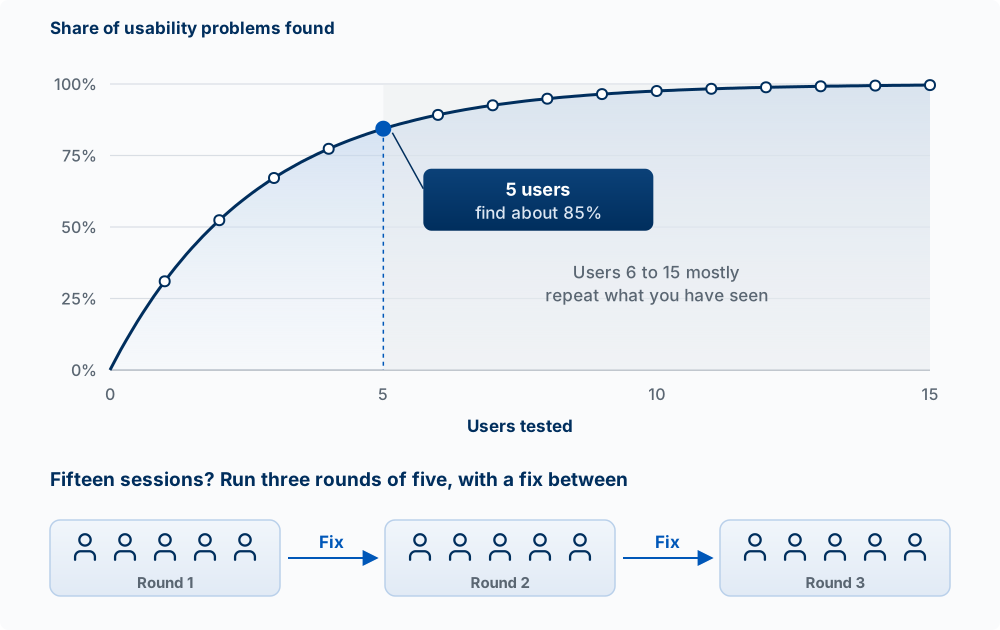
Jakob Nielsen’s rule of thumb, from a model he built with Thomas Landauer (Nielsen and Landauer 1993), is that a test with about five users finds most of the usability problems in a design, around 85 percent in his 2000 summary. The building blocks of the argument:
- Each user runs into some share of the problems. The first user shows you a lot you did not know.
- Each additional user mostly repeats problems you have already seen, so new findings fall off fast.
- So the better use of fifteen sessions is three rounds of five, with a fix between each round. Fixes can fail or create new problems, and only a retest shows that.
The rule assumes your testers are the same kind of user. If you have two very different groups (students who post shifts and managers who approve them, say), test three or four from each.
An analogy: proofreading. The first fresh reader catches many of the typos; the fifth mostly finds the same ones. Where it breaks: typos are visible to anyone, while a usability problem only appears to someone with the user’s goal and background, which is why the testers have to be real users.
Running a Usability Test
Before the Session
- Define your goals: What questions are you trying to answer?
- Prepare 3-5 tasks: Specific things you want them to try, written as a goal (“Get your Thursday shift covered”), never as instructions (“Click Give away”)
- Recruit the right people: They should match your target user
- Set up recording: Screen + audio (get permission)
- Prepare your script: Consistent intro and task instructions
The script below asks the tester to think aloud: to say what they are looking at, looking for, and expecting as they work. Their words tell you why they did what you saw them do.
The Test Script Structure
INTRO (2 minutes)
"Thanks for helping me test this. I'm trying to improve [product],
and watching you use it helps me find problems. I'm testing the
product, not you, there are no wrong answers. Please think out loud
as you go. I'll mostly stay quiet and take notes."

WARM-UP (2 minutes)
"Tell me a little about yourself. Have you ever [relevant experience]?"

TASKS (15-20 minutes)
"Imagine you want to [scenario]. Go ahead and try to do that."
[Stay quiet. Observe. Take notes.]

FOLLOW-UP (5 minutes)
"What was that experience like for you?"
"What was most confusing?"
"When you paused on [screen], what were you looking for?"

WRAP-UP (1 minute)
"Thank you so much. This was really helpful."
The follow-up questions ask about what just happened. Avoid “What would you change?”: it invites a design opinion, and opinions are exactly what this method is built to get past.
During the Session
Do: - Stay silent while they work - Let them struggle (it’s painful, but necessary) - Take detailed notes on behavior, not just outcomes - Note where they pause, click wrong things, or seem uncertain - Ask “What are you thinking?” if they go quiet
Don’t: - Help them unless they’re completely stuck - Explain why something works that way - Defend your design decisions - Lead with questions like “Did you see the button in the corner?” - Ask “Do you like it?” (opinions aren’t data)
Find the mistakes in this session transcript. The tester is trying to post a shift on ShiftSwap.
Builder: “Okay, so to post a shift you’d tap Give Away, the green button at the bottom.”
Tester: “Oh, okay.” (taps it) “Hm, what’s ‘eligible coworkers’?”
Builder: “That’s everyone trained on the same station. It’s filtered by the database.”
Tester: “Got it. Yeah, this is nice.”
Builder: “Great, so you’d use it?”
Name at least three things the builder did that cost real information, and rewrite the task prompt so it gives a goal instead of the answer.
What to Observe
| Observe | What It Tells You |
|---|---|
| Task completion | Can they do the core thing? |
| Time on task | Is it faster or slower than expected? |
| Error rate | Where do mistakes happen? |
| Recovery | Can they fix their mistakes? |
| Verbal comments | What frustrates or delights them? |
| Facial expressions | Where do they show confusion? |
| Click patterns | What do they try first? |
Record what people did before what they said. A tester who says “this is easy” after three wrong taps has told you two things, and the taps are the reliable one. The states from Interface and Flow are good places to watch closely: the first empty screen, the wait while something loads, and any error.
Synthesizing Feedback
After a round of about five tests, you’ll have a lot of notes. Time to find patterns.
The Affinity Mapping Process
- Write each observation on a sticky note (or digital equivalent)
- Group similar observations together
- Name each group (these become your themes)
- Prioritize by frequency and severity
Claude Code is useful here once the observing is done: paste in your notes and ask it to group them and count how many testers hit each problem. Check its grouping against your notes; it was not in the room.
Severity Scoring
| Severity | Description | Example |
|---|---|---|
| Critical | Users cannot complete core task | Can’t sign up |
| Major | Task is difficult but possible | Takes 5 minutes to find main feature |
| Minor | Annoying but doesn’t block | Date field rejects “10/14” the first time; user retypes it and continues |
| Cosmetic | Polish issue | Icon looks dated |
Severity depends on what a problem does to the task, not on what kind of problem it is. A confusing label on the core action (“Submit” where the user expected “Post shift”) can be Critical if testers stop there. Labels are part of the interface.
Fix critical and major issues first. Don’t let minor issues distract you from what matters.
Fix the top issue and retest
The method depends on repeating this loop:
- Pick the one or two highest-severity problems.
- Fix them, ideally with a precise prompt that names the problem and the principle (see Directing an Agent on Design).
- Run the same tasks with a new round of users.
- Check that the problem is gone and that the fix did not create a new one.
Iteration Frameworks
The Build-Measure-Learn Loop (Ries 2011)
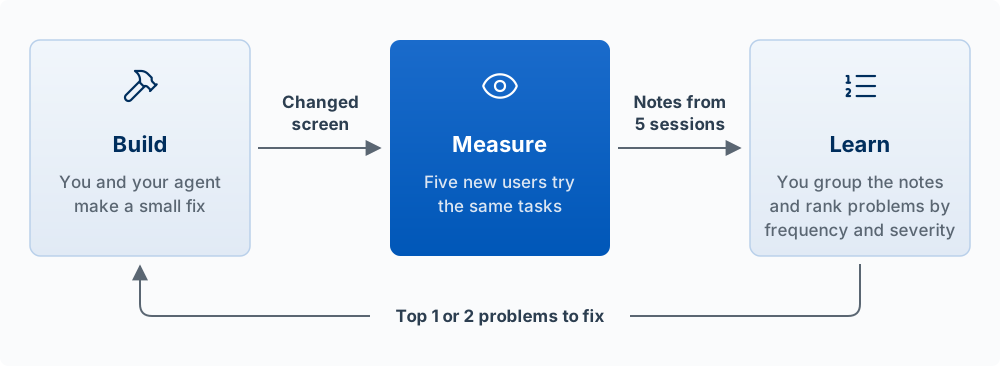
Each cycle should be as fast as possible: - Build: Make a small, testable change - Measure: Observe users with the change - Learn: Decide what to do next
Common mistake: Building too much before measuring. Ship smaller changes so you learn sooner. In usability terms, the retest loop above is one turn of this cycle.
When to Pivot vs. Persevere
To pivot is to change a basic part of the product, such as the problem, the user, or the core solution, while keeping what you have learned. To persevere is to keep the same direction and improve how well it works.
Consider pivoting when: - Users consistently don’t understand the value - The problem you’re solving isn’t painful enough - Multiple users suggest a different core use case - You’ve iterated 3+ times with no improvement
Consider persevering when: - Users struggle but eventually succeed - Issues are about UX, not core value - Fixes are straightforward (labeling, placement) - Users express desire for the product
Responding to Feedback Without Overreacting
Not all feedback is equal. One user’s opinion isn’t a mandate.
Process feedback through these filters:
- Frequency: Did multiple people say this?
- Severity: Does it block the core task?
- Source: Is this from your target user?
- Alignment: Does it fit your product vision?
Signs that feedback is misleading: - “I would want…” (hypothetical) - “My friend would love…” (secondhand) - Feature requests without a problem statement - Requests that conflict with your core value proposition
Useful responses to feedback: - “That’s interesting, tell me more about when that would happen.” - “What are you trying to accomplish when you need that?” - “How do you handle that today?”
Testing at Scale
Once your product has users, you can test at scale:
| Method | Best For | Sample Size |
|---|---|---|
| Usability testing | Deep understanding | About 5 per round, repeated |
| A/B testing (half your users see version A, half see version B, and you compare a number such as sign-ups) | Optimizing metrics | 1000+ users |
| Surveys | Broad sentiment | 100+ users |
| Analytics (counts of what users do, recorded automatically) | Behavior patterns | All users |
| Session replay (a recording of one user’s clicks and scrolling, played back later) | Specific issues | As needed |
| In-app feedback button | Bugs and confusion, reported when they happen | Any user who clicks it |
| Agent walk-through | Steps where the app does something a user would not expect | Before each round with people |
Start with usability testing. First learn why people struggle by watching a few of them; only then is it worth measuring how many struggle across many users. Analytics and A/B testing come back in Measuring What Matters.
The last two rows suit a product built with agents. A feedback button that sends, along with the user’s sentence, the page they were on, a screenshot, and the recent errors gives an agent enough to reproduce the problem without going back to the user. The Agent Team Kit’s feedback loop spec describes how to build one, and its fix-bug skill is the agent’s side of it. An agent walk-through, such as the kit’s ux-critique skill, has an agent use the app in a browser, predict at each step what should happen, and record where the app does something else. It is cheap enough to run before every round of testing. It does not replace the five users: the agent already knows what the app is for, which is the curse of knowledge from the start of this chapter.
A note on the Peer Product Testing assignment: classmates are useful testers for finding where an interface confuses a first-time user, but most are not your target user. Treat a peer test as practice and a first pass, and still test with real users before you trust a result about your market.
Plan your next round: write one task as a goal, name five testers who match your target user (and say why each one does), and write the one problem from your last test you expect to be gone after your fix. After the round, check the prediction.
Key Concepts
- Watch, do not ask: give about five real users a real task and watch what they do. Behavior shows the problem; opinions hide it.
- Curse of knowledge: once you know something, it is nearly impossible to imagine not knowing it. You cannot see your product the way a new user does, and neither can the agent that built it.
- Affordances and signifiers (Norman): an affordance is an action a thing makes possible; a signifier is the visible cue that the action is there. When users hesitate, a signifier is usually missing.
- Don’t make me think (Krug): every moment a user has to stop and figure out the interface is friction you can remove. A polished screen can still make people think.
- Usability testing: observing real users attempt real tasks while you stay quiet and take notes. It shows where people get stuck; it does not show whether they will pay or what to build next.
- The five-user rule (Nielsen and Landauer): about five comparable users find most usability problems, so fifteen sessions are better spent as three rounds of five with a fix between each. If you have two very different groups, test three or four from each.
- Tasks written as goals: “Get your Thursday shift covered,” never “Click Give away.”
- Think-aloud: testers say what they are looking at, looking for, and expecting as they work; you stay silent, do not help or explain, and do not ask whether they like it.
- What to observe: task completion, time on task, errors, recovery, and where people pause. Record what people did before what they said.
- Affinity mapping: write each observation down, group similar ones, name each group, and rank the groups by frequency and severity.
- Severity scoring: critical, major, minor, cosmetic, judged by what the problem does to the task. Fix critical and major problems first.
- Fix and retest: fix the one or two highest-severity problems, run the same tasks with new users, and check that the problem is gone and the fix created no new one.
- Build-Measure-Learn (Eric Ries): make a small change, observe users with it, decide what to do next. One round of usability testing is one turn of the loop.
- Pivot vs. persevere: to pivot is to change a basic part of the product (the problem, the user, or the core solution) while keeping what you learned; to persevere is to keep the direction and improve how well it works.
- Responding to feedback without overreacting: filter each piece of feedback by frequency, severity, source, and alignment with your vision. Hypothetical, secondhand, and solution-only requests are weak.
- Testing at scale: A/B tests, surveys, analytics, session replay, a feedback button, and an agent walk-through each answer a different question. Start with usability testing, because it shows why people struggle before you measure how many do.