
Measuring What Matters
Why This Matters
You can’t improve what you don’t measure. But measuring the wrong things is worse than measuring nothing. It leads you to optimize for metrics that don’t matter while ignoring what does.
Launch is the start of an experiment. This chapter is how you run it: decide what working means before you ship, record what people actually do, follow them from arrival to coming back, tell a real effect from a coincidence, and decide which features to keep, change, or kill.
Read a metric as evidence that moves a belief up or down. It does not certify that you are right, or that you are worthy. And remember that outcomes carry luck: a good number can follow a poor decision and a bad number a sound one (Duke 2018). Track what updates your beliefs about the product, not what confirms them.
This chapter continues the example from Going to Market: QuizMe, an app that turns a student’s lecture notes into a practice quiz, for $4 a month.
Decide What Working Means First
The model: pick one number that moves only if the product delivers value, plus a few guardrails (numbers that must not get worse, defined below) that show when the number rose for the wrong reason. Write it down before launch, so you cannot change the definition after you see the data.
Outcomes, not output
There is a more basic mistake than any bad metric: measuring how much you built instead of whether it worked. Features shipped, tickets closed, lines of code: these are output. Whether users are better off, whether they came back, whether the problem actually got solved, is outcome. Marty Cagan and Melissa Perri call the habit of mistaking the first for the second the build trap: a team busily shipping, feeling productive, and delivering nothing that matters.
In the AI era this trap is more dangerous, because output has never been cheaper. You can ship a feature a day now. So hold yourself to outcomes: did more people get the job done, did more new users reach that point, did a real user get real value? The goal is changing an outcome; shipping is only the means. The rest of this section is how you pick the number that measures the outcome.
Outcomes over output, and the build trap, from Marty Cagan, Inspired / Empowered (Cagan 2017), and Melissa Perri, Escaping the Build Trap (2018) (Perri 2018).
The North Star and the metrics under it
Think of metrics in layers:
                    North Star Metric
                          ↑
              Input Metrics (drivers)
                          ↑
        Operational Metrics (activities)
                          ↑
              Diagnostic Metrics (health checks)
North Star Metric: the one number that best captures the value customers get. It counts value delivered, not activity. Airbnb’s is usually given as nights booked: a booked night means a guest found a place and a host earned money. Amplitude’s North Star Playbook is the standard reference for choosing one.
Below it sit input metrics (drivers you can change that move the North Star), operational metrics (day-to-day activity), and diagnostic metrics (health checks that tell you something is broken). For QuizMe: the North Star is quizzes completed per week; an input metric is the share of new signups who upload their first notes; an operational metric is notes uploaded per day; a diagnostic metric is how often quiz generation fails.
The test for a North Star: would this number go up if the product got worse? Weekly active users fails the test. Send more reminder emails and it rises, even if nobody gets more out of the product. A value metric counts the moment the job gets done.
| Product | Activity metric (weak) | Value metric (stronger) |
|---|---|---|
| QuizMe (notes to practice quiz) | Weekly logins | Quizzes completed per week |
| A rent-splitting app | Accounts created | Bills settled with every roommate paid |
| A club event planner | Pages viewed | Events that happened with RSVPs filled |
Guardrails are the numbers that must not get worse while you push the North Star: AI cost per active user, error rate, unsubscribes, time to complete the core task. They stop you from “winning” by spamming users or by running a model call that costs more than the user pays.
Write a success definition
Before you launch (Sprint 5 at the latest), commit one short note to your repo:
| Line | Example |
|---|---|
| Value metric | Students who complete at least one quiz in their second week |
| Threshold | 5 of the first 20 invited users |
| Guardrail 1 | AI cost per active user under $1 a month |
| Guardrail 2 | Quiz generation fails less than 1 time in 20 |
| Judgment date | Two weeks after the invite goes out |
Without the threshold and date, any result can be read as a success.
Vanity, leading, and lagging
Vanity metrics make you feel good but don’t help you make decisions: total registered users (includes everyone who left), page views without context, followers, downloads. Actionable metrics inform a decision: active users doing the core task, conversion between steps, retention by cohort, time to value (how long a new user takes to first get what they came for). The test: can this metric change what you do next week?
Lagging indicators measure outcomes after the fact (revenue, churn: the share of users who stop using the product). Leading indicators move earlier and predict them (completing the core task in the first week, days since last visit, a feature adopted or ignored). Lagging indicators report the result; leading indicators show you where to act. If churn is your problem, look for what churned users stopped doing first.
Write your product’s North Star and apply the test: name one way the number could go up while the product got worse. If you can, it is an activity metric; find the moment the job gets done and count that instead. Then add two guardrails and fill in the success-definition table.
Instrument the Core Action
The model: log the events that trace your main task from start to finish. You cannot analyze what you did not record, and you cannot go back and record last week.
The building blocks of an event
An event is one row that says something happened:
| Part | Example | Why it matters |
|---|---|---|
| Who | user_id (or an anonymous id before signup) |
Lets you count people, not clicks, and follow one person over time |
| What | quiz_completed |
One name per step, verb in the past tense |
| When | created_at, with time zone |
Lets you build funnels and cohorts |
| Details | { "questions": 10, "score": 7 } |
Lets you split results later |
The data path is short:
User does the core task
    ↓
Your code records an event (who, what, when, details)
    ↓
Events table (Supabase) or an analytics service (PostHog, Mixpanel)
    ↓
A query or dashboard (funnel, cohort)
    ↓
Decision
Start from the task, not from a generic list
A generic schema (page_viewed, feature_used) records a lot and answers little. Instead, write the four to six events that trace your one core task, start to finish. For QuizMe:
| Step | Event | Details |
|---|---|---|
| Arrived | landing_viewed |
referrer (where they came from) |
| Signed up | user_signed_up |
method |
| Gave input | notes_uploaded |
word count |
| Got value | quiz_completed |
questions, score |
| Came back | quiz_completed in a later week |
|
| Something failed | quiz_generation_failed |
error type, model |
Each row answers a question: how many arrived, signed up, got a finished quiz, came back, and how often the AI step broke. In code it is one line per step, after the step succeeds. The lines below are plain-language sketches, not real code; Claude Code writes the real version for your app:
after notes are saved:      track("notes_uploaded", { words })
after the quiz is scored:   track("quiz_completed", { questions, score })
if the model call fails:    track("quiz_generation_failed", { error })
Ask Claude Code to add it, and give it this table. Then check that real rows arrive: use the app yourself and look in the table. “Tracking returns real data” is the done condition.
Where the events live, and who can touch them
If you store events in your own Supabase table, remember how the browser talks to your database (see Row Level Security): the browser holds the publishable key, which anyone can see, so anyone can send requests to your tables directly. A table with no row-level security (RLS) is open to anyone with that key: they could write fake events, and possibly read every user’s activity. The rule you need:
- A signed-in user may insert events about themselves only.
- Nobody reads events from the browser. You read them in the Supabase SQL editor or from server code.
- Events from signed-out visitors (the landing page) cannot pass the first rule. Log those through an analytics service like PostHog, or through a server route (code that runs on your server, where the browser cannot change it).
Use this if you keep events in Supabase. It replaces an earlier version of this chapter that left RLS off.
CREATE TABLE analytics_events (
  id UUID PRIMARY KEY DEFAULT gen_random_uuid(),
  user_id UUID REFERENCES auth.users(id),
  event_name TEXT NOT NULL,
  event_data JSONB DEFAULT '{}',
  page_url TEXT,
  session_id TEXT,
  created_at TIMESTAMPTZ DEFAULT NOW()
);

ALTER TABLE analytics_events ENABLE ROW LEVEL SECURITY;

-- Signed-in users may add events about themselves, and nothing else.
CREATE POLICY "insert own events" ON analytics_events
  FOR INSERT TO authenticated
  WITH CHECK (user_id = auth.uid());

-- No SELECT policy: the browser cannot read anyone's events.
Or use an analytics service
A service gives you funnels and cohorts without building them, and handles signed-out visitors. Free tiers as of October 2026:
| Service | Best For | Free Tier |
|---|---|---|
| PostHog | Product analytics, open source | 1M events/mo |
| Mixpanel | Event-based analytics | 1M events/mo |
| Amplitude | Product analytics at scale | 2M events/mo |
| Plausible | Simple, privacy-focused | Paid, after a 30-day free trial |
| Google Analytics | Basic web analytics | Free |
With PostHog, setup is one init, one capture per event, and identify for signed-in users:
posthog.init('your-project-key', { api_host: 'https://us.i.posthog.com' });
posthog.capture('quiz_completed', { questions: 10, score: 7 });
posthog.identify(userId);Write your own event table: the four to six steps of your core task, one event name each, and the details you would want to split by. Then find the mistake in this plan: “We log button_clicked on every button, so we can reconstruct anything later.” What question about your core task can that log not answer?
Signups Are Not Adoption
The model: follow people from arrival to first value to coming back. Each step loses people, and the step that loses the largest share is the first one to fix.
The funnel
Dave McClure’s Pirate Metrics (McClure 2007) name the stages. They are also called AARRR, from the stages’ first letters. CAC, ARPU, and LTV in the last column are money measures, defined in Money Metrics below; you need only Activation and Retention for now.
| Stage | Question | Key Metrics |
|---|---|---|
| Acquisition | How do users find you? | Traffic sources, CAC, sign-ups |
| Activation | Do they reach first value? | Activation rate, time to value |
| Retention | Do they come back? | Week 1, 2, 4 retention by cohort |
| Revenue | Do they pay? | Conversion, ARPU, LTV |
| Referral | Do they tell others? | Referral rate, invites sent |
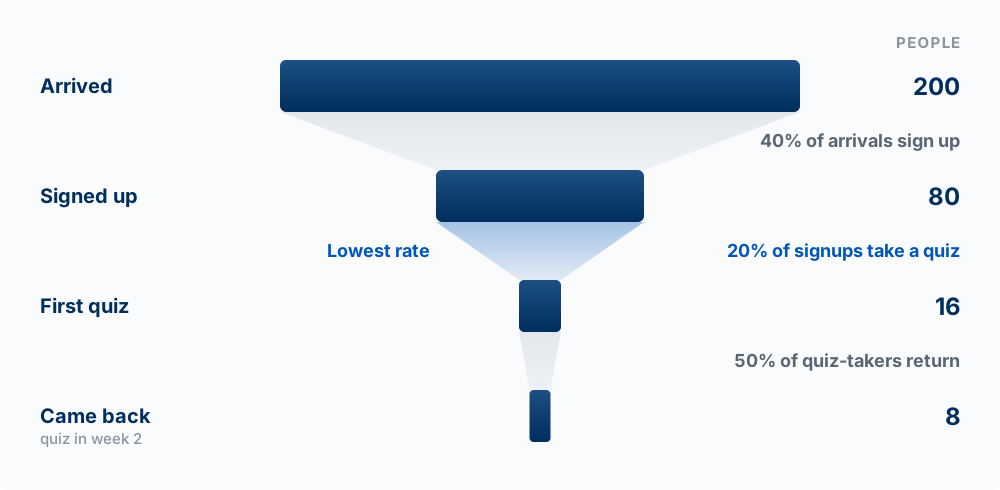
Activation is the moment a new user first gets the value the product promises: for QuizMe, the first completed quiz, not the signup. Activation rate = users who reached that moment / users who signed up.
Worked example. QuizMe’s first two weeks, from its events:
| Step | People | Share of previous step |
|---|---|---|
| Arrived at the landing page | 200 | |
| Signed up | 80 | 40% |
| Completed a first quiz | 16 | 20% |
| Completed a quiz in week 2 | 8 | 50% |
The largest loss is between signup and first quiz: 80 percent of the people who signed up never got value. Compare two fixes. Doubling traffic to 400 visitors yields 16 week-2 users, at the cost of finding 200 more people. Doubling activation from 20 to 40 percent yields the same 16, with no new traffic, and it helps every future visitor too. High acquisition with low activation is a leaky bucket: fix activation before spending more on acquisition. Until you have evidence that a group of people wants the product enough to keep using it (product-market fit, from chapter 04), Activation and Retention are where to focus.
Onboarding is the activation step
Good onboarding gets users to the first value moment fast, teaches by doing, and removes every step that moment does not need. Common mistakes: too many steps before value, asking for information you do not need yet, and no guidance after signup. Measure it with the funnel: time to first value and where people drop.
Fill in the funnel table for your own product from your events: arrived, signed up, reached first value, came back. If you cannot fill a row, that is an event you are not logging yet. Predict which step loses the largest share before you look.
Retention Shows Whether It Works
The model: group users by the week they started and watch who returns. Averages and running totals hide decay, because new arrivals keep adding to the count.
Cohorts
A cohort is everyone who started in the same period. Track each cohort separately: of the people who signed up in week 1, what share were active in week 2, week 3, week 4?
Cohort: January signups (illustrative)
Day 0:  100% (by definition: the day they signed up)
Day 7:   60%
Day 30:  35%
Day 90:  20%
Retention for a cohort = members of the cohort active in period N / members of the cohort. Do not compute it as “users at the end of the period / users at the start”: that counts new arrivals as if they were retained, which is exactly the error cohorts exist to avoid. Churn = users active last period who are not active this period / users active last period.
Why totals mislead
Suppose a class assignment sends a new wave of signups every week:
| Week | Weekly active users (total) | That week’s new cohort, active one week later |
|---|---|---|
| 1 | 40 | 50% |
| 2 | 60 | 35% |
| 3 | 85 | 20% |
The total more than doubles. Meanwhile each new cohort keeps a smaller share than the one before: the product is getting worse at keeping people, and only the stream of new signups hides it. Once the signups stop, the total falls.
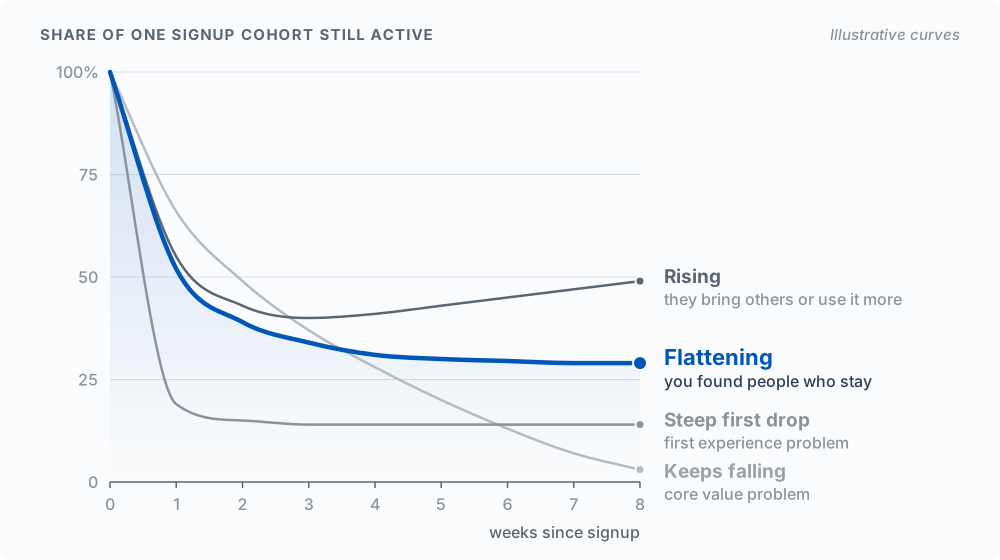
What the shape of a retention curve means (plot share of cohort active against weeks since signup):
- Steep initial drop → first experience problem (go back to the funnel)
- Continued decline → core value problem
- Flattening curve → you have found people who keep using it
- Rising curve → returning users bring others or use it more
For benchmarks, see Lenny Rachitsky and Casey Winters, “What is good retention?” in Builder Resources; at student scale the curve’s shape tells you more.
Engagement measures count people
DAU / WAU / MAU are distinct users who did the core action in a day, week, or month. Stickiness = DAU / MAU, how many of the month’s users show up on a typical day. Feature adoption = users who used a feature / active users. Each one counts people: an “active user” is a distinct user_id, not an event. The query that gets this right:
SELECT DATE(created_at) as date, COUNT(DISTINCT user_id) as dau
FROM analytics_events
WHERE created_at > NOW() - INTERVAL '30 days'
GROUP BY DATE(created_at)
ORDER BY date;
Find the mistake. An earlier version of this chapter built a dashboard card labeled “Daily Active Users” that counted every event row in the last 24 hours. One student who completes ten quizzes is then ten “active users.” The building block it was missing is DISTINCT user_id. (Note also that a dashboard that reads events from the browser needs read access the RLS rule above forbids; build it server-side or read the numbers in the SQL editor.)
WRONG:  dau = count(events where created_at in last 24h)
RIGHT:  dau = count(distinct user_id among events where created_at in last 24h)
What improves retention
| Method | Description | Technical Implementation |
|---|---|---|
| Habit formation | Make the app part of a routine the user already has | Reminders tied to a real moment (the night before the quiz) |
| Increased value | More usage = more value | Data accumulation, personalization |
| Social connection | Users connect with others | Sharing, collaboration features |
Keeping users by making it hard to leave (for example, making their data hard to export) is not a method this course teaches; see Product Morality.
Run this in the Supabase SQL editor on your events table. It counts, for each signup week, how many of that cohort were active in each later week. Divide each count by the cohort’s size (its first row) to get the retention curve.
WITH user_cohorts AS (
  SELECT
    user_id,
    DATE_TRUNC('week', MIN(created_at)) as cohort_week
  FROM analytics_events
  WHERE event_name = 'user_signed_up'
  GROUP BY user_id
),
user_activity AS (
  SELECT
    user_id,
    DATE_TRUNC('week', created_at) as activity_week
  FROM analytics_events
  GROUP BY user_id, DATE_TRUNC('week', created_at)
)
SELECT
  uc.cohort_week,
  ua.activity_week,
  COUNT(DISTINCT ua.user_id) as active_users
FROM user_cohorts uc
JOIN user_activity ua ON uc.user_id = ua.user_id
WHERE ua.activity_week >= uc.cohort_week
GROUP BY uc.cohort_week, ua.activity_week
ORDER BY uc.cohort_week, ua.activity_week;Run the cohort query (or your analytics service’s retention view) on your own product and draw the curve for your largest cohort. Predict its shape first. Then compare your total weekly active users with the cohort curve: does the total show the same trend?
Cause Versus Coincidence
The model: a randomized test shows cause. A before-and-after comparison usually shows the season, the campaign, or noise.
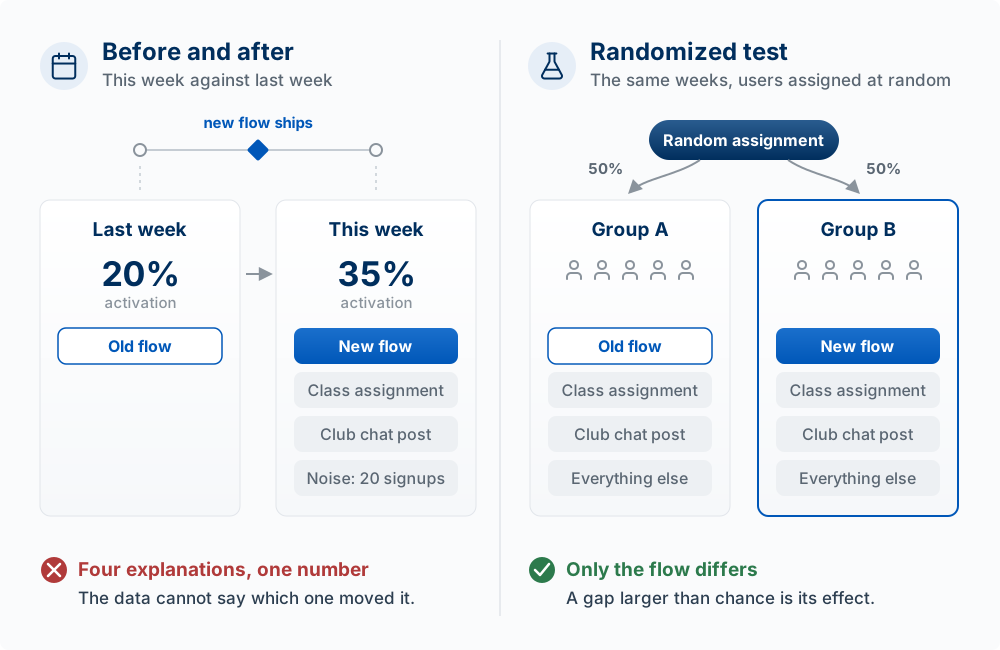
When a number moves right after you change something, two explanations compete: your change caused it, or something else happened at the same time. The data alone cannot tell them apart.
Three ways a before-and-after comparison misleads you
Suppose you ship a new onboarding flow on Monday, and that week’s activation rate jumps from 20 to 35 percent. Before you credit the new flow, consider:
- The calendar. A professor assigned the class to try each other’s apps that week, so the new signups were classmates who were told to finish the flow. The users changed, not only the product.
- The campaign. You posted in a club’s group chat the same day. People who come from a friend’s recommendation behave differently from people who find you on their own.
- Noise. With 20 signups a week, one person is 5 percentage points. Three more people finishing the flow by chance moves the rate 15 points. Week-to-week swings that large happen with no change at all.
Why random assignment works
In a randomized controlled experiment (an A/B test), each new user is assigned at random to the old flow (A) or the new flow (B), during the same weeks. Because chance alone decides who gets which, the class assignment, the club post, and everything else you did not think of affect both groups about equally. The only systematic difference between the groups is the flow. So a difference in outcomes, if it is larger than chance would produce, was caused by the flow.
Ron Kohavi, Diane Tang, and Ya Xu’s Trustworthy Online Controlled Experiments is the standard reference (Kohavi et al. 2020). One of its lessons matters most at your scale: detecting the small improvements large companies test for takes thousands of users per group, which is why chapter 06 lists A/B testing for products with 1,000+ users (Testing at Scale).
What to do with 20 users
You can still learn honestly at student scale:
- Look only for big effects. If 2 of 10 people finished the old flow and 8 of 10 finished the new one, that is hard to explain as chance. A move from 3 of 10 to 4 of 10 tells you nothing.
- Hold out a group. Send the reminder email to a randomly chosen half of your users and not the other half, in the same week. Compare the halves, not this week with last week.
- Watch people. Five usability sessions show you why people stall, which no number does (see chapter 06).
- Say “can’t tell yet.” It is a legitimate finding, and it is better than a confident explanation based on noise.
Data-informed versus data-driven. “The data says X, so we do X” works only when the data came from a clean test with enough people. Otherwise: “the data says X, combined with what we saw in interviews and sessions, so we will try Z and check again.”
What AI can and cannot do here
A model can write the query that splits users into A and B, compute the rates, and list what else changed that week for you to rule out. It cannot turn a before-and-after into a causal answer. Ask it for “patterns” in eight weeks of signup totals and it will report some, because it always produces an answer; with a few dozen users most of them are noise. Asking a model which version your users would prefer is a guess about people it has never met.
Your signups doubled the week you added a “share with a classmate” button. List three explanations other than the button. Then design the smallest test that would separate the button’s effect from the others, with the users you actually have. What result would make you say “can’t tell yet”?
Keep, Change, or Kill
The model: every feature carries an upkeep cost. Usage data tells you which features to invest in and which to retire.
With a coding agent, a feature costs minutes to add. It then has to keep working: every later change can break it, every prompt and test has to account for it, every new user has to understand it, and an AI feature keeps costing money per call. This is another form of the build trap: a feature is cheap to add and expensive to maintain.
A feature review takes ten minutes with your events:
| Feature | % of active users who used it (last 2 weeks) | Upkeep cost | Tied to the North Star? | Decision |
|---|---|---|---|---|
| Quiz from notes | 90% | Model cost per quiz, prompt maintenance | Yes, it is the core task | Keep, invest |
| Flashcard export | 5% | Broke twice in two sprints | No | Kill |
| Study streaks | 30% | Low | Weakly | Change: test whether it brings people back |
| Dark mode | Not logged | Low | No | Can’t tell: log it first |
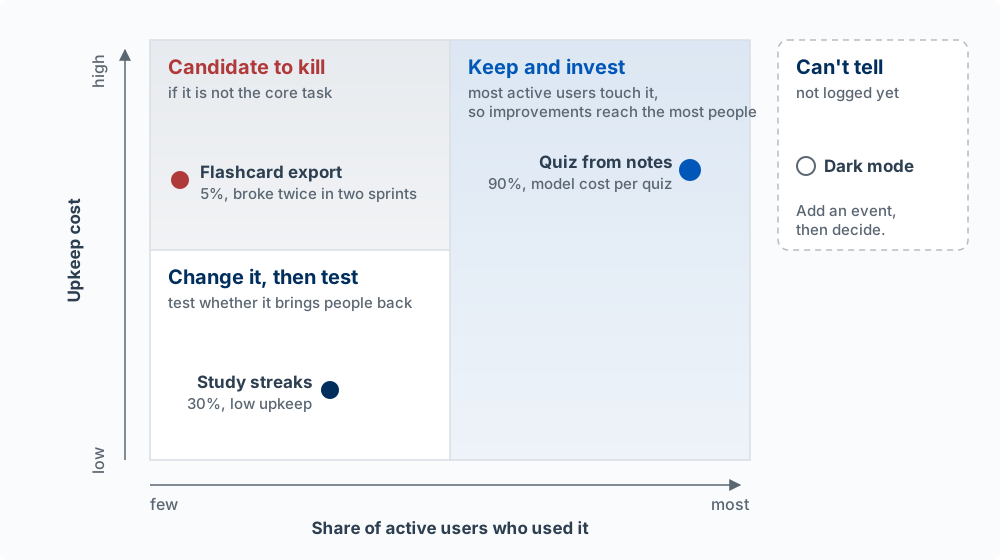
A feature few people use, that breaks often, and that does not serve the core task is a candidate to remove. A feature most active users touch is where improvements reach the most people. A feature you cannot measure you cannot judge: add an event before you decide. When you remove one, tell the people who used it.
Fill in the feature review table for your own product (it makes a good Sprint 6 reflection). Name one feature you would kill, and say what number would have to be true for you to keep it instead.
Money Metrics
The model: revenue metrics only mean something per customer and net of what that customer costs you. For an AI product, the cost side is real for every user.
| Metric | What It Measures | Formula |
|---|---|---|
| Conversion rate | Free to paid | Paying users / Total users |
| ARPU | Revenue per user | Revenue / Active users |
| CAC | Cost to acquire a customer | Total acquisition spend (money and time) / New customers |
| LTV | Lifetime customer value | Contribution margin per month (ARPU minus cost to serve, including model calls) × average months retained |
| LTV:CAC ratio | Unit economics health | LTV / CAC |
Revenue-based LTV assumes serving a customer is free, which for an AI product it is not (Business Models works an example). If LTV is below CAC, each new customer loses money; a common rule of thumb is LTV at least three times CAC. Pricing is in Going to Market.
Asking How People Feel
Behavior is the stronger evidence, but asking helps you interpret it.
| Metric | What It Measures | Scale |
|---|---|---|
| NPS | Likelihood to recommend | -100 to +100 |
| CSAT | Satisfaction with experience | 1-5 or 1-10 |
| CES | Effort to accomplish goal | 1-7 |
Net Promoter Score (NPS) (Reichheld 2003): “How likely are you to recommend us?” (0-10). Promoters (9-10), Passives (7-8), Detractors (0-6). NPS = % Promoters - % Detractors. Benchmarks vary by industry, and with twenty respondents one person changing their answer moves NPS by five points or more, so at student scale read the comments rather than the score. For product-market fit, Sean Ellis’s survey question (“How would you feel if you could no longer use this product?”) is listed in Builder Resources.
Key Concepts
- Outcomes vs. output: whether users are better off versus how much you built. Mistaking shipping for success is the build trap, and cheap AI-written output makes it easier to fall into.
- North Star Metric: the one number that best captures the value customers get. The test: could it go up while the product got worse? If so, it counts activity.
- Input, operational, and diagnostic metrics: drivers you can change that move the North Star, day-to-day activity, and health checks that show something is broken.
- Guardrail metrics: numbers that must not get worse while you push the North Star, such as AI cost per active user and error rate.
- Success definition: value metric, threshold, guardrails, and a judgment date, committed before launch. Without the threshold and date, any result can be read as a success.
- Vanity vs. actionable metrics: numbers that feel good versus numbers that can change what you do next week.
- Leading vs. lagging indicators: early signals that predict an outcome versus the outcome measured after the fact, such as revenue or churn.
- Event: one row recording who, what, when, and details. Log the four to six events that trace your core task from start to finish, and check that real rows arrive.
- Row-level security on event data: signed-in users may insert only their own events, and nobody reads them from the browser. Signed-out visitors’ events go through an analytics service or a server route.
- AARRR (Pirate Metrics): Acquisition, Activation, Retention, Revenue, Referral.
- Activation and activation rate: activation is the moment a new user first gets the value the product promises; the rate is users who reached it divided by users who signed up.
- Leaky bucket: high acquisition with low activation. Fix the step with the lowest rate, usually activation, before buying more traffic; onboarding is that step.
- Cohort retention: of the people who started in the same period, the share still active N periods later; Day 0 is 100% by definition. Never compute it from totals at the end and start.
- Churn: users active last period who are not active this period, divided by users active last period.
- Why totals mislead: a stream of new signups can make total active users rise while each cohort keeps a smaller share than the one before.
- Retention curve shapes: a steep first drop points to the first experience, continued decline to the core value, and a flattening curve means you found people who keep using it.
- DAU/MAU and stickiness: counts of distinct people (
DISTINCT user_id) who did the core action, never counts of events. Stickiness is DAU divided by MAU. - Cause versus coincidence: a before-and-after change can come from the calendar, a campaign, or noise, and the data alone cannot tell them apart.
- Randomized test (A/B test): users are assigned to A or B at random in the same weeks, so the change is the only systematic difference, and a gap larger than chance is its effect.
- Learning with 20 users: look only for big effects, hold out a random group in the same weeks, watch people use it, and say “can’t tell yet” when the data cannot decide.
- Data-informed decisions: combine the numbers with what interviews and sessions show, unless the data came from a clean test with enough people.
- Keep, change, or kill: every feature carries upkeep. Retire one that few use, that costs upkeep, and that does not serve the core task; log a feature before you judge it.
- Margin-based LTV and LTV:CAC: lifetime contribution margin, net of the cost to serve, compared with cost to acquire. A common rule of thumb is LTV at least three times CAC.
- NPS: percent promoters minus percent detractors on “how likely are you to recommend us?” At student scale one answer moves it five points or more, so read the comments.