
Tests and Tech Debt
Why This Matters
An agent changes your code many times a day, and any change can break something that used to work. A test is how you find out within seconds instead of from a user. Chapter 9 showed where tests run: on your laptop, and on every pull request as one of the automated checks. This chapter shows how to read a test, which kinds to ask the agent for, and what a passing suite does and does not tell you. The second half is about technical debt: the shortcuts that make each later change slower, how to tell a deliberate shortcut from an accidental mess, and when to clean one up.
Tests: Code That Checks Your Code
The model: a test is a short program that runs a piece of your code with an input you chose and compares the result with the answer you expect. If they match, the test passes; if they do not, it fails. A test runner finds every test file in the repo, runs them all, and prints how many passed and how many failed. The kinds of tests differ in how much of the real app each one runs.
One test, taken apart
Start with a situation. Your app shows a balance on every account page, using a function called formatCurrency that turns a number into a price. (A function, from Chapter 7, is a named piece of your app’s code that takes an input and gives back a result; a line of code runs it by writing its name followed by parentheses, which programmers call calling it.) A new user has a balance of zero, and the page must show $0.00, never $0 or 0. A test is a few lines of code that check this for you, every time anyone changes the code:
// lib/format.test.ts
import { expect, test } from 'vitest';
import { formatCurrency } from './format';

test('formats zero with two decimal places', () => {
  const amount = 0;
  const got = formatCurrency(amount);
  expect(got).toBe('$0.00');
});
You do not need to write this, but you should be able to read it. Line by line:
| Code | What it means |
|---|---|
import { expect, test } from 'vitest'; |
Bring in the testing tools from Vitest, a test runner common in Next.js projects |
import { formatCurrency } from './format'; |
Bring in the function being tested, from the file format.ts next to this one |
test('formats zero with two decimal places', () => { |
Start one test. The text in quotes is its name: a sentence saying what the code must do |
const amount = 0; |
Make a named value, amount, and set it to 0. const means “a name for a value that will not change” |
const got = formatCurrency(amount); |
Run your function with 0 as its input, and keep what it returns under the name got |
expect(got).toBe('$0.00'); |
The check: what the function returned must be exactly '$0.00'. If it is, the test passes; if not, it fails |
}); |
End of this test |
Every test has the same three steps: choose an input, run your code on it, and state the answer it must give. (Programmers call them arrange, act, assert, a name you will see in test files and in Claude Code’s explanations.) The last line is the assertion. If a later change makes formatCurrency(0) return '$0', the test fails, and the runner prints both values ('$0' received, '$0.00' expected) so you can see what changed. A test file usually holds several tests, one per behavior: zero, a large number with a comma ($1,234.56), a negative amount.
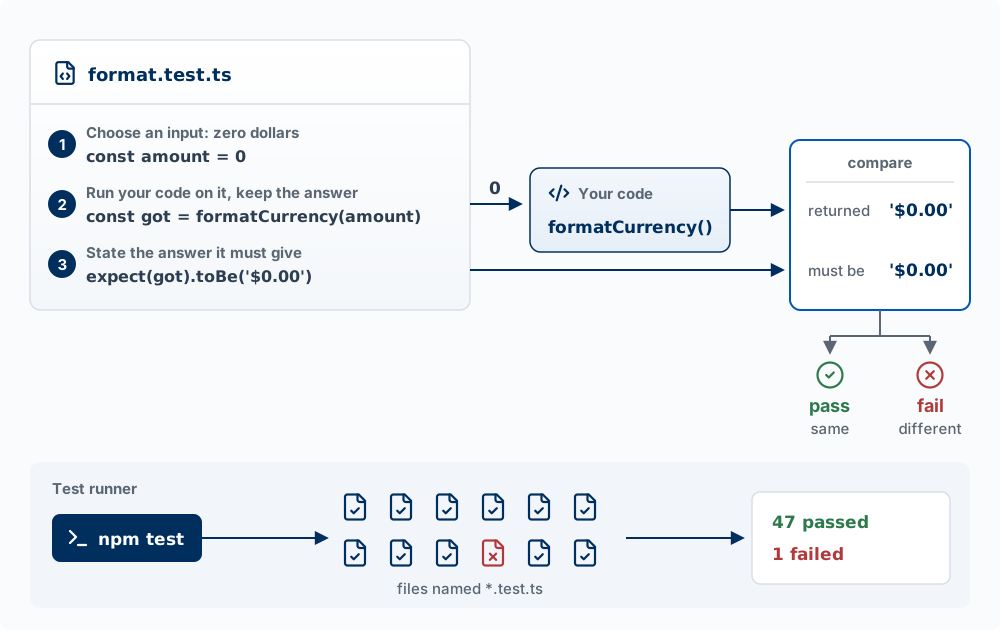
The runner, and the files in your repo
A test runner is the program that finds test files and runs them. The ones you will see in a Next.js and Supabase project:
| Runner | Used for | How it finds tests | Command |
|---|---|---|---|
| Vitest or Jest | Unit and integration tests | Any file whose name ends in .test.ts or .spec.ts (and the .js and .tsx versions); Jest also runs files in a __tests__ folder |
npm test, or npx vitest |
| Playwright | End-to-end tests in a real browser | Files ending in .spec.ts or .test.ts inside the test folder named in playwright.config.ts, often tests/ or e2e/ |
npx playwright test |
| Node’s built-in runner | Unit tests, with nothing to install | The files the command names | node --test |
Unit, integration, and end-to-end tests are explained under Kinds of tests below. In a file name, .test and .spec mean the same thing (spec is short for specification): both mark a file of tests, which the app itself never runs. npm test runs whatever command the "test" line in package.json (the file that lists your project’s packages and its named commands) names, so open that file to see what it does in your repo.
Why there seem to be a thousand test files. Search a project for “test” and most of what you find belongs to other people. The folder node_modules holds the code of every package your app depends on, and many packages ship their own test files inside it. In one Next.js and Supabase app checked while writing this chapter, 17 test files were the app’s own and 394 sat inside node_modules. Those are not your code, and your runner does not run them: Vitest and Jest skip node_modules by default. To list only your own test files, ask for the files git tracks (node_modules is in .gitignore):
git ls-files | grep -E '\.(test|spec)\.'Why Claude Code keeps running them. Running tests is the check step of the agent loop (Chapter 1). After an edit, the agent runs the test suite (all the tests in the project) to find out whether the change broke something that used to work, reads any failure, fixes the code, and runs it again. Red output (failing tests) partway through a session is normal. What matters is the last run before it says it is done, and whether it got to green (every test passing) by fixing the code or by changing a test. You can require green: a Stop hook (Chapter 2) can keep the agent working until the tests pass.
Kinds of tests
The kinds differ in how much of the real app a test runs. The examples use the problem tracker from Chapter 8: users log problems with a title and an intensity from 1 to 10, and row-level security lets each user see only their own. Two pieces of that app’s code appear in the examples:
validateProblemis a function in the app (not in a test) that checks a new problem before it is saved: the title is not empty, and the intensity is a whole number from 1 to 10./api/problemsis the address the app’s pages send a new problem to, and a route is the code on your server that answers requests sent to that address (Chapter 7 calls these API routes; Chapter 8 calls the address an endpoint). When it gets a new problem, it saves it as a row in the database.
Each test is a separate file that sits beside the app’s code and runs some of it. The figure shows, for each kind, the test file on the left and the parts of the app it actually runs.
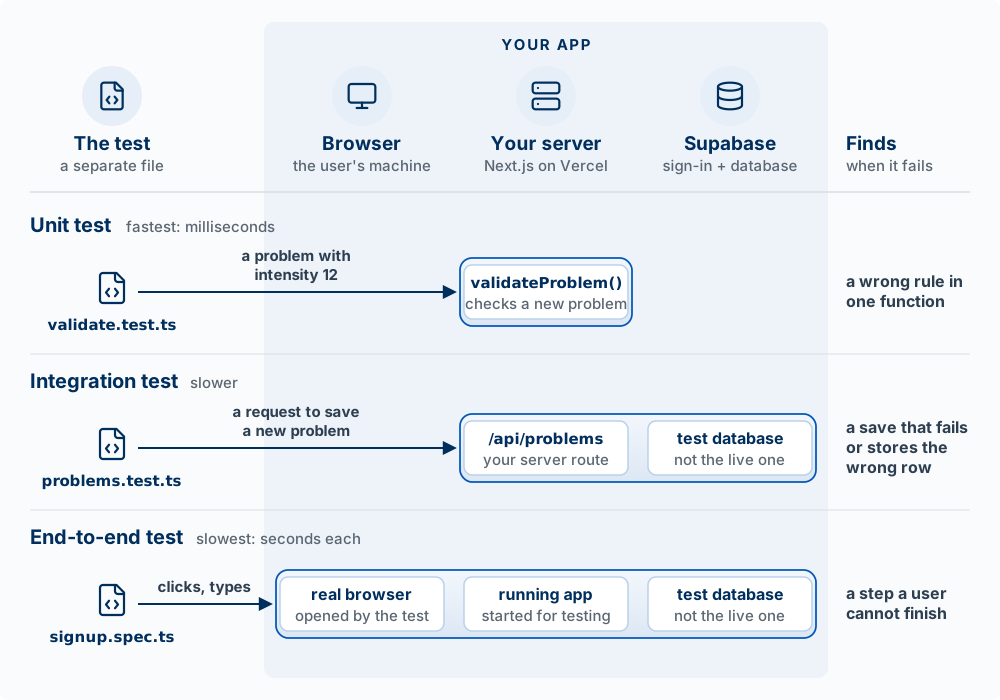
| Kind | The situation | What the test does | What it would catch | How fast |
|---|---|---|---|---|
| Unit | A user types 12 as the intensity. validateProblem must refuse it |
Runs validateProblem directly with intensity 12 and checks that the answer is “no.” No browser, server, or database is started |
A wrong rule in that one function, such as a limit typed as 100 instead of 10 | Milliseconds, so a project can have hundreds |
| Integration | Ana saves a problem. The new row in the database must belong to Ana | Sends a request to /api/problems signed in as Ana, then reads the test database to see whose row was saved |
A route that fails to save, saves the wrong fields, or saves the row under the wrong user | Slower: each test waits for the server and the database |
| End-to-end | A new user must be able to sign up and log a first problem | Opens a real browser on the running app, fills in the sign-up form, adds a problem, and checks that it appears on the page | A step a user cannot finish, such as a button that does nothing or a page that never loads | Seconds per test |
The three examples below are the code behind each row. In each, the import lines at the top (like the two in the first example) are left out.
Unit test: one function, alone. The situation: a user types 12 into the intensity field, and the app must refuse it, because intensity runs from 1 to 10. A unit test runs a single function from your app directly, with no browser, no server, and no database.
// lib/validate.test.ts
test('rejects an intensity above 10', () => {
  const result = validateProblem({ title: 'Lost receipts', intensity: 12 });
  expect(result.ok).toBe(false);
});| Code | What it means |
|---|---|
test('rejects an intensity above 10', () => { |
Start one test, named for what the code must do |
const result = validateProblem({ title: 'Lost receipts', intensity: 12 }); |
Run the app’s validateProblem function on one problem, and keep its answer under the name result. The part in curly braces is the problem written as code: each field’s name, a colon, and its value. Here the title is “Lost receipts” and the intensity is 12 |
expect(result.ok).toBe(false); |
The check. In this app, validateProblem answers with a field named ok: true if the problem may be saved, false if not. For intensity 12, ok must be false |
}); |
End of this test |
Integration test: several real pieces together. The situation: Ana saves a problem, and the row saved in the database must be marked as hers, or row-level security will hide it from her (or show it to someone else). An integration test checks that several real pieces work together: here, that the real /api/problems route saves a row to a real database. It runs against a test database: a separate Supabase project, or a local copy started with supabase start (which needs Docker, a program that runs Supabase’s database and services on your laptop). Never point tests at your live database; they create and delete rows.
// tests/problems.test.ts
test('saving a problem stores it under the signed-in user', async () => {
  const response = await postAs(ana, '/api/problems', { title: 'Lost receipts', intensity: 4 });
  expect(response.status).toBe(201);
  const { data } = await testDb.from('problems').select('user_id').eq('title', 'Lost receipts');
  expect(data).toEqual([{ user_id: ana.id }]);
});
This test uses three names that are not part of your app or of Vitest. ana, postAs, and testDb are short helpers: a few lines the agent writes once, in a setup file the tests share, so that each test does not repeat them.
| Code | What it means |
|---|---|
test('saving a problem stores it under the signed-in user', async () => { |
Start one test. async marks a test that has to wait for answers from elsewhere (here, the server and the database) |
const response = await postAs(ana, '/api/problems', { title: 'Lost receipts', intensity: 4 }); |
Helper postAs sends a request to /api/problems signed in as ana, a test user the setup file creates. The request carries a new problem. await means “wait for the server’s response before going to the next line.” Keep the response under the name response |
expect(response.status).toBe(201); |
Check 1: the response’s status code must be 201, the code for “created” (Chapter 8) |
const { data } = await testDb.from('problems').select('user_id').eq('title', 'Lost receipts'); |
Helper testDb is a connection to the test database. The line reads it: from the problems table, get the user_id column of every row whose title is “Lost receipts.” Supabase answers with the rows under the name data |
expect(data).toEqual([{ user_id: ana.id }]); |
Check 2: exactly one row came back, and its user_id is Ana’s id. The square brackets are a list, here a list holding one row |
}); |
End of this test |
End-to-end test: the whole app, through a real browser. The situation: a new user must be able to sign up and log a first problem, the path your demo depends on. An end-to-end test (often written E2E) does what a user does. Playwright, a test runner made for this, opens a real browser, goes to your running app, types, clicks, and checks what appears on screen. This is the same browser automation as the Playwright server from Chapter 2, with one difference: there, Claude clicks around once; a Playwright test file is saved in the repo and repeats the same steps every time it runs.
// e2e/signup.spec.ts
test('a new user can sign up and log a problem', async ({ page }) => {
  await page.goto('/signup');
  await page.getByLabel('Email').fill('new-user@example.com');
  await page.getByLabel('Password').fill('a-long-test-password');
  await page.getByRole('button', { name: 'Sign up' }).click();
  await page.getByLabel('Title').fill('Lost receipts');
  await page.getByRole('button', { name: 'Add problem' }).click();
  await expect(page.getByText('Lost receipts')).toBeVisible();
});| Code | What it means |
|---|---|
test('a new user can sign up and log a problem', async ({ page }) => { |
Start one test. Playwright hands the test page: a tab in a real browser that the test controls |
await page.goto('/signup'); |
Open the app’s sign-up page |
await page.getByLabel('Email').fill('new-user@example.com'); |
Find the field labeled “Email,” the way a user would, and type a made-up address into it |
await page.getByLabel('Password').fill('a-long-test-password'); |
Find the field labeled “Password” and type a made-up password |
await page.getByRole('button', { name: 'Sign up' }).click(); |
Find the button that reads “Sign up” and click it |
await page.getByLabel('Title').fill('Lost receipts'); |
On the page that opens next, type “Lost receipts” into the field labeled “Title” |
await page.getByRole('button', { name: 'Add problem' }).click(); |
Click the “Add problem” button |
await expect(page.getByText('Lost receipts')).toBeVisible(); |
The check: the text “Lost receipts” must be showing on the page. Playwright waits a few seconds for it to appear before it fails the test |
}); |
End of this test |
Each run takes seconds, and it needs the app running and a test Supabase project (with email confirmation turned off, or the test cannot finish signing up). The test database must also be emptied between runs, or the test must use a different email each time, because the second sign-up with the same address would fail; the agent sets this up. The Next.js documentation recommends end-to-end tests over unit tests for pages that wait for data on the server (async Server Components), because some unit-testing tools do not yet fully support them.
Four more kinds you will see. Each is a unit, integration, or end-to-end test written for one particular purpose:
| Kind | The situation | What it checks | Problem-tracker example |
|---|---|---|---|
| Permission test | Ben is signed in to his own account and asks the database for Ana’s problems | That a user cannot reach data they should not | Ana creates a problem; signed in as Ben, a query for it returns an empty list, and an update changes nothing |
| Regression test | Users reported that a problem with intensity 10 was refused. You fixed it | That a bug you fixed stays fixed | The code checked “less than 10” (< 10) where it should have checked “10 or less” (<= 10). The test saves a problem with intensity 10 |
| Snapshot or visual test | You approved the look of the problem list. A later change to shared styles should not change it without someone noticing | That output has not changed since it was last approved | Vitest’s toMatchSnapshot() saves the rendered problem list and compares later runs with it; Playwright’s toHaveScreenshot() does the same with a picture of the page |
| Smoke test | You just deployed, and before telling anyone you want to know the site is up | That the deployed app works at all, in under a minute | After a deploy: the home page loads, and a test user can sign in |
Permission tests are the two-account drill from Chapter 8, written down so it runs on every change. The situation: Ana has logged a problem, and Ben, signed in to his own account, must get nothing back when he asks the database for it. This matters more in a Supabase app than in most, because the browser queries the database directly and row-level security is the only thing stopping Ben from reading Ana’s rows. A permission test must sign in as an ordinary user with the publishable key. The secret key bypasses row-level security, so a test that uses it checks nothing about your policies. Supabase can also run permission tests written in SQL, with supabase test db.
test("Ben cannot read Ana's problems", async () => {
  const { data } = await asBen.from('problems').select('*').eq('user_id', ana.id);
  expect(data).toEqual([]);
});| Code | What it means |
|---|---|
test("Ben cannot read Ana's problems", async () => { |
Start one test, which waits on the database |
const { data } = await asBen.from('problems').select('*').eq('user_id', ana.id); |
Helper asBen is a connection to the test database signed in as the test user Ben, with the publishable key, the way Ben’s own browser would connect. The line asks: from the problems table, every column (*) of every row whose user_id is Ana’s id. Keep the rows under the name data |
expect(data).toEqual([]); |
The check: [] is an empty list, so no rows may come back. Row-level security hides Ana’s rows from Ben, so Supabase returns an empty list; it does not report an error |
}); |
End of this test |
Regression tests come from bugs. The situation: users report that intensity 10 is refused. When you find a bug like this, ask the agent to write a test that reproduces it first and to show you that test failing. Then it fixes the code, and the same test passes. The failing run proves the test detects the bug; the passing run proves the fix works. This one is a unit test like the first example, with 10 as the input and true as the answer it must give:
test('accepts an intensity of exactly 10', () => {
  const result = validateProblem({ title: 'Lost receipts', intensity: 10 });
  expect(result.ok).toBe(true);
});
Snapshot and visual tests compare today’s output with a saved copy. The first run saves a snapshot (the rendered problem list as text in a .snap file, or a picture of the page in a .png file) in the repo. Each later run produces the output again and fails on any difference. They catch any change, including changes you meant to make. When you change the design on purpose, the stored snapshot is updated (npx vitest -u, npx playwright test --update-snapshots), and the updated .snap or .png file appears in the diff. Check that someone meant to change it.
Smoke test has a different meaning here than in Chapter 4, where it was an offer for a product that does not exist yet. In software, it is a short check run right after a deploy, against the live site.
Two more words you will meet in test output. A mock is a stand-in for a real dependency that returns a fixed answer. The situation: your app has a “summarize my notes” feature that sends the notes to Anthropic’s API. A test that used the real API would cost money, need a network connection, and get a different summary each run. Instead, the test replaces the call to Anthropic with a mock that always returns the same summary, so the test is fast, free, and gives the same result every time. The cost: a test with a mock checks your code against your assumption about the other service. If the service changes how it answers, the test still passes.
A flaky test passes on one run and fails on the next with no change to the code. The situation: an end-to-end test checks the page before it has finished loading, so it passes when the page is fast and fails when it is slow. Have flaky tests fixed or deleted. A suite that fails at random teaches everyone, including the agent, to ignore red.
How many of each. Mike Cohn’s testing pyramid recommends many unit tests, fewer integration tests, and fewest end-to-end tests, because the larger ones are slow and fail for reasons unrelated to your change (Cohn 2009). Ham Vocke’s The Practical Test Pyramid works through the same idea in code (Vocke 2018). For a student product, a reasonable starting set is unit tests on the logic with rules (prices, scores, validation), permission tests on every table that holds user data, and one end-to-end test of the path your demo depends on.
What tests do not tell you
- A passing suite means that none of the checks someone wrote failed. A behavior with no test is unchecked, however green the output. Coverage, a percentage some runners report, counts the lines of code a test ran, whether or not any assertion looked at the result.
- Tests check the code against what the test’s author expected. If the agent misunderstood the feature, it writes code and tests that share the misunderstanding, and both agree.
- Tests do not tell you whether the feature is the right one or whether users can use it. That is what interviews (Chapter 4) and usability tests (Chapter 6) are for.
- A test can be changed to pass. An agent told to “make the tests pass” sometimes changes the expected value, deletes the test, or marks it
.skip(writtentest.skip(...), which tells the runner not to run that test) instead of fixing the code. A diff review catches it.
What you do
You will rarely write a test by hand; the agent writes them. Your part:
- Ask for tests on what matters: anything with money, grades, or permissions, and the main path through your product. “Add tests” with no target gets tests of whatever was easiest to test.
- Read the test names as a spec. A list like rejects an intensity above 10, Ben cannot read Ana’s problems, a new user can sign up and log a problem tells you what is protected. A missing behavior in the list is a missing check.
- Run the suite yourself before you merge (
npm test, andnpx playwright testif the repo has end-to-end tests), or confirm the pull request’s checks ran it. - Watch for edited tests in diffs. When a change touches both the code and its tests, read the test changes first. A changed expected value, a deleted test, or a new
.skipneeds a reason. - For every bug, ask for a regression test that fails first.
Test what the change could break, including features you did not touch. The most damaging regressions come from changing a function several features share, then testing only the feature you were working on. Before finishing a change to shared code, ask the agent to list every place that calls what it changed and the features behind them, and to add a test of each affected feature’s visible result (“Start over empties the form, and it stays empty after a reload”). Then mark the few user paths that must always work (sign up, the core task, payment) and run only those before every push, so the check is fast enough that nobody skips it. The Agent Team Kit’s regression-check skill and its lesson keep a small green critical suite describe the method.
Words used in this section:
| Term | What it means |
|---|---|
| Test | A short program, kept in its own file, that runs some of your app’s code with a chosen input and checks the result |
| Function | A named piece of your app’s code that takes an input and gives back a result, such as validateProblem. Running it is called calling it |
| Route | The code on your server that answers requests sent to one address, such as /api/problems (Chapter 7) |
| Request | A message sent to a server asking it to do one thing, such as save a problem (Chapter 8) |
| Assertion | The line that states the expected result, such as expect(got).toBe('$0.00') |
| Arrange, act, assert | The three steps of a test: choose the input, run your code on it, state the answer it must give |
| Test suite | All the tests in a project, run together |
| Test runner | The program that finds test files by name, runs them, and reports passes and failures |
| Vitest, Jest | Test runners for unit and integration tests in JavaScript and TypeScript projects |
| Playwright | A test runner that opens a real browser and clicks through your app; used for end-to-end tests |
| Unit test | A test that runs one function from your app on its own, with no browser, server, or database |
| Integration test | A test of several real pieces together, such as a route and a test database |
| End-to-end (E2E) test | A test that drives a real browser through the running app, as a user would |
| Test database | A separate database that tests may fill and empty, never the live one |
| Helper | A few lines written once in a test setup file and used by many tests, such as postAs or testDb |
| Permission test | A test that signs in as one user and confirms they cannot read or change another user’s data |
| Regression test | A test written for a fixed bug, so the bug cannot return unnoticed |
| Snapshot | A saved copy of some output (text, or a picture of the page) that later runs are compared with |
| Smoke test | A short check, run right after a deploy, that the live app works at all, such as that the home page loads |
| Mock | A stand-in for a real service, used in tests, that always returns the same fixed answer |
| Flaky test | A test that passes or fails at random with no change to the code |
| Coverage | The share of your code’s lines that some test ran, whether or not any assertion checked the result |
Ask Claude Code: “List the test files in this repo that are mine, not the ones in node_modules. Run them, and for three of them explain in one sentence each what they check.” If there are none, ask for one unit test on a function with a rule in it, and read the test names it chose. Then break something on purpose: ask it to change one line of that function so the rule is wrong (on a branch, or undo it afterward), run the tests, and read the failure. Which test failed, and what did it print? Restore the line and run them again.
What is Technical Debt?
The model: choose boring, well-known tools. Every shortcut is a loan with interest; take it on purpose.
Technical debt is the extra work you will have to do later because you chose a quick solution now instead of a better one that would take longer. An unusual or brand-new tool is one such shortcut: it may save a day now, but when it breaks there are fewer documented answers, for you and for the agent, than for a tool thousands of teams already use.
The metaphor comes from finance: just like financial debt, technical debt (Cunningham 1992):
- Accumulates interest: every later change in that part of the code takes longer, so the longer you wait to pay it down, the more expensive it becomes
- Can be strategic: Sometimes borrowing makes sense
- Can be crippling: Too much debt slows everything down
Examples of technical debt:
- Duplicated code across multiple files
- Hard-coded values that should be configurable
- Missing tests for critical functionality
- Components that do too many things
- Outdated dependencies with security vulnerabilities
- No error handling for edge cases
Debt at agent speed. An agent writes code faster than any person, so it also borrows faster. Ask it to fix a bug and it may add a second copy of a function instead of finding the first, or patch one screen while three others keep the bug. Each choice is small; together they make the codebase harder for the agent itself to change, because it now has to read and keep consistent more code than the product needs.
Strategic vs. Accidental Debt
Not all tech debt is bad. Some is intentional and strategic.
Strategic (deliberate) debt makes sense when you need to find out quickly whether anyone wants the product, meeting a hard deadline such as a demo, or testing a hypothesis quickly. Example:
“We know this data model won’t scale past 10,000 users, but we need to launch next week to test demand. If it works, we’ll rebuild the database layer.”
What makes it strategic: you know you are taking on debt, and you have a plan to address it.
Accidental (inadvertent) debt happens when nobody knew a better approach, requirements changed after the code was written, quick fixes became permanent, or the design was never written down (for an agent, never put in CLAUDE.md). Example:
“I didn’t realize there was already a date formatting utility, so I wrote another one. Now we have three different date formatters and they don’t all produce the same output.”
The Tech Debt Quadrant (Fowler 2009)
| Reckless | Prudent | |
|---|---|---|
| Deliberate | “We don’t have time for tests” | “Ship now, refactor later” |
| Inadvertent | “What’s a design pattern?” | “Now we know how we should have built it” |
Read the rows as whether you knew you were taking on debt (deliberate) or found out later (inadvertent). Read the columns as whether the choice was careless (reckless) or thought through (prudent).
Prudent deliberate debt is often justified. It’s a conscious business decision.
Reckless inadvertent debt is the most dangerous: you don’t even know you’re accumulating it.
When to Pay Down Tech Debt
The answer isn’t “always” or “never”. It depends on context.
Pay it down when: the debt is blocking new features; you are about to change code in that area anyway; it is causing bugs or slowness; or security is involved.
Defer payment when: you are still finding out whether anyone wants the product; the code might be deleted soon (pivoting); the cost of cleaning up exceeds the benefit; or a hard deadline has real consequences.
The Boy Scout Rule: Leave the code better than you found it (Martin 2008). When you’re working in an area, clean up a little. Incremental improvements compound over time.
Agent-written code adds one kind of debt that nobody decides to take on: a file that grows past a thousand lines one reasonable edit at a time. A file-size check (Chapter 2, Common Claude Code hook patterns) stops new files from passing a size limit and stops large existing files from growing. To pay this debt down, delete dead code, and split a file only when it is causing real trouble, one piece at a time with a check in the browser after each. Moving lines between files just to get under the limit does not make the code easier to change (architecture guards as alarms).
Two principles worth asking the agent to follow. DRY (Don’t Repeat Yourself): each piece of knowledge should exist in exactly one place (Hunt and Thomas 1999). If “is this a student?” is checked in three places, the three will drift apart; one isStudent(user) function that the others call cannot. Single responsibility: each function or component should do one job (Martin 2008), so a sign-up handler calls separate steps (validate, save, send the welcome email) rather than doing all of them inline. Both make the next change touch one place. Refactoring is changing code’s structure without changing what it does, and it is safe only when tests or a careful preview confirm the behavior stayed the same.
In your next sprint review, name one deliberate shortcut you took (what you borrowed, and when you plan to repay it) and one accidental mess you found. Ask Claude Code: “Find duplicated logic in this repo: the same rule or calculation written in more than one place.” Pick one result and decide, using the lists above, whether to pay it down now or later.
Key Concepts
- Test: a short program, in its own file, that runs some of your app’s code with a chosen input and compares the result with the expected answer (arrange, act, assert: choose the input, run the code, state the answer); the assertion is the comparison.
- Test runner and test suite: the program that finds test files by name and runs them (Vitest, Jest, Playwright), and all the tests in a project. Test files in
node_modulesbelong to your dependencies and are not run. - Tests in the agent loop: running the suite is the agent’s check step. Red partway through a session is normal; what matters is whether the last run is green, and whether it got there by fixing the code or by changing a test.
- Unit, integration, end-to-end tests: one function from your app run directly, with no browser, server, or database; a request to a real server route that writes to a test database, never the live one; a real browser clicking through the whole running app. The more of the app a test runs, the slower it is and the more kinds of failure it can find.
- Permission, regression, snapshot, and smoke tests: a user cannot reach others’ rows (signed in with the publishable key, never the secret key); a fixed bug stays fixed; output unchanged since approved; the deployed app works at all.
- Regression test that fails first: for every bug, have the agent write a test that reproduces it and show it failing, then fix the code so it passes.
- Mock and flaky test: a stand-in for a real service that always returns the same answer, so the test checks your assumption about that service; a test that passes or fails at random, which should be fixed or deleted.
- Testing pyramid: many unit tests, fewer integration tests, fewest end-to-end tests. A starting set for a student product is unit tests on rules, permission tests on every table with user data, and one end-to-end test of the demo path.
- What a passing suite means: none of the checks someone wrote failed. Untested behavior is unchecked, coverage counts lines run whether or not anything was checked, and code and tests can share the same misunderstanding.
- Your part in testing: ask for tests on money, grades, permissions, and the main path; read the test names as a spec; read test changes first in a diff; and when changing shared code, test every feature that calls it.
- Technical debt: the extra work you will have to do later because you chose a quick solution now. Like a loan, it accumulates interest: every later change in that code takes longer. An agent borrows faster because it writes code faster.
- Strategic vs. accidental debt: debt you take on knowingly, with a plan to repay it, or debt nobody chose, from not knowing a better way, changed requirements, or quick fixes that stayed.
- Tech debt quadrant: deliberate or inadvertent (did you know?) crossed with reckless or prudent (was it thought through?). Prudent deliberate debt is often justified; reckless inadvertent debt is the most dangerous.
- When to pay it down: when it blocks features, when you are changing that code anyway, when it causes bugs, or when security is involved. Defer while you are still testing demand, when the code may be deleted, or when cleanup costs more than it saves.
- Boy Scout Rule: leave code better than you found it, a little at a time.
- DRY and single responsibility: one place for each piece of knowledge, one job per function or component, so the next change touches one place.
- Refactoring: changing code’s structure without changing what it does; safe only when tests or a careful preview confirm the behavior stayed the same.