
graph LR
A[Requirements] --> B[Design]
B --> C[Tasks]
C --> D[Implementation]
D --> E[Test & Review]
E --> F{Need Changes?}
F -->|Yes| A
F -->|No| G[Done]
style A fill:#e1f5ff
style B fill:#fff4e1
style C fill:#e8f5e9
style D fill:#f3e5f5
style E fill:#fce4ec
Specs: Designing the Build
Why This Matters
Discovery decides what to build and for whom. Design decides how it looks and how it flows. The spec is the last step of design: it writes those decisions down precisely enough that a coding agent can build from them and you can check what it built.
The spec is the prompt for the whole project. A spec, short for specification, is a written description of what the product should do (defined in Chapter 1). A coding agent can write a working first version of a feature in minutes, which is why the course has no Build axis (The Six Builder Axes). The agent cannot supply the decisions you made while exploring: who the feature is for, what happens when the list is empty, which option you rejected and why. Those live in your head and in a chat log the next session will not see. A vague spec produces code that looks plausible and is wrong.
Directing the Agent covers how to give an agent context and how to check its work. This chapter covers what to give it. It starts with the smallest unit, the user story with its acceptance criteria, then the PRD, then spec-driven development: when to use it, the workflow, the tools that package it, and two skills from the Agent Team Kit that write a spec and then build from it.
User Stories
User stories with acceptance criteria are the smallest unit of a spec. They come from Agile and Extreme Programming (Beck 1999; Cohn 2004).
A user story describes a feature from the user’s perspective. It keeps the focus on what the user gets from the feature.
The Format
As a [type of user], I want [goal] so that [benefit].
Examples:
As a marketing manager, I want to see all my campaigns in one dashboard so that I don’t waste time switching between tools.
As a job seeker, I want to save interesting positions so that I can apply when I have time.
As a small business owner, I want to accept credit card payments so that I can sell to customers who don’t carry cash.
Good vs. Bad User Stories
| Bad Story | Why It’s Bad | Better Story |
|---|---|---|
| “Build login system” | No user, no benefit | “As a user, I want to save my progress so I don’t lose my work” |
| “Add profile pictures” | Names a feature with no outcome | “As a user, I want colleagues to recognize me so team coordination is easier” |
| “Make it faster” | Too vague | “As a user loading the dashboard, I want it to load in under 2 seconds so I can start working immediately” |
Acceptance Criteria
Every user story needs acceptance criteria, specific conditions that must be true for the story to be “done”. They are also your check in the agent loop: the list you hold the agent’s work against.
User Story: As a customer, I want to reset my password so I can access my account if I forget it.

Acceptance Criteria:
- User can request reset via email
- Reset link expires after 1 hour
- User must create password with 8+ characters
- User receives confirmation email after reset
- Old password no longer works
Product Requirements Documents (PRDs)
A PRD explains what you’re building, why, and how you’ll know it’s successful. It aligns your team (even if that’s just you and Claude) around a shared understanding.
PRD Structure
| Section | Purpose |
|---|---|
| Overview | What is this feature/product? |
| Objectives | Why are we building it? What problem does it solve? |
| User Stories | Who uses it and what do they accomplish? (with acceptance criteria) |
| Functional Requirements | What must it do? |
| Non-Functional Requirements | Performance, security, usability standards |
| Success Metrics | How will we measure success? |
| Out of Scope | What we’re explicitly NOT building |
Claude can draft one fast. Give it the product, the target user, and the problem, and ask for those sections. Then review and refine it; the AI draft is a starting point. Structure helps the agent as much as it helps people: bullets over paragraphs, tables for comparisons, numbered requirements it can cite back (Requirement 2.1), so every task traces to a requirement.
Build first, then spec what you keep
Madhu Guru’s tweet in Chapter 1 described Google moving from a writing-first to a building-first culture. The PRD still gets written, at a different point. Explore to learn, then spec anything you intend to keep. A throwaway prototype to test an idea with users needs no spec. The moment you decide to keep building on it, write down what it does and should do, because the next session of the agent will know only what is written.
In the near future, the person who communicates most effectively is the most valuable programmer. If you can communicate effectively, you can program.
Moving forward, the new scarce skill is writing specifications that fully capture the intent and values [of what you want to build]. Whoever masters that becomes the most valuable programmer. There’s a reasonable chance that this is going to be the coders of today. This is already very similar to what we do. However, product managers also write specifications…
Sean Grove, Engineer at OpenAI
Spec-Driven Development (SDD) is the discipline Grove describes: write specifications before code you intend to keep. Specs usually come in three documents:
- Requirements: what should the system do? (user stories and acceptance criteria)
- Design: how will it work? (architecture and data models)
- Tasks: what are the discrete implementation steps? (a checklist)
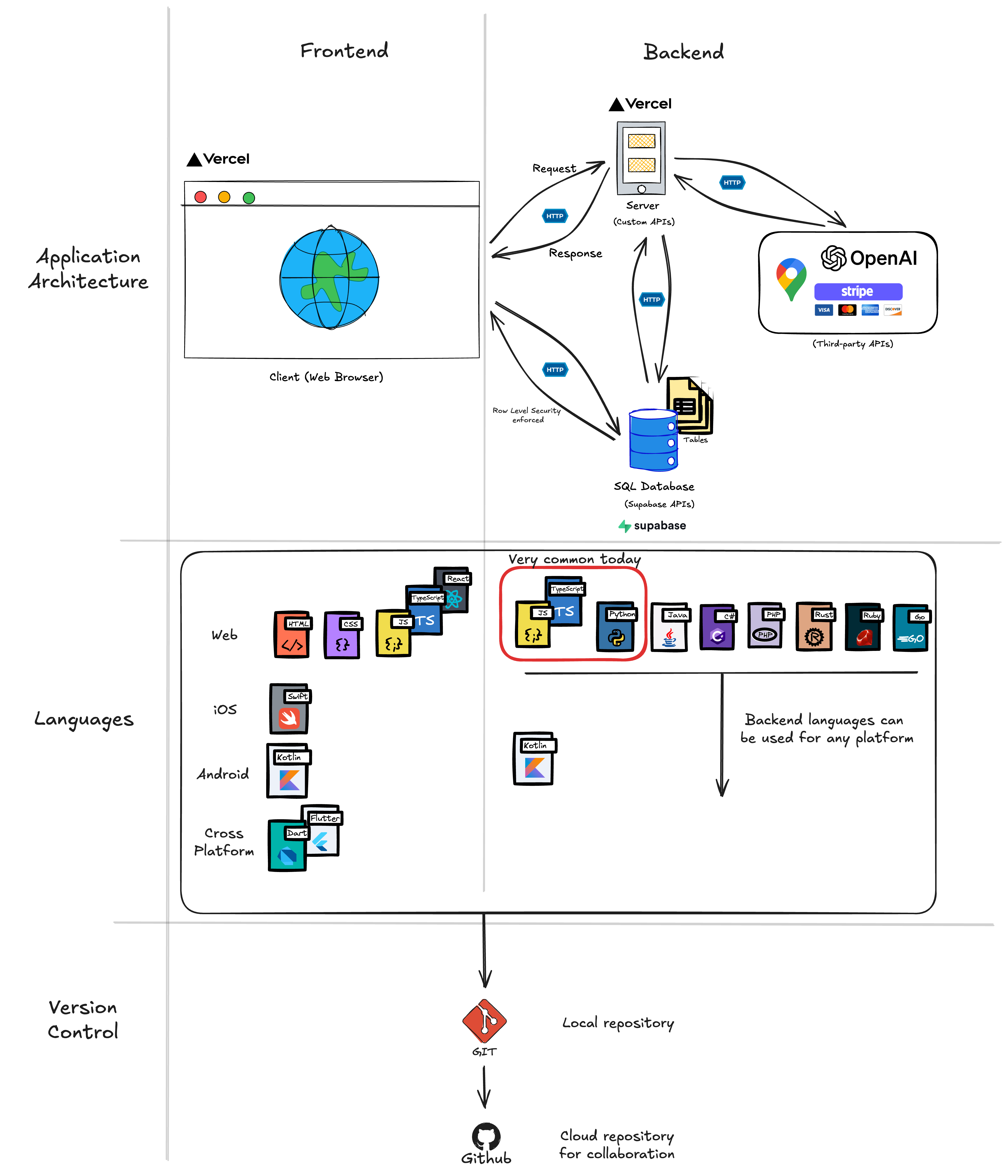
A traditional PRD’s audience was engineers and colleagues. An AI-native spec has the same goal, but its first reader is an agent, so it lives as Markdown files in the repo where the agent can read it. AI drafts it; you refine it. To specify a design you need the building blocks of an application (client, server, APIs, database), which Chapter 7 covers:
Why SDD Matters (Especially for PMs)
- Your code stays maintainable. Weeks later, the specs tell you (and the agent) why things were built that way.
- You can collaborate. Teammates, and your future self, read the specs instead of deciphering code, and design review happens before an expensive rewrite.
- You catch problems early. Writing requirements forces the edge cases: an empty form, an API that is down.
- The agent builds closer to your intent. Less improvisation, fewer surprises, because the spec is in its context.
- You can check the result. Every task traces to a requirement, so “does it do what we said?” has an answer.
When to Use SDD vs. Pure Vibe Coding
Use pure vibe coding for: - Quick throwaway prototypes - Exploring ideas (“what would this look like?”) - One-off scripts and automations - Learning new technologies
Use spec-driven development for: - Features that will be maintained - Code that multiple people touch - Anything going to production - Complex logic with edge cases - When you’ll need to come back later
In practice, you’ll often start with vibe coding to explore, then transition to SDD once you know what you want to build.
The SDD Workflow
Most SDD approaches follow a similar pattern:
Instead of asking the AI to “build the entire authentication system,” you:
- Write down what authentication needs to do (requirements)
- Design how it will work technically (design)
- Break it into small tasks (tasks)
- Have AI implement one task at a time (implementation)
- Check each task against its acceptance criteria, then continue
The goal is to guide the AI through small, checkable changes instead of letting it improvise an entire feature. Each task is one short pass through the agent loop with a clear check at the end.
Major SDD Approaches
Three tools package this workflow. They share the same three documents; pick one.
Kiro’s three files and EARS
Kiro popularized the three-file layout: requirements.md, design.md, and tasks.md. Its requirements use EARS (Easy Approach to Requirements Syntax), which makes each one testable:
WHEN a user submits the login form with invalid credentials
THE SYSTEM SHALL display "Invalid username or password"
AND not reveal which field was incorrect
Either the system does that or it doesn’t, which is exactly what you want to check an agent’s work against. design.md covers architecture, data models, API endpoints, and error handling; tasks.md is a checklist where each task names the requirements it satisfies (Requirements: 1.1, 1.2).
GitHub Spec Kit
GitHub’s open-source Spec Kit adds commands to your agent for each step. In the current version they appear as skills named /speckit-specify (what the feature should do, no technical decisions), /speckit-plan (the technical approach), /speckit-tasks (break the plan into chunks), and /speckit-implement. Install it by following the repository’s README and choosing Claude Code as the integration; it adds a .specify folder to your project.
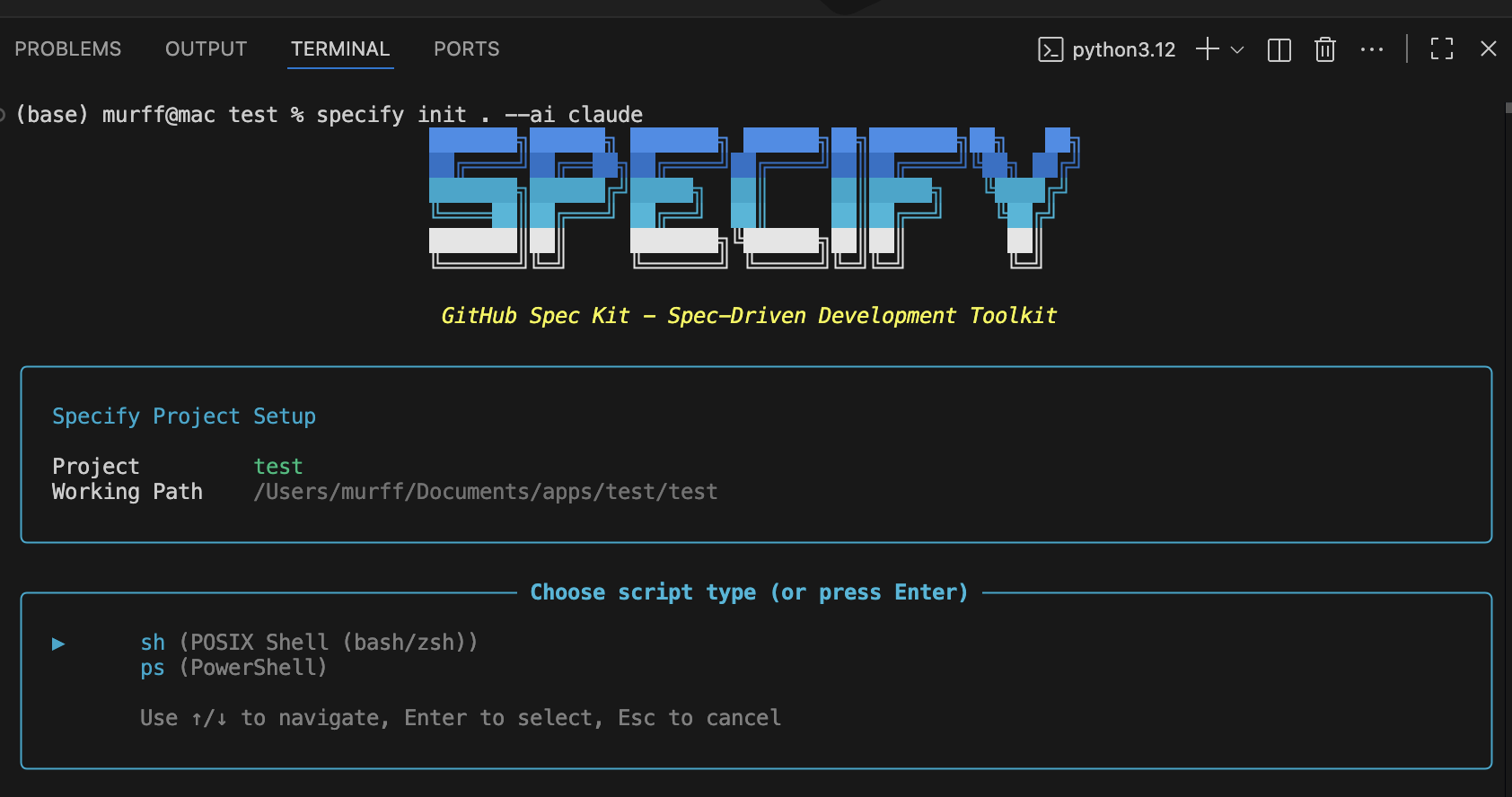
Spec Kit’s distinctive idea is the constitution: a file of non-negotiable project principles (security rules, performance standards, quality rules) that every later step must respect, such as “all user data encrypted at rest” or “API responses under 200 ms at the 95th percentile.” When the agent proposes something that violates it, you point back to the rule. A constitution is still advice to the agent, though (Advice Versus Enforcement). A rule that must hold every time also needs a hook or a permission rule.
Claude Code’s plan mode
Claude Code has plan mode built in. In plan mode Claude reads files, searches, and runs exploratory commands, then writes a plan, but it does not edit your source files until you approve. That makes it the safest mode for exploring, because Claude does not edit your files while you plan.
You enter plan mode with Shift+Tab (press until the status bar shows plan mode on) or by starting a message with /plan, for example /plan add user profiles. Telling Claude “let’s plan” in ordinary words does not switch modes. When the plan is ready, Claude asks how to proceed: approve it and let Claude start editing (with auto mode or with your approval for each edit), or keep planning. Ctrl+G opens the plan in your editor so you can change it first.
A spec-driven workflow with plan mode:
- Enter plan mode (
Shift+Tabor/plan) and describe the feature. - Research: Claude explores the codebase, asks clarifying questions, and proposes a plan.
- Review the plan and send it back until it is right.
- Approve the plan, which exits plan mode.
- Write the specs: now that Claude can write files, have it save the agreed plan as
requirements.md,design.md, andtasks.md. (It could not write them in step 2, because plan mode is read-only.) - Execute tasks one at a time, checking each.
The docs add one caution: planning has overhead. If you could describe the change in one sentence, skip the plan and just ask.
You can make the workflow standing behavior by putting rules in CLAUDE.md (“read requirements.md, design.md, and tasks.md before implementing any task”; “mark tasks complete by changing [ ] to [x]”), and you can wire Kiro’s approach into Claude Code with the community spec-workflow-mcp server. Cursor added a similar plan mode in October 2025.
The Agent Team Kit’s spec and build-spec Skills
The Agent Team Kit (introduced in Directing the Agent) packages this workflow as two skills you can copy into a project’s .claude/skills/ folder. They are split in two so that you approve the spec before any code exists. Editing a paragraph in a spec is the cheapest change you can make; the same change after the code is written means rewriting the code.
spec turns an exploration (a conversation, a mockup, a sketch of a feature) into two files, .specs/<slug>/spec.md and .specs/<slug>/punchlist.md, and then stops. It writes no code. It reconstructs the decisions from the conversation, the mockups, and the code, and where the exploration said nothing, it lists an open question with a recommended answer instead of inventing a requirement. The skill’s reason: an invented requirement is worse than a missing one, because it reads as if you agreed to it.
The kit writes one spec file where Kiro and Spec Kit write three. Its argument is that a rule written in Markdown does not make the agent follow it (“a markdown assertion has no teeth”), so the spec names, for every acceptance criterion, the check that will confirm it. Each criterion gets one of three tags:
| Tag | The criterion is about | Checked by |
|---|---|---|
walk |
What a user sees, does not see, or is told | A check in the browser |
unit |
A calculation, ranking, formatter, or parser | A test next to the code |
structure |
How the code is organized, such as “there is one place that saves a task” | An automated rule or a search of the code |
A criterion you cannot tag is too vague to build from, and the skill tells you to rewrite it. Two more rules from the skill: write each criterion about one observable thing, naming the user and the screen, and for any criterion about who can see something, write its opposite as a separate criterion (“a member does NOT see the Billing page”).
The spec follows the kit’s template. Its section headings:
# <Feature>, spec
## Intent
## Access and release
### Access: what differs by person, and which lever handles it
### Release
## Stories and acceptance criteria
### S1, <as a ..., I ...>
## Decisions already made
## Considered and rejected
## Open questions
## Constraints in this repo
Three of these sections matter most.
- Decisions already made records what you settled while exploring: the wording, the empty state, the error state, what the feature is called. Without it, the build reopens those questions.
- Considered and rejected lists each option you turned down and why. Without it, the agent proposes a rejected option again.
- Access and release says who gets the feature and how it reaches them: for everyone at once, behind a switch that turns it on for some users first, or tried on a test copy of the app before the live one. The kit asks you to decide this in the spec because the answer changes where the code checks access and what a user without the feature sees (decide the release at spec time).
The punch list is an ordered checklist of build steps. Each item names the files it will touch and the criteria it closes.
build-spec runs after you approve the spec. It works the punch list one item at a time: implement the item, write the tests that close its unit and structure criteria, run them, check the item off, and commit. Because its progress is saved in punchlist.md, a fresh session can pick up where the last one stopped. It collects the walk criteria into a check sheet, check.md, that you work through by hand in a few minutes, three lines per entry:
### 2.1, a member does not see the Billing page
Go:      http://localhost:3000/settings   (signed in as a member)
Do:      open the settings menu
Expect:  Billing is NOT in the list.
The skill forbids rewording a criterion to make it pass and forbids claiming a browser check it did not run. Its final report lists which criteria were closed and by which check, which are still open, and what it assumed. The kit’s skills guide states the lesson behind both skills: for anything bigger than a one-line fix, have the agent show you the plan in a form you can edit, and count the work as done when there is evidence for each criterion.
Getting Started: Your First SDD Feature
Build an advanced task manager (projects, tags, priorities, due dates) on top of the to-do app from Chapter 1. Each step is one prompt; the specs live in .claude/specs/advanced-task-management/.
| Step | Ask Claude to | What you check before moving on |
|---|---|---|
| 1. Requirements | Write requirements.md: user stories and EARS acceptance criteria for task organization, projects, tags, filtering and sorting, and completion tracking |
Every criterion is testable; nothing is ambiguous |
| 2. Design | Write design.md from the requirements: an ASCII architecture diagram (drawn with plain text characters), data models (the fields each kind of record holds: Task, Project, Tag), JSON-file storage, UI components, validation, error handling |
You can trace each requirement to part of the design |
| 3. Tasks | Write tasks.md: numbered checkboxes, at most two levels, 15 to 30 minutes each, each citing its requirements, starting with data models and storage |
Each task is small enough to check on its own |
| 4. Implement | “Implement task 1. Read requirements.md and design.md first, follow the data models exactly, then mark task 1 complete in tasks.md.” | Read the diff and run the app (the three checks in Done Means You Saw It Work), then go to task 2 |
| 5. Explain | Write architecture-explained.md: the architecture as an ASCII diagram and a plain-language account of what happens when a user creates a task |
A non-technical reader could follow it |
Implement one task per prompt. After each, review the code and test it before the next. The explanation from step 5 might read:
1. UI layer: what the user sees (TaskList, TaskForm)
2. State layer: the data in memory while the app runs
3. Storage layer: reads and writes data/app-data.json

When you create a task: TaskForm calls store.addTask(), the store updates
memory and calls storage.saveData(), the JSON file is rewritten, and
TaskList re-renders with the new task.
CLAUDE.md: Your SDD Configuration
You can give Claude Code your SDD workflow as standing instructions by adding them to your project’s CLAUDE.md file or your global ~/.claude/CLAUDE.md. A starter:
# Spec-Driven Development Workflow

Specs live in `.claude/specs/{feature-name}/`: requirements.md, design.md, tasks.md.

1. Write requirements.md first, in EARS format. Get approval before design.
2. Read requirements.md before writing design.md. Get approval before tasks.
3. Read ALL spec files before implementing any task.
4. Implement ONE task at a time; mark it [x]; wait for approval before the next.
5. Validate all user input server-side.
With this in place, Claude Code reads your SDD process at the start of every session and follows it closely. CLAUDE.md is guidance. For a rule that must hold every time, such as “never skip the tests,” add a hook (Advice Versus Enforcement).
SDD in Practice: Tips and Gotchas
- Start small. Spec one feature at a time.
- Specs are living documents. You will learn things while building. Update the spec so it stays the single source of truth.
- Don’t over-specify. If an implementation detail doesn’t matter, leave it to the agent.
- Use AI to write specs, then review and refine them yourself.
- Name the check for each acceptance criterion. Next to each criterion, write what will confirm it: a test, a browser check that you or an agent will do, or a search of the code (for example, “every server action checks the user’s role”). The Agent Team Kit’s
specskill (above) requires this, on the reasoning that a criterion you cannot attach a check to is too vague to build from. Write permission criteria in both directions: who can see the feature, and who must not. - Review specs before code. Have another person, or Claude in a fresh session (
/clear), critique the spec. A design flaw caught in a spec costs a paragraph; caught in code, it costs a rewrite.
Exercise: Add a Feature Using SDD
Take the to-do list app you built in chapter 1 (or any project you’re working on) and add one feature using spec-driven development. Pick something relatively simple: categories or tags, due dates and reminders, search and filter, or user authentication.
Follow the workflow:
- Plan in plan mode (
Shift+Tabor/plan): have Claude explore the code and propose an approach. Approve it when it is right. - Create requirements.md: 3-5 user stories, EARS-format acceptance criteria for each, edge cases thought through.
- Create design.md: data model changes, any new API endpoints, UI changes, error handling.
- Create tasks.md: 5-10 small tasks of 10-30 minutes each, each referencing its requirements.
- Implement with Claude Code, one task at a time: read the diff, run the app, check the acceptance criteria, mark the task complete, move on. Commit after each task so you can return to any point.
Observe the difference:
How does this feel compared to pure vibe coding? Is the code quality better? Do you feel more in control? Can you explain why the code looks the way it does? Which of your acceptance criteria caught something the agent’s own report missed?
Key Concepts
- Spec: a written description of what the product should do, precise enough that an agent can build from it and you can check what it built. It is the last step of design, and it carries the decisions you made while exploring that the agent cannot supply.
- User story: a feature described from the user’s point of view: as a [type of user], I want [goal] so that [benefit].
- Acceptance criterion: a specific condition that must be true for a story to count as done. It is the list you hold the agent’s work against.
- PRD: a product requirements document that says what you are building, why, and how you will know it is successful, including what is out of scope. Numbered requirements let every task trace back to one.
- Explore to learn, then spec what you keep: a throwaway prototype needs no spec; once you decide to keep building on it, write down what it does, because the next session knows only what is written.
- Spec-driven development (SDD): write the requirements, the design, and the tasks before code you intend to keep, then have the agent implement one task at a time and check each against its acceptance criteria.
- When to use SDD: vibe coding fits throwaway prototypes, exploration, and one-off scripts; SDD fits features that will be maintained, shared, or put into production.
- EARS: a requirement format (WHEN … THE SYSTEM SHALL …) that makes each requirement testable. Kiro uses it in a three-file layout:
requirements.md,design.md,tasks.md. - Constitution: Spec Kit’s file of non-negotiable project rules every later step must respect. It is still advice, so a rule that must always hold also needs a hook or a permission rule.
- Plan mode: Claude reads, explores, and writes a plan, and edits nothing until you approve. Enter it with
Shift+Tabor/plan, then save the approved plan as spec files. Skip it for a change you can describe in one sentence. specandbuild-spec: the Agent Team Kit’s two skills.specwrites the spec and a punch list and stops for your approval, listing open questions instead of inventing requirements;build-specthen works the punch list one item at a time.- Decisions already made, considered and rejected: spec sections that record what you settled and what you turned down, so the build does not reopen them or propose a rejected option again.
walk,unit,structure: the kit’s tags for how each criterion will be checked: in the browser, by a test, or by a rule about the code. A criterion you cannot tag is too vague to build from.- Punch list: the ordered build steps for a spec, each naming the files it touches and the criteria it closes. Progress saved there lets a fresh session pick up where the last one stopped.
- Review the spec before the code: have another person, or Claude in a fresh session, critique it. A flaw caught in a spec costs a paragraph; caught in code, it costs a rewrite.