
sequenceDiagram
participant User
participant Browser as Browser (frontend)
participant Server as Your server (API route)
participant Database
User->>Browser: Types "Buy groceries" and clicks Add
Browser->>Browser: Quick check: text is not empty (a courtesy)
Browser->>Server: POST /api/tasks {"task_text": "Buy groceries"}
Server->>Server: Who is asking? Check again: not empty, not too long
Server->>Database: INSERT a new task for this user
Database->>Server: New task with id=123
Server->>Browser: 201 Created {"task": {...}}
Browser->>User: Shows the new task in the list
Anatomy of an Application
Why This Matters
You have been shipping since week one, and Claude Code has been making the architectural decisions for you. That was on purpose. You cannot learn everything before you build anything, and the fastest way to understand a stack (the set of technologies an app is built from) is to already have one running.
Now you find out what you have been shipping. The model for this chapter and the next two fits in two sentences:
An app is a few places where code runs and data lives, connected by requests. Most bugs and breaches come from something sitting in the wrong place, or from trusting the wrong side.
Every web or mobile product is built from the same handful of blocks: the user’s browser, a server, a database, and the requests that pass between them. Once you can say which block a piece of code or data belongs in, you can direct an agent instead of hoping it guesses right, and you can catch it when it puts something in the wrong place.
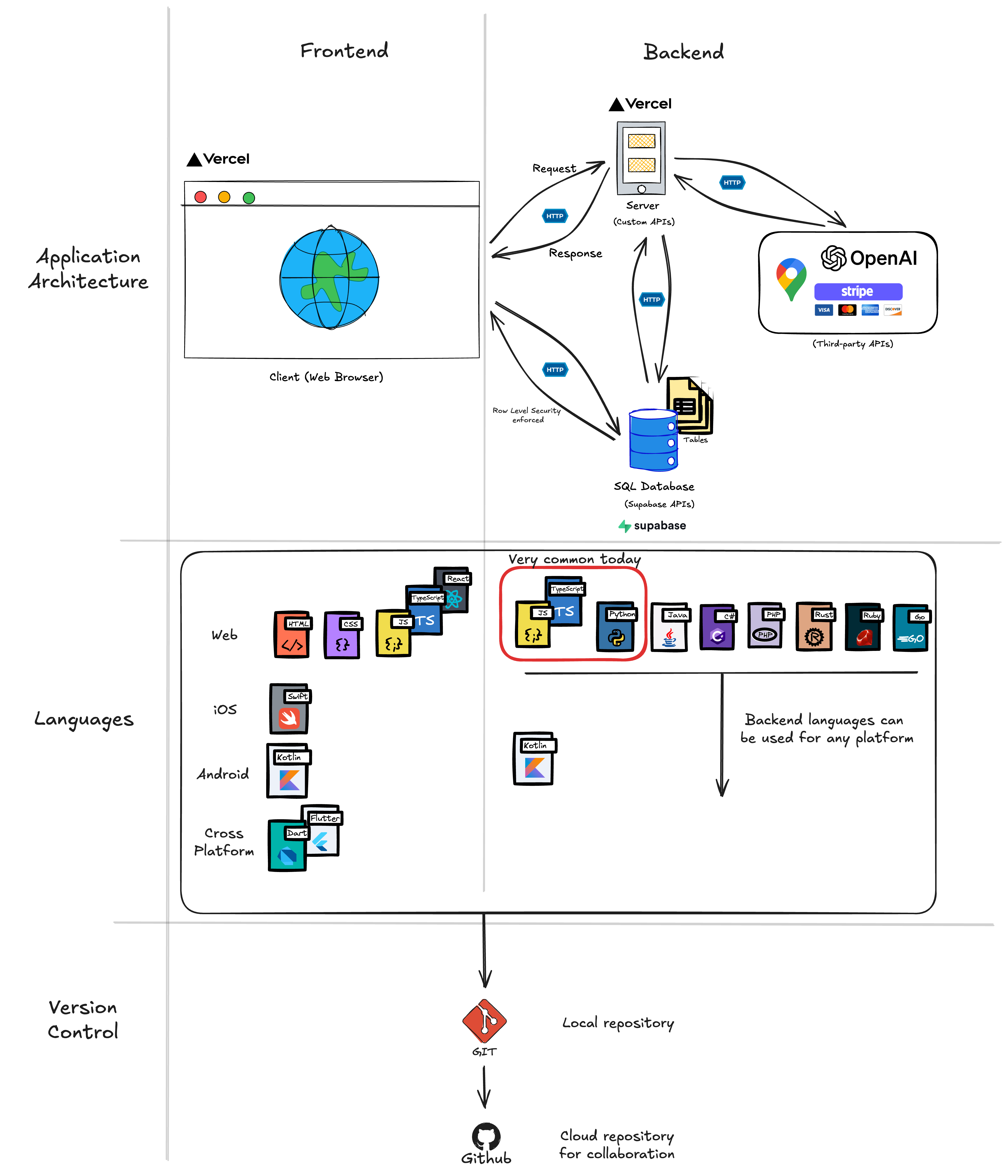
Words in this chapter
Every one of these comes up below. Come back here when you meet one you do not know.
| Word | What it means |
|---|---|
| Browser (frontend, client) | The program on the user’s device that shows your app, such as Chrome or Safari, and the app code running inside it |
| Server (backend) | A computer you control that runs your app’s code and keeps its secrets |
| Database | Where the app stores what it must remember, as tables of rows |
| Request, response | A message one place sends another asking for something, and the reply |
| API, endpoint | The list of requests a place will answer; one entry on that list, at its own address |
| Method | The verb at the start of a request. GET reads, POST creates, PATCH changes, DELETE removes |
| Status code | The number at the start of a response. 200 OK means it worked, 201 Created means something new was saved, codes in the 400s mean the request was refused or wrong, and the 500s mean the server failed |
| API key | A secret string a paid service such as Anthropic gives your account. Sent with each request, it says whose account is calling and gets the bill, so it stays on your server |
| API documentation (docs) | The provider’s published description of its API: every endpoint, the inputs each one accepts, and the output it returns |
| JSON | A plain-text format for data: labels and values inside curly braces, such as { "task_text": "Buy groceries" }. Most APIs send and receive it |
| React | A library for building the screens that run in the browser |
| Next.js | A framework built on React that also lets you write server code in the same project |
| Vercel | The company whose computers run your Next.js app and serve it at a web address |
| Supabase | A company that runs a database for you, plus sign-in (Supabase Auth) and file storage |
| Postgres | The database software Supabase runs |
| SQL | The language for asking a database questions and changing its tables, such as INSERT (add a row) and SELECT (read rows) |
| TypeScript | JavaScript, the language of the browser, with labels that say what kind of data each value holds, so mistakes show up before the code runs |
| Package, npm | Code someone else wrote and published for others to use; npm is the tool that downloads packages into your project’s node_modules/ folder |
| Token | A signed string Supabase Auth gives the browser after sign-in. Every later request carries it to prove who is asking |
| Publishable key, secret key | Supabase’s two keys. The publishable key is public and can reach only what row-level security allows; the secret key bypasses those rules and stays on your server |
| Row-level security | Rules inside the database that decide, row by row, who may read or change it. Data and APIs shows how to write them |
| Environment variable | A setting kept outside your code, such as a key. In Next.js, names that start with NEXT_PUBLIC_ are sent to the browser; all others stay on the server |
| OAuth | Signing in through another service (“Sign in with Google”), which vouches for who the user is |
Three Places Code Runs and Data Lives
The model: the browser belongs to the user, who can see and change anything there. The server runs your code on Vercel’s computers and holds the secret keys. The database, on Supabase’s computers, stores each record until it is deleted.
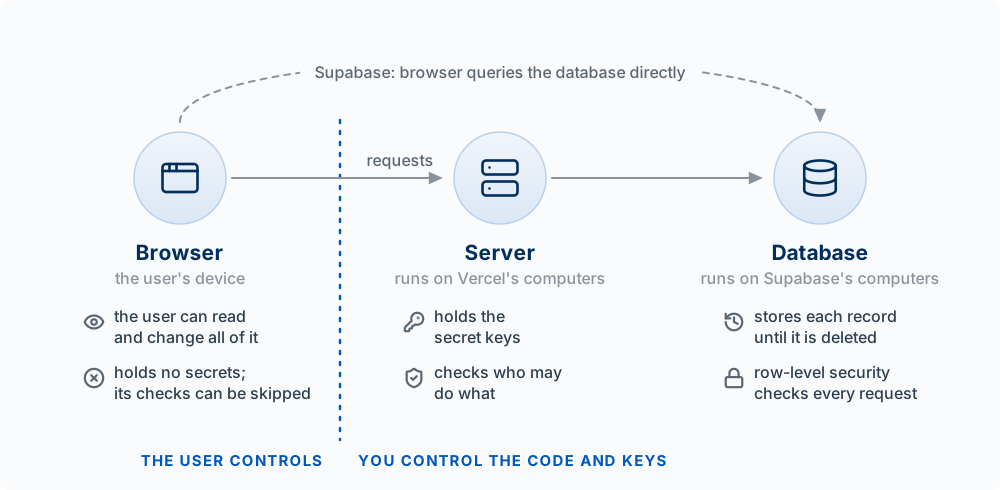
| Place | Also called | Who controls it | What belongs there | What must never be there |
|---|---|---|---|---|
| The user’s browser or phone | Frontend, client, client-side | The user | Screens, buttons, forms, quick checks that save the user a round trip (a request to the server and the wait for its reply) | Secret keys, the only copy of a rule that protects money or data (prices, permissions, grades) |
| Your server | Backend, server-side | You | Business logic (the rules of your product), secret keys, calls to paid services such as a model or Stripe | Nothing the user should not trigger without a check |
| The database | Storage, persistence | You, through its rules | Everything the product must keep between visits: users, records, history | Data with no rule about who may read it |
A few terms you will hear constantly:
- Frontend is what the user sees and touches. In this course it is React running in the browser. “Client” usually means the same thing, though it can mean any program that calls an API, including another server.
- Backend is code that runs on a computer you control. In this course that means Next.js route handlers (the
route.tsfiles that answer requests) and server components (explained in How the Code Works) running on Vercel. - Database is durable storage. Postgres, in this course, run by Supabase.
The rule that follows. Every line of frontend code is downloaded to the user’s machine. Anyone can open the browser’s developer tools (a panel built into every browser that shows the page’s code, its stored data, and every request it sends) and read or change any of it. So a check that runs only in the browser can be bypassed, and a key shipped to the browser is public. Checks that matter run again on the server or in the database. Secrets stay on the server.
Worked example. A student builds a study-room booking app. The “Book” button is greyed out after a user has two bookings this week. That limit lives only in the React component. A user opens developer tools, re-enables the button, and books ten rooms. The fix is to enforce the limit where the data lives (a database rule or a server check), and keep the greyed button as a courtesy.
NoteAnalogy: a bank
The browser is the deposit slip: the customer fills it out and can write anything on it. The server is the teller, who checks ID and applies the bank’s rules. The database is the vault. Where it breaks: in a Supabase app the browser can talk to the vault directly, through a window with its own guard (row level security, Chapter 8), with no teller in between. That is why the database’s own rules matter so much in this stack.
TipTry it
- In your own repo, ask Claude Code: “List every file in this project and label it browser, server, or both. Explain how you decided.” In Next.js, a file that starts with
"use client"ships to the browser; aroute.tsunderapp/api/runs only on the server. Check two of its labels yourself. - Predict: a quiz app checks each answer in browser code and then sends
{ score: 7 }to the server, which saves it. What can a student do, and where should the check move?
NoteAnswer to 2
Send { score: 10 } directly, or edit the code to mark every answer correct. The server should receive the answers, look up the correct ones itself, and compute the score.
How a Request Crosses the Internet
The model: every computer on the internet has a number, its IP address, such as 216.198.79.67. People use names instead, such as your-app.vercel.app, and a lookup service called DNS turns the name into the number. Once the browser has the number, it opens an encrypted connection to that computer and sends its request. Everything in the rest of this chapter depends on this one trip.
A web address, a URL, names every part of the trip in one line:
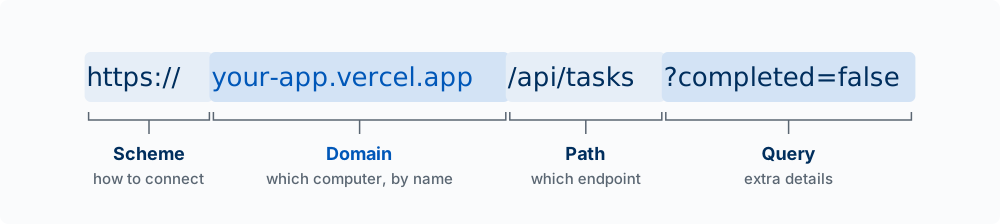
The scheme says how to connect (https means encrypted). The domain names the computer. The path names what you want on that computer; for an API, that is the endpoint. The query, after the ?, adds details, here “only the tasks that are not done.” Your API docs, your Vercel links, and your app’s own routes are all read this way.
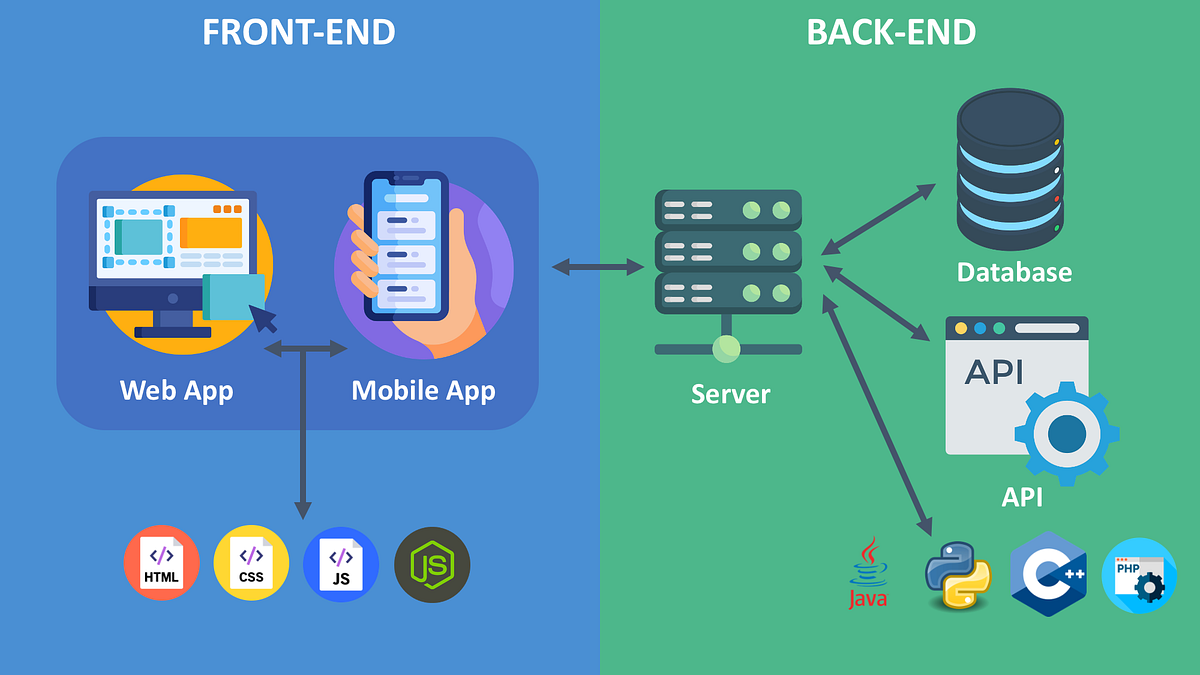
Figure 13.3 follows one request, saving a task in the to-do app, from the user’s browser to your server and back:
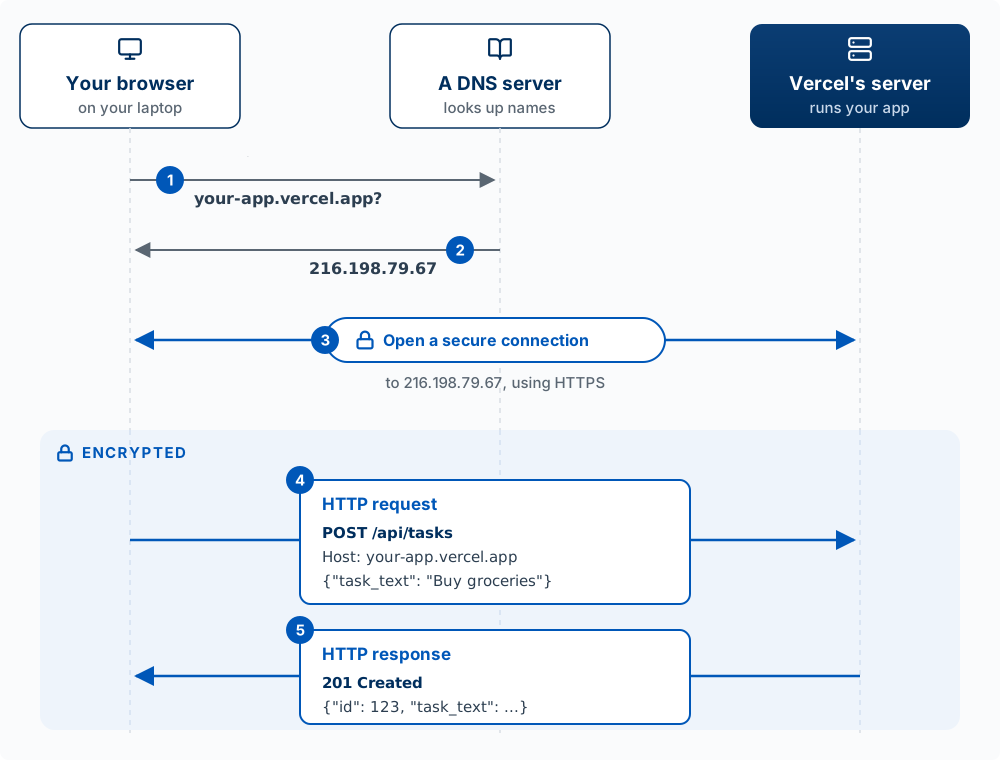
- Look up the name. The browser asks a DNS server where
your-app.vercel.appis. (Your computer does the asking on the browser’s behalf, and it remembers the answer for a while, so most requests skip this step.) - Get the number. The answer is an IP address. Asked on October 10, 2026, DNS returned
216.198.79.67for avercel.appname; Vercel uses many addresses, and they change. - Open a secure connection. The browser connects to that address and the two sides agree on encryption. From here on, anyone between them sees only scrambled data. This is the “S” in HTTPS, and it is why an API key sent in a request header is safe on the way to the server. It is not safe in browser code, where the user can read it before it is ever sent.
- Send the HTTP request. The method, the path, some headers, and a body.
- Get the HTTP response. A status code, some headers, and a body.
On the wire, steps 4 and 5 look like this (the classic text form; newer connections send the same parts in a more compact form):
POST /api/tasks HTTP/1.1
Host: your-app.vercel.app
Content-Type: application/json
Cookie: sb-abcdefgh-auth-token=...

{"task_text": "Buy groceries"}
HTTP/1.1 201 Created
Content-Type: application/json
{"id": 123, "task_text": "Buy groceries", "completed": false}Host repeats the domain, because one Vercel computer serves many apps and needs to know which one you want. Content-Type says the body is JSON. Cookie carries the user’s sign-in, which the browser attaches to every request to your site (Who You Are, What You May Do covers it). Underneath, the internet splits each message into small pieces called packets that travel separately and are put back together at the other end; you never see them.
The browser always asks first, and the server only answers. A server cannot send a browser something it did not ask for over this kind of request. A feature that updates live, such as a shared list that changes when a teammate adds a task, either asks again every few seconds or keeps a connection open for the server to send through, which is what Supabase’s Realtime feature does.
On your own laptop, the same trip is shorter. When you run npm run dev, your app is at http://localhost:3000. localhost is a name that always means “this computer,” so there is no DNS lookup and nothing leaves your machine, which is also why plain http is fine there. 3000 is the port: one computer runs many programs that accept connections, and the port number says which one. Websites use port 443 for HTTPS by default, so the port is left out of their URLs.
What the browser does with the reply. The browser turns the HTML, CSS, and JavaScript it receives into the page, then runs your JavaScript each time the user clicks or types. Everything it receives, the user can read and change. The Browser, Developer Tools, and Claude in Chrome shows that process and the tools for watching it.
Words used in this section:
| Term | What it means |
|---|---|
| IP address | The number that identifies a computer on the internet, such as 216.198.79.67 |
| Domain | A name for a computer that people can remember, such as your-app.vercel.app |
| DNS | The internet’s lookup service: give it a domain, and it returns the IP address |
| URL | A full web address: scheme, domain, path, and sometimes a query |
| HTTP, HTTPS | The format for requests and responses on the web. HTTPS is HTTP sent over an encrypted connection |
| Header | A labeled line of extra information in a request or response, such as Content-Type or Cookie |
| Port | A number that says which program on a computer a connection is for, such as 3000 |
| localhost | A name that always means the computer you are on |
| Packet | One of the small pieces a message is split into for the trip |
Requests Connect the Places
The model: the places never share memory. They talk only by sending requests and getting responses, and an API (Application Programming Interface) is the set of requests a place agrees to answer. Your server’s API is a list of addresses, called endpoints, such as POST /api/tasks, each with a defined input and output.
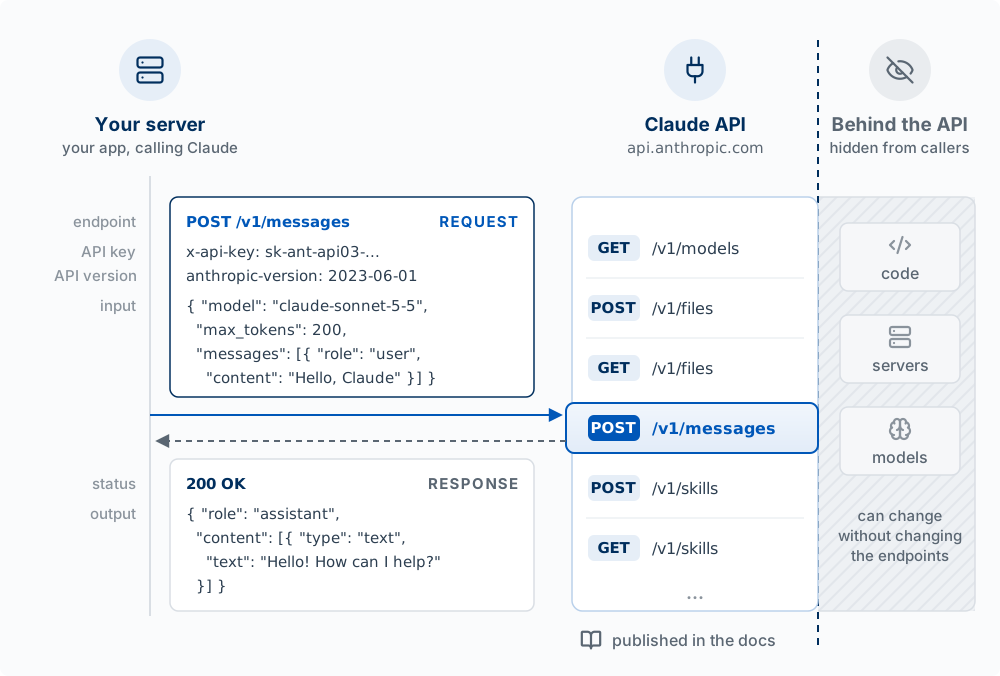
Figure 13.4 shows a real API: the one your server calls to use Claude. Anthropic publishes a list of endpoints in its documentation, and each entry is a method and an address. To use one, your server sends a request to that address with the inputs the documentation names: an API key that says whose account is calling (and gets the bill), a version, and a body in JSON with the model, the longest reply allowed (max_tokens, counted in model tokens, the small pieces of text a model reads and writes; these are a different thing from the sign-in token in the Words table), and the message. The answer comes back in the form the documentation describes. Your server never sees Anthropic’s code, servers, or models. Anthropic can change any of them, and your code keeps working as long as the endpoints, their inputs, and their outputs stay the same. The documentation states those three things, so it is the contract between the two sides.
Stripe, Resend, and Supabase work the same way. Claude Code is a caller too: each time it asks the model for its next step, it sends a request to Anthropic’s Messages API (or to a cloud provider’s copy of it, when a company runs Claude Code through Amazon or Google). So does your own app: each route in app/api/, such as POST /api/tasks, is an endpoint, and the list of them is your server’s API, which your browser calls.
Here is what happens when a user adds a to-do item. In the sequence below, your server’s API is its set of routes, such as POST /api/tasks, so it is drawn as part of the server. Read it top to bottom; each arrow is one message. INSERT is the SQL command that adds a row, and 201 Created is the status code that says the new task was saved.
The database stores it as a row in a table:
| id | user_id | task_text | completed | created_at |
|---|---|---|---|---|
| 1 | 42 | “Buy groceries” | false | 2025-01-15 10:30:00 |
| 2 | 42 | “Call dentist” | true | 2025-01-15 11:45:00 |
One session in this course’s stack. Here is what happens, place by place, when a student opens a to-do app, signs in, loads their tasks, and asks an AI feature for help.
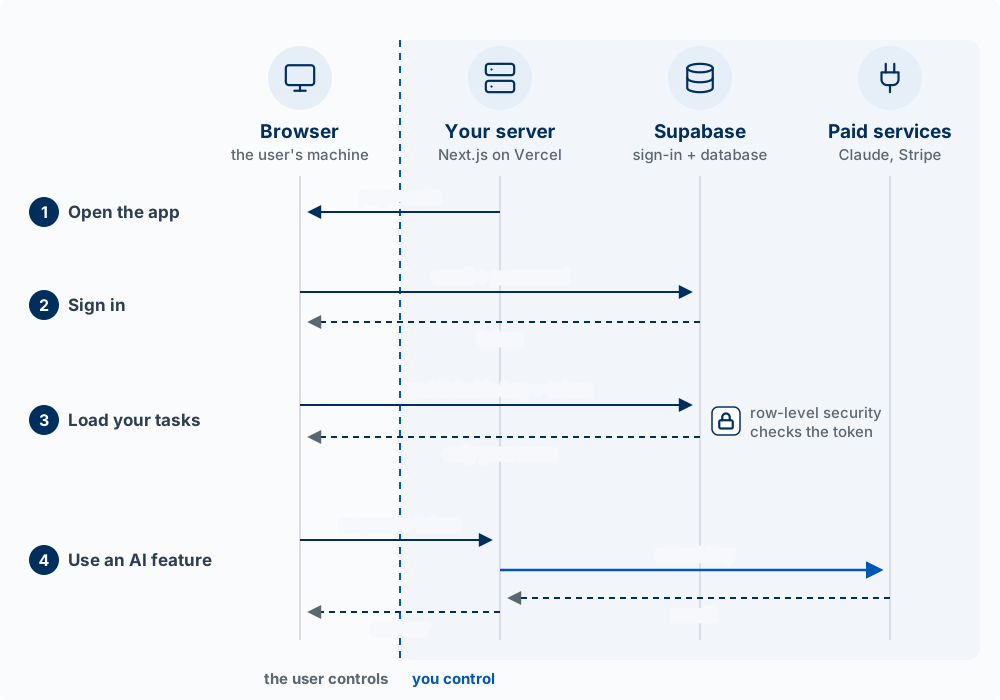
- Open the app. The browser asks for your site’s address. Vercel’s computers send back the page’s code, which now runs on the user’s machine.
- Sign in. The browser sends the email and password to Supabase Auth, which checks them and sends back a token.
- Load your tasks. The browser asks Supabase’s database directly, carrying the publishable key and the token. Row-level security reads the token and returns only that user’s rows. Your server is not involved.
- Use an AI feature. A model call costs money and needs a secret key, so the browser asks your server instead. Your server checks the token, calls the paid service with the secret key, and passes the result back. The secret key never leaves your server.
Two things follow. Because the browser talks to the database directly in step 3, the database’s own rules are the only check on ordinary data. And anything that needs a secret, such as a model call, a payment, or an email, goes through your server, as in step 4.
Three credentials: publishable key, token, secret key
The figure shows three things that look alike, since each is a long string sent with a request. They answer different questions.
| Publishable key | Token | Secret key | |
|---|---|---|---|
| What it identifies | Your app (which Supabase project) | One signed-in user | Your server, with full access |
| Who gets it, and when | Every visitor, inside the page code | The browser, from Supabase Auth at sign-in | Only your server, from an environment variable |
| Who can see it | Anyone (it is in the code the browser downloads) | That user’s browser | Nobody outside your server |
| What it allows | Reaching your project; row-level security still decides what each request sees | Row-level security knows who is asking and returns that user’s rows | Everything: Supabase’s secret key skips row-level security; a paid service’s key spends your money |
| How long it lasts | Until you replace it | About an hour, then the browser gets a new one automatically | Until you replace it |
| If someone copies it | Nothing extra; it was public already | They can act as that user until it expires | They can read or change all data, or run up your bill. Replace it immediately |
Step 4 uses a paid service’s key (an Anthropic API key, for example), which is a different secret from Supabase’s secret key. Both follow the same rule: they live only on your server.
The actual messages
Here is what travels in steps 2 to 4, slightly shortened. You will not write these by hand; the Supabase library and your server code build them. Seeing them makes clear what each credential is for. Each request has an address, a few headers (labeled lines that carry keys and tokens), and a body (the data).
Step 2, sign in. The browser sends the email and password, with the publishable key to say which project:
POST https://abcd1234.supabase.co/auth/v1/token?grant_type=password
apikey: sb_publishable_7xKq...

{ "email": "maya@example.com", "password": "********" }
Supabase Auth checks the password and replies with a token:
{ "access_token": "eyJhbGciOiJIUzI1NiIs...", "expires_in": 3600,
  "user": { "id": "8f14e45f-ceea-467a-9575-0a5b1b2a3c4d", "email": "maya@example.com" } }
Supabase signs the token, so it cannot be edited without breaking the signature. Inside it are the user’s id ("sub": "8f14e45f-...") and an expiry time.
Step 3, load your tasks. The browser asks the database directly, carrying both the publishable key and the token:
GET https://abcd1234.supabase.co/rest/v1/tasks?select=id,task_text,completed
apikey: sb_publishable_7xKq...
Authorization: Bearer eyJhbGciOiJIUzI1NiIs...
The request asks for every task. Row-level security reads the user id from the token, applies the rule “a user may read rows where user_id is their own id,” and returns only Maya’s rows:
[ { "id": 1, "task_text": "Buy groceries", "completed": false },
  { "id": 2, "task_text": "Call dentist", "completed": true } ]
Step 4, use an AI feature. The browser sends the request and the token to your server. It never contacts Anthropic itself:
POST https://your-app.vercel.app/api/suggest
Authorization: Bearer eyJhbGciOiJIUzI1NiIs...

{ "task_text": "Call dentist" }
Your server checks the token, then makes its own request to Anthropic with the secret key, read from an environment variable:
POST https://api.anthropic.com/v1/messages
x-api-key: sk-ant-api03-...
anthropic-version: 2023-06-01

{ "model": "claude-sonnet-5-5", "max_tokens": 200,
  "messages": [ { "role": "user", "content": "Suggest a first step for: Call dentist" } ] }
Anthropic replies to your server, and your server sends the browser only what it needs:
{ "suggestion": "Look up the office's phone number and hours." }The secret key appears in exactly one message, the one between your server and Anthropic. The browser never sees it.
This is the “full stack”: frontend, backend, database, and the requests connecting them. As a full-stack product builder, you decide what lives where, even when the agent types it.
Requests fail in many ways (no network, not signed in, not allowed, too many requests). Chapter 8 covers what each failure looks like and what the user should see.
TipTry it
Pick one feature in your product. Write the sequence as the diagram above does, one line per hop: what the user does, what the browser sends, what the server checks, what the database stores, what comes back. Then ask Claude Code to trace the same feature through your actual code and compare. Where the two differ, find out which one is right.
How the Code Works
The model: the screen is computed from data. The code never edits the screen directly. It changes the data, called state, and React computes the screen again from the new state.
The code an agent writes for a web app is built from about a dozen ideas. The agent types them; your job is to recognize each one when you read its code, so you can say what a file does and ask a precise question when something is wrong. This section uses React, the library this course builds with and the most widely used one. Svelte, Vue, and Angular are built on the same ideas (components, state, events) with different syntax, so what you learn here applies to them too.
Words used in this section
| Word | What it means | In the to-do app |
|---|---|---|
| Value | One piece of data: text (a string), a number, or true or false (a boolean) | "Buy groceries", 123, false |
| Variable | A name that holds a value so later lines can use it. const means the name will not be pointed at a different value |
const text = "Buy groceries" |
| Function | Named steps that take inputs and return an output. A line of code runs a function by calling it: its name followed by parentheses | addTask() |
| Object | Labeled values that describe one thing. JSON is an object written out as text | { task_text: "Buy groceries", completed: false } |
| Array (list) | Values in order, usually objects of the same shape | [ { task_text: "Call dentist" }, { task_text: "Buy groceries" } ] |
| Type | A TypeScript label for the shape a value must have. TypeScript checks it before the code runs | type Task = { id: number; task_text: string; completed: boolean } |
| Component | A function that returns a piece of the screen. Its name starts with a capital letter, and components are placed inside other components | TaskList returns the whole list; TaskItem returns one row |
| Props | The inputs a component receives from the component that places it | TaskItem receives one task |
| State | Data a component keeps while the page is open, which can change. Changing it through React makes React draw the component again | tasks (the list); text (what is typed in the box) |
| Render | React calling your components to compute what the screen should show, then changing the page to match | After every state change |
| Event, handler | Something the user does (a click, a keystroke), and the function that runs when it happens | A click on Add runs addTask |
async, await |
async marks a function that waits for something slow, such as a reply from the server. await is the line where it waits. The rest of the page keeps working meanwhile |
await fetch("/api/tasks", ...) |
| Module, import, export | Each file is a module. It exports the pieces other files may use, and those files import them by name | TaskList.tsx imports TaskItem |
"use client" |
A line at the top of a file telling Next.js to send that file’s code to the browser | The first line of TaskList.tsx |
One component, annotated
Here is the component behind the to-do list, close to what an agent writes. The numbers match the notes below it.
1"use client";

2import { useState } from "react";
import { TaskItem } from "@/components/TaskItem";

3type Task = { id: number; task_text: string; completed: boolean };

4export function TaskList({ initialTasks }: { initialTasks: Task[] }) {
5  const [tasks, setTasks] = useState(initialTasks);
  const [text, setText] = useState("");

6  async function addTask() {
7    const response = await fetch("/api/tasks", {
      method: "POST",
      body: JSON.stringify({ task_text: text }),
    });
    const { task } = await response.json();
8    setTasks([...tasks, task]);
    setText("");
  }

9  return (
    <div>
      <input value={text} onChange={(e) => setText(e.target.value)} />
      <button onClick={addTask}>Add</button>
      <ul>
        {tasks.map((task) => <TaskItem key={task.id} task={task} />)}
      </ul>
    </div>
  );
}- 1
-
"use client". This file has state and responds to clicks, so it must run in the browser. Without this line, Next.js treats the file as server code, and the build stops with an error, because server code cannot hold state or respond to clicks. - 2
-
Imports.
useStatecomes from React, a package that npm installed in thenode_modulesfolder (see The Files in a Next.js Project).TaskItemcomes from another file in this project;@/is a shortcut for the project’s top folder. - 3
-
A type. The shape of one task, matching the columns of the
taskstable. If a line tries to readtask.title, TypeScript reports the mistake before the app runs, because a task has notitle. - 4
-
A component with a prop.
TaskListis a function. The page that places it passes ininitialTasks, the tasks already saved. - 5
-
State.
useStatereturns two things: the current value (tasks) and the function that changes it (setTasks).textholds whatever is typed in the box; theonChangehandler on the input updates it on every keystroke. - 6
-
A handler.
addTaskis the function that runs when Add is clicked.asyncmarks it as one that waits. - 7
-
A request, and waiting.
fetchsendsPOST /api/tasksto your server with the text as JSON.awaitpausesaddTaskuntil the reply arrives. The reply holds the saved task, including theidthe database gave it. - 8
-
Changing state.
setTasksreceives a new array: the old tasks (...taskscopies them in) plus the new one.setText("")empties the box. Neither line touches the screen. - 9
-
The screen, computed from state. React calls
TaskListagain after every state change. The input showstext. The list makes oneTaskItemfor each task intasks.onClick={addTask}connects the click to the handler.keygives React an id for each row, so it can tell which rows are new.
TaskItem, in its own file, is a few lines long: it receives one task as a prop and returns one row of the list showing task.task_text.
The sign-in token does not appear in this code. With Supabase’s setup for Next.js (the @supabase/ssr package), the token is stored in a cookie, a small piece of data the browser attaches to every request it sends to your own site, so POST /api/tasks carries it automatically and your server checks it. Two things are left out to keep the example short: the failure checks from Chapter 8 (what the user sees if the save fails) and a pending state on the button while addTask waits (Chapter 5).
The loop: state, render, event, state
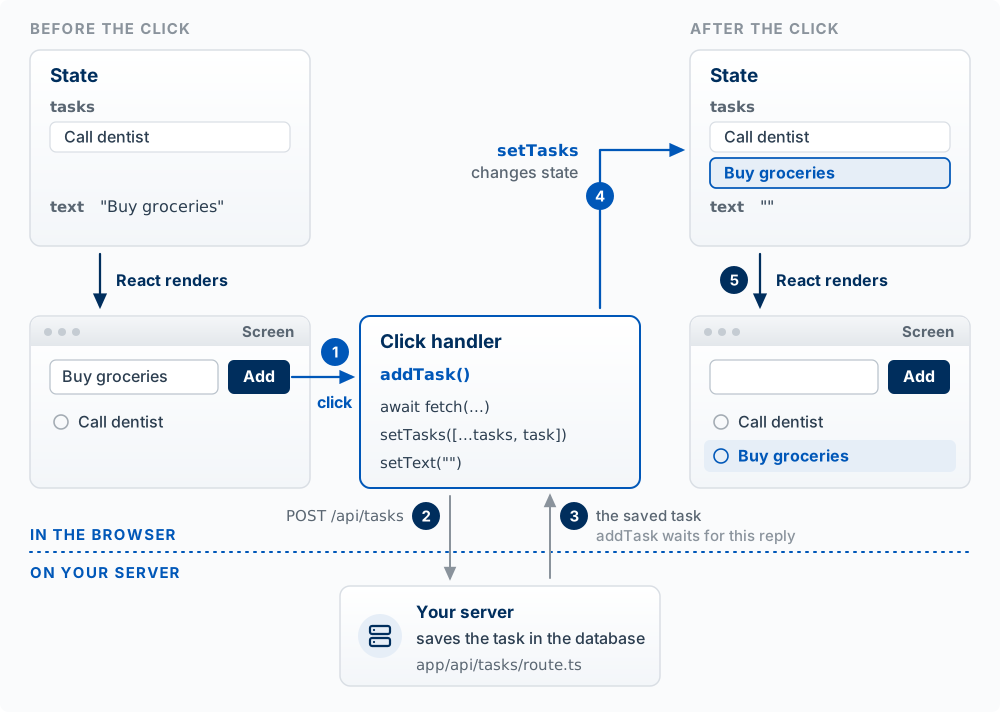
Figure 13.6 shows the one idea that explains most front-end code: the screen is a function of state. Given the same state, a component always returns the same screen. So every screen your app can show, including the loading, empty, and error screens from Chapter 5, is what React computes from some value of state. When a screen is wrong, the question to ask is which state produced it, and which line set that state.
NoteAnalogy: a chart in a spreadsheet
A chart redraws whenever a cell it depends on changes. You edit the cells and never the bars. State is the cells, components are the formulas, and the screen is the chart. Where it breaks: a spreadsheet recalculates after any edit. React draws again only when state is changed through its setter, such as setTasks. A line that adds to the array directly, tasks.push(task), changes the data without telling React, so the screen stays as it was.
Where each file runs. TaskList runs in the browser because of "use client". The page that places it, app/tasks/page.tsx, has no such line, so Next.js runs it on the server: in Next.js, pages and layouts are server components unless marked otherwise (Vercel 2026f). A server component can read secret keys and query the database before the page is sent, and its code never reaches the browser. It cannot hold state or respond to clicks. A client component (a file marked "use client") can, and its code is downloaded to every user, along with every file it imports. This is the three-places model from the start of the chapter, applied one file at a time.
That last point decides where keys may go. Next.js copies only environment variables whose names start with NEXT_PUBLIC_ into browser code; any other variable read in a client component comes out empty (Vercel 2026f). A key typed directly into a client component’s code gets no such protection: it is downloaded with the file.
What you recognize, and what the agent handles.
| You recognize | The agent handles |
|---|---|
| Which file is a page, a component, an endpoint, or a helper | Brackets, semicolons, ..., and the rest of the syntax |
| What state a screen depends on, and every value that state can take (empty, loading, error, full) | Writing the useState lines and the setters |
Whether a file runs in the browser or on the server, from "use client" and its folder |
Imports, exports, and types |
| Where the code waits on a request, and what happens if the request fails | The details of each fetch call |
TipTry it
- Ask Claude Code: “Open the component for my app’s main screen. List its state, its props, its event handlers, and every request it sends, with line numbers. Then list each value the state can take and what the screen shows for each.” Check two of the line numbers yourself.
- Predict: a handler adds a task with
tasks.push(newTask). The request succeeds and the row is in the database, but nothing new appears on the screen until the page is reloaded. Why?
NoteAnswer to 2
push changes the array in place without calling setTasks, so React is never told that state changed and does not render again. Reloading the page works because the page loads the tasks from the database again. The fix is setTasks([...tasks, newTask]).
The Files in a Next.js Project
The model: in a Next.js project, a file’s name and folder tell you what it does and where it runs. Learn the conventions once and you can find your way around any Next.js repo, including the one the agent built for you.
Most of these files come from create-next-app, the command that starts a Next.js project. Its defaults in the current version (Next.js 16) are TypeScript, the App Router (the app/ folder), Tailwind CSS, ESLint, and an AGENTS.md file (Vercel 2026b). If your app lives in the product/ folder of your course repo, these files sit inside that folder.
Folders are addresses. Inside app/, the path to a page.tsx is the address of a screen, and the path to a route.ts is the address of an endpoint. app/page.tsx is the home page at /, app/tasks/page.tsx is the page at /tasks, and app/api/tasks/route.ts answers requests to /api/tasks. A folder becomes reachable only when it holds one of those two files, and a layout.tsx wraps every page in its folder and the folders below it (Vercel 2026c). A route.ts exports functions named after request methods (GET, POST, PATCH, DELETE), and each one answers that method (Vercel 2026e).
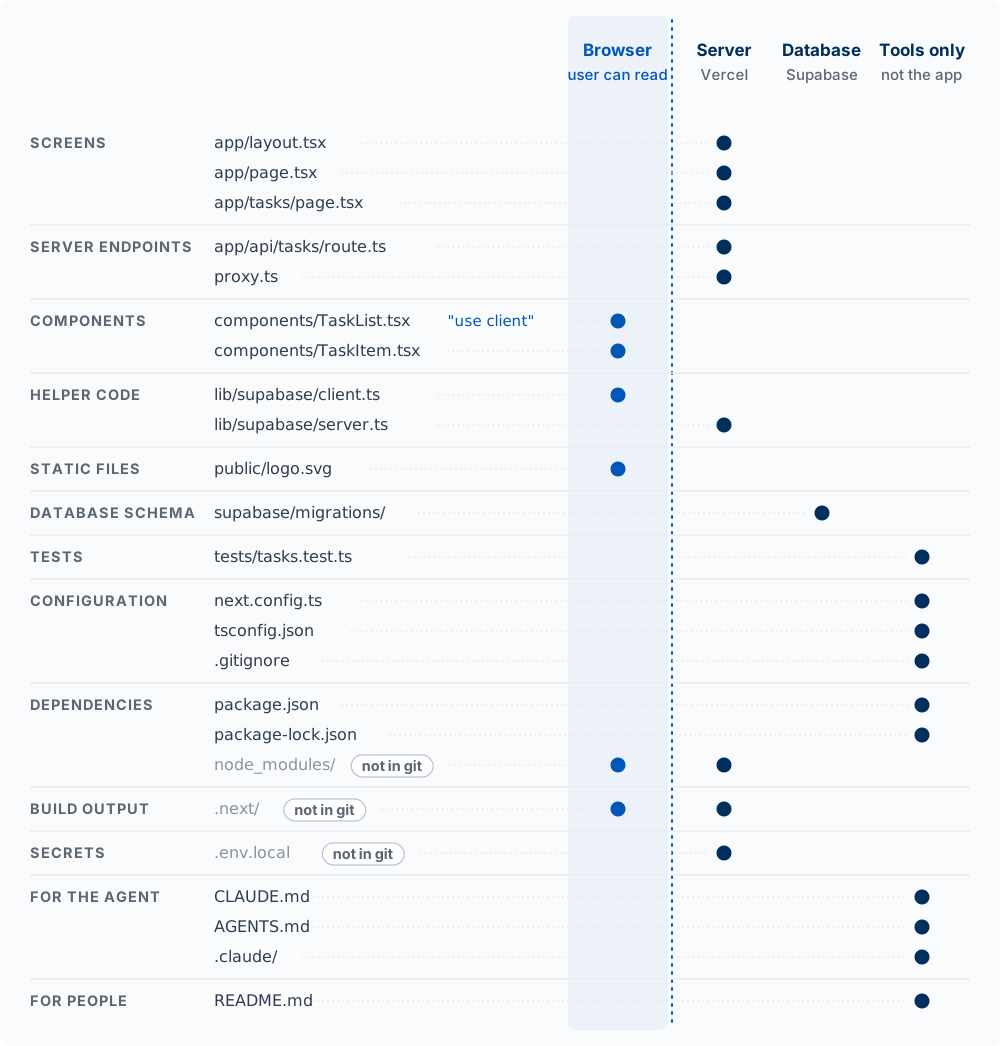
| File or folder | What it holds | Where it runs | In git? | Who usually edits it |
|---|---|---|---|---|
app/layout.tsx |
The frame around every page: the <html> and <body> tags, fonts, the header and navigation |
Server | Yes | The agent |
app/page.tsx, app/tasks/page.tsx |
One screen each, at the address its folder names | Server, unless the file starts with "use client" |
Yes | The agent |
app/api/tasks/route.ts |
An endpoint: one function per request method it answers | Server only | Yes | The agent |
proxy.ts |
Code that runs before matching requests reach a page, often to send signed-out users to the sign-in page. Called middleware.ts before Next.js 16 (Vercel 2026d) |
Server | Yes | The agent |
components/ |
Components used on more than one screen, such as TaskList and TaskItem. shadcn/ui puts its components in components/ui/ (Chapter 5) |
Browser if the file, or a file that imports it, says "use client"; otherwise server |
Yes | The agent |
lib/ |
Helper code that is not a component, such as the Supabase connection: client.ts for browser code, server.ts for server code |
Wherever the file that imports it runs | Yes | The agent |
public/ |
Files sent as they are: public/logo.svg is served at /logo.svg |
Downloaded by the browser | Yes | You or the agent |
supabase/migrations/ |
One SQL file per change to the tables, such as 20261001120000_create_tasks.sql (Chapter 8) |
In the database, when the migration is applied | Yes | The agent writes; you review and apply |
tests/, *.test.ts |
Tests (Chapter 9b) | On your laptop and in automated checks, run by the test runner | Yes | The agent |
next.config.ts |
Next.js settings, such as redirects and which sites images may load from | Read by Next.js when it builds and starts the app | Yes | The agent |
tsconfig.json, eslint.config.mjs |
Settings for TypeScript (including what @/ points to) and for the linter (Chapter 9) |
Read by those tools | Yes | Created by create-next-app; rarely edited |
.gitignore |
The files git must not track, including node_modules/, .next/, and .env* |
Read by git | Yes | Created by create-next-app; check it |
package.json |
The packages the app depends on, and named commands such as dev, build, and test |
Read by npm, on your laptop and in Vercel’s build | Yes | npm, when the agent installs a package |
package-lock.json |
The exact version of every package, including the packages those packages use, so every install gets the same code | Read by npm | Yes | npm only; never by hand |
node_modules/ |
The installed packages themselves, often hundreds of folders | Their code runs in the browser and on the server, wherever it is imported | No. npm install rebuilds it from package-lock.json |
npm |
.next/ |
The compiled code from the last npm run dev or npm run build |
Served by Next.js on your laptop. Vercel builds its own copy | No | Next.js |
.env.local |
Keys and settings for your laptop, such as NEXT_PUBLIC_SUPABASE_URL and the Supabase secret key |
Loaded by your server when you run npm run dev. Names starting with NEXT_PUBLIC_ are also copied into browser code |
No. On Vercel, the same names are set in the project’s settings | You |
CLAUDE.md |
Instructions Claude Code reads at the start of every session (Chapter 2) | Read by Claude Code | Yes | You and the agent |
AGENTS.md |
Instructions for coding agents from Next.js, pointing them to the documentation for the installed version, which is copied into node_modules/next/dist/docs/ (Vercel 2026a) |
Read by coding agents. Claude Code reads it when CLAUDE.md contains the line @AGENTS.md |
Yes | Next.js writes its part; you may add to it |
.claude/ |
This project’s skills, hooks, and settings (Chapters 1 and 2) | Read by Claude Code | Yes, except settings.local.json |
You and the agent |
README.md |
What the project is and how to run it, for people | Read by people | Yes | You |
How the groups map to the three places. The shaded column in Figure 13.7 is the browser from Figure 13.1: every file there is downloaded to the user’s device, where the user can read it. The server column is your code on Vercel, which holds the secret keys. The database column holds a single folder, because the database runs the SQL in supabase/migrations/ and nothing else from your repo. The files in the last column are used to build, test, and edit the app, and none of them is part of the app a user reaches. When you direct the agent, naming the file is often the clearest instruction you can give: “put this check in app/api/tasks/route.ts” leaves no doubt about where it runs.
Three files are kept out of git, each for its own reason. node_modules/ is large and can be rebuilt exactly from package-lock.json, so the lock file is committed instead. .next/ is rebuilt on every run. .env.local holds secrets, and a secret committed to a public repo is published. If git status ever lists one of these three as a new file, .gitignore is missing a line; fix that before you commit.
TipTry it
- Open your repo’s file list. For five files, name the row of the table each belongs to and the column of Figure 13.7 where it runs. Then ask Claude Code: “Which files in this project are ignored by git, and why is each one ignored?”
- Predict: you find a line in
components/TaskList.tsxthat readsconst key = "sb_secret_...". Who can read that key, and what should you do?
NoteAnswer to 2
Anyone who opens the app. TaskList.tsx starts with "use client", so its code, including the key, is downloaded to every visitor’s browser. Replace the key in the Supabase dashboard at once, since the old one must be treated as public. Then move the work that needed it into a server file such as app/api/tasks/route.ts, which reads the new key from an environment variable set in .env.local and in Vercel’s settings.
Writing Specs That Cover Every Layer
When you direct an agent, a spec that names each layer gets you code that puts each piece in the right place. Specs covers how to write a spec in full; this section adds one rule from this chapter: name the layer each piece belongs to.
Bad spec (vague):
The app should let users create accountsGood spec (covers all layers):
## User Registration Feature

### Requirements
WHEN user submits registration form with valid email and password
THEN system SHALL create account and send confirmation email

### Design

**Frontend (browser):**
- Registration form with email and password fields
- Quick checks for the user's convenience: email format, password at least 8 characters
- Display loading state during submission, and the error message if signup fails

**Auth (Supabase Auth):**
- Call Supabase Auth signUp with email and password
- Supabase checks the email is not taken, stores the password securely,
  sends the confirmation email, and starts a session once the email is confirmed
- The same length and format rules are enforced in Supabase's auth settings,
  so a request that skips the form is still checked

**Database:**
- profiles table: id (= auth user id), display_name, created_at
- Row level security: a user can read and update only their own profile
The Requirements line uses EARS, the WHEN … THEN … SHALL form from Specs, which makes each requirement testable. The good spec says where each rule is enforced. The browser checks are there for speed; the enforcing checks run where the user cannot reach them.
This might feel like a lot if you are new to technical concepts. You need enough to know what questions to ask, and you will start thinking in layers without trying: “This feature needs a form, an endpoint to submit it, a server-side check, and a table to store the result.” When you are unsure, ask the agent to explain before it builds:
I want to add user authentication to my app. Before writing code, explain
what runs in the browser, what runs on the server, what tables I need,
and where each access rule is enforced.
Tech Stacks and Languages
A stack is the specific set of technologies you have chosen for each layer. People name stacks as shorthand for a whole set of decisions.
| Layer | What it does | Common choices |
|---|---|---|
| Frontend | What the user sees and touches | React, Next.js, Vue, Svelte, plain HTML and CSS; Swift, Kotlin, or React Native on phones |
| Backend | Business logic, the rules of your product | Node.js, Python, Ruby, Go |
| Database | What the product remembers | Postgres, MySQL, SQLite, MongoDB |
| Hosting | Where it runs so others can reach it | Vercel, Netlify, Railway, Fly.io, AWS |
| Auth | Who is allowed to do what | Supabase Auth, Clerk, Auth0 |
The stack this course uses is React and Next.js on the frontend, Supabase for the database and authentication, and Vercel for hosting. That combination is not the only reasonable one. It is chosen because it gets a real, multi-user, authenticated application onto the internet faster than anything else available to a solo builder, and because the free tiers are large enough to cover a student product for a semester.
On languages. You will mostly read JavaScript and TypeScript (JavaScript with labels that say what kind of data each value holds, so mistakes show up before the code runs), because that is the language of the browser. SQL turns up whenever you ask the database a question. Python appears when you are doing analysis or calling a model. You do not need fluency in any of them to ship. You need enough to read what the agent wrote and notice when it is wrong, which takes much less skill and is much more useful.
Choosing a stack. Pick the boring one. Dan McKinley’s essay “Choose Boring Technology” makes the case: every new tool spends attention you could spend on the product, and a well-known tool’s failure modes are already documented (McKinley 2015). There is also a reason specific to AI: an agent writes better code in a popular stack because it has seen far more of it. The stack that is well documented, widely used, and already familiar to your tools is almost always the right choice for a first product.
Supabase Introduction
Supabase is a hosted Postgres database with an API, sign-in, and file storage built around it. Supabase generates an API for every table, so your browser code can query the database directly. This shapes your architecture. It is fast to build with, and it moves the job of protecting data into the database itself.
| Feature | What It Does |
|---|---|
| Database | PostgreSQL database for storing data |
| Authentication | User signup, login, OAuth |
| Storage | File uploads and hosting |
| Realtime | Live updates when data changes |
| Edge Functions | Small pieces of server code that Supabase runs for you, so you do not manage a server |
Your app connects with a project URL and a key:
import { createClient } from '@supabase/supabase-js';

const supabase = createClient(
  process.env.NEXT_PUBLIC_SUPABASE_URL,
  process.env.NEXT_PUBLIC_SUPABASE_PUBLISHABLE_KEY  // public by design
);
That key is public, on purpose. This is the publishable key from the credentials table in Requests Connect the Places: it ships to every visitor’s browser, which is why its variable starts with NEXT_PUBLIC_, and it can reach only what your row-level security rules allow. The secret key bypasses those rules, so it lives only on your server and never gets the NEXT_PUBLIC_ prefix. Older projects and tutorials use other names: the publishable key (sb_publishable_...) was the anon key, and the secret key (sb_secret_...) was the service role key. Supabase is retiring the old anon and service role names by the end of 2026, so you will see both in code for a while. Chapter 8 covers the rules that make a public key safe.
Who You Are, What You May Do
The model: authentication proves identity. Authorization decides access. Enforce access where the data lives, never only on the screen.
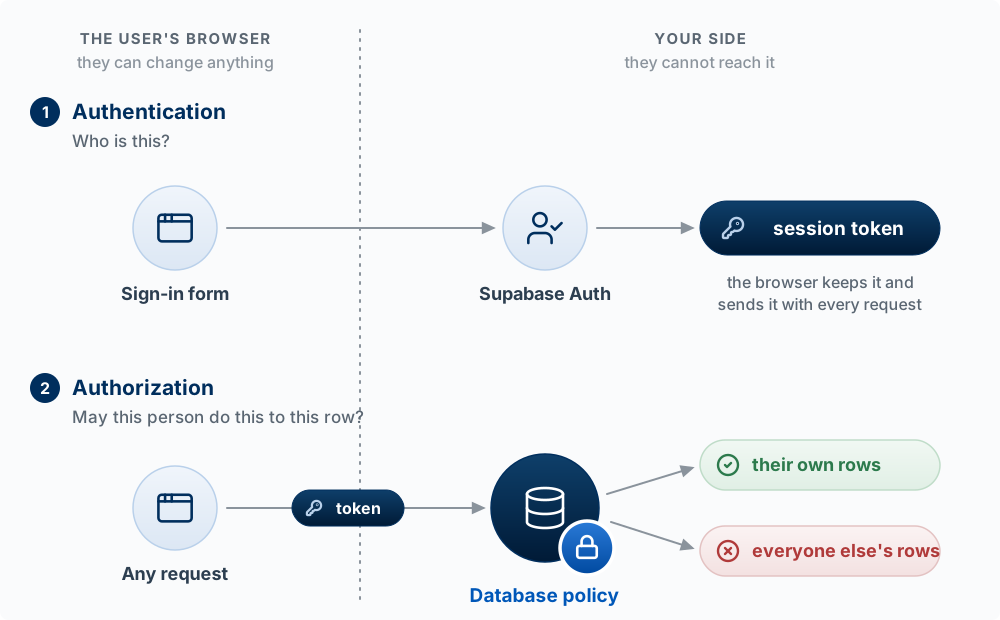
| Block | Question it answers | In this course’s stack |
|---|---|---|
| Authentication (authn) | Who is this? | Supabase Auth: email and password, or “Sign in with Google” (OAuth, where another service vouches for the user) |
| Session | How does the app remember who signed in? | A signed token the browser stores and sends with each request; the server and database can verify it was not forged |
| Authorization (authz) | May this person do this to this row? | Row level security policies in the database, plus checks in your server routes |
The common mistake is to treat authorization as a screen problem: hide the Delete button from non-owners and call it done. The button is in the browser, and so is the request it would have sent, which anyone can send by hand. Authorization works only when the database or server refuses the request.
Worked example. A club app shows officers an “Edit roster” page. Members never see the link. A curious member types /roster/edit into the address bar, and the page loads, because the only check was the hidden link. With a database rule that lets only officers update the roster table, the page may still load, but every save fails. That is the outcome you want.
NoteAnalogy: a concert wristband
At the door you show ID once and get a wristband: signing in gives the browser a token. At every bar you show the wristband instead of your ID: every request carries the token. The bar decides what you may order: authorization. Where it breaks: a token expires after a while and is renewed in the background, and anyone who copies it can act as you until it expires. That is why a token must never be pasted into logs, chats, or prompts.
The sign-up and sign-in calls are short, because Supabase does the hard parts (storing passwords safely, issuing the session token):
// Sign up, sign in, sign out (supabase-js v2: results come back as { data, error })
const { data, error } = await supabase.auth.signUp({ email, password });
const { data: signIn, error: signInError } =
  await supabase.auth.signInWithPassword({ email, password });
await supabase.auth.signOut();

// Who is signed in right now?
const { data: { user } } = await supabase.auth.getUser();

// Sign in with Google (configure providers in the Supabase dashboard
// under Authentication, then Providers)
await supabase.auth.signInWithOAuth({ provider: 'google' });
TipTry it
For each, say whether it is authentication or authorization, and where it should be enforced: (a) a student must be signed in to see the dashboard; (b) a student may edit only their own posts; (c) only the TA can export grades; (d) a password must be at least 8 characters. Then find one place in your own app where access is enforced only by hiding something on screen. Chapter 8 has a drill for testing it.
Key Concepts
- Three places: the browser belongs to the user, the server runs your code and holds the secret keys, and the database stores each record until it is deleted.
- The trust rule: anything in the browser can be read and changed by the user, so a check that runs only there can be skipped and a key shipped there is public. Checks that matter run again on the server or in the database, and secrets stay on the server.
- Frontend, backend, database: the frontend (client) is what the user sees and touches, running in the browser; the backend (server) is code on a computer you control; the database is durable storage.
- API and endpoint: an API is the set of requests a place agrees to answer, and an endpoint is one of them, a method and an address with a defined input and output. The published documentation states those, so it is the contract between caller and provider.
- API key: a secret string a paid service gives your account; sent with each request, it says whose account is calling and gets the bill, so it stays on your server.
- Publishable key, token, secret key: the publishable key identifies your app and is public, limited by row-level security; the token identifies one signed-in user and expires in about an hour; the secret key gives your server full access and never leaves it. Older code calls them the anon key and the service role key.
- Full stack: the frontend, the backend, the database, and the requests connecting them. As a product builder you decide what lives where, even when the agent types it.
- The screen is a function of state: code changes state through its setter, and React computes the screen again from the new state. The handler never edits the screen.
- Component and props: a function that returns a piece of the screen, and the inputs it receives from the component that places it.
- Event and handler: a user action, and the function that runs when it happens.
asyncandawait: a function that waits for a slow reply, and the line where it waits.- Module, import, export: each file exports named pieces that other files import.
- Server component vs. client component: pages and layouts run on the server by default and their code never reaches the browser; a file marked
"use client"is downloaded to the browser, with everything it imports. NEXT_PUBLIC_variables: Next.js copies only environment variables whose names start withNEXT_PUBLIC_into browser code, so a secret never gets that prefix.- File conventions: in
app/,page.tsxis a screen,route.tsis an endpoint, and the folder path is the address;layout.tsxwraps the pages below it. - Not in git:
node_modules/(rebuilt frompackage-lock.json),.next/(rebuilt on every run), and.env.local(secrets). - Specs that name the layer: a spec that says where each rule is enforced (browser, server, auth, database) gets code that puts each piece in the right place. Browser checks are for speed; enforcing checks run where the user cannot reach them.
- Stack choice: pick the boring, well-documented option; its failure modes are known, and agents write better code in a popular stack.
- Supabase: a hosted Postgres database with a generated API, sign-in, and storage. Browser code can query the database directly, which moves the job of protecting data into the database itself.
- Authentication vs. authorization: authentication proves who a user is; authorization decides what they may do to each row. Enforce authorization where the data lives, never only by hiding something on screen.